
Verdant VX-TW-KT-W
Verdant VX Series Wired Energy Management Thermostat User Manual
Model: VX-TW-KT-W
Entwodiksyon
This manual provides comprehensive instructions for the installation, operation, and maintenance of your Verdant VX Series Wired Energy Management Thermostat. Designed for robust performance and energy efficiency, this thermostat is ideal for various commercial and hospitality environments.
Pwodwi souview
The Verdant VX thermostat is a field-proven solution for energy management, offering reliability and significant value. It incorporates advanced features for guestroom energy management, trusted by numerous hotels across North America.
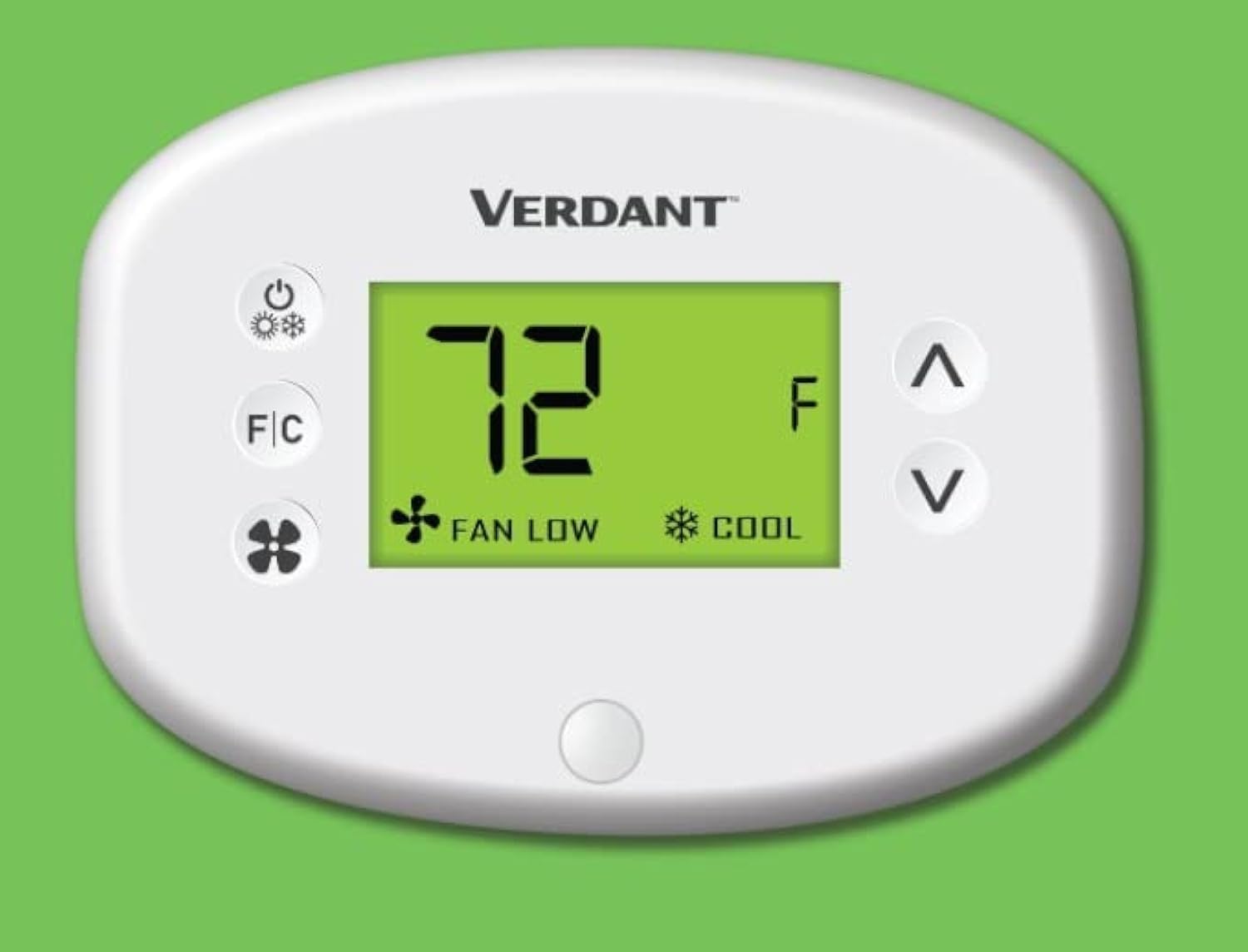
Figi 1: Devan view of the Verdant VX Series Wired Energy Management Thermostat, displaying temperature and mode settings.
Karakteristik kle
- High-Quality Hotel thermostat can control PTAC, VTAC, Hot Water Heat pump units.
- 10 Minute Install Time.
- Compatible with VX-TW-RM, VX-TW-SA, VX-TW-KT, VX-TW-XMF systems.
- Reduces heating & cooling costs by up to 40%.
- Control type: Button Control.
- Item shape: Round.
- Mounting type: Wall Mount.
- Built-in Occupancy Sensor for intelligent energy management.
- LCD Display for clear temperature and setting visibility.

Figure 2: Visual representation of the VX Thermostat's features, highlighting its user-friendliness and energy-saving capabilities.
Espesifikasyon
| Atribi | Detay |
|---|---|
| Mak | Verdant |
| Non modèl | VX Series Wired |
| Kalite kontwolè | Pouse bouton |
| Karakteristik espesyal | Motion Detector (Occupancy Sensor) |
| Koulè | Blan |
| Itilizasyon espesifik pou pwodwi | Heat Pump, PTAC, VTAC, Hot Water Heat Pump Units |
| Kalite Kontwòl Tanperati | Chofaj, refwadisman |
| Koneksyon Teknoloji | Branche |
| Konpozan ki enkli | Mounting Plate (Thermostat Base), Faceplate, Mounting Hardware |
| Voltage | 230 Volts |
| Materyèl | Plastik |
| Fòm | Round |
| Kalite ekspozisyon | LCD |
| Metòd kontwòl | Button Control, App, Touch (Note: App/Touch control may require additional accessories/setup not detailed here) |
| Kalite aliye | Mi mòn |
| Ekleraj | Wi |
| Dimansyon pwodwi | 1 x 5.5 x 2 pous |
| Pwa atik | 8.1 ons |
| Peyi orijin | Kanada |
Enstalasyon ak Enstalasyon
The Verdant VX thermostat is designed for quick and easy installation, typically within 10 minutes per room by an on-site facilities team. It is a wall-mount unit and comes with the necessary mounting plate, faceplate, and hardware.
Etap enstalasyon:
- Preparasyon: Ensure power to the HVAC unit is turned off at the circuit breaker before beginning installation.
- Mounting Plak: Secure the mounting plate (thermostat base) to the wall using the provided mounting hardware. Ensure it is level and securely fastened.
- Fil elektrik: Connect the thermostat wires according to the wiring diagram provided with your specific HVAC system and the thermostat's instructions. This is a wired connectivity device.
- Faceplate Attachment: Once wiring is complete and secure, attach the faceplate to the mounting plate, ensuring it snaps firmly into place.
- Pouvwa sou: Restore power to the HVAC unit. The thermostat display should illuminate.
Note: For detailed wiring diagrams and specific installation requirements, please refer to the full installation guide included with your product packaging or consult a qualified HVAC technician.
Enstriksyon Operasyon
The Verdant VX thermostat features an intuitive LCD display and button controls for easy operation. The built-in occupancy sensor helps manage energy consumption efficiently.
Operasyon debaz:
- Limen/Etenyen: Peze a Bouton pouvwa (usually indicated by a circle with a vertical line) to turn the thermostat on or off. When off, the display will show "OFF".
- Ajiste Tanperati: Sèvi ak la Up (^) and Down (v) arrow buttons to increase or decrease the desired temperature setting. The display will show "SET" indicating the target temperature.
- Changing Temperature Units (Fahrenheit/Celsius): Peze a F / C bouton to toggle between Fahrenheit (°F) and Celsius (°C) temperature displays.
- Selecting Mode (Heat/Cool): The thermostat automatically adjusts between heating and cooling based on the set temperature and ambient room temperature, leveraging its occupancy sensor. If the room temperature is higher than the set temperature, it will cool. If lower, it will heat. The display will indicate "HEAT" or "COOL" accordingly.
- Ajiste vitès fanatik: Peze a bouton fanatik (indicated by a fan icon) to cycle through available fan speeds, typically "LOW" and "HIGH". This controls how quickly the desired temperature is reached.

Figi 3: Detaye view of the thermostat's interface, showing the power, F/C, fan, and temperature adjustment buttons.
The integrated motion detector (occupancy sensor) automatically adjusts settings to save energy when a room is unoccupied, and returns to comfort settings when occupancy is detected. This feature significantly reduces heating and cooling costs.
Antretyen
To ensure optimal performance and longevity of your Verdant VX thermostat, follow these simple maintenance guidelines:
- Netwayaj: Siye sifas tèmosta a dousman avèk yon twal mou.amp twal. Evite itilize pwodui netwayaj abrazif, solvan, oswa pwodui chimik ki agresif, paske sa yo ka domaje ekran an oswa casing.
- Ranplasman batri: The thermostat requires AA batteries (not included) for operation. If the display dims or the thermostat becomes unresponsive, it may be time to replace the batteries. To access the battery compartment, locate the small groove at the bottom of the unit and gently pull the faceplate forward. Ensure correct polarity when inserting new batteries.
- Espas pou Capteur: Ensure the occupancy sensor (small button at the bottom of the display) is not obstructed by furniture, curtains, or other objects, as this can affect its ability to detect occupancy accurately.
- Tèks regilye: Periodically check the thermostat for any loose connections or signs of damage. If any issues are observed, contact technical support.
Depanaj
If you encounter issues with your Verdant VX thermostat, try the following troubleshooting steps:
- No Display/Unresponsive:
- Check if the thermostat is powered on. Press the Power button.
- Verifye ke pil yo byen enstale epi yo gen ase chaj. Ranplase yo si sa nesesè.
- Ensure the main power to the HVAC unit is on at the circuit breaker.
- Lekti tanperati ki pa kòrèk:
- Ensure the F/C button is set to your preferred unit (Fahrenheit or Celsius).
- Check for drafts or direct sunlight hitting the thermostat, which can affect readings.
- Chofaj/Refwadisman pa aktive:
- Confirm the set temperature is appropriately higher (for heat) or lower (for cool) than the current room temperature.
- Check if the occupancy sensor is obstructed.
- Ensure the HVAC system itself is functioning correctly.
- Vantilatè a pa ap fonksyone:
- Press the Fan button to cycle through fan speeds (LOW/HIGH).
- Ensure the thermostat is not in "OFF" mode.
If these steps do not resolve the issue, please contact Verdant technical support for further assistance.
Garanti ak sipò
Verdant stands by the quality and reliability of its products. The Verdant VX thermostat comes with free lifetime technical support, ensuring assistance is always available for property owners.
For technical assistance, troubleshooting, or any product-related inquiries, please contact Verdant customer service. Refer to your product packaging or the official Verdant websit la pou jwenn enfòmasyon kontak ki pi resan yo.

Figi 4: Plis paseview of the Verdant Energy Management System's advantages, emphasizing its efficiency and ease of integration.
Ask a question about this manual
Ask about setup, troubleshooting, compatibility, parts, safety, or missing instructions. Manuals+ will review the question and use this page’s manual context to help answer it.