
1. Entwodiksyon
This manual provides essential information for setting up, operating, maintaining, and troubleshooting your Alienware X17 R2 Gaming Laptop. Please read this guide thoroughly to ensure optimal performance and longevity of your device.
The Alienware X17 R2 is designed for high-performance gaming and demanding tasks, featuring advanced cooling technologies, powerful processors, and dedicated graphics.
2. Pwodwi souview
The Alienware X17 R2 is engineered to deliver an immersive gaming experience in a thin 17-inch form factor. Key features include:
- Powerful Intel CPUs: Experience high-performance action across all your favorite games with 12th Gen Intel Core processors.
- Next-Gen GPUs: Game unrestrained with NVIDIA GeForce RTX 3070Ti graphics, Dynamic Boost 2.0, and Deep Learning Super Sampling technology.
- Patented Quad Cooling: An industry-first design uses four intelligently controlled and programmable fans to dissipate heat.
- Tan pou jwe pwolonje: Improve battery life with Advanced Optimus technology from NVIDIA—now available on all display options.
- Legend 2.0 Industrial Design: A fresh evolution in design with a high-endurance finish and customizable AlienFX lighting.

Figi 2.1: Devan view of the Alienware X17 R2 Gaming Laptop displaying a game.
3. Enstalasyon
3.1 Debale ak Premye Enspeksyon
- Retire laptop la ak tout akseswa yo nan anbalaj la avèk anpil atansyon.
- Verifye ke tout atik ki nan lis nan seksyon "Sa ki nan bwat la" yo prezan.
- Enspekte laptop la pou wè si li gen nenpòt domaj fizik. Si ou jwenn domaj, kontakte machann ou an imedyatman.
3.2 Konekte pouvwa
- Connect the power adapter to the charging port located at the rear of the laptop.
- Ploge fil elektrik la nan yon priz miray.
- The power indicator light will illuminate, indicating the laptop is receiving power.
3.3 Premye Demaraj ak Enstalasyon Sistèm Operasyon an
- Press the Alienware head power button to turn on the laptop.
- Swiv enstriksyon ki parèt sou ekran an pou konplete pwosesis konfigirasyon Windows 11 Home la. Sa gen ladan l chwazi rejyon w lan, konekte ak yon rezo Wi-Fi, epi kreye yon kont itilizatè.
- Allow the system to download and install any necessary updates.
4. Kijan pou itilize òdinatè pòtab ou a
4.1 Klavye ak Touchpad
The Alienware X17 R2 features a backlit keyboard and a responsive touchpad. The AlienFX lighting allows for customizable colors and effects across the keyboard and other zones.

Figi 4.1: Detaye view klavye a ak touchpad la ki gen ekleraj dèyè.
4.2 Ekspozisyon ak Grafik
Enjoy stunning visuals on the 17.3-inch FHD display with a 480Hz refresh rate and 3ms response time. The NVIDIA GeForce RTX 3070Ti graphics card ensures smooth gameplay and high-fidelity rendering. The laptop supports Dolby Vision for optimized color profiles.
4.3 Odyo
Experience immersive 3D sound via Dolby Atmos, designed to deliver audio as studios intended.
4.4 Pò ak Konektivite
The laptop offers a variety of ports for peripherals and external displays:

Figi 4.2: Dèyè view illustrating the various connectivity ports.
- Pò USB 3.0: 3 ports for connecting various USB devices.
- Pò USB-C: For versatile connectivity, including Thunderbolt 4.
- HDMI2.1: Supports up to 4K/120Hz output for external displays.
- Ethernet: Killer E3100 RJ45 Ethernet for stable wired network connections.
- San fil: Killer Wi-Fi 6 (802.11ax) and Bluetooth for wireless connectivity.
5. Antretyen
5.1 Netwayaj
- Sèvi ak yon twal mou ki pa gen pousyè pou netwaye ekran an ak sifas ekstèn yo.
- Evite itilize pwodwi chimik piman bouk oswa materyèl abrazif.
- Regularly clean the cooling vents to prevent dust buildup, which can affect performance.
5.2 Mizajou lojisyèl
Ensure your operating system and drivers are kept up-to-date. Windows Update will handle OS updates, and Alienware Command Center can assist with driver and firmware updates.
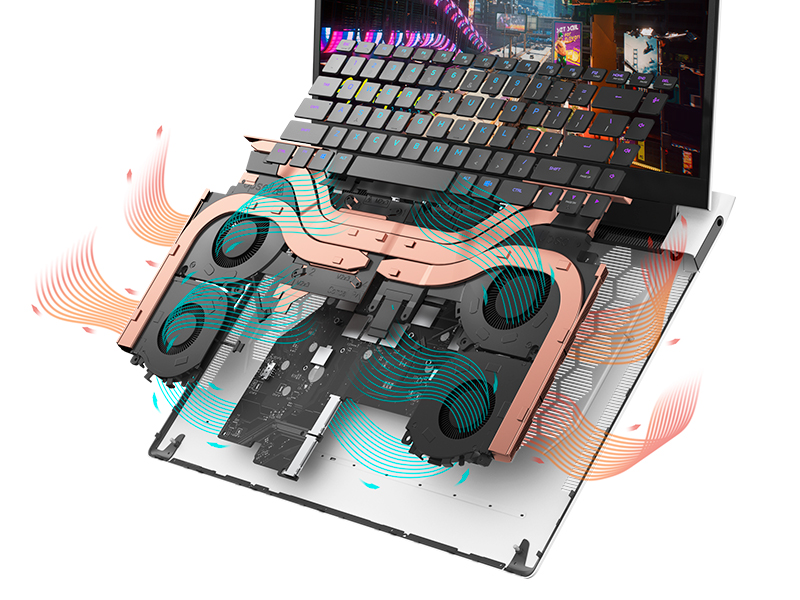
Figure 5.1: Alienware Command Center for system management.
NAN. Depanaj
If you encounter issues with your Alienware X17 R2, consider the following basic troubleshooting steps:
- Pa gen pouvwa: Asire w adaptè kouran an byen konekte ak laptop la ak yon priz kouran ki fonksyone. Tcheke limyè endikatè kouran an.
- Pwoblèm ekspozisyon: If the screen is black, try connecting an external monitor to verify if the issue is with the laptop's display or the graphics card. Update graphics drivers.
- Surchof: Ensure cooling vents are clear of obstructions. Use Alienware Command Center to monitor temperatures and adjust fan profiles.
- Ralentissement pèfòmans: Close unnecessary applications. Check for background processes consuming high CPU or RAM. Ensure sufficient free space on the SSD.
- Pwoblèm lojisyèl: Restart the laptop. If issues persist, consider performing a system restore or reinstalling the problematic software.
7. Espesifikasyon
| Karakteristik | Spesifikasyon |
|---|---|
| Gwosè ekran | 17.3 pous |
| Rezolisyon ekran | 1920 x 1080 piksèl (FHD) |
| Processeur | Intel Core i9-12900H (3.8 GHz, 14 Cores) |
| RAM | 16 GB DDR5 (4800 MHz) |
| Disk Drive | 1 TB SSD (Solid State) |
| Koprosesè grafik | NVIDIA GeForce RTX 3070 Ti (8 GB GDDR6) |
| Sistèm operasyon | Windows 11 Kay |
| Kalite san fil | 802.11ax (Killer Wi-Fi 6), Bluetooth |
| Pò USB 3.0 | 3 |
| Pwa atik | 6.82 liv |
| Dimansyon pwodwi | 11.79 x 15.72 x 0.58 pous |
8. Ki sa ki nan bwat la
- Alienware X17 R2 Gaming Laptop
- Adaptè pouvwa
- Kòd pouvwa
- Dokimantasyon
9. Videyo pwodwi ofisyèl yo
Alienware X17 R2 Gaming Laptop Overview
Videyo 9.1: Yon ofisyèl finiview of the Alienware X17 R2 Gaming Laptop, highlighting its design, cooling, and performance features.
About Alienware X17 R2 Gaming Laptop
Video 9.2: A detailed look at the Alienware X17 R2 Gaming Laptop, showcasing karakteristik ak eleman konsepsyon li yo.
10. Garanti ak sipò
Your Alienware X17 R2 Gaming Laptop comes with a standard manufacturer's warranty. For detailed warranty information, please refer to the documentation included with your product or visit the official Alienware support websit.
For technical support, driver downloads, and service requests, please visit the Alienware support portal. You can also find FAQs and community forums for additional assistance.