
OTL Technologies PK0980
OTL Technologies Pokemon Pikachu Wireless Bluetooth Kids Headphones PK0980 Instruction Manual
Model: PK0980
1. Entwodiksyon
This manual provides essential information for the safe and effective use of your OTL Technologies Pokemon Pikachu Wireless Bluetooth Kids Headphones, model PK0980. Please read this manual thoroughly before using the product and retain it for future reference.
2. Enfòmasyon sou Sekirite
Pou asire yon operasyon an sekirite epi pou anpeche domaj, swiv prekosyon sa yo:
- Apwopriye laj: These headphones are suitable for children aged 3 years and above.
- Kontwòl Volim: The headphones feature two safe volume settings: 85 dB and 95 dB. Always select the appropriate volume level for the listening environment to protect hearing. Prolonged exposure to loud noise may cause hearing damage.
- Rezistans dlo: Pwodwi sa a se pa reziste dlo. Avoid exposure to water or moisture to prevent damage.
- Netwayaj: Do not use harsh chemicals or strong detergents to clean the headphones. Use a soft, dry cloth.
- Demonte: Do not attempt to disassemble, repair, or modify the headphones. This will void the warranty and may cause damage or injury.
- Konsyantizasyon anviwònman an: Do not use headphones in situations where an inability to hear surrounding noise may present a danger (e.g., while cycling, driving, or near operating machinery).
- Sekirite batri: The headphones contain a Lithium-ion battery. Do not expose to extreme temperatures or dispose of in fire.
3. Pake kontni
Verifye ke tout atik yo prezan nan pakè a:
- 1x OTL Technologies Pokemon Pikachu Wireless Bluetooth Kids Headphones
- 1x USB Kalite-C Chaje Kab
- 1x 3.5mm Audio Sharing Cable
- 1x Instruction Leaflet (this manual)

Image: Headphones and accessories neatly packaged in the box.
4. Pwodwi souview
Familyarize w ak konpozan ak kontwòl kas ekoutè w yo.
4.1 Headphone Structure

Imaj: Devan view nan kas ekoutè yo, montreasing the Pikachu design on the earcups and the adjustable headband.

Imaj: Anlè view of the headphones, showing the foldable design and the headband's cushioning.
4.2 Kontwòl ak Pò

Image: Close-up of the right earcup, displaying the power button, volume controls, and charging port.

Imaj: Detaye view of the volume limit switch, allowing selection between 85 dB and 95 dB.
- Bouton pouvwa: Used to turn the headphones on/off and for Bluetooth pairing.
- Bouton Volim: Ajiste volim pou koute.
- Volume Limit Switch: Toggle between 85 dB and 95 dB maximum volume levels.
- USB Kalite-C Port: Pou chaje kas ekoutè yo.
- 3.5mm Audio Jack: Pou koneksyon filaire lè l sèvi avèk kab odyo ki enkli a.
- Mikwofòn: Entegre pou apèl men lib.
4.3 Adjustable Headband

Image: Close-up of the extendable headband, showing numbered adjustment points for a customized fit.
The headband is extendable to provide a flexible and customized fit for various head sizes. Adjust both sides evenly for optimal comfort.
5. Enstalasyon
5.1 Chaje kas ekoutè yo
Anvan premye itilizasyon an, chaje kas ekoutè yo nèt.
- Connect the USB Type-C charging cable to the charging port on the headphones.
- Konekte lòt bout kab USB a nan yon sous kouran USB konpatib (pa egzanp, yon pò USB òdinatè, yon adaptè USB nan miray).
- The LED indicator will show the charging status. A full charge takes approximately 2 hours.
- Once fully charged, the LED indicator will change (refer to the instruction leaflet for specific LED behavior) and the headphones will provide up to 24 hours of playback time.
5.2 Bluetooth Pairing
Pou konekte kas ekoutè ou yo san fil ak yon aparèy:
- Asire w ke kas ekoutè yo chaje.
- Peze epi kenbe bouton Power la jiskaske endikatè LED la flache, sa ki endike mòd koneksyon an.
- On your device (e.g., smartphone, tablet, laptop), enable Bluetooth and search for available devices.
- Select "OTL Pikachu" or a similar name from the list of found devices.
- Once connected, the LED indicator will change (e.g., solid blue) and a confirmation tone may sound.
- The headphones have a working distance of up to 10 meters from the paired device.
5.3 Koneksyon filaire (opsyonèl)
You can use the headphones with the included 3.5mm audio cable for devices without Bluetooth or when the battery is depleted.
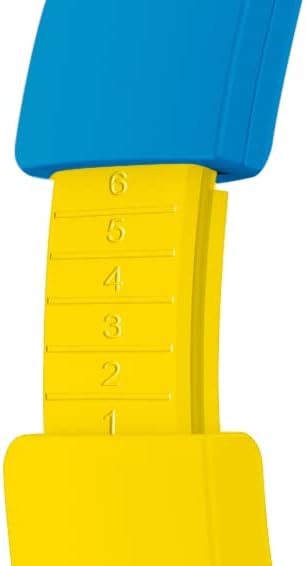
Image: The included 3.5mm audio cable for direct connection to devices.
- Branche yon bout kab odyo 3.5mm lan nan priz odyo ki sou kas ekoutè a.
- Branche lòt bout la nan sòti odyo 3.5mm aparèy ou an.
- The headphones will operate in passive mode, and Bluetooth functionality will be disabled.
6. Itilizasyon kas ekoutè yo
6.1 Power On/Off
- Pou limen: Peze epi kenbe bouton Power la pou apeprè 3 segonn. Endikatè LED la ap limen.
- Pou etenn: Peze epi kenbe bouton Power la pou apeprè 3 segonn. Endikatè LED la ap etenn.
6.2 Ajiste Volim
- Volim moute: Peze bouton '+' la.
- Volim desann: Peze bouton '-' la.
- Setting Maximum Volume: Use the volume limit switch (85 dB / 95 dB) located on the earcup to set the desired maximum safe listening level.
6.3 Jwe mizik ak apèl
- Jwe/Poz: Press the Power button once during music playback.
- Pwochen Track: Peze epi kenbe bouton '+' la.
- Track Previous: Peze epi kenbe bouton '-' la.
- Reponn/Fen Apèl: Press the Power button once during an incoming call or to end an active call.
- Rejte apèl: Press and hold the Power button during an incoming call.
6.4 Using the Sharing Cable
The included sharing cable allows two pairs of headphones to listen to the same audio source simultaneously.
- Connect the main 3.5mm audio cable from your audio source to the first pair of headphones.
- Connect one end of the sharing cable to the available 3.5mm audio jack on the first pair of headphones.
- Connect the other end of the sharing cable to the 3.5mm audio jack on the second pair of headphones.
- Both headphones will now receive audio from the same source.
7. Antretyen
- Netwayaj: Wipe the headphones with a soft, dry, lint-free cloth. Do not use liquid cleaners or aerosols.
- Depo: Lè w pa ap itilize kas ekoutè yo, sere yo nan yon kote ki fre epi sèk, lwen limyè solèy dirèk ak tanperati ekstrèm. Design pliyan an pèmèt ou sere yo yon fason konpak.
- Swen batri: Pou pwolonje lavi batri a, evite dechaje batri a nèt souvan. Chaje kas ekoutè yo regilyèman, menm si w pa itilize yo tout tan.
NAN. Depanaj
| Pwoblèm | Kòz posib | Solisyon |
|---|---|---|
| Kas ekoutè yo pa limen. | Batri ap vide. | Charge the headphones using the provided USB Type-C cable. |
| Pa ka konekte atravè Bluetooth. | Kas ekoutè a pa nan mòd koneksyon; Bluetooth aparèy la etenn; twò lwen aparèy la. | Ensure headphones are in pairing mode (flashing LED). Turn Bluetooth on your device. Move headphones closer to the device (within 10 meters). Try restarting both devices. |
| Pa gen son lè konekte. | Volume too low; incorrect audio source selected; wired cable not fully inserted. | Increase headphone and device volume. Check if the correct audio output is selected on your device. Ensure the 3.5mm cable is fully inserted if using wired mode. Check the volume limit switch. |
| Son an defòme oswa li koupe. | Low battery; interference; too far from device. | Charge the headphones. Move away from other wireless devices. Reduce distance to the paired device. |
9. Espesifikasyon
| Nimewo Modèl | PK0980 |
| Koneksyon Teknoloji | San fil (Bluetooth) |
| Teknoloji kominikasyon san fil | Bluetooth |
| Ranje laj (Deskripsyon) | Children (3+ years) |
| Materyèl | Plastik |
| Tan pou chaje | Apeprè 2 èdtan |
| Itilizasyon Rekòmande | Personal Audio |
| Aparèy konpatib | Laptop, Smartphones, Tablets (Bluetooth enabled) |
| Kalite kontwòl | Kontwòl Volim, Remote |
| Pwa atik | 160 gram |
| Nivo rezistans dlo | Pa Dlo ki reziste |
| Karakteristik adisyonèl | Microphone included, Foldable design |
| Mwayèn lavi batri | 24 èdtan |
| Konpozisyon selil batri | Lityòm-ion |
| Koulè | Jòn |
| Plasman Zòrèy | Sou zòrèy |
| Faktè fòm | Sou zòrèy |
| Enpedans | 32 Ohms |
| Kontwòl bri | Izolasyon bri |
| Repons Frekans | 20000 Hz |
| Sansiblite | 85 dB |
| Jack kas ekoutè | 3.5mm Jack |
| Dimansyon pwodwi | 16 x 7 x 17 cm |
Ask a question about this manual
Ask about setup, troubleshooting, compatibility, parts, safety, or missing instructions. Manuals+ will review the question and use this page’s manual context to help answer it.