
1. Entwodiksyon
This manual provides detailed instructions for the installation, operation, and maintenance of your Spedal MINIEYE AC1 Dash Cam. Please read this manual thoroughly before using the device to ensure proper functionality and safety. The MINIEYE AC1 is designed to record your driving journey in high definition and offers advanced features for enhanced road safety.
2. Pwodwi souview
2.1 Karakteristik kle
- 1944P Ultra Full HD Recording: Kaptire videyo klètage with a 140° wide-angle field of view.
- AI ADAS (Advanced Driver-Assistance System): Provides real-time alerts for collision avoidance.
- Capteur G entegre: Automatically detects sudden movements or impacts and locks footage.
- Siveyans pakin 24 èdtan: Monitors your vehicle even when parked (requires hardwire kit, sold separately).
- Pwisan vizyon lannwit: Ensures clear recordings in low-light conditions.
- Anrejistreman bouk: Ranplase pi ansyen foo atage lè kat memwa a plen, pou asire anrejistreman kontinyèl.
- Kontwòl APP: Manage settings, view footage, and download videos via a dedicated mobile application.
2.2 Kontni pake a
Verifye ke tout atik ki nan lis anba a yo prezan nan pakè ou a:
- MINIEYE AC1 Dash Cam Unit
- Machin Charger
- Pouvwa kab
- Monitè kab
- Host Base
- GPS Modil
- Electrostatic Sticker
- Crowbar (pou routage kab)
- Nivo jarèt
- Free 32GB TF Card (MicroSD Card)
- Manyèl Itilizatè (dokiman sa a)
2.3 Konpozan Aparèy
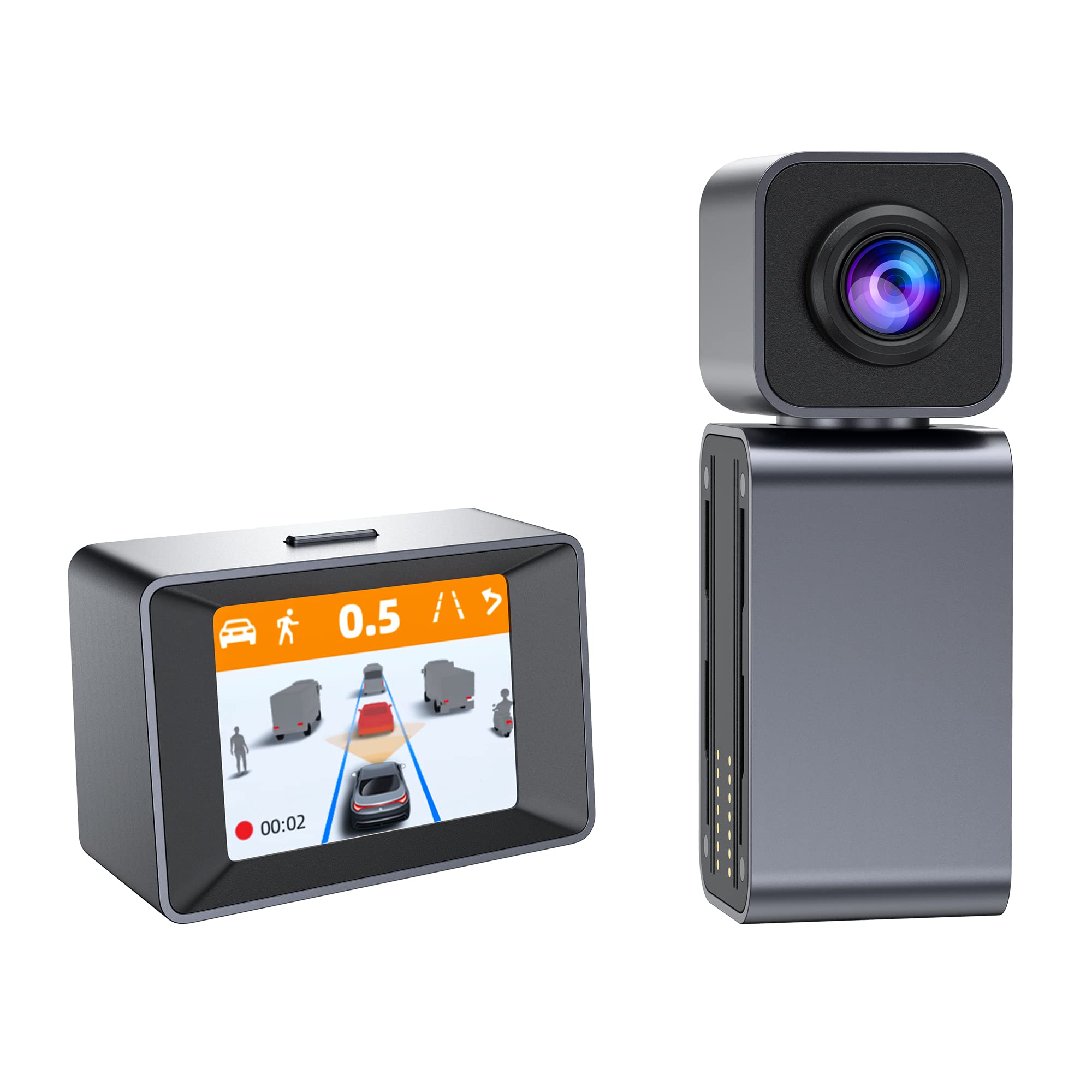
Image: The MINIEYE AC1 Dash Cam showing the main recording unit with its lens and the separate display unit. The display unit shows a simulated traffic scenario with distance warnings, illustrating the ADAS functionality.
3. Enstalasyon
3.1 Enstalasyon
- Prepare vit machin nan: Clean the area on your windshield where the dash cam will be mounted. Ensure it is free of dust and grease.
- Aplike fich elektwostatik: Kole fich elektwostatik la sou zòn ki netwaye a. Sa ede retire li fasilman epi anpeche rezidi sou vit machin nan.
- Attach Host Base: Secure the host base to the electrostatic sticker. Use the bubble level to ensure the base is level for optimal camera angle.
- Monte Kamera Dash: Attach the MINIEYE AC1 Dash Cam unit to the host base.
- Mete kat TF la: Insert the provided 32GB TF card into the designated slot on the dash cam. Ensure it is inserted correctly until it clicks into place.
- Konekte pouvwa: Connect the power cable to the dash cam and route it along the windshield edge and dashboard using the crowbar to tuck it neatly. Plug the car charger into your vehicle's cigarette lighter socket.
- Connect Monitor (if applicable): If using an external monitor, connect it using the monitor cable.
- Konekte Modil GPS la: Attach the GPS module to the dash cam for location and speed data recording.
3.2 Premye Limen ak Paramèt
- Pouvwa sou: Start your vehicle. The dash cam will automatically power on and begin recording.
- Fòma kat TF: It is recommended to format the TF card upon first use and periodically thereafter to ensure optimal performance. This can usually be done through the device settings or the mobile app.
- Ajiste Ang kamera: Adjust the camera lens to ensure it captures the road ahead clearly, covering the desired field of view.
3.3 App Control Setup
- Telechaje App: Chèche pou the "MINIEYE" in your smartphone's app store (iOS or Android) and install it.
- Konekte ak Wi-Fi: Enable Wi-Fi on your smartphone and connect to the dash cam's Wi-Fi network. The network name and password can typically be found in the dash cam's settings or manual.
- Pè aparèy: Open the MINIEYE app and follow the on-screen instructions to pair your dash cam.
- Konfigirasyon Anviwònman: Use the app to adjust recording resolution, G-sensor sensitivity, parking monitoring settings, and other preferences.
4. Operasyon Enstriksyon
4.1 Anrejistreman Debaz
Once powered on, the MINIEYE AC1 automatically begins continuous loop recording. Video files are saved in segments (e.g., 1, 3, or 5 minutes) to the TF card. When the card is full, the oldest unprotected files yo ranplase.
4.2 G-Sensor and Emergency Recording
The built-in G-Sensor detects sudden impacts or rapid acceleration/deceleration. When triggered, the current video segment is automatically locked and saved to a protected folder, preventing it from being overwritten by loop recording. The sensitivity of the G-Sensor can be adjusted via the mobile app.
4.3 Siveyans pakin
With the optional hardwire kit (not included), the dash cam can monitor your vehicle while parked. If an impact or motion is detected, the dash cam will automatically record a short video segment. Ensure this feature is enabled and configured in the app settings.
4.4 ADAS (Advanced Driver-Assistance System)
The AI ADAS features provide real-time alerts to enhance driving safety:
- Avètisman Kolizyon Devan (FCW): Avèti ou si w ap apwoche yon machin ki devan w twò vit.
- Avètisman Depa Liy (LDW): Avèti w si machin ou an kite liy li san l pa fè siyal.
- Front Vehicle Start Alert: Informs you when the vehicle in front of you has started moving after a stop.
These alerts are typically visual on the display and/or audible. Calibration may be required for optimal ADAS performance.
4.5 Viewe telechaje Footage
Footage kapab viewed directly on the dash cam's display (if available) or more conveniently through the MINIEYE mobile application. Use the app to browse recorded videos, download important clips to your smartphone, or share them.
5. Antretyen
- Netwaye lantiy la: Regularly clean the camera lens with a soft, lint-free cloth to ensure clear video quality.
- Fòma kat TF: Format the TF card every 2-4 weeks to prevent data corruption and maintain optimal recording performance. Back up any important files anvan fòma.
- Mizajou mikrolojisyèl: Check the MINIEYE app or official website periodically for firmware updates. Keeping your dash cam's firmware updated ensures access to new features and performance improvements.
- Depo: Lè w pa itilize kamera a pou yon bon bout tan, sere l nan yon kote ki fre epi sèk, lwen limyè solèy dirèk.
NAN. Depanaj
- Kamera Dash la pa limen:
- Check the car charger connection and ensure the vehicle's cigarette lighter socket is functioning.
- Asire w ke kab kouran an byen konekte ak kamera tablodbò a.
- Pwoblèm anrejistreman (pa egzanp, bloke, pèvèti files):
- Fòma kat TF la.
- Try a different high-speed (Class 10 or U1/U3) TF card.
- Ensure the TF card is not full of locked files.
- Pwoblèm koneksyon aplikasyon an:
- Asire w ke Wi-Fi kamera a aktive.
- Rekòmanse tou de kamera tablodbò a ak telefòn entelijan ou.
- Verify you are connecting to the correct Wi-Fi network and using the correct password.
- ADAS Alerts Not Functioning:
- Ensure ADAS features are enabled in the app settings.
- Perform ADAS calibration if available in the app.
- Asire w ke lantiy kamera a pwòp epi pa gen okenn obstak.
7. Espesifikasyon
| Karakteristik | Detay |
|---|---|
| Non modèl | MINIEYE AC1 |
| Mak | Spedal |
| Rezolisyon Capture Videyo | 1944p |
| Ang reyèl nan View | 140 Degre |
| Koneksyon Teknoloji | USB, Wireless (for App Control) |
| Metòd kontwòl | App |
| Kalite aliye | Aspirasyon mòn |
| Kalite Sèvis Machin | Machin |
| Manifakti | Shenzhen Youjia Innov Tech Co., Ltd |
8. Garanti ak sipò
For warranty information, technical support, or service inquiries, please refer to the warranty card included with your product or visit the official Spedal website. You may also contact Spedal customer service directly through the contact information provided on their website or within the MINIEYE mobile application.
Tanpri kenbe prèv ou achte pou reklamasyon garanti.