
1. Entwodiksyon
This manual provides detailed instructions for the installation, operation, and maintenance of your SOGTICPS BL912-40A-WIFI MPPT Solar Charge Controller. This advanced charge controller is designed for off-grid solar applications, compatible with 12V/24V battery systems, including Gel, Flooded, and Lithium types. It features efficient MPPT tracking, an LCD display, dual USB outputs, and WiFi connectivity for remote monitoring.
Karakteristik kle:
- Innovative MPPT (Maximum Power Point Tracking) technology for up to 99% tracking efficiency.
- Volim sistèm otomatik 12V/24Vtage deteksyon.
- Integrated LCD display for real-time monitoring of temperature, charge current, discharge current, and power generation.
- Comprehensive system protection: over-temperature, over-current, short-circuit, open-circuit, and reverse polarity.
- Compatibility with Gel, Flooded, and Lithium battery types.
- Dual 5V 2A USB outputs for charging mobile devices.
- WiFi communication for remote parameter adjustment and monitoring via a dedicated application.
- Industrial-grade main control chip with 16AD sampling presizyon.
- Two-way MOS tube anti-reverse circuit for high-power charging and low heat generation.
2. Enstriksyon Sekirite
Please read all instructions carefully before installation and operation. Failure to follow these instructions may result in damage to the unit, personal injury, or property damage.
- Ensure all connections are tight and correct to avoid excessive voltage drop and potential hazards.
- Install the controller indoors, away from direct sunlight, high temperatures, and moisture.
- The controller generates heat during operation; ensure adequate ventilation.
- Connect the battery first, then the solar panel, and finally the load. Disconnect in the reverse order: load, solar panel, then battery.
- Do not connect any inverter directly to the load terminals of the controller.
- Ensure the solar panel's open-circuit voltage (Voc) does not exceed the controller's maximum input voltage.
- Use appropriate circuit breakers or fuses for the battery and solar panel circuits.
- Keep children away from the solar power system.
- Pa eseye demonte oswa repare kontwolè a tèt ou. Kontakte pèsonèl kalifye pou sèvis.
3. Pwodwi souview
The SOGTICPS BL912-40A-WIFI solar charge controller features a robust design with an intuitive LCD display and multiple connection points.

Imaj: Devan view of the SOGTICPS BL912-40A-WIFI Solar Charge Controller, highlighting its security protection features such as short-circuit, overload, overcharge, under-voltage, ak sou-voltage pwoteksyon.
Eleman:
- Ekspozisyon LCD: Montre estati ak paramèt sistèm nan an tan reyèl.
- Bouton kontwòl: For navigating menus and setting parameters.
- Solar Panel Input Terminals: Connect to solar panels.
- Tèminal batri yo: Konekte ak bank batri a.
- Tèminal pwodiksyon chaj: Connect to DC loads.
- Dual USB Ports (5V 2A): Pou chaje aparèy ekstèn yo.
- Antèn WiFi: Pou kominikasyon san fil.
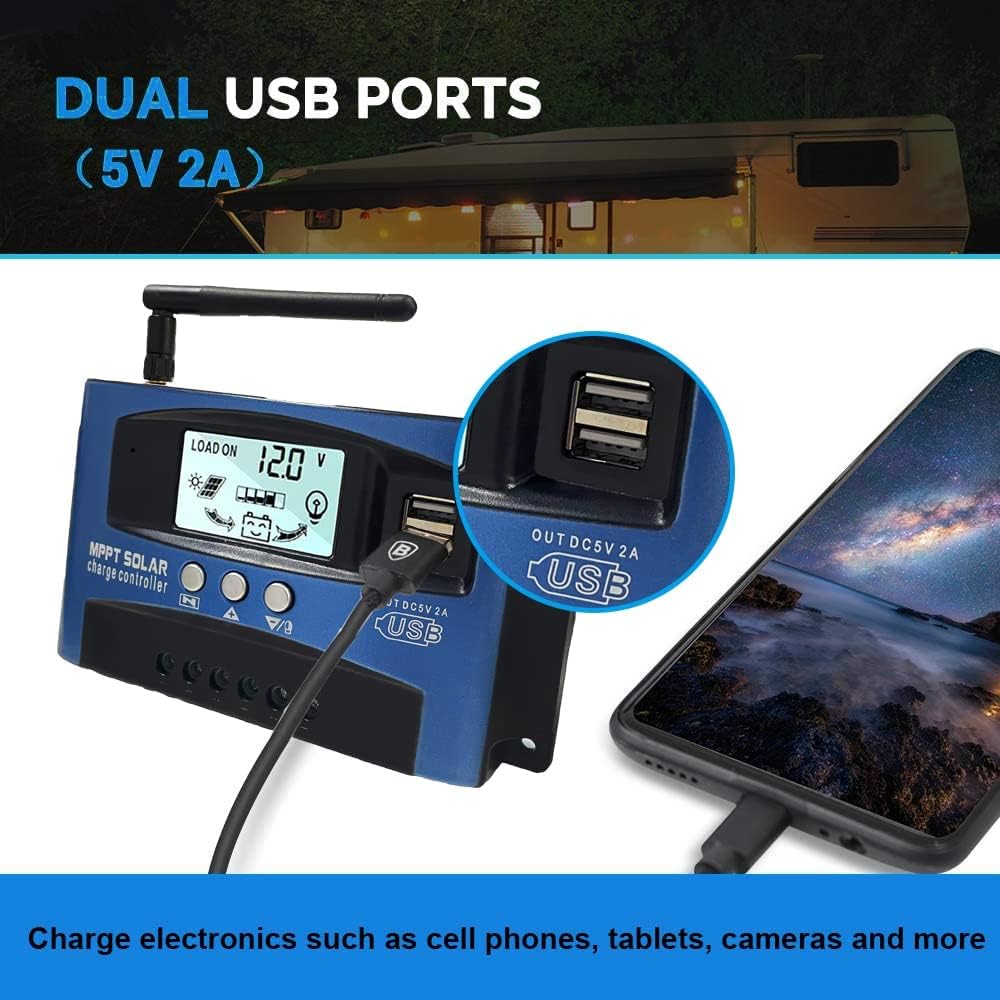
Imaj: Fèmen view of the SOGTICPS BL912-40A-WIFI Solar Charge Controller, showing the dual 5V 2A USB ports in use, charging a smartphone.
4. Enstalasyon ak Enstalasyon
Proper installation is critical for the safe and efficient operation of your solar charge controller. Follow the connection order precisely.
Lòd Koneksyon:
- Connect the Battery First: Connect the battery to the charge controller's battery terminals. Ensure correct polarity (+ to + and - to -). The controller will automatically detect 12V or 24V system voltage.
- Connect Solar Panels: Connect the solar panels to the charge controller's solar input terminals. Again, observe correct polarity.
- Connect DC Load (Optional): Connect your DC loads to the load output terminals.
Enpòtan: When disconnecting, reverse the order: first disconnect the load, then the solar panels, and finally the battery. Failure to follow this order may damage the controller or other components.
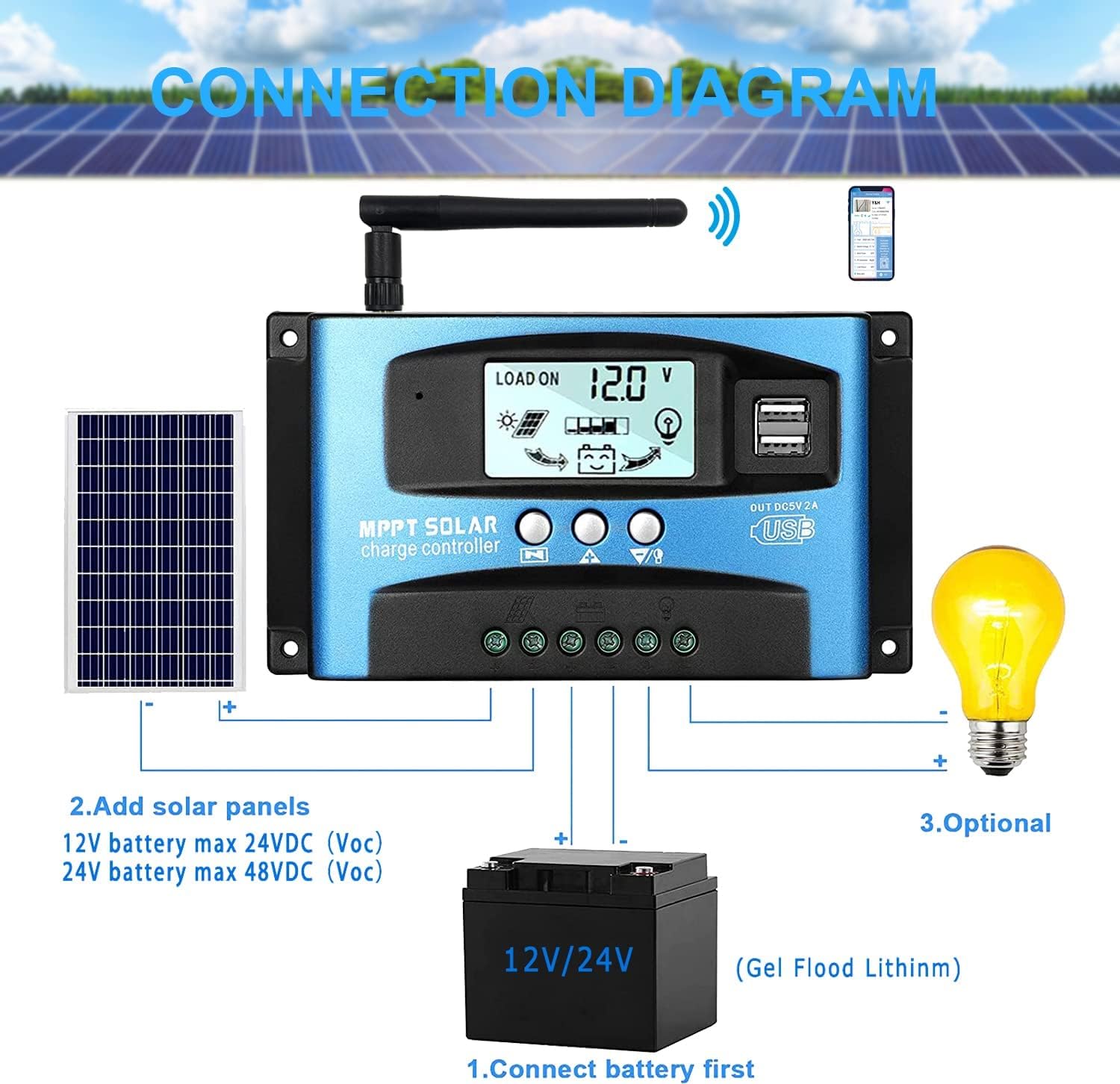
Imaj: A clear connection diagram illustrating the proper wiring sequence for the solar charge controller, connecting to a battery, solar panels, and an optional DC load. It emphasizes connecting the battery first.
Batri konpatibilite:
The controller is compatible with various battery types, including Gel, Flooded (Lead-Acid), and Lithium batteries. Ensure the correct battery type is selected in the controller settings for optimal charging.

Imaj: Visual representation showing the SOGTICPS BL912-40A-WIFI Solar Charge Controller's compatibility with Gel, Flooded, and Lithium battery types, indicated by arrows pointing between battery icons and the controller.
5. Operasyon Enstriksyon
Ekran LCD ak Navigasyon:
The LCD provides real-time information about your solar system. Use the control buttons to navigate through the display interfaces and adjust parameters.

Imaj: A series of LCD screen captures demonstrating the browsing interface and parameter setting process for the SOGTICPS BL912-40A-WIFI Solar Charge Controller. It shows main display, float voltage, discharge reconnect, discharge stop, load work mode, battery type, and work parameter display.
- Entèfas Navigasyon: Peze a MENI button to cycle through different display interfaces, showing information such as main display, float voltage, volim rekonekte egzeyattage, volim arè egzeyattage, load work mode, battery type, and other work parameters.
- Anviwònman Paramèt: In interfaces 2-8, press the MENI button to enter the setting mode. Use the UP epi DESANN buttons to adjust the values. Press MENI ankò pou konfime epi sòti nan mòd konfigirasyon an.
Siveyans WiFi:
The controller supports WiFi connectivity, allowing you to monitor and control your solar system remotely via a smartphone application.

Imaj: The SOGTICPS BL912-40A-WIFI Solar Charge Controller shown alongside a smartphone displaying its monitoring application interface. This illustrates the wireless monitoring capability of the PV system.
- Enstalasyon aplikasyon an: Download the dedicated application for your smartphone (Android). Refer to the QR code or instructions provided with the product for app download.
- Koneksyon: Follow the in-app instructions to connect your controller to your local WiFi network.
- Siveyans Adistans: Yon fwa konekte, ou kapab view real-time data such as temperature, charge current, discharge current, accumulated power generation, battery voltage, and adjust charging modes from anywhere.
6. Antretyen
Antretyen regilye asire lonjevite ak pèfòmans optimal kontwolè chaj solè ou a.
- Tcheke Koneksyon: Enspekte tout koneksyon fil elektrik yo detanzantan pou asire yo sere epi yo pa gen korozyon.
- Kontwolè pwòp: Kenbe kontwolè a pwòp epi san pousyè ak debri. Sèvi ak yon twal sèk pou netwaye.
- Vantilasyon: Ensure the installation area has adequate ventilation to prevent overheating.
- Enspeksyon batri: Regularly check battery terminals for corrosion and ensure battery fluid levels (for flooded batteries) are correct.
- Siveyans sistèm: Use the LCD display or the WiFi app to monitor system performance and identify any anomalies early.
NAN. Depanaj
Si ou rankontre pwoblèm ak kontwolè chaj solè ou a, gade pwoblèm ak solisyon komen sa yo:
| Pwoblèm | Kòz posib | Solisyon |
|---|---|---|
| Pa gen ekspozisyon sou LCD | Batri a pa konekte oswa li gen ti vòltajtage; reverse polarity. | Tcheke koneksyon batri ak voltage. Ensure correct polarity. |
| Batri pa chaje | Panno solè yo pa konekte; limyè solèy la pa ase; panno solè ki gen pwoblèm; move kalite batri. | Check solar panel connections and ensure adequate sunlight. Verify solar panel functionality. Confirm battery type setting. |
| Chaj la pa fonksyone | Load disconnected; battery low voltage protection; overload protection. | Check load connections. Charge battery. Reduce load or check for short circuits. |
| WiFi app issues (connection/language) | Incorrect WiFi setup; app region/language settings; firmware issues. | Ensure correct WiFi network and password. Check app settings for language. Contact support if issues persist. |
8. Espesifikasyon
| Paramèt | Valè |
|---|---|
| Modèl | BL912-40A-WIFI |
| Rated chaj aktyèl | 40 A |
| Sistèm Voltage | 12V/24V Auto-detection |
| Max PV Input Power (12V) | 480 W |
| Max PV Input Power (24V) | 960 W |
| Rekòmande Panèl Solè Voltage | 18V pou batri 12V; 36V pou batri 24V |
| Oto-Konsomasyon | <10 mA |
| Tanperati Fonksyònman | -14 °F a 140 °F (-10 °C a 60 °C) |
| Kalite ekspozisyon | LCD |
| USB Sòti | Dual 5V 2A |
| Kominikasyon | WiFi |
| Dimansyon (Pake) | 18 x 11 x 5 cm |
| Pwa (Pakè) | 330 gram |
| Referans manifakti | 2-BL912-40A-WIFI-DE |
| UPC | 732246237116 |
9. Garanti ak sipò
For warranty information and technical support, please refer to the documentation included with your purchase or contact SOGTICPS customer service. Keep your purchase receipt as proof of purchase.