
1. Enfòmasyon enpòtan sou sekirite
Tanpri li tout enstriksyon yo ak anpil atansyon anvan ou monte epi itilize li. Kenbe manyèl sa a pou referans pita.
- Always assemble the desk on a stable, flat surface.
- Be cautious when moving the desk to avoid tipping or injury.
- Pa depase kapasite pwa a 132 liv total (33 lbs per shelf) to ensure stability and safety.
- Kenbe timoun ak bèt kay lwen zòn asanble a.
- Ensure all fasteners are securely tightened before use. Periodically check and re-tighten as needed.
2. Pwodwi souview ak Karakteristik
The Mount-It! MI-7940 Rolling Standing Desk is designed to provide a flexible and mobile workspace. It features adjustable height, multiple shelves for organization, and locking casters for easy movement and stability.

Figi 2.1: Diagram highlighting key features of the MI-7940 desk, including height adjustable tabletop, keyboard tray, utility shelves, durable steel frame, release knobs, decorative base cover, and locking wheel base.
Karakteristik kle:
- Flexible Workspace: Easily moves between various environments such as classrooms, offices, and home study areas.
- Wotè reglabl: Top shelves adjust through 11 locking intervals, from 37.25 inches to 53.75 inches, allowing for comfortable sitting or standing positions.
- Ampdepo: Four sturdy platforms provide dedicated surfaces for monitors, laptops, keyboards, printers, and supplies.
- Kapasite pwa segondè: Each shelf supports up to 33 lbs, with a total desk capacity of 132 lbs.
- Fasil Mobilite: Equipped with 1.5-inch smooth-rolling casters, two of which are locking, for secure positioning.
- Konstriksyon dirab: Built from high-strength steel and engineered wood for long-term reliability.

Figi 2.2: Illustration showing the weight capacity of each shelf (33 lbs) and the total maximum weight capacity of the desk (132 lbs).
3. Enstriksyon Asanble
Follow these steps to assemble your Mount-It! MI-7940 Rolling Standing Desk. All necessary tools are typically included, but a Phillips head screwdriver may be useful.
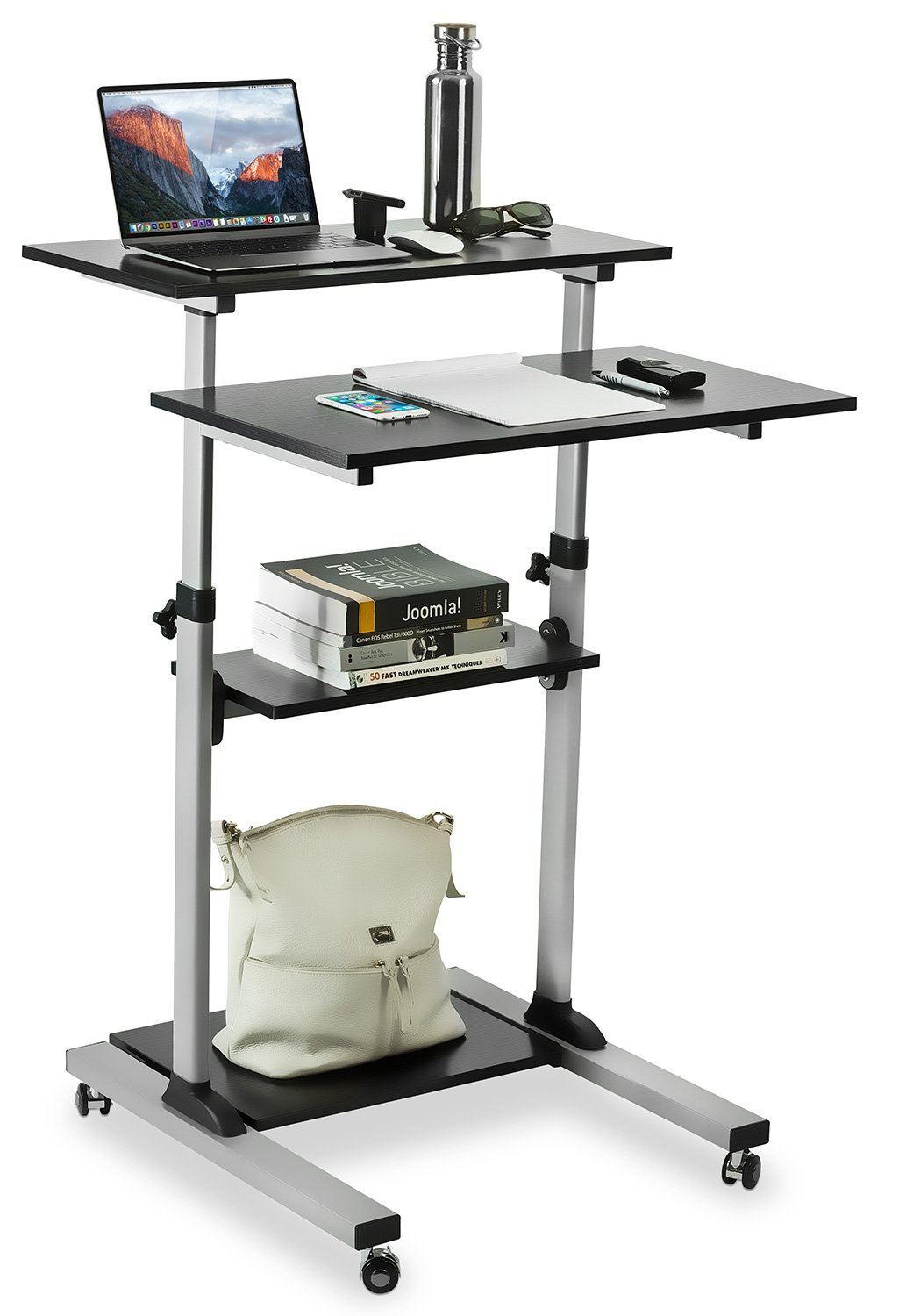
Figi 3.1: Fully assembled Mount-It! MI-7940 Rolling Standing Desk, showing its multi-tier design and mobile base.
- Depake konpozan: Carefully remove all parts from the packaging and lay them out on a clean, flat, and soft surface to prevent scratches. Verify all components are present against the parts list (not provided in this manual, refer to your product packaging).
- Mete wou yo nan baz la: Insert the caster wheels into the designated holes on the base frame. Ensure two of the casters are locking wheels and position them on the front side for easy access. Tighten securely.
- Assemble Vertical Posts: Connect the vertical support posts to the base frame using the provided hardware. Ensure they are oriented correctly according to the design.
- Enstale etajè ki pi ba a: Slide the lowest utility shelf onto the vertical posts and secure it at the desired height using the locking knobs.
- Install Middle Shelf: Slide the middle utility shelf onto the vertical posts and secure it using the locking knobs.
- Attach Main Tabletop and Keyboard Tray: Attach the main tabletop and the keyboard tray to the upper sections of the vertical posts. These sections are designed for height adjustment. Secure them with the provided hardware and locking knobs.
- Tcheke final la: Once all components are assembled, gently shake the desk to ensure stability. Re-tighten any loose connections.
4. Operasyon Enstriksyon
4.1. Ajisteman Wotè
The MI-7940 desk allows for flexible height adjustment to switch between sitting and standing positions. The top platforms can be adjusted from 37.25 inches to 53.75 inches.

Figi 4.1: Visual representation of the desk's height adjustment range, showing compressed (37.4 inches) and extended (54.7 inches) positions.
- Debloke: Locate the release knobs on the vertical posts supporting the main tabletop and keyboard tray. Turn these knobs counter-clockwise to loosen them.
- Ajiste Wotè: Carefully raise or lower the platforms to your desired height. The desk features 11 locking intervals for precise positioning.
- Fèmen: Once the desired height is reached, turn the release knobs clockwise to securely tighten them. Ensure both knobs are fully tightened to prevent accidental movement.
4.2. Mobility and Locking Casters
The desk is equipped with smooth-rolling casters for easy movement. Two of these casters have locking mechanisms to secure the desk in place.

Figi 4.2: Fèmen view of the high-quality caster wheels, highlighting the locking mechanism.
- Pou deplase: Ensure the locking brakes on the casters are disengaged (unlocked). Gently push the desk to its new location.
- Pou Sekirize: Once the desk is in the desired position, press down on the locking levers of the two locking casters until they click into place. This will prevent the desk from rolling.
4.3. Posture Guidance
Maintaining correct posture is crucial for comfort and health, especially during prolonged use. The adjustable height feature of this desk can help you achieve an ergonomic setup.

Figi 4.3: Comparison of incorrect and correct posture when using a desk, illustrating how an adjustable standing desk can promote better ergonomics.
- Pozisyon Kanpe: Adjust the desk height so your elbows are at a 90-degree angle when your hands are on the keyboard. Your monitor should be at eye level.
- Pozisyon Chita: If using with a chair, ensure your feet are flat on the floor, knees at a 90-degree angle, and elbows at a 90-degree angle to the keyboard.
5. Antretyen
Regular maintenance will help prolong the life and appearance of your Mount-It! MI-7940 Rolling Standing Desk.
- Netwayaj: Siye sifas yo ak yon mou, damp twal. Evite pwodui chimik ki agresif oswa pwodui netwayaj abrazif, ki ka domaje fini an.
- Fastener: Tcheke tout vis ak boulon yo detanzantan pou asire yo rete byen sere. Sere yo ankò jan sa nesesè pou kenbe estabilite.
- Woulèt: Keep caster wheels free of debris (hair, dust, etc.) to ensure smooth movement.
- Limit pwa: Always adhere to the specified weight limits for each shelf and the total desk to prevent structural damage.
NAN. Depanaj
If you encounter any issues with your desk, refer to the following common problems and solutions.
| Pwoblèm | Kòz posib | Solisyon |
|---|---|---|
| Biwo a ap tranble oswa li pa estab. | Loose fasteners; uneven surface. | Check and tighten all screws and bolts. Move the desk to a flat, level surface. |
| Ajisteman wotè a difisil oswa li bloke. | Locking knobs are too tight; mechanism obstructed. | Ensure locking knobs are fully loosened. Check for any obstructions in the adjustment mechanism. |
| Rou yo pa woule san pwoblèm. | Debris in wheels; locking brake engaged. | Clean any debris from the caster wheels. Ensure locking brakes are disengaged. |
| Desk makes noise during movement. | Loose connections; friction. | Tighten all fasteners. A small amount of silicone spray on moving parts (avoiding wood surfaces) may reduce friction. |
If you are unable to resolve an issue using the troubleshooting guide, please contact Mount-It! customer support for assistance.
7. Espesifikasyon
Detailed specifications for the Mount-It! MI-7940 Rolling Standing Desk.

Figi 7.1: Detailed dimensional drawing of the MI-7940 desk, including height, width, and depth measurements for all shelves and the overall structure.
| Karakteristik | Spesifikasyon |
|---|---|
| Nimewo Modèl | MI-7940 |
| Mak | Monte-Li! |
| Konsepsyon biwo | Kanpe Biwo |
| Koulè | Nwa |
| Kalite Materyèl | Bwa Enjenyè, Asye |
| Fini Kalite | Plastifye |
| Wotè Minimòm | 37 Inches (approx. 94 cm) |
| Wotè maksimòm | 54.7 Inches (approx. 139 cm) |
| Kantite etajè | 4 |
| Kapasite pwa (pa etajè) | 33 liv |
| Rekòmandasyon Pwa Maksimòm (Total) | 132 liv |
| Gwosè koule | 1.5 pous |
| Pwa atik | 20 liv |
| UPC | 810041737267 |
8. Garanti ak sipò
8.1. Enfòmasyon sou Garanti
Mount-It! products are backed by a garanti pou tout lavi, ensuring reliable performance for years to come. This warranty covers defects in materials and workmanship under normal use.
For specific details regarding the lifetime warranty, please refer to the official Mount-It! warranty policy available on their websit oswa kontakte sipò kliyan.
8.2. Sipò pou Kliyan
Mount-It! provides expert US-based technical assistance to help you with any questions or issues before, during, and after setup.
For support, please visit the official Mount-It! website or refer to the contact information provided with your product packaging. You can also find additional resources and FAQs on their brand store: