
Entwodiksyon
Mèsi pou acha aasing the RCA 32V-type FHD Tunerless Smart TV, model RCA-32D1. This television is designed for seamless access to online streaming content without the need for traditional terrestrial broadcast tuners. It features a Full HD display, built-in Wi-Fi, Chromecast functionality, and voice control for an enhanced viewing experience. This manual provides essential information for setting up, operating, maintaining, and troubleshooting your new TV.

Figi 1: Devan view of the RCA 32V-type FHD Tunerless Smart TV.
Enfòmasyon sou Sekirite
Tanpri li tout enstriksyon sekirite yo ak anpil atansyon anvan ou itilize pwodwi a. Kenbe manyèl sa a pou referans pita.
- Pa ekspoze televizyon an anba lapli oswa imidite pou evite dife oswa chòk elektrik.
- Asire bon vantilasyon. Pa bloke ouvèti vantilasyon yo.
- Sèvi ak sèlman kòd kouran ki vini ak televizyon an.
- Pa ouvri televizyon an.asing. Konfye tout antretyen bay pèsonèl kalifye.
- Kenbe pil yo lwen timoun yo. Jete pil itilize yo yon fason responsab.
- Evite mete televizyon an sou sifas ki pa estab.
Kontni pake
Verifye ke tout atik yo prezan nan pakè a:
- RCA 32V-type FHD Tunerless Smart TV Unit
- Kontwòl Remote
- AAA Pil (x2)
- TV Stand (Base and Screws)
- Pouvwa kab
- Manyèl itilizatè (dokiman sa a)
Enstalasyon
1. Enstalasyon fizik
Attach the TV stand or mount the TV to a wall. For wall mounting, ensure you use a VESA-compatible bracket (40 x 40mm) and appropriate screws (M6 10mm x 2 for upper two points, screws for lower two points are included with the TV). Always ensure the TV is securely mounted to prevent accidents.

Figure 2: TV dimensions and connection terminal layout.
2. Koneksyon
Connect the power cable to the TV and then to a power outlet. This TV requires only a power connection and Wi-Fi for internet streaming.

Figure 3: Power and Wi-Fi connectivity for the tunerless TV.
For external devices, use the available ports:
- Pò HDMI (x3): Connect game consoles, Blu-ray players, or other HDMI-compatible devices.
- Pò USB 2.0 (x2): Konekte aparèy depo USB pou lekti medya.
- Pò LAN: For wired internet connection (optional, Wi-Fi is also available).
- Sòti odyo: Pou konekte sistèm odyo ekstèn yo.

Figure 4: Connecting external devices via HDMI ports.
3. Premye Limen
After connecting the power, press the power button on the remote control. Follow the on-screen instructions to complete the initial setup, including connecting to your Wi-Fi network and logging into your Google account to access smart TV features.
Opere
1. Kontwòl Remote
The included remote control allows for easy navigation and features voice control capabilities. Dedicated buttons provide quick access to popular streaming services.
- Kontwòl vwa: Press the voice assistant button and speak commands like "Play cat videos on YouTube" or "Increase volume."
- Bouton Aplikasyon Dedye: Quickly launch NETFLIX, YouTube, and Prime Video with a single press.
- Navigasyon: Sèvi ak pavé direksyon an ak bouton OK a pou navige nan meni yo epi chwazi opsyon yo.
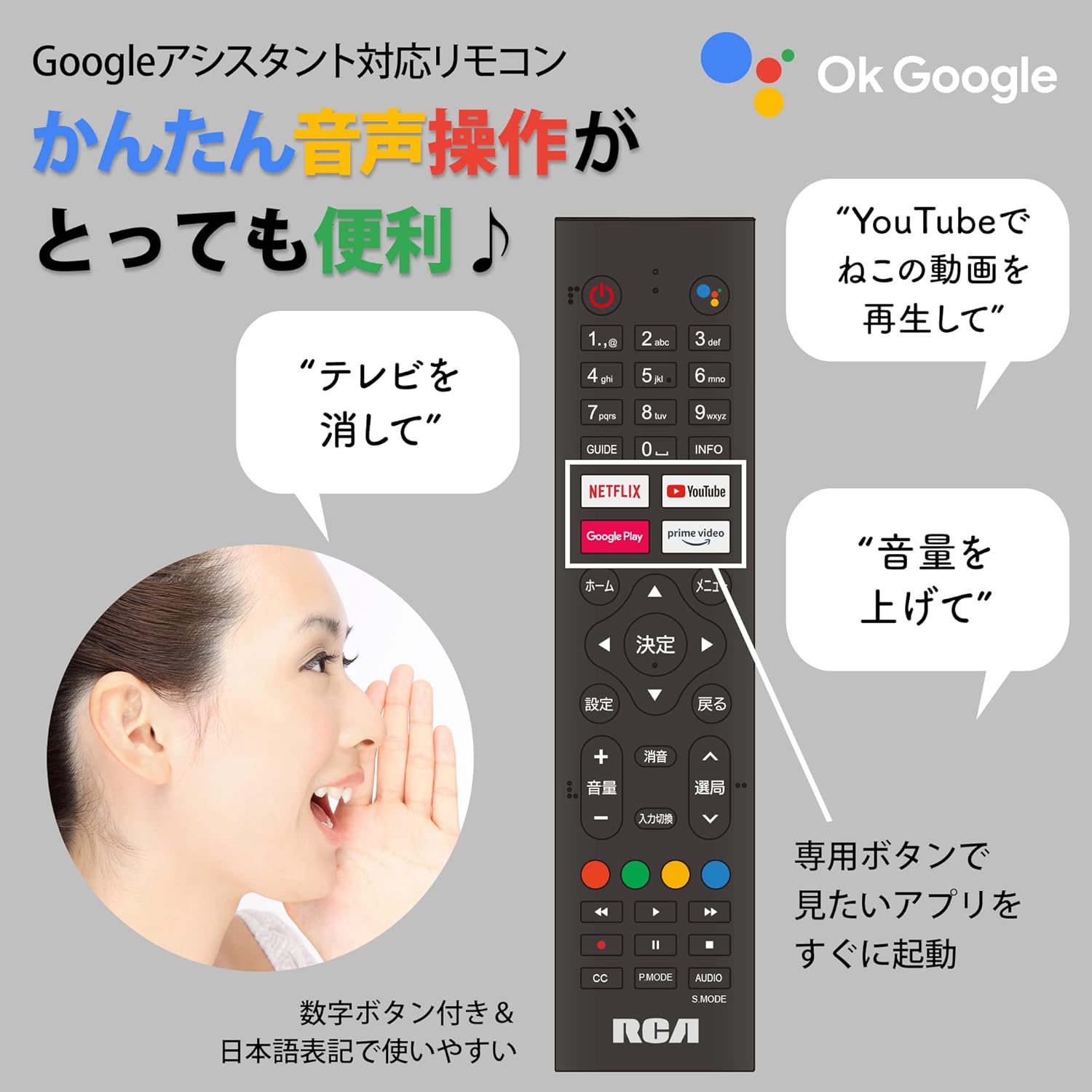
Figure 5: Remote control with voice command functionality and dedicated app buttons.
2. Karakteristik televizyon entelijan
This tunerless TV provides access to a wide range of online video distribution services and features:
- Sèvis difizyon: Enjoy content from NETFLIX, YouTube, Prime Video, Tver, U-NEXT, AbemaTV, and more.
- Chromecast entegre: Cast content directly from your smartphone or tablet to the TV screen.
- Android eksplwatasyon: Access a variety of apps from the Google Play Store.

Figure 6: Using Chromecast to cast content from a smartphone to the TV.
Video 1: Demonstration of the Google TV interface and voice control for content discovery.
3. Operasyon debaz yo
- Limen/Etenyen: Peze bouton pouvwa a sou kontwòl remote la.
- Kontwòl Volim: Sèvi ak bouton Monte/Diminye Volim yo sou telekòmand lan.
- Seleksyon Antre: Press the Input button to switch between HDMI and other connected sources.
Antretyen
1. Netwayaj
To clean the TV screen, gently wipe it with a soft, lint-free cloth. For stubborn marks, slightly dampen the cloth with water or a screen-cleaning solution. Do not spray liquid directly onto the screen. Clean the TV casinSiye ak yon twal mou epi sèk.
2. Depo
If storing the TV for an extended period, disconnect it from the power outlet and store it in a cool, dry place away from direct sunlight and extreme temperatures.
Depanaj
Si w rankontre pwoblèm ak televizyon w lan, gade pwoblèm ak solisyon komen sa yo:
| Pwoblèm | Solisyon |
|---|---|
| Pa gen pouvwa | Asire w kab kouran an byen konekte ak televizyon an ak priz kouran an. Eseye yon lòt priz. |
| No picture/Sound but no picture | Tcheke sous opinyon an. Asire w ke aparèy ekstèn yo limen epi yo konekte kòrèkteman. |
| Remote kontwòl pa travay | Ranplase pil yo. Asire w pa gen okenn obstak ant telekòmand lan ak detèktè IR televizyon an. |
| Pa ka konekte ak Wi-Fi | Check your router and internet connection. Re-enter the Wi-Fi password. Move the TV closer to the router. |
| App is slow or freezes | Restart the TV. Clear the app's cache in the TV settings. Ensure your internet connection is stable. |
Si pwoblèm nan pèsiste, tanpri kontakte sèvis kliyan.
Espesifikasyon
The following are the technical specifications for the RCA-32D1 Tunerless Smart TV:
| Karakteristik | Detay |
|---|---|
| Nimewo Modèl | RCA-32D1 |
| Gwosè ekran | 31.5 inches (32V-type) |
| Teknoloji ekspozisyon | LCD, VA Panel, LED Backlight |
| Rezolisyon | Full HD (1920 x 1080) |
| Rafrechisman pousantaj | 60 Hz |
| Pwopòsyon kontras | 3000:1 |
| Sistèm operasyon | Android |
| Koneksyon | Wi-Fi, HDMI (x3), USB 2.0 (x2), LAN, Audio Output |
| Karakteristik espesyal | Chromecast Built-in, Voice Control |
| Sèvis difizyon ki sipòte | Netflix, YouTube, Prime Video, Tver, U-NEXT, AbemaTV |
| Dimansyon pwodwi (D x W x H) | 16.1 x 73.1 x 47 cm |
| Pwa atik | 4.9 kg |
| Estanda Mòn VESA | 40 x 40mm |
| Batri enkli | 2 pil AAA |

Figure 7: High-definition VA panel for vivid image quality.
Garanti ak sipò
This product is covered by the manufacturer's warranty. Please refer to the warranty card included in your package for specific terms and conditions.
Sipò pou Kliyan
For technical assistance or inquiries, please contact the KEIYO Support Center:
- Telefòn: 050-8880-2812
- Orè resepsyon: Weekdays 10:00-12:00, 13:00-17:00 (Excluding summer holidays, year-end/New Year holidays, Golden Week, and public holidays).