
Candy FIDC X625 L
Candy Idea FIDC X625 L Multifunction Oven User Manual
Model: FIDC X625 L
Mak: Bonbon
Entwodiksyon
The Candy Idea FIDC X625 L is a versatile 70-liter electric multifunction oven designed to integrate seamlessly into any kitchen. It features a double glass door for safety, a telescopic guide for ease of use, and a durable stainless steel handle. This manual provides essential information for the safe and efficient operation, installation, and maintenance of your new oven.

Figi 1: Devan view of the Candy Idea FIDC X625 L Multifunction Oven.
Ki sa ki nan bwat la
Please check the contents of the packaging carefully. If any items are missing or damaged, contact your retailer immediately.
- Candy Idea FIDC X625 L Oven Unit
- 1 x Plato boulanjri
- 2 x Wire Racks
- Pouvwa kab
- Manyèl Enstriksyon (dokiman sa a)
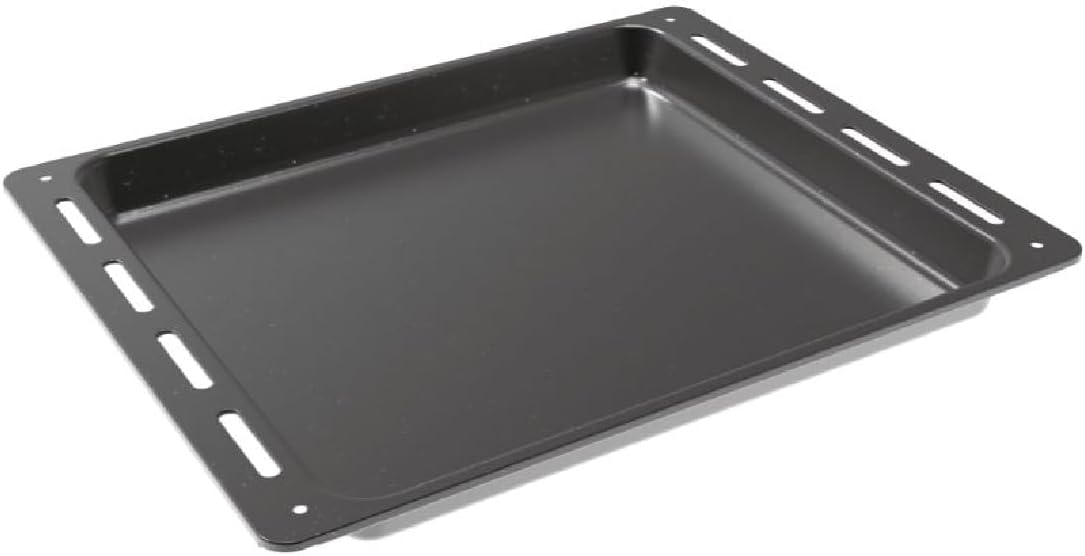
Figure 2: Included baking tray.
Enstalasyon ak Enstalasyon
Bon enstalasyon enpòtan anpil pou fou ou a fonksyone byen epi avèk efikasite. Li rekòmande pou yon teknisyen kalifye fè enstalasyon an.
Debake
Remove all packaging materials from the oven and its accessories. Inspect the oven for any signs of damage during transit.
Plasman ak Otorizasyon
The oven is designed for built-in installation. Ensure the cabinet opening dimensions match the oven's requirements. The integration niche size should be approximately 59 cm (Height) x 56 cm (Width) x 56 cm (Depth).

Figure 3: Installation dimensions and clearances. Consult the cooktop manufacturer's guide for adequate clearances if installing below a hob.
Koneksyon elektrik
Connect the oven to a suitable electrical supply according to local regulations. The oven operates at 2400 watts. Do not use extension cords or adapters. Ensure the power cable is not trapped or damaged during installation.
Enstriksyon Operasyon
Kontwòl Panel Plis paseview
The oven features a user-friendly control panel with Push&Pull knobs and a Touch Timer Display for precise control over cooking functions and time.

Figure 4: Detail of the oven's control panel with Push&Pull knobs and digital display.
Basic Operation (Temperature and Functions)
Pou opere fou a:
- Chwazi Fonksyon: Use the left Push&Pull knob to choose one of the 8 available cooking functions (e.g., convection, grill, defrost).
- Mete Tanperati: Use the right Push&Pull knob to set the desired cooking temperature.
- Prechofaj: Allow the oven to preheat to the set temperature before placing food inside for optimal results.
Sèvi ak revèy la
The Touch Timer Display allows you to set cooking durations or program delayed starts. Refer to the detailed instructions in the full manual for specific timer functions.
Gid teleskopik
The oven is equipped with telescopic guides for easy and safe insertion and removal of trays and racks. These guides allow you to pull out the tray or rack fully without it tipping.

Figure 5: Oven interior showing the telescopic guides and wire racks.
Netwayaj ak antretyen
Aquactiva Cleaning System
The Aquactiva steam cleaning system simplifies daily maintenance:
- Pour 300 ml of distilled water into the bottom of the oven cavity.
- Heat the oven at 90°C for 30 minutes.
- Once the oven has cooled down, wipe away any remaining grease or residue with a damp twal.
Netwayaj jeneral
- Toujou asire w fou a frèt anvan ou netwaye li.
- Netwaye sifas ekstèn yo ak yon twal mou,amp twal ak detèjan twò grav. Evite pwodui netwayaj abrazif.
- The double glass door can be cleaned with a glass cleaner.
Depanaj
If you encounter any issues with your oven, please refer to the following common solutions before contacting customer service.
| Pwoblèm | Kòz posib | Solisyon |
|---|---|---|
| Fou a pa limen. | Pa gen kouran; disjonktè a sote. | Check power connection and circuit breaker. Ensure oven is properly plugged in. |
| Fou a pa chofe byen. | Pa gen bon tanperati; pòt la pa byen fèmen. | Verify temperature setting. Ensure oven door is fully closed. |
| Display pa travay. | Power interruption; control panel issue. | Reset power to the oven. If issue persists, contact service. |
For issues not listed here, or if solutions do not resolve the problem, please contact Candy customer support.
Espesifikasyon
| Karakteristik | Detay |
|---|---|
| Mak | Sirèt |
| Nimewo Modèl | FIDC X625 L |
| Dimansyon pwodwi (D x W x H) | 56.8 x 59.5 x 59.5 cm |
| Pwa pwodwi | 22.3 kg |
| Kapasite | 70 lit |
| Koulè | Nerjaveèi ak Nwa |
| Metòd chofaj | Konveksyon |
| Kalite gaz | Elektrik |
| Kalite enstalasyon | Bati-an |
| Wattage | 2400 wat |
| Sistèm dekonjle | Self-dekonjle |
| Peyi orijin | Latiki |
Garanti ak sipò
Your Candy Idea FIDC X625 L oven comes with a manufacturer's warranty. Please refer to the warranty card included with your purchase for specific terms and conditions. For technical assistance, spare parts, or service requests, please contact Candy customer support through their official websit la oswa enfòmasyon kontak ki nan dokiman garanti ou a.
Always use genuine Candy spare parts for repairs to ensure safety and maintain product performance.
Ask a question about this manual
Ask about setup, troubleshooting, compatibility, parts, safety, or missing instructions. Manuals+ will review the question and use this page’s manual context to help answer it.