
1. Enstalasyon
Follow these steps to install and connect your Linkind ST19 Smart Edison Bulbs.
1.1 Enstalasyon Fizik
Ensure the power is off before installation. Screw the E26 base bulb into a standard E26 light socket. These bulbs are designed for indoor use and are not compatible with dimmer switches, which may cause flickering.

Image: Easy installation into a standard E26 bulb base. Confirm bulb dimensions (2.28in x 5.04in) for proper fit before purchase.
1.2 App Connection (AiDot APP)
The Linkind Smart Edison Bulbs require the AiDot APP for smart features. Download the AiDot APP from your device's app store. Ensure your Wi-Fi network is 2.4GHz, as 5GHz networks are not supported for initial setup.
- Download the AiDot APP from the App Store or Google Play.
- Kreye yon kont epi konekte.
- Tape ikòn "+" la oubyen "Ajoute Aparèy" pou kòmanse pwosesis koneksyon an.
- Follow the in-app instructions to connect your bulbs to your 2.4GHz Wi-Fi network.
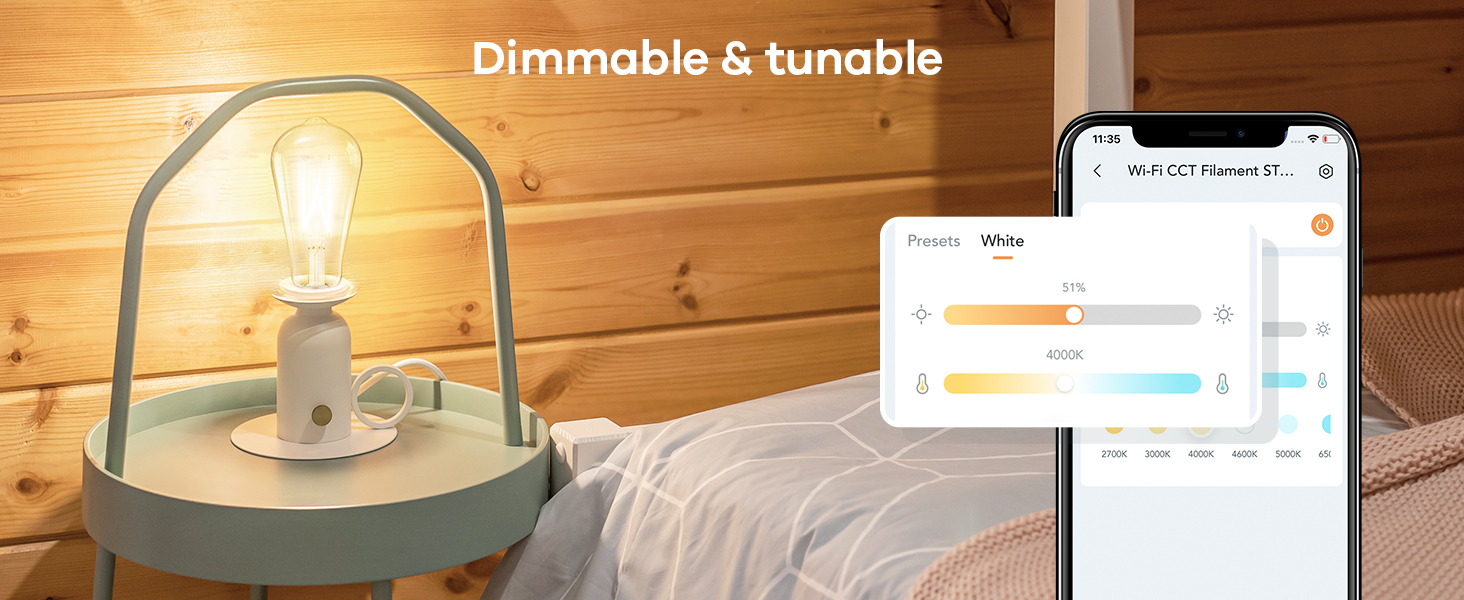
Image: Visual guide for connecting the smart bulbs using the AiDot APP, showing the device addition process and Wi-Fi setup.
1.3 Pè kontwòl remote
The included remote control is pre-paired with the bulbs for immediate use. If re-pairing is needed, ensure the bulb is powered on, then press the remote's pairing button as instructed in the remote's user guide. The remote features a magnetic piece for convenient storage, such as on a refrigerator.
Video: Instructions on how to pair Linkind Smart Bulbs with the remote control. This video demonstrates the steps to establish a connection between the bulb and the remote for direct control.
2. Operasyon Enstriksyon
Control your Linkind Smart Edison Bulbs using the AiDot APP, voice commands, or the included remote control.
2.1 AiDot APP Control
The AiDot APP provides full control over your bulbs:
- Limyè Blan Reglabl: Adjust color temperature from 2700K (warm white) to 6500K (cool white).
- Dimmable: Ajiste klète soti nan 1% a 100%.
- Time Schedule Function: Fikse orè pou lè limen/etenn otomatik.
- Kontwòl Gwoup: Control multiple bulbs simultaneously.
- Prereglaj: Utilize pre-set lighting scenes.

Image: Demonstrates both app control for dimming and color temperature, and remote control functions for turning on/off, adjusting temperature, and brightness.
Video: A step-by-step guide on how to set timers and schedules for your Linkind smart bulbs using the AiDot APP, allowing for automated lighting control.
2.2 Kontwòl Vwa (Alexa ak Google Home)
The bulbs are compatible with Amazon Alexa and Google Home for convenient voice control. Link your AiDot account to your Alexa or Google Home app to enable voice commands.
- Exampkòmandman yo:
- "Alexa, limen limyè salon an."
- "Hey Google, set the bedroom light to warm white."
- "Alexa, dim the kitchen light to 50%."
Video: Demonstrates the integration of Linkind smart bulbs with Alexa and Google Home, showing how to control lighting using voice commands for on/off, dimming, and color temperature adjustments.
2.3 Operasyon kontwòl Remote
The remote control offers quick access to basic functions:
- Kout laprès x1: Vire sou / sou.
- Kout laprès x2: Change color temperature.
- Long peze: Ajiste klète.
3. Antretyen
To ensure optimal performance and longevity of your Linkind Smart Edison Bulbs, follow these simple maintenance guidelines:
- Netwayaj: Ensure the bulb is off and cool before cleaning. Use a soft, dry cloth to wipe the bulb. Avoid using liquid cleaners or abrasive materials.
- Depo: If storing the bulbs for an extended period, keep them in their original packaging in a cool, dry place.
- Ranplasman: With an average life of 25,000 hours, these LED bulbs are designed for long-term use. Replacement is typically not required for many years under normal usage.
NAN. Depanaj
If you encounter issues with your Linkind Smart Edison Bulbs, refer to the following common solutions:
4.1 Pwoblèm koneksyon
- Bulb not connecting to Wi-Fi: Ensure your Wi-Fi network is 2.4GHz. Move the bulb closer to your router during setup. Restart your router and try connecting again.
- Kontwòl remote la pa reponn: Check if the remote's battery is properly inserted or needs replacement. If the remote is not paired, follow the pairing instructions in Section 1.3.
- Kontwòl vwa a pa fonksyone: Verify that your AiDot account is correctly linked to your Alexa or Google Home app. Ensure your voice assistant device is online and within range.
4.2 Pwoblèm Pèfòmans
- Bulb flickering: These bulbs are not compatible with traditional dimmer switches. Ensure they are installed in a non-dimmable fixture or that any existing dimmer switch is set to full power (100%) or bypassed.
- Incorrect brightness or color temperature: Use the AiDot APP or remote control to adjust settings. If using voice control, specify the desired brightness percentage or color temperature (e.g., "warm white").

Image: Illustrates the ST19 (ST58) bulb shape and explicitly states incompatibility with dimmer switches to prevent flickering.
5. Espesifikasyon
| Karakteristik | Detay |
|---|---|
| Mak | Linkind |
| Nimewo Modèl | Edison (ST19/ST58) |
| Kalite limyè | dirije |
| Wattage | 8 Watts |
| Enkandesan ekivalan | 60 Watts |
| Klète | 800 Lumen |
| Tanperati Koulè | 2700K-6500K (Blan reglabl) |
| Dimmable | Yes (via App/Voice/Remote, NOT external dimmer switches) |
| Baz anpoul | E26 |
| Gwosè fòm anpoul | ST19 (ST58) |
| Metòd kontwòl | Aplikasyon, Kontwòl a distans, Vwa (Alexa, Google Home) |
| Koneksyon | 2.4GHz Wi-Fi |
| Itilizasyon Andedan kay la / Deyò | Andedan kay la |
| Mwayèn lavi | 25,000 èdtan |
| Materyèl | Glass |

Imaj: Detaye view of the Linkind ST19 Smart Edison Bulb, showing its physical dimensions and highlighting key features and limitations.
6. Garanti ak sipò
Linkind is committed to providing quality products and customer satisfaction.
- Garanti: This product comes with a 1-year coverage from the date of purchase.
- Sèvis Kliyan: For any questions, technical assistance, or warranty claims, please contact Linkind customer service. Live customer service is available Monday-Friday, 9 AM - 5 PM PST.
- Resous sou entènèt: Vizite ofisyèl la Magazen Linkind pou plis enfòmasyon sou pwodwi ak sipò.