
1. Entwodiksyon
The FLIPSKY Dual FSESC 4.20 Plus is an advanced electric speed controller (ESC) designed for a variety of electric vehicles, including electric skateboards, e-bikes, and longboards. This controller features an integrated anti-spark switch and an anodized aluminum heatsink for efficient heat dissipation. It is engineered to provide smooth startup for sensorless motors and offers strong, reliable, and progressive electric braking capabilities.
This manual provides essential information for the proper setup, operation, and maintenance of your Dual FSESC 4.20 Plus to ensure optimal performance and longevity.
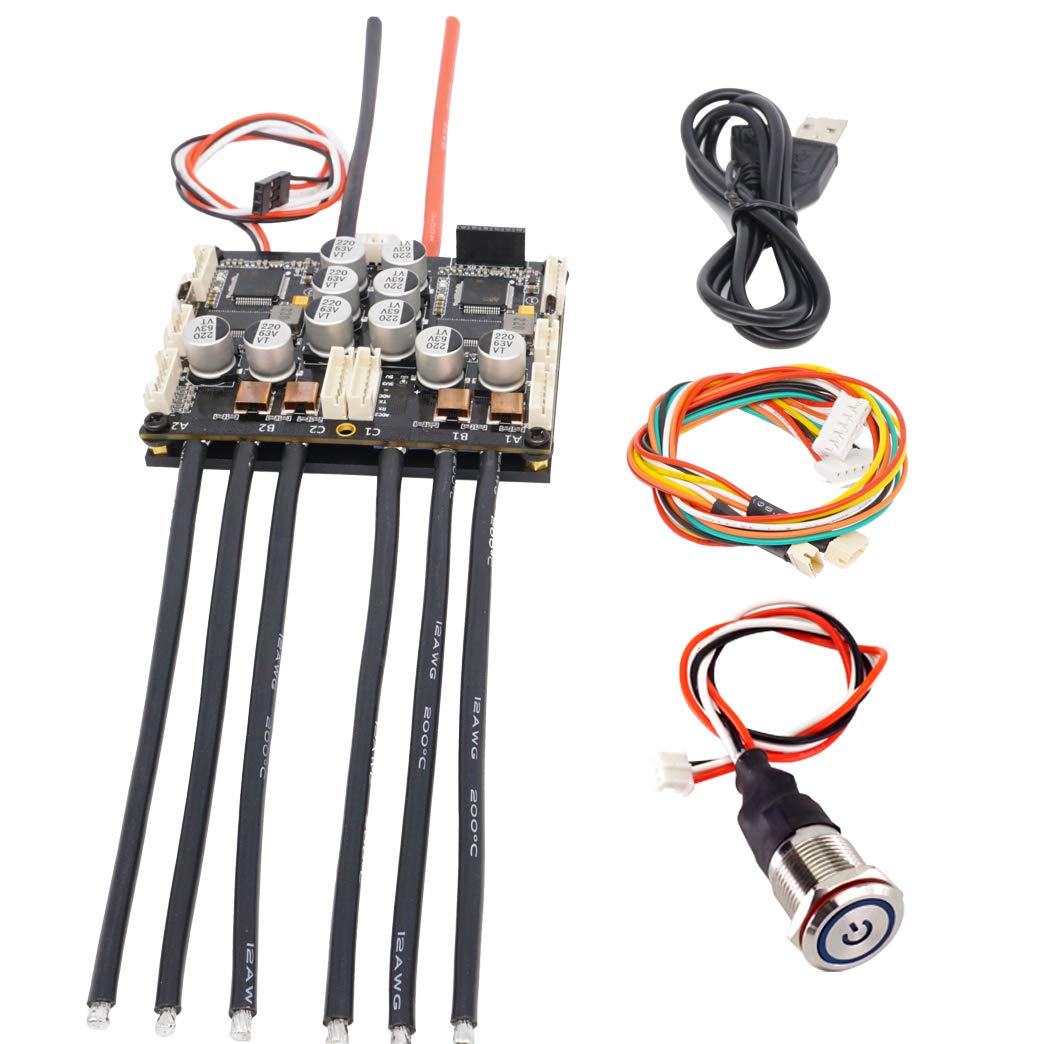
Image 1.1: The FLIPSKY Dual FSESC 4.20 Plus Electric Speed Controller.

Image 1.2: The FSESC 4.20 Plus is suitable for various electric vehicles including skateboards, scooters, and e-bikes.
2. Ki sa ki nan bwat la
Lè w ap debalaje, tanpri verifye si tout konpozan sa yo enkli:
- 1 x Dual FSESC 4.20 Plus with Heatsink
- 2 x VESC Sensor Wires
- 1 x Micro USB kab
- 1 x Manyèl Itilizatè (dokiman sa a)
- 1 x 16mm LED Button
3. Espesifikasyon teknik
The Dual FSESC 4.20 Plus is built with robust components to deliver high performance and reliability.

Imaj 3.1: Plis paseview of the Dual FSESC 4.20 Plus highlighting its aluminum heatsink and continuous current rating.
| Karakteristik | Spesifikasyon |
|---|---|
| Materyèl vèsyon | V4.20 |
| ERPM | 60000 |
| Firmware | 3.40 (Upgradable) |
| Continuous Current (Single) | 50A |
| Continuous Current (Dual) | 100A |
| Burst Current (Single) | 150A |
| Burst Current (Dual) | 300A |
| Voltage Range | 8V-60V (3-13S LiPo) |
| Sòti BEC | 5V@1.5A (Internal driver support) |
| Mòd sipòte | DC, BLDC, FOC (sinizoyid) |
| Distribisyon | Kalibrasyon lojisyèl |
| Koupe Voltage | Pwogramasyon |
| Frekans | Antre PWM |
| Ranvèse Fonksyon | Wi |
| Rejenerasyon frenaj | Wi |
| Dimensions (with heatsink) | 64 x 84 x 20.5mm |
| Kouch PCB | 6 |
| Mosfet Quantity | 30 (NTMFS5C628NL) |

Image 3.2: Physical dimensions of the Dual FSESC 4.20 Plus, showing length, width, and height.

Imaj 3.3: Anba view of the Dual FSESC 4.20 Plus, showing the heatsink plate.
4. Enstalasyon ak Enstalasyon
Careful installation and correct wiring are crucial for the safe and proper functioning of the ESC. Please follow these guidelines:
4.1. Koneksyon fil elektrik
- Koneksyon motè: Connect your motors to the appropriate outputs on the ESC. Ensure phase wires are correctly matched.
- Koneksyon batri: Connect your battery to the main power input. Verify polarity before connecting.
- Fil Capteur: If using sensored motors, connect the VESC sensor wires to the designated sensor ports on the ESC.
- Bouton ki ap dirije: The integrated anti-spark switch requires the 16mm LED button to be connected. DO NOT power on the switch without the LED button connected.
- Mikwo USB: Use the Micro USB cable to connect the ESC to your computer for configuration.

Image 4.1: Detailed wiring diagram showing connections for battery, motors, USB, and other peripherals.

Imaj 4.2: Anlè view of the ESC with power and motor wires connected.

Imaj 4.3: Angle view of the ESC, illustrating the various connection points for motors and power.
4.2. Inisyal Konfigirasyon
The ESC comes pre-tested, but optimal performance requires configuration specific to your motor and battery setup. Use the ESC BLDC Tool software on your computer for this purpose.
- Connect the ESC to your computer via the Micro USB cable.
- Launch the ESC BLDC Tool software.
- Follow the software's instructions to detect and configure your motors and battery parameters.
- Adjust settings such as motor current limits, battery voltage cutoffs, and braking parameters as needed.
5. Operating the ESC
The Dual FSESC 4.20 Plus offers versatile operating modes and advanced protection features.
5.1. Operasyon Modes
The ESC supports DC, BLDC, and FOC (Field Oriented Control) modes. FOC mode is recommended for its smoother operation, reduced motor noise, and improved power efficiency. You can select and fine-tune these modes using the ESC BLDC Tool.
5.2. Pwoteksyon Karakteristik
The ESC includes adjustable protection against:
- Segondè opinyon voltage
- Segondè aktyèl motè
- Segondè opinyon aktyèl
- High regenerative braking current (separate limits for motor and input)
- Rapid duty cycle changes (ramping)
These protections can be configured via the ESC BLDC Tool to safeguard your system from potential damage.
5.3. Product Demonstration Videos
Video 5.1: Demonstration of an electric skateboard powered by a FLIPSKY ESC, showcasing its performance and control.
Videyo 5.2: Finiview of the Dual V4.20 Plus, highlighting its features and components.
6. Antretyen
To ensure the longevity and reliable performance of your FLIPSKY Dual FSESC 4.20 Plus, follow these maintenance recommendations:
- Enspeksyon regilye: Periodically check all electrical connections for tightness and signs of wear or damage. Loose connections can lead to intermittent operation or component failure.
- Lapwòpte: Keep the ESC and its heatsink free from dust, dirt, and debris. A clean heatsink ensures optimal thermal performance and prevents overheating. Use a soft brush or compressed air for cleaning.
- Depo: When not in use, store the ESC in a dry, cool environment, away from direct sunlight and extreme temperatures. Avoid environments with high humidity or corrosive substances.
- Mizajou mikrolojisyèl: Regularly check the official FLIPSKY website for the latest firmware updates. Keeping your firmware up-to-date can improve performance, add new features, and resolve potential issues.
NAN. Depanaj
If you encounter issues with your Dual FSESC 4.20 Plus, consider the following troubleshooting steps:
7.1. Aparèy la pa limen
- LED Button Connection: Ensure the 16mm LED button is securely connected to the anti-spark switch. The ESC will not power on if this button is disconnected.
- Koneksyon batri: Verify that the battery is correctly connected and fully charged. Check for proper polarity.
- Entegrite fil elektrik: Inspect all power wires for any breaks, shorts, or loose connections.
7.2. Motor Not Responding or Irregular Operation
- Fil Faz Motè: Double-check that the motor phase wires are correctly connected to the ESC. Incorrect connections can cause erratic motor behavior.
- Fil Capteur: If using sensored motors, ensure the sensor wires are properly connected and undamaged.
- ESC BLDC Tool Configuration: Reconnect the ESC to your computer and review your motor and battery settings in the ESC BLDC Tool. Incorrect configuration (e.g., ERPM limits, current limits) can prevent proper operation.
- Kouran ak Voltage Limit: Asire w ke aktyèl la ak voltage supplied to the ESC are within its specified operating range and not exceeding the configured limits.
7.3. Firmware Update Issues
If you experience difficulties during firmware updates (e.g., stalling, looping), ensure you have a stable USB connection and are using the correct version of the ESC BLDC Tool. Follow the software's instructions precisely. If the issue persists, try a different USB port or cable.
7.4. General Malfunction
If the ESC cannot be used normally after checking the above points, please record a video demonstrating the problem. This video will be helpful for customer support to diagnose the issue efficiently.
8. Garanti ak sipò
8.1. Enfòmasyon sou Garanti
The FLIPSKY Dual FSESC 4.20 Plus comes with a 2-month warranty from the date of purchase. This warranty covers manufacturing defects under normal use. Please retain your proof of purchase for warranty claims.
8.2. Sipò pou Kliyan
For any questions, technical assistance, or warranty inquiries, please do not hesitate to contact FLIPSKY customer support. We are committed to providing support and aim to respond to all inquiries within 24 hours.
Contact information can typically be found on the official FLIPSKY websit la oubyen atravè platfòm acha ou a.