
1. Entwodiksyon
Mèsi pou acha aasing the Lenco SCD-341 Portable CD-Radio. This device combines a CD player, DAB+ and FM radio, and Bluetooth connectivity in a compact design. This manual provides essential information for safe and efficient use of your new audio system. Please read it thoroughly before operation and retain it for future reference.
2. Enfòmasyon sou Sekirite
- Pa ekspoze aparèy la anba lapli oswa imidite pou evite dife oswa chòk elektrik.
- Asire bon vantilasyon. Pa bloke ouvèti vantilasyon yo.
- Sèvi ak adaptè pouvwa a sèlman ak inite a.
- Pa ouvri c laasing. Konfye tout antretyen bay pèsonèl kalifye.
- Evite mete aparèy la toupre sous chalè oswa anba limyè solèy dirèk.
- Kenbe inite a lwen gwo chan mayetik.
3. Pake kontni
Tanpri verifye ke tout atik yo prezan epi yo an bon kondisyon:
- Lenco SCD-341 Portable CD-Radio Unit
- Adaptè pouvwa
- Manyèl Itilizatè (dokiman sa a)
- Gid Quick Start
4. Pwodwi souview
The Lenco SCD-341 features a user-friendly interface with clearly labeled buttons and an LCD display.

Figi 1: Devan view of the Lenco SCD-341, showing the main controls, LCD display, and stereo speakers.

Figure 2: Lenco SCD-341 with its integrated handle and telescopic antenna extended for radio reception.
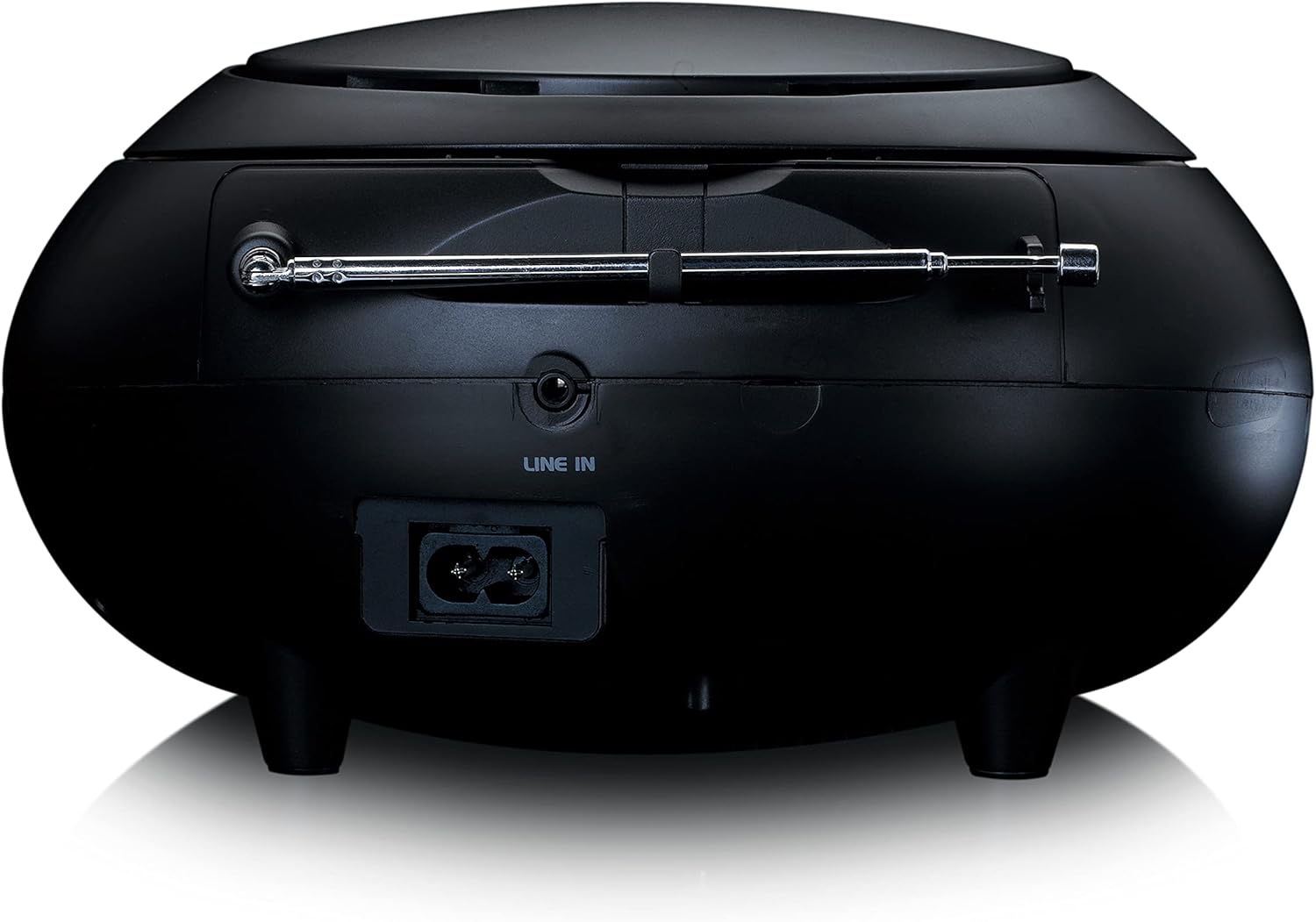
Figi 3: Dèyè view of the Lenco SCD-341, highlighting the power input and LINE IN audio port.
5. Enstalasyon
5.1 Koneksyon pouvwa
The Lenco SCD-341 can be powered by the included AC adapter or by batteries.
- AC pouvwa: Connect the supplied power adapter to the AC IN socket on the rear of the unit (refer to Figure 3) and plug the other end into a standard wall outlet.
- Pouvwa batri: Open the battery compartment on the bottom of the unit. Insert the required number of C-type batteries (not included), ensuring correct polarity. Close the compartment securely.
5.2 Enstalasyon antèn
For optimal DAB+ and FM radio reception, fully extend the telescopic antenna located on the rear of the unit. Adjust its position for the best signal.
6. Operasyon Enstriksyon
6.1 Power On/Off
Peze a POUVWA bouton pou limen oswa etenn inite a.
6.2 Lekti CD
- Peze a SOUS button repeatedly until "CD" is displayed on the LCD screen.
- Louvri kouvèti konpatiman CD a lè w leve l dousman.
- Mete yon CD ak bò etikèt la anlè sou aks la.
- Close the CD compartment lid. The unit will begin reading the CD.
- Sèvi ak la JWE/POZ, SISPANN, PASE ANVAN, ak SOTE ARYE bouton pou kontwole lèktur.

Figi 4: Top view of the Lenco SCD-341 with the CD compartment open, showing a CD being inserted.
6.3 Operasyon Radyo DAB+
- Peze a SOUS button repeatedly until "DAB" is displayed.
- The unit will automatically scan for available DAB+ stations. This may take a few moments.
- Yon fwa optik fini, sèvi ak la TUNE +/- buttons to navigate through the available stations.
- Pou sove yon estasyon kòm yon predefinisyon, peze epi kenbe bouton an PRESET bouton, Lè sa a, sèvi ak TUNE +/- to select a preset number and press PRESET ankò pou konfime.
6.4 Operasyon Radyo FM
- Peze a SOUS button repeatedly until "FM" is displayed.
- Peze epi kenbe la TUNE +/- buttons to automatically scan for the next available station. Briefly press to manually tune.
- Pou sove yon estasyon kòm yon predefinisyon, peze epi kenbe bouton an PRESET bouton, Lè sa a, sèvi ak TUNE +/- to select a preset number and press PRESET ankò pou konfime.
6.5 Bluetooth Pairing
- Peze a SOUS button repeatedly until "Bluetooth" is displayed. The unit will enter pairing mode, indicated by a flashing Bluetooth icon on the display.
- On your external device (smartphone, tablet), enable Bluetooth and search for available devices.
- Select "Lenco SCD-341" from the list of found devices.
- Once paired, the Bluetooth icon on the unit's display will stop flashing and remain solid. You can now play audio from your device through the Lenco SCD-341.
6.6 Kontwòl Volim
Sèvi ak la VOLIM +/- buttons to adjust the audio output level.
7. Antretyen
- Netwayaj: Sèvi ak yon twal mou epi sèk pou netwaye deyò aparèy la. Pa sèvi ak pwodui netwayaj abrazif oswa solvan.
- Swen Lantiy CD: Si gen pwoblèm pou lèktur CD, sèvi ak yon disk netwayaj lantiy CD ki disponib nan komès.
- Depo: When not in use for extended periods, disconnect the power adapter and remove batteries. Store the unit in a cool, dry place.
NAN. Depanaj
| Pwoblèm | Kòz posib | Solisyon |
|---|---|---|
| Pa gen pouvwa | Power adapter not connected; batteries depleted or incorrectly inserted. | Check power adapter connection; replace batteries or ensure correct polarity. |
| Pa gen son | Volume too low; incorrect source selected; headphones connected. | Increase volume; select correct source (CD, DAB, FM, Bluetooth); disconnect headphones. |
| CD a pa ap jwe | CD a pa byen mete; CD a sal oswa grate; Fòma CD a pa sipòte. | Reinsert CD correctly; clean or replace CD; ensure CD is a standard audio CD. |
| Resepsyon radyo pòv | Antenna not extended or positioned poorly; strong interference. | Fully extend and adjust antenna; move unit away from other electronic devices. |
| Aparèy Bluetooth echwe | Bluetooth not enabled on external device; device too far; unit not in pairing mode. | Ensure Bluetooth is on and discoverable; move device closer; select Bluetooth source on unit. |
9. Espesifikasyon
| Nimewo Modèl | SCD-341 |
| Mak | Lenco |
| Dimansyon (L x W x H) | 21.5 x 21 x 11.5 cm |
| Pwa | 1.09 kg |
| Sous pouvwa | AC (adapter included) / Battery-Powered |
| Tuner Teknoloji | DAB +, FM |
| Koneksyon | Bluetooth |
| Audio Sòti Mode | Stereo |
| Kalite ekspozisyon | LCD |
| Sortie pouvwa | 3 Watt RMS |

Figure 5: Dimensions of the Lenco SCD-341 unit.
10. Garanti ak sipò
For warranty information and technical support, please refer to the warranty card included in your package or visit the official Lenco websit.
Manifakti: Lenco GmbH
Peyi orijin: Hongkong
11. Videyo pwodwi ofisyèl yo
Watch this official video for a visual guide to the Lenco SCD-341.
Video 1: A 360-degree product view of the Lenco SCD-341, showcasing konsepsyon ak karakteristik li yo sou tout ang.