
1. Entwodiksyon
This manual provides detailed instructions for the safe and effective use of your AMIRO 9-inch Lighted Makeup Mirror, Model AML009. Please read this manual thoroughly before operating the device and retain it for future reference.

Figure 1: AMIRO 9-inch Lighted Makeup Mirror (Model AML009) and packaging.
2. Enfòmasyon enpòtan sou sekirite
Tanpri obsève prekosyon sekirite sa yo pou evite blesi oswa domaj nan pwodwi a:
- Manyen glas la ak atansyon pou evite kase.
- Be cautious of sharp edges if the mirror glass is broken.
- Ensure proper placement on a stable, flat surface to prevent tipping.
- Do not use the mirror while sleeping or in a location where it could fall and cause injury.
- Kenbe soti nan atenn timoun yo.
- Do not expose the mirror to excessive moisture or immerse it in water.
- Sèvi sèlman ak kab USB-C ki vini ak aparèy la pou chaje.
3. Pake kontni
Verifye ke tout atik yo prezan nan pakè a:
- AMIRO 9-inch Lighted Makeup Mirror (Model AML009)
- 10X Magnifying Mirror (detachable)
- USB-C Chaje Kab
- Manyèl itilizatè
4. Pwodwi Features
The AMIRO 9-inch Lighted Makeup Mirror offers advanced features for an enhanced grooming experience:
- 9-pous HD glas: Provides a clear, wide view for makeup application.
- 10X agrandisman glas: A small, detachable mirror for detailed tasks like eyebrow tweezing or contact lens application.
- Entegre ekleraj dirije: Premium bright LEDs provide natural and soft illumination without glare.
- 3 mòd ekleraj koulè: Switch between warm, natural, and cold white light to simulate various environments.
- 6 Nivo klète: Adjust light intensity from 0% to 100% for optimal visibility.
- Kontwòl Smart Touch: Intuitive touch buttons for power, color mode, and brightness adjustments.
- Smart Sensor (Induction Mode): Automatically turns the light on when human movement is detected within 30cm and off when no movement is detected for 50cm outside the mirror surface for 10 seconds.
- Fonksyon memwa: The mirror remembers your last used brightness and color settings.
- Rechargeable & san fil: Equipped with a built-in 2200 mAh lithium battery, offering 3-5 hours of continuous use on a full charge.
- USB-C chaje: Convenient charging via USB-C cable from various power sources.
- 50 ° wotasyon gratis: Allows adjustment of the mirror angle for optimal viewing.
- Baz ki estab: Features soft, non-slip rubber for secure tabletop placement.

Figi 2: Plis paseview of AMIRO Lighted Makeup Mirror features.
5. Enstalasyon
5.1 Premye chaj
Before first use, fully charge the mirror. Connect the provided USB-C cable to the charging port located at the back of the mirror's base and plug the other end into a USB power source (e.g., wall adapter, power bank, computer).
- The indicator light will blink green during charging.
- The indicator light will turn solid green when fully charged.

Figure 3: USB-C Charging Port and Indicator Light.
5.2 Attaching the 10X Magnifying Mirror
The 10X magnifying mirror attaches magnetically to the main mirror surface. Simply place it onto the desired area of the main mirror. Ensure it is securely attached before use.
5.3 Plasman
Place the mirror on a flat, stable surface. The non-slip rubber base provides stability. Avoid placing it near edges where it could fall.

Figure 4: Stable silicone base.
6. Operasyon Enstriksyon
The mirror features intuitive touch controls located on the front of the mirror's base.

Figure 5: Smart Touch Controls.
6.1 Power On/Off and Color Mode Selection
- Limen/Etenyen: Short press the center touch button (power icon) to turn the light on or off.
- Change Color Modes: While the light is on, short press the center touch button to cycle through the three color modes: Warm Light, Natural Light, and Cold White Light.

Figure 6: 3 Color Temperature and 6 Brightness Levels.
6.2 Ajiste Klate
- Ogmante klète: Long press the right touch button (+ icon).
- Diminye klète: Long press the left touch button (- icon).
- The brightness can be adjusted from 0% to 100%.
6.3 Smart Sensor (Induction Mode)
The mirror can automatically turn on or off based on human presence.
- To activate Induction Mode: Long press the center touch button until the indicator light turns blue. The light will turn on when you are within 30cm of the mirror surface.
- To deactivate Induction Mode (Constant On Mode): Long press the center touch button until the indicator light turns red. The light will remain on until manually turned off.
- When in Induction Mode, the light will automatically turn off approximately 10 seconds after you move 50cm away from the mirror surface.
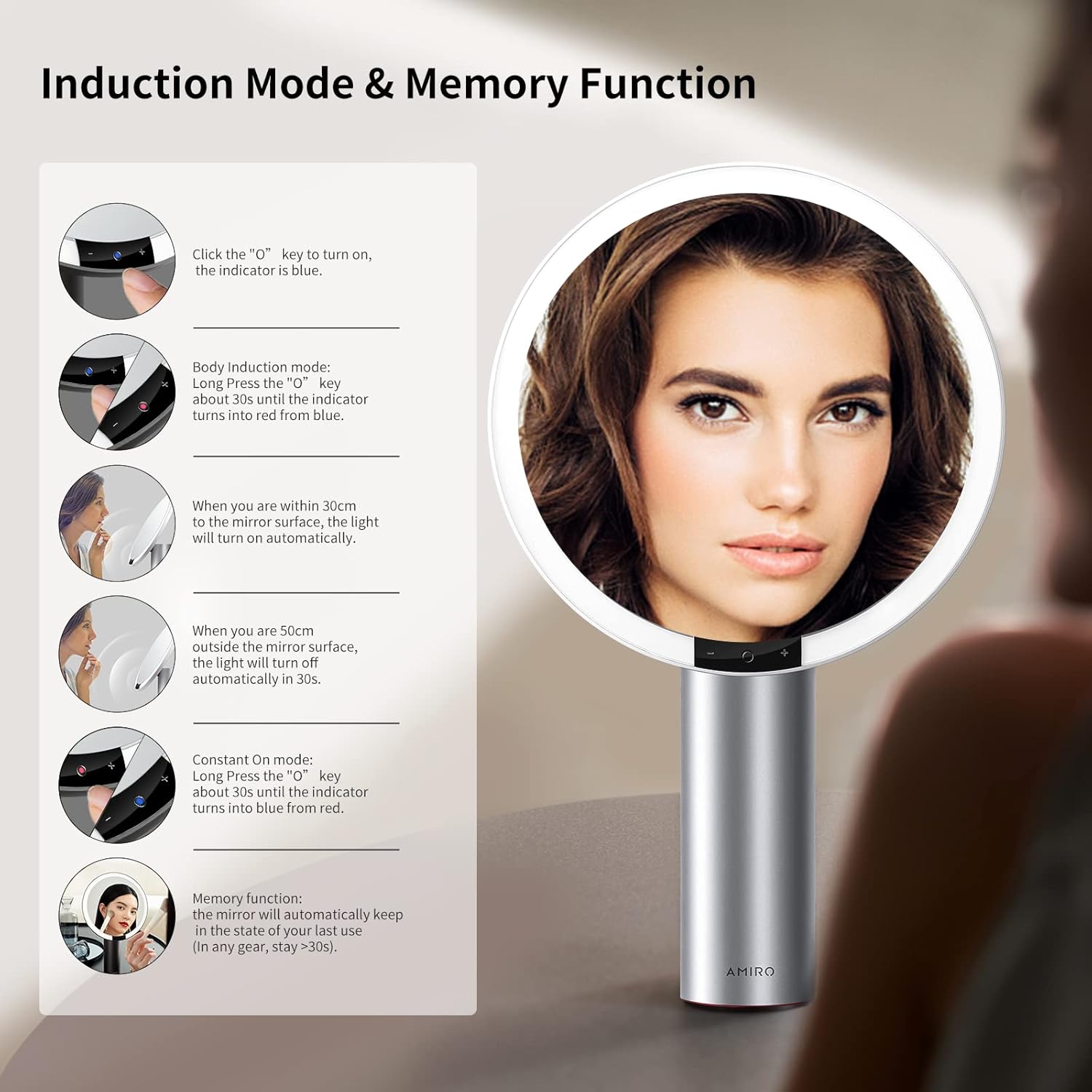
Figure 7: Induction Mode and Memory Function.
6.4 Fonksyon memwa
The mirror is designed with a memory function. It will automatically recall the last used brightness and color mode settings when turned on again, provided the mirror was used for more than 10 seconds in the previous session.
6.5 Mirror Rotation
The mirror head can be freely rotated up to 50 degrees to adjust the viewang ang jan sa nesesè.

Figure 8: Free Rotation feature.
7. Antretyen
7.1 Netwayaj
- To clean the mirror surface, gently wipe with a soft, lint-free cloth. For stubborn spots, a small amount of glass cleaner can be applied to the cloth (not directly to the mirror).
- Do not use abrasive cleaners or harsh chemicals, as these may damage the mirror or its finish.
- Wipe the body of the mirror with a dry or slightly damp twal mou.
7.2 Depo
Store the mirror in a cool, dry place away from direct sunlight and extreme temperatures when not in use for extended periods.
NAN. Depanaj
If you encounter issues with your AMIRO Lighted Makeup Mirror, refer to the following common problems and solutions:
| Pwoblèm | Kòz posib | Solisyon |
|---|---|---|
| Limyè glas la pa limen. | Battery is depleted; Mirror is in Induction Mode and no movement is detected; Power button not pressed correctly. | Charge the mirror fully. Ensure the mirror is in Constant On Mode or activate Induction Mode by approaching the mirror. Short press the center touch button to turn on. |
| Limyè a twò fèb oswa twò klere. | Nivo klète a bezwen ajisteman. | Long press the '+' or '-' touch buttons to adjust brightness to your preference. |
| Cannot change light color. | Color mode not selected. | Short press the center touch button repeatedly to cycle through Warm, Natural, and Cold White light modes. |
| 10X magnifying mirror does not stay attached. | Weak magnetic connection; Surface not clean. | Ensure both the main mirror surface and the back of the magnifying mirror are clean and dry. Reattach firmly. If the issue persists, contact customer support. |
| Mirror feels unstable or tips easily. | Not placed on a flat, stable surface; Base suction not engaged (if applicable). | Relocate the mirror to a completely flat and stable surface. Ensure the non-slip base is making full contact. |
| Lavi batri se pi kout pase espere. | Frequent use at maximum brightness; Battery degradation over time. | Reduce brightness settings for longer battery life. Ensure the mirror is fully charged before each use. If battery life significantly degrades, contact customer support. |
9. Espesifikasyon
Detailed technical specifications for the AMIRO 9-inch Lighted Makeup Mirror (Model AML009):
- Modèl: AML009
- Mak: AMIRO
- Gwosè glas: 9 pous
- Agrandisman: 10X (detachable mirror)
- Dimansyon pwodwi: 10.7"L x 17"Lajè
- Pwa atik: 2.93 liv (1.33 kg)
- Materyèl ankadreman: Metal
- Materyèl kò: Aliminyòm
- Koulè: Blan
- Kalite montaj: Tabletop mòn
- Ekleraj: Entegre dirije
- Mòd koulè: 3 (Warm, Natural, Cold White)
- Nivo klète: 6 (0%-100% adjustable)
- Karakteristik espesyal: Smart Sensor, Touch Control, Memory Function, 50° Free Rotation, Cordless, USB Charging
- Batri: 2200 mAh Lityòm Ion (enkli)
- Pò chaje: USB-C
- Asanble obligatwa: Non
- Itilizasyon Rekòmande: Makeup application, Personal grooming, Home use

Figure 9: Mirror dimensions and key specifications.
10. Garanti ak sipò
For warranty information, please refer to the documentation included with your purchase or contact AMIRO customer support directly. If you require assistance with your product, have questions, or need to report an issue, please contact AMIRO customer service through their official channels.
Contact information can typically be found on the product packaging or the official AMIRO websit.