
1. Entwodiksyon
Thank you for choosing the Kaidi TWS Smart Touch Wireless Earbuds KD-771. These earbuds feature Bluetooth V5.1 for stable connectivity, Smart Touch controls for easy operation, and an IPX4 splash-resistant design, making them suitable for various activities. This manual provides detailed instructions to help you get the most out of your new earbuds.
Kontni pake:
- 1 Pair of Kaidi KD-771 Wireless Earbuds
- 1 Chaje Ka
- 1 USB Charging Cable (Type-C, typically)
- 1 Manyèl itilizatè
2. Enstalasyon
2.1 Chaje ekoutè yo ak bwat chaje a
Anvan premye itilizasyon an, chaje ekoutè yo ak bwat chaje a nèt. Bwat chaje a sèvi kòm yon bank pouvwa pòtab pou ekoutè ou yo.
- Chaje ekoutè yo: Place the earbuds into their respective slots in the charging case. Ensure the charging contacts align. The indicator lights on the earbuds will show their charging status.
- Chaje ka a: Connect the USB charging cable to the charging port on the case and the other end to a USB power adapter (not included) or a computer USB port. The charging case indicator will illuminate to show charging status. A full charge for the case and earbuds typically takes approximately 4 hours.
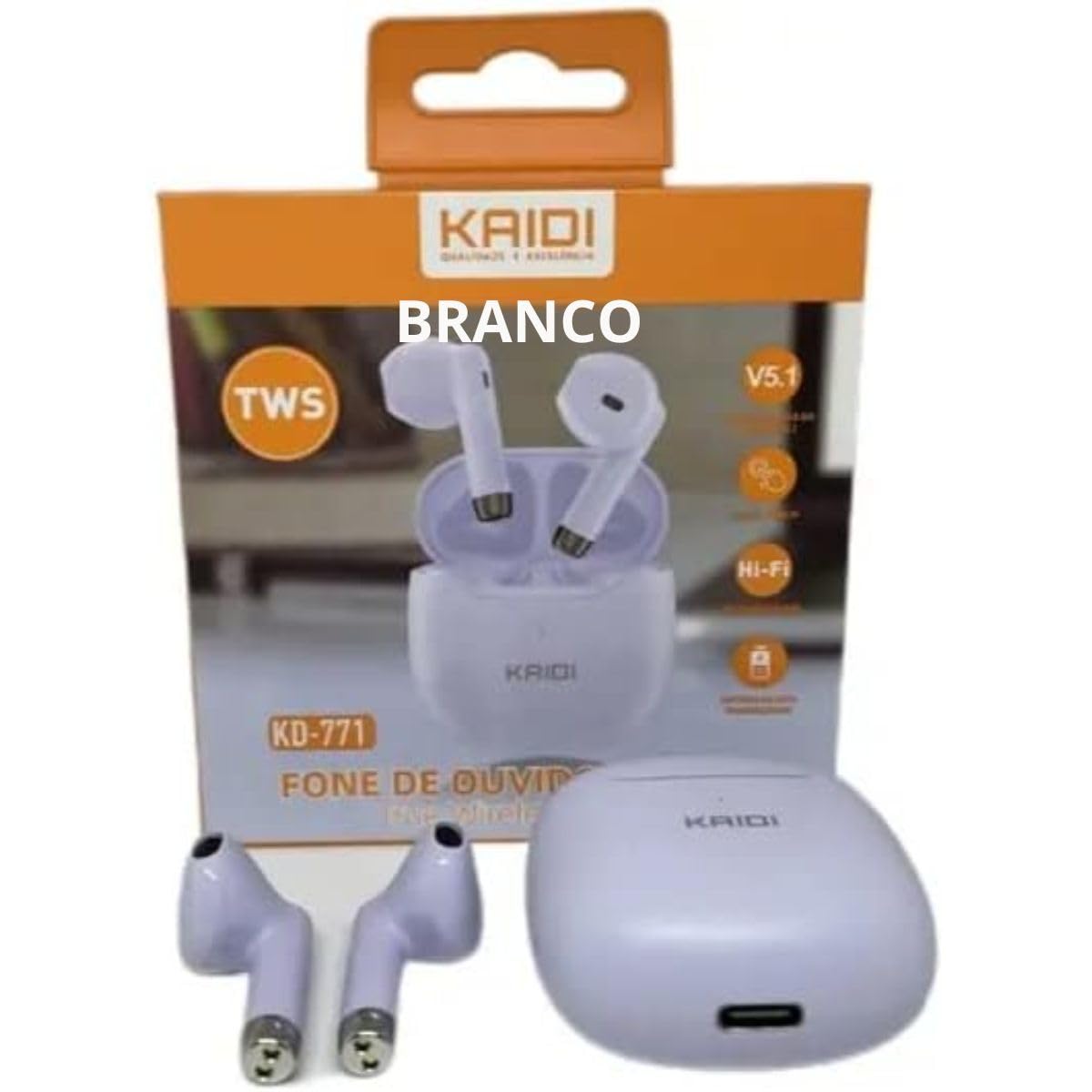
Image: Kaidi KD-771 Earbuds in their charging case. The earbuds are white and sit securely in the case, which is also white. This image illustrates the product's appearance and how the earbuds are stored.
2.2 Konekte ak Aparèy ou an
Follow these steps to pair your Kaidi KD-771 earbuds with your smartphone or other Bluetooth-enabled device:
- Pouvwa sou: Open the charging case. The earbuds will automatically power on and enter pairing mode. You will hear an audible prompt, and the indicator lights on the earbuds will flash (typically blue and red alternately).
- Aktive Bluetooth: Sou aparèy ou an, ale nan paramèt Bluetooth yo epi asire w ke Bluetooth la aktive.
- Chwazi ekoutè: In the list of available Bluetooth devices, look for "KD-771" or a similar name and select it to connect.
- Konfimasyon: Once connected, you will hear a confirmation sound from the earbuds, and the indicator lights will stop flashing or flash slowly.
Nòt: Ekoutè yo ap konekte otomatikman ak dènye aparèy ki te konekte a lè yo retire yo nan bwat la, si Bluetooth aktive sou aparèy la.
3. Operasyon Enstriksyon
The Kaidi KD-771 earbuds feature Smart Touch controls for convenient operation.
3.1 Power On/Off
- Pouvwa sou: Open the charging case, or long-press the touch area on both earbuds for approximately 3 seconds.
- Pouvwa Off: Place the earbuds back into the charging case and close the lid, or long-press the touch area on both earbuds for approximately 5 seconds.
3.2 Mizik lèktur
- Jwe/Poz: Tap the touch area on either the left or right earbud once.
- Pwochen Track: Tape de fwa sou zòn manyen an ki sou ekoutè dwat la.
- Track Previous: Tape de fwa sou zòn manyen an ki sou ekoutè gòch la.
3.3 Jesyon Apèl
- Reponn/Fen Apèl: Tape zòn manyen an sou nenpòt ekoutè yon fwa pandan yon apèl k ap antre oswa pandan yon apèl aktif.
- Rejte apèl: Long-press the touch area on either earbud for approximately 2 seconds during an incoming call.
3.4 Asistan Vwa
- Aktive Asistan Vwa: Triple-tap the touch area on either earbud.
3.5 Kontwòl Volim
- Ogmante Volim: Long-press the touch area on the right earbud.
- Diminye Volim: Long-press the touch area on the left earbud.
4. Antretyen
4.1 Netwayaj
- Sèvi ak yon twal mou, sèk, epi ki pa gen pousyè pou netwaye ekoutè yo ak bwat chaje a.
- Pa sèvi ak pwodui netwayaj abrazif, solvan, oswa espre ayewosòl.
- Netwaye kontak chaje yo sou ekoutè yo ak sou bwat la dousman avèk yon ti koton sèk pou asire chaj la byen fèt.
4.2 Depo
- Lè w pa ap itilize ekoutè yo, sere yo nan bwat chaje yo pou pwoteje yo epi kenbe yo chaje.
- Sere aparèy la nan yon kote ki fre epi sèk, lwen tanperati ekstrèm ak limyè solèy dirèk.
4.3 Rezistans dlo (IPX4)
The Kaidi KD-771 earbuds are rated IPX4, meaning they are splash-resistant. This protects them from splashing water from any direction. They are suitable for light rain or sweaty workouts.
- Pa plonje ekoutè yo nan dlo.
- Evite ekspoze yo anba jè dlo ki gen gwo presyon.
- Asire w ke ekoutè yo sèch anvan ou mete yo tounen nan bwat chaje a pou evite domaje kontak chaje yo.
NAN. Depanaj
Ekoutè 5.1 yo pa konekte
- Asire ke tou de ekoutè yo chaje.
- Etenn Bluetooth sou aparèy ou an epi aktive l ankò.
- Delete "KD-771" from your device's Bluetooth list and try pairing again.
- If only one earbud connects, try resetting the earbuds (refer to the full reset instructions if available in a separate guide, or try placing them back in the case and taking them out again).
5.2 Pa gen son oswa volim ki ba
- Tcheke nivo volim nan tou de aparèy ou an ak ekoutè yo.
- Asire w ke ekoutè yo byen konekte ak aparèy ou an.
- Netwaye tout debri ki sou may oratè ekoutè a.
5.3 Pwoblèm chaj
- Asire w ke kab chaje a byen konekte ak tou de bwat la ak sous kouran an.
- Verify that the power source is working.
- Netwaye kontak chaje yo sou ekoutè yo ak anndan bwat la.
6. Espesifikasyon
| Karakteristik | Spesifikasyon |
|---|---|
| Nimewo Modèl | KD-771 |
| Bluetooth vèsyon | V5.1 |
| Dire batri (ekoutè) | Approx. 4 hours (talk time/music playback) |
| Tan pou chaje | Approx. 4 hours (for full charge of case and earbuds) |
| Rezistans dlo | IPX4 (rezistan kont Splash) |
| Enpedans | 32 Ohms |
| Gamme frekans | 2.400 - 2.485 GHz |
| Kalite chofè odyo | Ekilibre chofè armature |
| Metòd kontwòl | Manyen |
| Eleman enkli | Earbuds, Charging Case |
| Sètifikasyon ANATEL | 18583-21-14467 |
7. Garanti ak sipò
7.1 Enfòmasyon sou Garanti
This Kaidi KD-771 product is covered by a 3-mwa garanti from the date of purchase against manufacturing defects. Please retain your proof of purchase for warranty claims.
Garanti a pa kouvri domaj ki te koze pa:
- Move itilizasyon oswa manyen.
- Reparasyon oswa modifikasyon san otorizasyon.
- Accidental damage, drops, or extreme temperatures.
- Water damage beyond the IPX4 rating (e.g., submersion).
7.2 Sipò
For further assistance, troubleshooting, or warranty inquiries, please contact the retailer or the manufacturer (KAIDI) directly. Refer to your purchase documentation for specific contact details.