
1. Entwodiksyon
Thank you for choosing the Steelplay Impulse Gaming Headset. This manual provides detailed instructions for setting up, operating, and maintaining your headset. The Steelplay Impulse offers versatile connectivity, supporting both Bluetooth wireless and 3.5mm wired connections, making it compatible with a wide range of devices including PC, Mac, Nintendo Switch, smartphones, tablets, PlayStation 4, PlayStation 5, Xbox One, and Xbox Series consoles.
Key features include a detachable microphone, up to 28 hours of battery life, comfortable ear cushions, an adjustable headband, and integrated controls for audio and microphone management.
2. Pwodwi souview ak Konpozan
The Steelplay Impulse Gaming Headset package includes the following components:
- Steelplay Impulse Gaming Headset
- Mikwofòn detachable
- 3.5mm Audio Jack Cable (2 meters)
- USB-C Charging Cable (1.5 meters)
Familiarize yourself with the headset's main parts:

Figure 2.1: Steelplay Impulse Gaming Headset with detachable microphone attached.
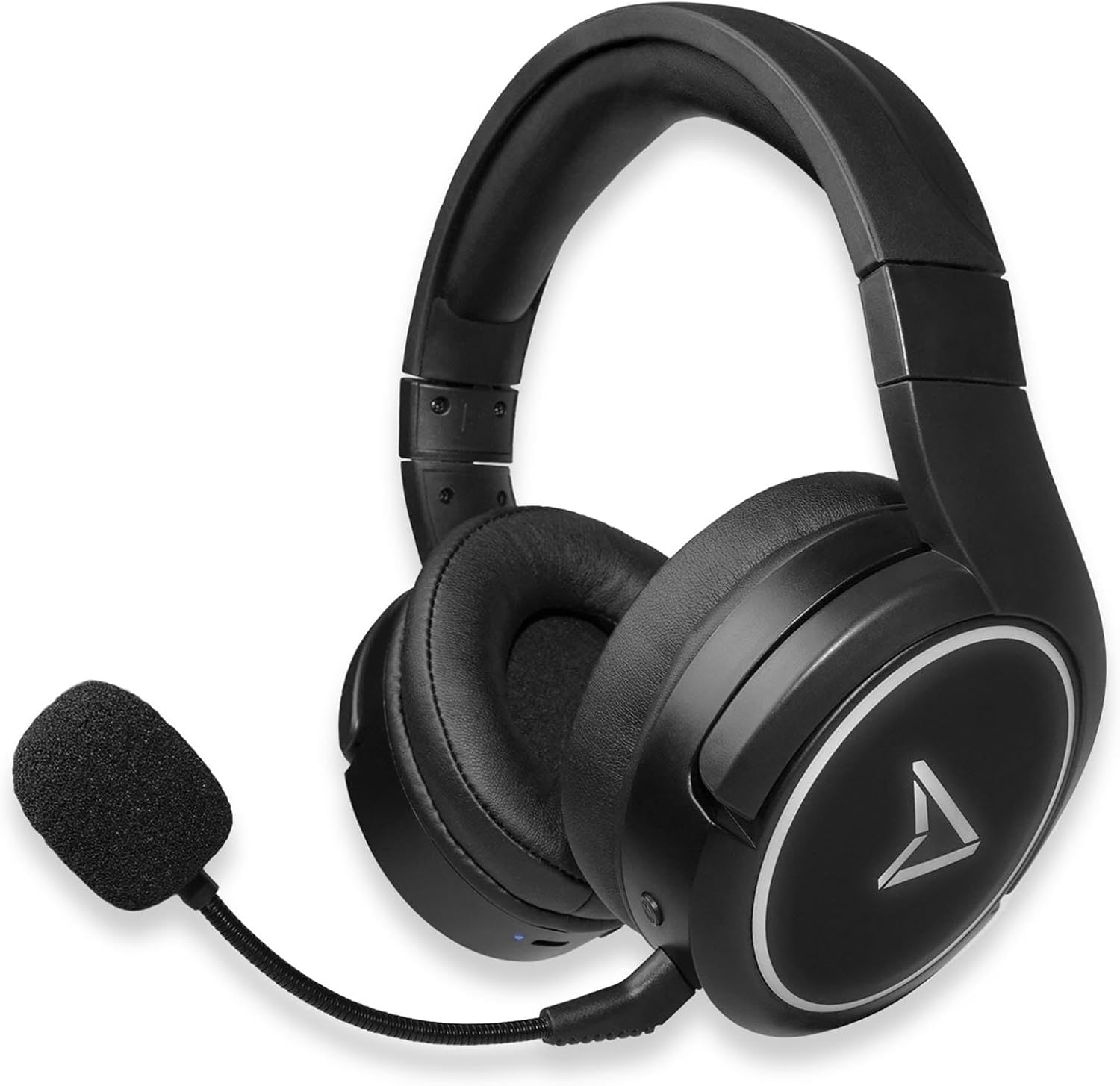
Figure 2.2: Steelplay Impulse Gaming Headset, highlighting the left earcup with integrated controls and microphone port.

Figi 2.3: Close-up view of the detachable microphone, showing its flexible arm and 3.5mm jack connector.
3. Enstalasyon
3.1 Premye chaj
Before first use, fully charge the headset. Connect the supplied USB-C charging cable to the headset's USB-C port and the other end to a compatible USB power source (e.g., computer USB port, USB wall adapter). The charging indicator light will show the charging status and turn off or change color when fully charged. A full charge provides up to 28 hours of autonomy.
3.2 Koneksyon san fil Bluetooth
The Steelplay Impulse headset can connect wirelessly via Bluetooth to compatible devices such as PC, Mac, Nintendo Switch, Android smartphones, iOS smartphones, and tablets.
- Pouvwa sou: Press and hold the Power button on the headset until the indicator light flashes, indicating it is in pairing mode.
- Pèmèt Bluetooth: On your device (PC, Mac, Switch, smartphone, tablet), navigate to the Bluetooth settings.
- Pè: Select "Steelplay Impulse" from the list of available devices. Once connected, the indicator light on the headset will typically show a solid color or slow flash.
3.3 Koneksyon filaire (3.5mm Jack)
For wired use, connect the supplied 3.5mm audio jack cable to the headset's 3.5mm port and the other end to your device. This connection is compatible with PS5, PS4, Xbox Series X/S, Xbox One, Nintendo Switch, PC, laptops, Mac, smartphones, and tablets.
- Microphone Note: When using the 3.5mm wired connection, the detachable microphone functions on all compatible platforms.
- Ensure the 3.5mm jack is fully inserted into both the headset and your device for optimal audio and microphone performance.
4. Operasyon Enstriksyon
4.1 Power On/Off
- Pou limen: Peze epi kenbe bouton Power la pou apeprè 3 segonn jiskaske limyè endikatè a limen.
- Pou etenn: Peze epi kenbe bouton Power la pou apeprè 5 segonn jiskaske limyè endikatè a etenn.
4.2 Kontwòl Volim
The headset features integrated volume controls, typically located on one of the earcups. Use the volume up (+) and volume down (-) buttons or wheel to adjust the audio level.
4.3 Itilizasyon Mikwofòn
- Tache mikwofòn la: Insert the detachable microphone's 3.5mm jack into the dedicated microphone port on the headset.
- Mikwofòn konpatibilite: The detachable microphone is designed for use with PC, Mac, and mobile devices when connected via Bluetooth. When using the 3.5mm wired connection, the microphone is compatible with all listed platforms (PS5, PS4, Xbox Series X/S, Xbox One, Switch, PC, Mac, smartphone, tablet).
- Fonksyon bèbè: The headset includes integrated microphone controls. Refer to the specific button layout on your headset for the microphone mute function.
5. Antretyen
Proper maintenance ensures the longevity and performance of your Steelplay Impulse Gaming Headset.
- Netwayaj: Sèvi ak yon twal mou epi sèk pou netwaye ekoutè yo ak bann tèt la. Pou pousyè tè ki difisil pou retire, yon ti kras siye.amp cloth can be used, but ensure no moisture enters the speaker grilles or ports. Avoid harsh chemicals or abrasive cleaners.
- Depo: Store the headset in a cool, dry place away from direct sunlight and extreme temperatures. If storing for an extended period, ensure the battery is partially charged (around 50%) to help preserve battery health.
- Swen kab: Avoid sharply bending or twisting the audio and charging cables. Disconnect cables by pulling the plug, not the cable itself.
- Rezistans dlo: This product is not waterproof. Avoid exposure to liquids.
NAN. Depanaj
Si ou rankontre pwoblèm ak kas ekoutè ou a, gade solisyon komen sa yo:
- Pa gen son:
- Ensure the headset is powered on and connected (Bluetooth or wired).
- Tcheke nivo volim yo sou kas ekoutè a ak sou aparèy ki konekte a.
- If using Bluetooth, try re-pairing the headset.
- If wired, ensure the 3.5mm cable is fully inserted and try a different audio port if available.
- Mikwofòn pa travay:
- Ensure the detachable microphone is securely attached.
- Check if the microphone is muted on the headset or in your device's settings.
- Verify microphone input settings on your PC or console.
- Remember the microphone's specific compatibility for Bluetooth (PC, Mac, mobile) vs. wired (all platforms).
- Pwoblèm Bluetooth Pairing:
- Ensure the headset is in pairing mode (flashing indicator light).
- Etenn epi aktive Bluetooth sou aparèy ou an.
- Remove "Steelplay Impulse" from your device's Bluetooth list and attempt to re-pair.
- Asire w ke kas ekoutè a byen chaje.
- Pwoblèm chaje:
- Verify the USB-C cable is correctly connected to both the headset and the power source.
- Eseye yon lòt kab USB-C oswa yon lòt sous kouran.
- Asire w ke pò chaje ki sou kas ekoutè a pwòp epi san debri.
7. Espesifikasyon
| Karakteristik | Deskripsyon |
|---|---|
| Non modèl | JVAMUL00143 |
| Mak | Steelplay |
| Koneksyon Teknoloji | Bluetooth, Wired (3.5mm Jack) |
| Teknoloji kominikasyon san fil | Bluetooth |
| Aparèy konpatib | PC, Mac, Switch, Android/iOS smartphones, tablets, PS5, PS4, Xbox Series X/S, Xbox One |
| Mikwofòn | Detachable, included |
| Lavi batri | Jiska 28 èdtan |
| Gamme frekans | 20 Hz - 20000 Hz |
| Materyèl | Plastik |
| Koulè | Nwa |
| Plasman Zòrèy | Sou Zòrèy (Sikon-Oditif) |
| Kalite kontwòl | Kontwòl entegre |
| Kab Karakteristik | Detachable |
| Nivo rezistans dlo | Pa reziste dlo |
8. Garanti ak sipò
The Steelplay Impulse Gaming Headset comes with a standard manufacturer's warranty. Please refer to the warranty card included in your product packaging or visit the official Steelplay websit la pou wè tèm ak kondisyon garanti detaye yo.
For technical support, troubleshooting assistance beyond this manual, or warranty claims, please contact Steelplay customer service through their official websit entènèt la oubyen magazen kote ou te achte pwodwi a.