
Entwodiksyon
The EVOLAND Under-Desk Pedal Exerciser (Model X1224) is a compact and portable fitness device designed for low-impact exercise of both arms and legs. It features adjustable resistance and an LCD display to track your workout progress, making it suitable for home, office, or rehabilitation use. This manual provides essential information for safe and effective operation.
Enfòmasyon sou Sekirite
- Consult a medical professional before starting any new exercise program.
- Place the exerciser on a stable, flat surface. Always use the included non-slip mat to prevent movement.
- Asire w tout pyès yo byen reyini epi sere byen anvan chak itilizasyon.
- Pa kanpe sou pedal yo. Aparèy sa a fèt pou itilizasyon chita sèlman.
- Keep children and pets away from the exerciser during operation.
- Stop exercising immediately if you experience pain, dizziness, or any discomfort.
- Pwa maksimòm itilizatè a pou aparèy sa a se 110 kg (242 liv).
Kontni pake
Tanpri verifye pake a pou asire w ke tout atik yo la:
- 1 x EVOLAND Pedal Exerciser Unit
- 1 x manyèl itilizatè
- 1 x Anti-slip Strap (for stabilization)
- 1 x Set of Assembly Accessories (screws, tools)
- 1 x Tapi anti-glise
Karakteristik pwodwi

A white and black EVOLAND under-desk pedal exerciser, featuring an integrated LCD screen for tracking workout data and an adjustable resistance knob.
- Rezistans reglabl: Customize your workout intensity by turning the resistance knob.
- Ekspozisyon LCD milti-fonksyonèl: Tracks time, count, distance, total count, and calories burned.
- Itilizasyon versatile: Suitable for both arm and leg exercises.
- Konsepsyon pòtab: Lightweight and compact with an integrated carry handle for easy transport and storage.
- Ergonomic Pedals: Non-slip surface with adjustable straps for secure and comfortable use.
- Konstriksyon dirab: Made with a sturdy steel frame and plastic components.
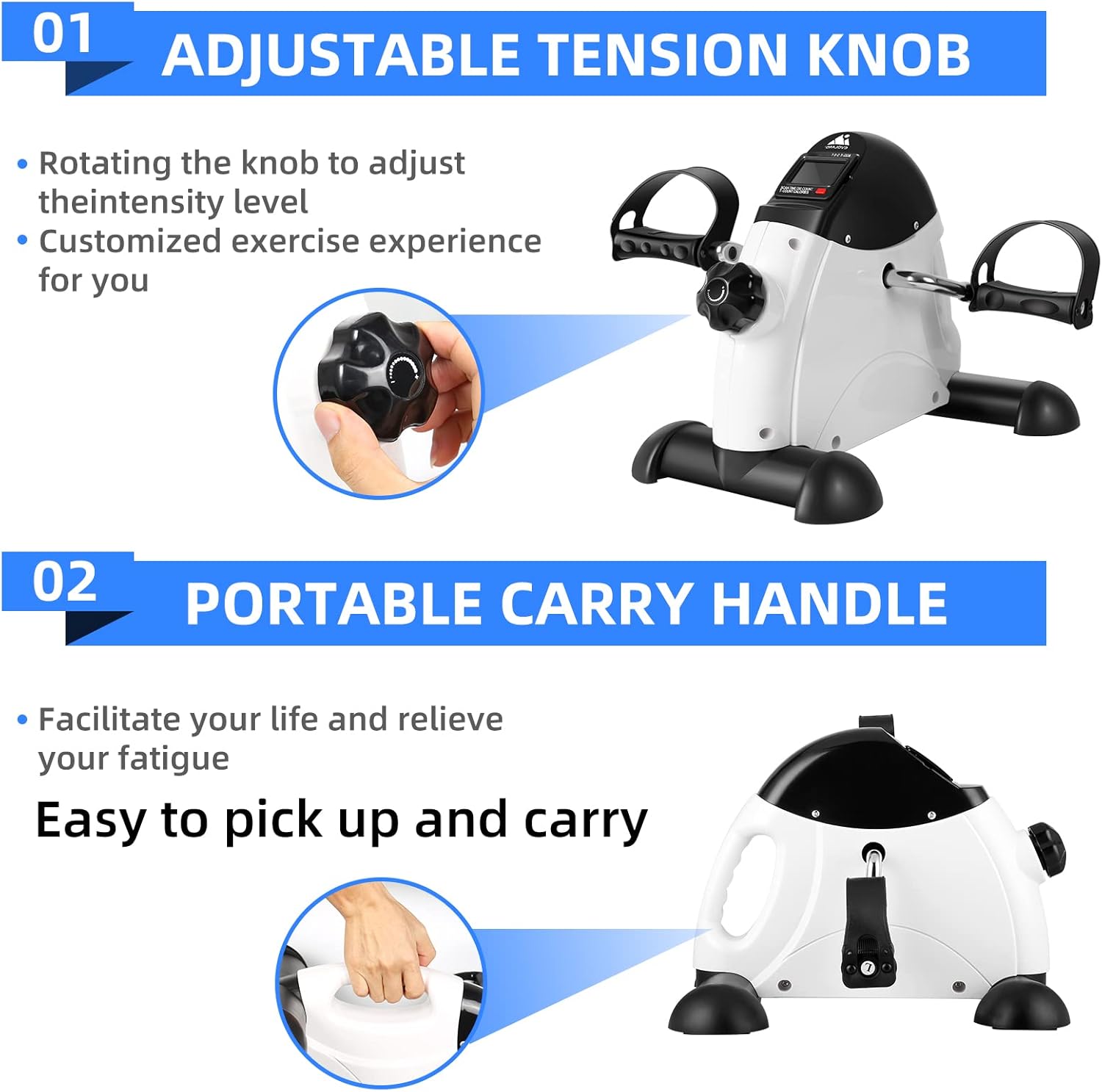
Detaye views highlighting the adjustable tension knob for customizing exercise intensity and the integrated portable carry handle for easy transport.

Imaj yo montreasing the ergonomic, non-slip pedals with adjustable straps and the safe, wear-resistant base, including a non-slip mat for stability during use.
Enstriksyon Enstalasyon
- Depake konpozan: Carefully remove all items from the packaging and verify against the 'Package Contents' list.
- Mete ba estabilizatè yo: Secure the front and rear stabilizer bars to the main unit using the provided screws and tools. Ensure they are firmly attached.
- Enstale pedal: Attach the left and right pedals to their respective cranks. Note that the left pedal typically tightens counter-clockwise, and the right pedal clockwise. Ensure both are tightened securely to prevent loosening during use.
- Insert Battery (for LCD): Locate the battery compartment for the LCD display. Insert the required battery (not included) according to the polarity markings.
- Position Exerciser: Place the assembled exerciser on a flat, stable surface. For optimal stability and to prevent movement, place the included non-slip mat underneath the unit.
- Attach Anti-slip Strap (Optional): If desired for additional stability, follow the instructions to secure the anti-slip strap to the exerciser and a stable object, such as a chair leg.
Enstriksyon Operasyon

Two images demonstrating the versatility of the exerciser: one showing a person using it on a table for arm exercise, and another showing it on the floor for leg exercise.
1. Power On/Off
The LCD display typically activates automatically when pedaling begins. It will power off automatically after a period of inactivity to conserve battery life.
2. Arm Exercise
- Place the exerciser on a sturdy, flat table.
- Sit comfortably in front of the table.
- Grip the pedals with your hands and begin rotating them in a circular motion.
3. Leg Exercise
- Place the exerciser on the floor, ensuring it is on the non-slip mat.
- Sit on a stable chair with your feet placed securely in the pedal straps. Adjust straps if necessary.
- Begin pedaling in a forward or backward motion.
4. Ajisteman Rezistans lan
Turn the resistance knob located on the top of the unit. Turn clockwise to increase resistance for a more challenging workout, and counter-clockwise to decrease it for easier pedaling.
5. Itilizasyon ekran LCD a

Fèmen views of the multi-functional LCD display, showing metrics such as Time, Distance, Count, Total Counts, and Calories Burned, with a hand pressing the scan button on the exerciser.
- Press the red button on the display to cycle through different metrics: Tan (duration of workout), Konte (pedal rotations during current session), Distans (estimated distance in meters), Konte total (cumulative pedal rotations), and Kalori (estimated calories burned).
- Hold the button down for a few seconds to reset the current workout data (Time, Count, Distance, Calories). The Total Count will not reset.
Antretyen
- Netwayaj: After each use, wipe down the exerciser with a soft, damp twal. Pa sèvi ak pwodui netwayaj abrazif oswa solvan, paske yo ka domaje fini an oswa konpozan elektwonik yo.
- Depo: Sere aparèy egzèsis la nan yon kote ki fre epi sèk, lwen limyè solèy dirèk ak tanperati ekstrèm. Ti gwosè li pèmèt ou sere l fasilman anba yon biwo oswa nan yon klozèt.
- Enspeksyon: Periodically check all screws, bolts, and connections to ensure they remain tight. Tighten any loose fasteners to maintain stability and safety.
Depanaj
| Pwoblèm | Kòz posib | Solisyon |
|---|---|---|
| LCD Display pa travay | Batri a mouri oswa li mal enstale. | Check if the battery is correctly installed with proper polarity. Replace the battery if necessary (battery not included). |
| Exerciser Moves During Use | Not placed on a stable surface; non-slip mat not used; anti-slip strap not secured. | Ensure the exerciser is on a flat, stable surface. Always use the included non-slip mat. Secure the anti-slip strap to a stable object (e.g., chair leg). Using on a carpeted surface can also help. |
| Pedals are Stiff or Too Loose | Resistance knob setting; loose pedal connection. | Adjust the resistance knob to your desired level. Check that the pedals are securely tightened to their cranks. |
Espesifikasyon
| Karakteristik | Detay |
|---|---|
| Mak | EVOLAND |
| Nimewo Modèl | X1224 |
| Koulè | Blan |
| Materyèl prensipal | Plastik ak metal |
| Dimansyon (L x W x H) | 41 x 32 x 19 cm (16.1 x 12.6 x 7.5 pous) |
| Pwa | 4 kg (8.8 liv) |
| Kapasite maksimòm pwa | 110 kg (242 liv) |
| Kalite kontwòl | Push-button (for LCD) |
| Kalite ekspozisyon | LCD |
| Rezistans | Adjustable (via knob) |
| Operasyon Mode | Manyèl |
| Sous pouvwa | Battery powered (for LCD) |
| Counter Metrics | Calories burned, Time, Distance, Count, Total Count |
| Konpozan ki enkli | Pedal Exerciser, User Manual, Anti-slip Strap, Assembly Accessories, Non-slip Mat |
Garanti ak sipò
For warranty information or technical support regarding your EVOLAND Under-Desk Pedal Exerciser Model X1224, please refer to the contact details provided with your purchase documentation or visit the official EVOLAND website. Please have your model number (X1224) and purchase date ready when contacting support.