
INSE S6T
Manyèl Itilizatè Aspiratè San Fil INSE S6T
Model: S6T | Brand: INSE
1. Entwodiksyon
Thank you for choosing the INSE S6T Cordless Vacuum Cleaner. This manual provides essential information for the safe and efficient operation, maintenance, and troubleshooting of your new vacuum cleaner. Please read it thoroughly before first use and keep it for future reference.

Figure 1.1: The INSE S6T Cordless Vacuum Cleaner and its included accessories.
Karakteristik kle:
- Pwisan aspirasyon: Equipped with a 265W brushless digital motor, offering up to 23K PA suction force for effective cleaning on various surfaces.
- Tan Runtime: Features an 8-cell 2500 mAh rechargeable battery providing up to 45 minutes of runtime on standard mode.
- Filtraj Avanse: 5-stage high-efficiency filtration system with HEPA filter, ensuring clean air expulsion.
- Konsepsyon versatile: Lightweight main body, easily converts to a handheld vacuum, and includes 10 combinations of attachments for diverse cleaning needs.
- Flexible Floor Head: Motorized LED floor head with 150° swivel and 90° tilt for easy maneuverability under furniture.
2. Enstriksyon Sekirite
Pou diminye risk dife, chòk elektrik, oswa blesi, tanpri obsève prekosyon sekirite sa yo:
- Li tout enstriksyon yo anvan ou sèvi ak aparèy la.
- Pa itilize deyò oswa sou sifas mouye.
- Pa pèmèt yo itilize kòm yon jwèt. Li nesesè anpil atansyon lè yo itilize pa oswa tou pre timoun yo.
- Sèvi ak li sèlman jan sa dekri nan manyèl sa a. Sèvi ak sèlman akseswa rekòmande pa manifakti a.
- Pa sèvi ak kòd oswa ploge ki domaje. Si aparèy la pa fonksyone jan li ta dwe, li te tonbe, andomaje, kite deyò, oswa tonbe nan dlo, retounen li nan yon sant sèvis.
- Pa rale oswa pote pa kòd, sèvi ak kòd kòm yon manch, fèmen yon pòt sou kòd, oswa rale kòd alantou kwen byen file oswa kwen. Pa pase aparèy la sou kòd. Kenbe kòd lwen sifas ki chofe.
- Pa deploge rale sou kòd. Pou deploge, atrab ploge a, pa kòd la.
- Pa okipe ploge oswa aparèy ak men mouye.
- Pa mete okenn objè nan ouvèti yo. Pa sèvi ak nenpòt ouvèti bloke; pa gen pousyè, pèl, cheve, ak nenpòt bagay ki ka diminye koule lè a.
- Kenbe cheve, rad ki lach, dwèt, ak tout pati nan kò a lwen ouvèti ak pati k ap deplase.
- Pa ranmase anyen k ap boule oswa fimen, tankou sigarèt, alimèt, oswa sann cho.
- Sèvi ak plis atansyon lè w ap netwaye sou eskalye.
- Pa itilize pou ranmase likid ki ka pran dife oswa ki ka pran dife, tankou gazolin, oswa itilize nan zòn kote yo ka prezan.
- Dekonekte batri a nan aparèy la anvan ou fè nenpòt ajisteman, chanje Pwodwi pou Telefòn, oswa estoke aparèy la.
- Sèvi ak sèlman chajè manifakti a te founi pou rechaje.
- Lè pake batri a pa nan itilize, kenbe li lwen lòt objè metal, tankou klip papye, pyès monnen, kle, klou, vis oswa lòt ti objè metal, ki ka fè yon koneksyon soti nan yon tèminal nan yon lòt.
- Nan kondisyon abizif, likid ka soti nan batri a; evite kontak. Si kontak aksidan rive, lave dlo. Si likid an kontak ak je, anplis chèche èd medikal.
- Pa sèvi ak yon aparèy ki domaje oswa modifye. Batri ki domaje oswa modifye ka montre yon konpòtman enprevizib ki lakòz dife, eksplozyon oswa risk pou yo blese.
- Pa ekspoze yon pake batri oswa aparèy nan dife oswa tanperati twòp. Ekspozisyon nan dife oswa tanperati ki pi wo pase 130 ° C (265 ° F) ka lakòz eksplozyon.
- Follow all charging instructions and do not charge the battery pack or the appliance outside of the temperature range specified in the instructions.
- Se yon moun ki kalifye ki dwe fè antretyen an epi ki dwe itilize sèlman pyès ranplasman idantik.
3. Pake kontni
Carefully unpack your INSE S6T Cordless Vacuum Cleaner and check that all items are present and in good condition. If any items are missing or damaged, please contact customer support.

Figure 3.1: All components included in the INSE S6T package.
- Tib Metal Retractable
- Kawoutchou fleksib
- Motè Prensipal (Inite Pòtab)
- Tèt bwòs motè
- Long Crevice Zouti
- Mi Mount Support
- Soft Roller Brush (for hard floors)
- Stiff Roller Brush (for carpets)
- 2-an-1 bwòs
- Mini bwòs motè
- Vis ak ploge miray pou monte
- Pak batri rechargeable
- Filtè HEPA
- Pouvwa adaptè/Charjeur
- Zouti netwayaj
- Manyèl itilizatè
- Gid Quick Start
4. Pwodwi souview
Familiarize yourself with the main components of your INSE S6T Cordless Vacuum Cleaner.
Main Unit (Handheld)
- Poubèl: Collects dirt and debris. Features a 0.5-liter capacity and one-button easy empty design.
- Sistèm filtre: Multi-stage filtration including HEPA filter, mesh filter, stainless steel strainer, and strong cyclone separation.
- Pake batri: Detachable 2500 mAh battery for flexible charging.
- Bouton pouvwa: On/Off kontwòl.
- bouton mòd: Switches between standard and max suction modes.
- Endikatè batri: LED lights showing remaining battery life.

Figure 4.1: The 1.2L extra large dustbin with one-button easy empty feature.
Atachman ak Itilizasyon yo
The INSE S6T comes with various attachments for different cleaning scenarios, offering up to 10 combinations.
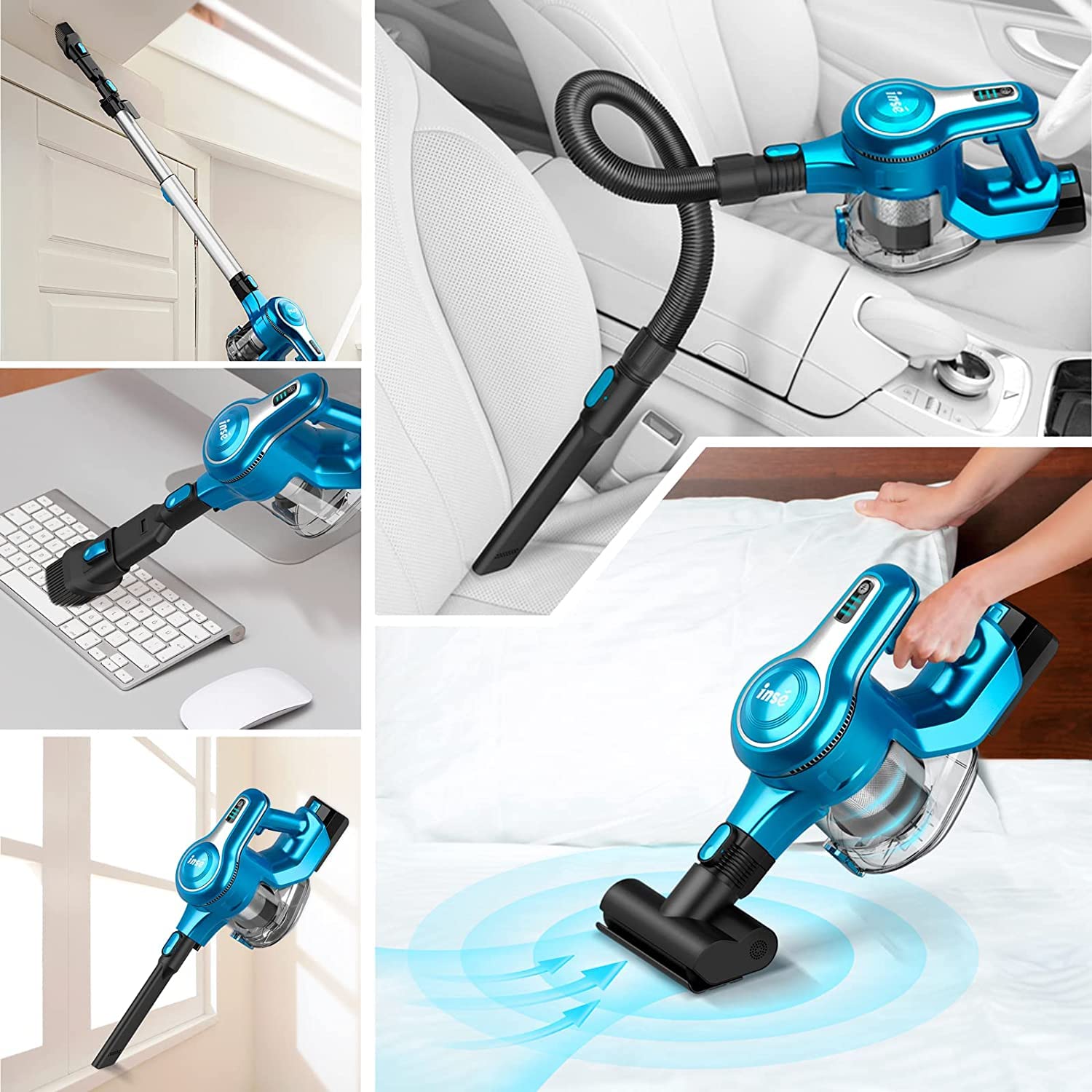
Figi 4.2: Egzamples of the vacuum's versatility with different attachments.
- Tèt bwòs motè: Ideal for floors (hardwood, tile, carpet). Features LED lights to illuminate dark areas.
- Tib metal Retractable: Extends reach for floor cleaning or high areas.
- Kawoutchou fleksib: Provides flexibility for cleaning tight spaces, car interiors, or upholstery.
- Zouti pou fant long: Pafe pou fant etwat, kwen, ak bor.
- 2-an-1 bwòs: Combines a wide nozzle and a brush for versatile cleaning of surfaces, furniture, and keyboards.
- Mini bwòs motè: Designed for pet hair, upholstery, and bedding.
5. Enstalasyon
5.1 Asanble
- Tache batri a: Slide the rechargeable battery pack into the slot on the main motor unit until it clicks into place.
- Assemble for Floor Cleaning:
- Connect the retractable metal tube to the main motor unit.
- Attach the motorized brush head to the other end of the metal tube. Ensure both connections click securely.
- Assemble for Handheld Use:
- Directly attach desired accessory (e.g., long crevice tool, 2-in-1 brush, mini motorized brush, or flexible hose) to the main motor unit.
5.2 Chaje batri a
Before first use, fully charge the battery for optimal performance.
- The battery can be charged while attached to the vacuum or detached.
- Connect the power adapter to the charging port on the battery pack or the main unit.
- Ploge adaptè a nan yon priz miray la.
- The battery indicator lights will show charging status. All lights illuminated indicate a full charge.


Figure 5.1: Detachable battery and battery indicator lights.
5.3 Enstalasyon miray mòn
The convenient wall mount allows for easy storage and charging.
- Chwazi yon kote ki apwopriye toupre yon priz kouran.
- Mark the drilling points using the wall mount bracket as a template.
- Fè twou epi mete ploge miray la.
- Secure the wall mount bracket with the provided screws.
- Kwoke aspiratè a sou mòn lan.

Figure 5.2: Easy storage options: in a cabinet or on the wall mount.
6. Operasyon
6.1 Limen/Etenn ak Mòd Aspirasyon
- Press the Power Button to turn the vacuum cleaner ON. It will start in Standard mode.
- Press the Mode Button to switch to Max mode for stronger suction.
- Press the Mode Button again to return to Standard mode.
- Press the Power Button again to turn the vacuum cleaner OFF.

Figure 6.1: The vacuum's powerful suction for deep cleaning.
6.2 Netwayaj diferan sifas
- Hard Floors & Low-Pile Carpets: Use the motorized brush head. The soft roller brush is ideal for hard floors, while the stiff roller brush is better for carpets.
- Anba Mèb: The flexible motorized LED floor head can swivel 150° sideways and 90° up and down, allowing easy access under furniture and beds (over 2 inches clearance).
- Corners & Crevices: Use the long crevice tool.
- Upholstery & Pet Hair: The mini motorized brush is effective for removing pet hair from sofas and beds.
- High Areas & Curtains: Attach the retractable metal tube with a suitable accessory like the 2-in-1 brush.
- Enteryè machin: Use the flexible hose with the long crevice tool or 2-in-1 brush for tight spots.

Figure 6.2: The flexible motorized floor head for easy maneuvering.
7. Antretyen
Antretyen regilye asire pèfòmans optimal epi pwolonje lavi aspiratè ou a.
7.1 Vide bwat fatra a
- Press the dustbin release button to open the bottom flap and empty contents into a trash bin.
- It is recommended to empty the dustbin after each use or when it reaches the MAX fill line.
7.2 Netwaye filtè yo
5-s yotage filtration system requires regular cleaning to maintain suction power.

Figure 7.1: Components of the 5-stagyon sistèm filtraj ki gen gwo efikasite.
- Twist and pull to remove the dustbin from the main unit.
- Remove the HEPA filter, mesh filter, and stainless steel strainer.
- Tap off loose dirt from all filter components.
- Rinse the HEPA filter, mesh filter, and stainless steel strainer under cold running water. Do NOT wash the main motor unit.
- Kite tout konpozan filtè yo seche nèt nan lè a pou omwen 24 èdtan anvan ou rasanble yo. Asire w ke yo byen sèk pou anpeche mwazi oswa domaj.
- Reassemble the filters and dustbin in reverse order.
7.3 Netwaye bwòs woulo yo
- Press the release button on the motorized brush head to remove the roller brush.
- Use the provided cleaning tool or scissors to cut and remove any tangled hair or debris from the roller brush.
- Rinse the roller brush if necessary and allow it to air dry completely before reinserting.
NAN. Depanaj
If you encounter any issues with your INSE S6T Cordless Vacuum Cleaner, please refer to the following table before contacting customer support.
| Pwoblèm | Kòz posib | Solisyon |
|---|---|---|
| Aspiratè a pa limen. | Batri a pa chaje oswa li pa byen enstale. | Asire w ke batri a byen chaje epi li byen klike nan plas li. |
| Ba pouvwa pou aspirasyon. | Dustbin is full; Filters are clogged; Roller brush is tangled; Blockage in tube/hose. | Empty dustbin. Clean/wash filters and allow to dry. Remove tangled hair from roller brush. Check for and clear any blockages. |
| Motorized brush head stops rotating. | Roller brush is jammed by debris or hair; Overheat protection activated. | Clear any obstructions from the roller brush. Turn off the vacuum and let it cool down for 30 minutes before restarting. |
| Batri a pa dire lontan. | Battery not fully charged; Using Max mode excessively; Battery life degradation. | Ensure battery is fully charged. Use Standard mode for longer runtime. If battery life is significantly reduced, consider replacing the battery. |
| Bri etranj. | Blokaj nan chemen lè a; Konpozan domaje. | Tcheke epi retire nenpòt blokaj. Si bri a pèsiste, kontakte sèvis kliyan. |
9. Espesifikasyon
| Karakteristik | Detay |
|---|---|
| Modèl | S6T |
| Mak | ENSE |
| Pouvwa motè | 265W Brushless Digital Motor |
| Pouvwa aspirasyon (Maksimòm) | 23K PA |
| Kapasite batri | 2500 mAh (8-Cell) |
| Runtime | Up to 45 minutes (Standard Mode), 20 minutes (Max Mode) |
| Kapasite pou fatra | 0.5 lit |
| Sistèm filtraj | 5-Stage Sealed Filtration with HEPA Filter |
| Nivo bri | 65 dB |
| Pwa atik | 1 kg 500 g |
| Karakteristik espesyal | Lightweight, Cordless, LED Floor Head, Wall Mountable |
10. Garanti & Sipò
INSE products are designed for reliability and performance. For any assistance, please contact our customer support team.
Sipò apre lavant:
- Kontakte Imèl: support@cambiumretail.com
- Nimewo Kontakte: 6366920571
- Our support team is active from 09:00 AM to 05:30 PM.
PAN INDIA SERVICING NETWORK:
Service centers are available in major cities across India, including:
Mumbai, Bangalore, Hyderabad, Delhi, Pune, Ahmedabad, Chennai, Kolkata, Goa, Chandigarh, Jaipur, Lucknow, Trivandrum, Bhopal, Coimbatore, Cochin, Vijayawada, Madurai, Vizag, and Patna. More cities to be added soon.

Figure 10.1: PAN India service network and contact details.
Ask a question about this manual
Ask about setup, troubleshooting, compatibility, parts, safety, or missing instructions. Manuals+ will review the question and use this page’s manual context to help answer it.