
1. Entwodiksyon
This manual provides essential information for the safe and efficient operation of your Dual DL-32HD-008 LED TV. Please read these instructions carefully before using the television and retain them for future reference. This 32-inch (81 cm) HD LED TV features a 1366 x 768 resolution, multiple connectivity options including HDMI and USB, and an integrated DVB-T/C/S2 tuner.

Image 1.1: The Dual DL-32HD-008 LED TV.
2. Enfòmasyon sou Sekirite
Toujou swiv prekosyon sekirite debaz yo lè w ap itilize televizyon sa a pou diminye risk dife, chòk elektrik, ak blesi.
- Pa ekspoze televizyon an ak lapli oswa imidite.
- Pa ouvri televizyon an.asing; konfye tout antretyen bay pèsonèl kalifye.
- Asire bon vantilasyon alantou televizyon an.
- Kenbe televizyon an lwen limyè solèy dirèk, sous chalè, ak chan mayetik fò.
- Dekonekte televizyon an pandan tanpèt zèklè oswa lè ou pa itilize li pou yon bon bout tan.
3. Pake kontni
Verifye ke tout atik yo prezan nan bwat la:
- Dual DL-32HD-008 LED TV
- Stand Feet (2 pieces)
- Kontwòl Remote
- Manyèl Itilizatè (dokiman sa a)
4. Enstalasyon
4.1. Enstalasyon kanpe
To install the stand feet:
- Mete televizyon an fas anba sou yon sifas ki plat e mou pou evite domaje ekran an.
- Aliyen chak pye sipò a ak fant ki koresponn yo anba televizyon an.
- Fikse pye yo avèk vis yo bay yo.

Image 4.1: TV with stand feet installed.
4.2. mi Mounting
The TV supports VESA 100 x 100 mm wall mounts. A wall mount kit is not supplied. Please consult a professional for wall mounting to ensure safety and proper installation.
4.3. Konekte Aparèy Ekstèn
Televizyon an ofri plizyè pò pou konekte aparèy ekstèn:
- Pò HDMI: Connect Blu-ray players, game consoles, or set-top boxes. This model includes 1 HDMI 1.4 port and 1 HDMI ARC port.
- USB 2.0 pò: For media playback or PVR (Personal Video Recorder) functionality.
- Antre Antre: Connect your terrestrial, cable, or satellite antenna for DVB-T/C/S2 reception.
- Plas CI+: Pou Modil Aksè Kondisyonèl (CAM) pou dekripte chanèl chiffres yo.

Image 4.2: Rear panel with connectivity ports.
4.4. Power Connection and First-Time Setup
- Konekte kòd kouran an nan televizyon an epi answit nan yon priz miray.
- Peze bouton Power ki sou kontwòl remote la oubyen sou televizyon an.
- Follow the on-screen instructions for the initial setup, including language selection, channel scanning, and network configuration (if applicable).
5. Opere
5.1. Remote Control Overview
Familiarize yourself with the remote control buttons for optimal TV operation.

Image 5.1: Remote Control.
5.2. Fonksyon Televizyon Debaz yo
- Pouvwa: Peze a POUVWA bouton pou limen oswa etenn televizyon an.
- Volim: Sèvi ak la VOL +/- bouton pou ajiste volim la.
- Chèn: Sèvi ak la CH +/- bouton pou chanje chanèl.
- Antre: Peze a Antre button to select different input sources (HDMI, USB, TV).
- Meni: Peze a MENI button to access the main menu for settings adjustments.
5.3. Operasyon Tuner
Your TV supports DVB-T (terrestrial), DVB-C (cable), and DVB-S2 (satellite) signal formats. After initial setup, channels will be scanned and stored. Use the EPG bouton pou view Gid Pwogram Elektwonik la.
5.4. USB PVR Function
Connect a USB storage device to the USB 2.0 port to record TV programs. Refer to the on-screen menu for PVR setup and operation instructions.
6. Antretyen
6.1. Netwaye ekran an
Siye ekran an dousman avèk yon twal mou ki pa gen pousyè. Pou mak ki difisil pou retire, siye l yon ti kras.ampRense twal la avèk dlo oswa yon pwodui netwayaj ekran espesyalize. Pa janm flite likid dirèkteman sou ekran an.
6.2. Netwayaj C aasing
Sèvi ak yon twal mou epi sèk pou netwaye televizyon an.asing. Evite itilize pwodui netwayaj oswa solvan abrazif.
NAN. Depanaj
Si ou rankontre pwoblèm, gade pwoblèm ak solisyon komen sa yo:
| Pwoblèm | Kòz posib | Solisyon |
|---|---|---|
| Pa gen pouvwa | Kòd kouran an dekonekte; pa gen kouran nan priz la. | Tcheke koneksyon kòd kouran an; teste priz la ak yon lòt aparèy. |
| Pa gen imaj, men gen son | Sous antre ki pa kòrèk la chwazi; kab ki gen pwoblèm. | Peze Antre to select correct source; check HDMI/AV cable connections. |
| Pa gen son, men imaj la la | Volim nan twò ba oswa twò ba; pwoblèm sistèm odyo ekstèn. | Aktive son an oswa ogmante volim nan; tcheke koneksyon odyo ekstèn yo. |
| Remote kontwòl pa travay | Pil yo fin itilize oswa yo mal mete; obstak. | Replace batteries (CR2032 type); ensure clear path to TV's IR sensor. |
| Pòv bon jan kalite foto | Siyal fèb; move paramèt imaj. | Check antenna connection; adjust picture settings in the menu. |
8. Espesifikasyon
Detailed technical specifications for the Dual DL-32HD-008 LED TV:
| Karakteristik | Spesifikasyon |
|---|---|
| Non modèl | DL-32HD |
| Gwosè ekran | 32 pous (81 cm) |
| Teknoloji ekspozisyon | dirije |
| Rezolisyon | 720p (1366 x 768) |
| Rafrechisman pousantaj | 60 Hz |
| Aspè rapò | 16:9 |
| Pwopòsyon kontras | 1200:1 |
| Maksimòm Klate | 180 Candelas per square meter |
| Tan repons | 8 milisgond |
| Viewing Ang | 178 Degre |
| Audio Sòti Mode | Antoure |
| Oratè Deskripsyon | 2 x 8 Watts Speakers |
| Total pò HDMI | 2 (1x HDMI 1.4, 1x HDMI ARC) |
| Total pò USB | 2 (USB 2.0) |
| Kalite sentonizè | DVB-T, DVB-C, DVB-S2 |
| Estanda Mòn VESA | 100 x 100 mm |
| Konsomasyon pouvwa | 65 Watts (On), 0.5 Watts (Standby) |
| Liy Voltage | 100-240 V AC 50-60 Hz |
| Dimansyon atik (D x W x H) | 19P x 73.2W x 47.8H cm |
| Pwa Atik (san sipò) | 3.5 Kilogram |
| Pwa Atik (ak sipò) | 4.5 Kilogram |
| Kalite batri kontwòl remote | CR2032 |
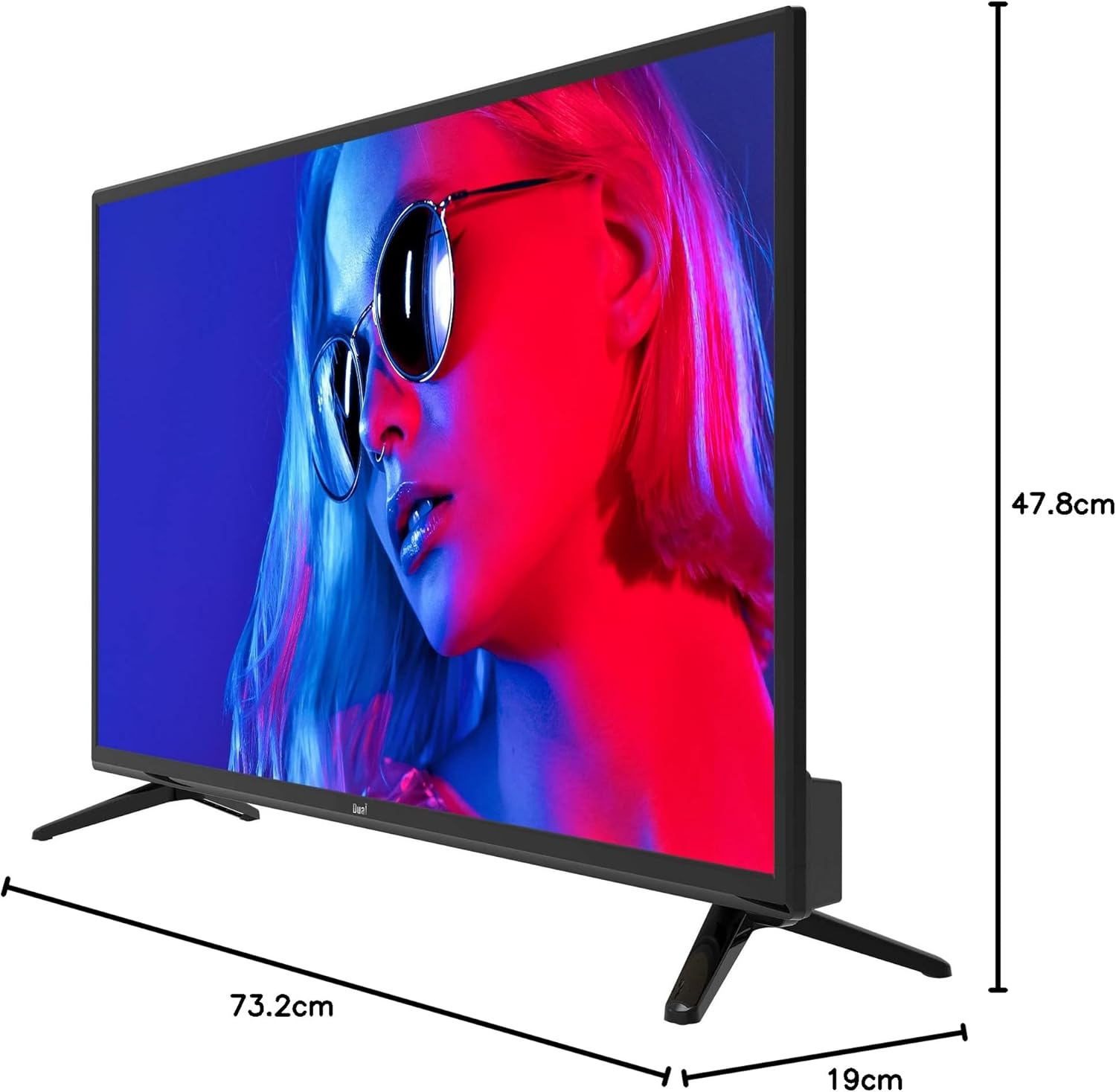
Imaj 8.1: Dimansyon televizyon.
8.1. Etikèt Enèji

Image 8.2: EU Energy Label. For more details, visit the official EPREL database: Paj pwodwi EPREL la
9. Garanti ak sipò
9.1. Enfòmasyon sou Garanti
This product comes with a Limited Warranty. Please refer to the warranty card included in your package for specific terms and conditions.
9.2. Spare Parts and Software Updates
Information regarding the availability of spare parts and guaranteed software updates for this model is currently not available. Please contact your retailer or the manufacturer for further inquiries.
9.3. Sipò pou Kliyan
For technical assistance or customer service, please contact your point of purchase or visit the official Dual websit pou resous sipò.