
1. Entwodiksyon
This manual provides detailed instructions for the Minno Maverick A10 Rugged 10-inch Android 10 Tablet. It covers initial setup, operation, maintenance, and troubleshooting to ensure optimal performance and longevity of your device. Please read this manual thoroughly before using the tablet.
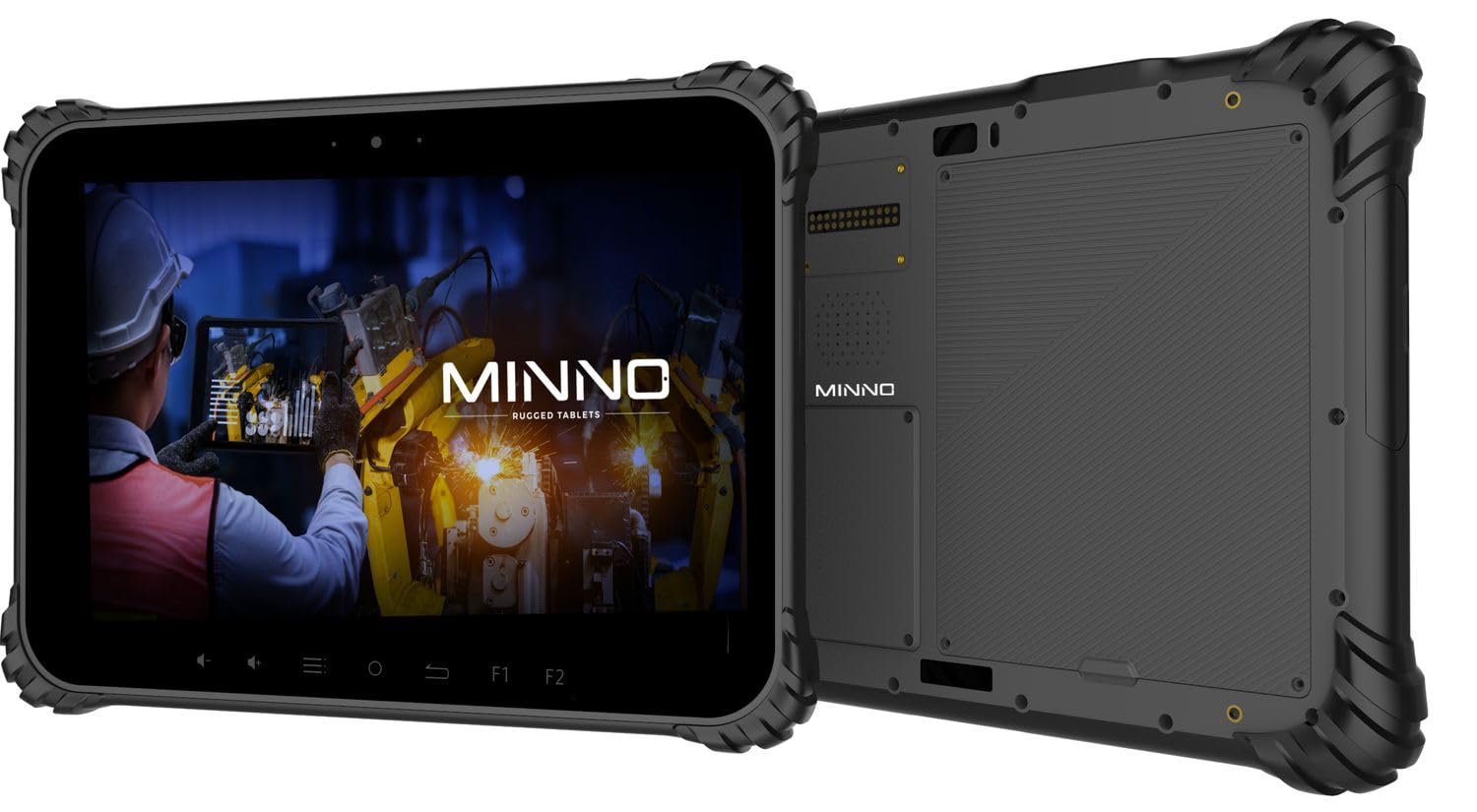
Figure 1.1: Minno Maverick A10 Rugged Tablet
2. Pake kontni
Verifye ke tout atik yo prezan nan pakè a:
- Minno Maverick A10 Rugged Android Tablet
- Adaptè pouvwa
- Manch pòtfèy
- Hand Strap (pre-installed)
3. Aparèy souview
3.1 Karakteristik kle
- Konsepsyon rezistan: IP67 dust and waterproof, MIL-STD-810H certified for drop, shock, and vibration resistance.
- Ekspozisyon: 10-inch sunlight-readable touchscreen.
- Pèfòmans: Android 10 operating system, 4GB RAM, 64GB internal storage.
- Koneksyon: LTE (unlocked for AT&T & T-Mobile), Wi-Fi, Bluetooth, NFC, GPS.
- Batri: 11,700 mAh swappable battery for extended use.
- Kamera: 13 MP rear camera, 5 MP front camera.
- Bouton fizik: Dedicated buttons for easy access to functions.

Figure 3.1: Minno Maverick A10 with core specifications
3.2 Physical Buttons and Ports
The tablet features physical buttons for common functions and easy access, even in demanding environments.

Figure 3.2: Tablet cameras and easy access buttons
- Bouton pouvwa: Sitiye sou bò a, yo itilize li pou limen/etenn oswa reveye/dòmi aparèy la.
- Volim monte/desann: Ajiste volim odyo a.
- Function Buttons (F1, F2): Customizable buttons for quick access to specific applications or features.
- Bouton Retounen: Retounen nan ekran anvan an.
- Bouton Kay: Retounen nan ekran kay la.
- Bouton meni: Accesses application options or recent apps.
- Pò USB: Pou chaje ak transfè done.
- Pò ki kouvri yo: Designed to protect against dust and water ingress.
4. Inisyal Enstalasyon
4.1 Chaje batri a
Before first use, fully charge the tablet battery. Connect the provided power adapter to the tablet's charging port and plug it into a power outlet. The charging indicator will show the charging status.
4.2 Limen/Etenyen
- Pou limen: Press and hold the Power button until the Minno logo appears on the screen.
- Pou etenn: Peze epi kenbe bouton pouvwa a jiskaske meni opsyon pouvwa a parèt. Chwazi "Etenn" epi konfime.
- Pou dòmi/reveye: Briefly press the Power button to put the tablet into sleep mode or wake it up.
4.3 Inisyal Konfigirasyon
Lè w ap limen aparèy la pou premye fwa, swiv enstriksyon ki parèt sou ekran an pou w konplete konfigirasyon inisyal la, tankou:
- Seleksyon lang
- Koneksyon rezo Wi-Fi
- Google account setup
- Paramèt dat ak lè
4.4 Installing SIM/SD Card
The tablet supports a SIM card for LTE connectivity and an SD card for expanded storage. Locate the covered slot on the side of the tablet. Carefully open the cover, insert the SIM card and/or SD card into their respective slots, ensuring correct orientation. Close the cover securely to maintain IP67 rating.
5. Operasyon debaz
5.1 Navigasyon ekran taktil
The 10-inch display is a multi-touch screen. Use standard Android gestures:
- Tape: Chwazi yon atik oubyen louvri yon aplikasyon.
- Tape epi kenbe: Jwenn aksè nan meni kontèks yo oubyen deplase ikòn yo.
- Glise: Defile nan lis yo oubyen chanje ant ekran yo.
- Zoom-pou-Zoom: Agrandi oswa diminye imaj yo epi web paj.
5.2 Koneksyon
- Wi-Fi: Ale nan Anviwònman > Rezo ak entènèt > Wi-Fi pou konekte ak rezo ki disponib yo.
- LTE: Ensure a valid SIM card is installed. Go to Settings > Network & internet > Mobile network to enable mobile data.
- Bluetooth: Ale nan Anviwònman > Aparèy konekte > Bluetooth pou konekte ak akseswa Bluetooth yo.
6. Karakteristik avanse
6.1 Itilizasyon Kamera
The tablet is equipped with a 13 MP rear camera and a 5 MP front camera. Open the Camera application to capture photos and videos. Adjust settings such as flash, timer, and mode within the app.
6.2 Navigasyon GPS
The integrated GPS module allows for location tracking and navigation. Ensure location services are enabled in Settings > Location for optimal performance with mapping applications.
6.3 Fonksyonalite NFC
NFC (Near Field Communication) allows for short-range wireless communication. Enable NFC in Settings > Connected devices > Connection preferences > NFC to use features like contactless payments or quick data sharing with compatible devices.
7. Swen ak Antretyen
7.1 Netwaye Tablèt la
Use a soft, lint-free cloth to clean the screen and body of the tablet. For stubborn marks, slightly dampRense twal la avèk dlo oswa yon solisyon pou netwaye ekran. Evite pwodui chimik ki agresif oswa materyèl abrazif.
7.2 Swen Batri
The tablet features a swappable 11,700 mAh battery. To maximize battery life:
- Evite tanperati ekstrèm.
- Pa dechaje batri a nèt regilyèman.
- Itilize sèlman adaptè pouvwa yo bay la.
- If replacing the battery, ensure it is an official Minno replacement part.
7.3 Pwoteksyon Anviwònman
The Minno Maverick A10 is designed for harsh environments with IP67 and MIL-STD-810H certifications.

Figure 7.1: IP67 Dustproof and Spillproof Protection

Figure 7.2: MIL-STD-810H Certified Durability
- Evalyasyon IP67: Provides protection against dust ingress and immersion in water up to 1 meter for 30 minutes. Ensure all port covers are securely closed.
- MIL-STD-810H: Certified to resist drops up to 4 feet, withstand prolonged intense vibrations, and operate in extreme temperatures from -4°F to 150°F.
NAN. Depanaj
If you encounter issues with your Minno Maverick A10, refer to the following common solutions:
| Pwoblèm | Solisyon posib |
|---|---|
| Tablèt la pa limen | Ensure the battery is charged. Connect the power adapter and try again. If the battery is swappable, ensure it is correctly seated. |
| Touchscreen pa reponn | Restart the tablet by holding the power button. If the issue persists, perform a factory reset (data will be lost). |
| Pa ka konekte ak Wi-Fi | Check if Wi-Fi is enabled in settings. Restart your router. Ensure you are entering the correct password. |
| LTE/Mobile data not working | Ensure a valid SIM card is properly inserted. Check mobile data settings and APN configurations. Contact your service provider. |
| Applications are crashing | Clear the cache of the problematic application (Settings > Apps > [App Name] > Storage & cache). Update the app or the Android system. |
9. Espesifikasyon
Detailed technical specifications for the Minno Maverick A10 Rugged Tablet:
| Karakteristik | Spesifikasyon |
|---|---|
| Nimewo Modèl | A10Z03001 |
| Sistèm operasyon | Android 10 |
| Gwosè ekran | 10 pous |
| Rezolisyon ekran | 1280x800 (Max: 1920x1200 Pixels) |
| RAM | 4 GB |
| Depo Entèn | 64 GB |
| Mak processeur | MediaTek |
| Kalite san fil | 802.11ac (Wi-Fi), Bluetooth, NFC, GPS, 4G LTE |
| Dèyè WebCam Rezolisyon | 13 MP |
| Rezolisyon kamera devan | 5 MP |
| Batri | 11,700 mAh Lithium-ion polymer (swappable) |
| Pwa atik | 3.89 liv |
| Dimansyon pwodwi | 10 x 1 x 8 pous |
| Koulè | Nwa |
| Sètifikasyon Durabilite | IP67, MIL-STD-810H |
10. Garanti ak sipò
10.1 Enfòmasyon sou Garanti
Minno warrants its products to be free from material and workmanship defects for 2 ane from the date of purchase. This warranty covers manufacturing defects under normal use. It does not cover damage caused by misuse, accidents, unauthorized modifications, or natural disasters.
10.2 Sipò pou Kliyan
For technical assistance, warranty claims, or further inquiries, please contact Minno customer support through the official Minno website or your point of purchase. Have your model number (A10Z03001) and purchase date ready when contacting support.