
Ysametp M10
Manyèl Itilizatè Pwojektè Ysametp Mini M10
1080P Full HD Supported Portable Video Projector
Entwodiksyon
Mèsi pou acha aasing the Ysametp Mini Projector M10. This portable video projector is designed to provide a high-quality home theater experience with its 1080P Full HD support and 10000 Lux LED light source. It features dual built-in stereo speakers with an SRS sound system for immersive audio. Its compact size and multi-connection capabilities make it ideal for various entertainment and presentation needs. Please read this manual thoroughly before operating the projector to ensure proper use and maintenance.
Enfòmasyon sou Sekirite
To ensure safe operation and prolong the lifespan of your projector, please observe the following safety precautions:
- Pa bloke ouvèti vantilasyon yo. Asire w ke gen ase lè k ap sikile toutotou pwojektè a pou anpeche l chofe twòp.
- Pa ekspoze pwojektè a anba lapli oswa imidite pou evite chòk elektrik oswa dife.
- Pa louvri pwojektè a casing. Konfere tout antretyen bay pèsonèl sèvis kalifye.
- Sèvi sèlman ak adaptè kouran ki vini ak pwojektè a.
- Mete pwojektè a sou yon sifas ki plat e ki estab pou anpeche l tonbe.
- Evite kontak dirèk ak lantiy pwojektè a lè l ap fonksyone.amp se sou.
- Debranche pwojektè a nan priz kouran an pandan tanpèt zèklè oswa lè ou pa itilize li pou yon bon bout tan.
Kontni pake
Tanpri verifye sa ki nan pake a lè w ap debale l:
- 1 x Ysametp Mini Projector M10
- 1 x HDMI kab
- 1 x 3-in-1 AV Line
- 1 x pouvwa kòd
- 1 x Tripod
- 1 x Drawstring Backpack
- 1 x Remote Control (pil pa enkli)
- 1 x manyèl itilizatè

Pwodwi souview
Familiarize yourself with the projector's components and connection ports.

Pò Antre / Sòti:
- HDMI Port: Connect to devices like TV sticks, laptops, gaming consoles.
- Pò USB: Konekte kle USB yo pou li medya yo.
- TF Kat plas: Insert TF cards for media playback.
- Pò VGA: Connect to computers or laptops.
- Pò AV: Connect to older devices like DVD players using the 3-in-1 AV cable.
- 3.5mm Audio Jack: Konekte kas ekoutè oswa oratè ekstèn yo.
Enstalasyon
1. Plasman ak gwosè ekran an
Position the projector on a flat, stable surface. The projection size can range from 32 inches to 200 inches, with an optimal projection distance between 3.6 feet and 16.4 feet.

2. Koneksyon pouvwa
Connect the supplied power cord to the projector's power input and then plug it into a power outlet.
3. Ajisteman Konsantrasyon ak Keystone
After powering on, adjust the focus and keystone knobs located on top of the projector to achieve a clear and rectangular image. The focus ring adjusts image sharpness, while the keystone correction corrects trapezoidal distortion if the projector is not perfectly perpendicular to the screen.
Enstriksyon Operasyon
1. Limen/Etenyen
- Pou limen: Peze bouton pouvwa a sou pwojektè a oswa kontwòl remote la.
- Pou etenn: Press the power button again. The projector will go through a shutdown sequence.
2. Seleksyon sous Antre
Use the "Source" button on the remote control or the projector's control panel to select the desired input source (HDMI, USB, TF, VGA, AV).
3. Konekte Aparèy
- HDMI: Connect an HDMI cable from your device (e.g., TV Stick, laptop, game console) to the projector's HDMI port.
- Kat USB/TF: Insert a USB drive or TF card into the respective port. The projector will automatically detect the media or prompt you to select it.
- VGA: Connect a VGA cable from your PC/laptop to the projector's VGA port.
- DE: Use the provided 3-in-1 AV cable to connect to devices with AV output.
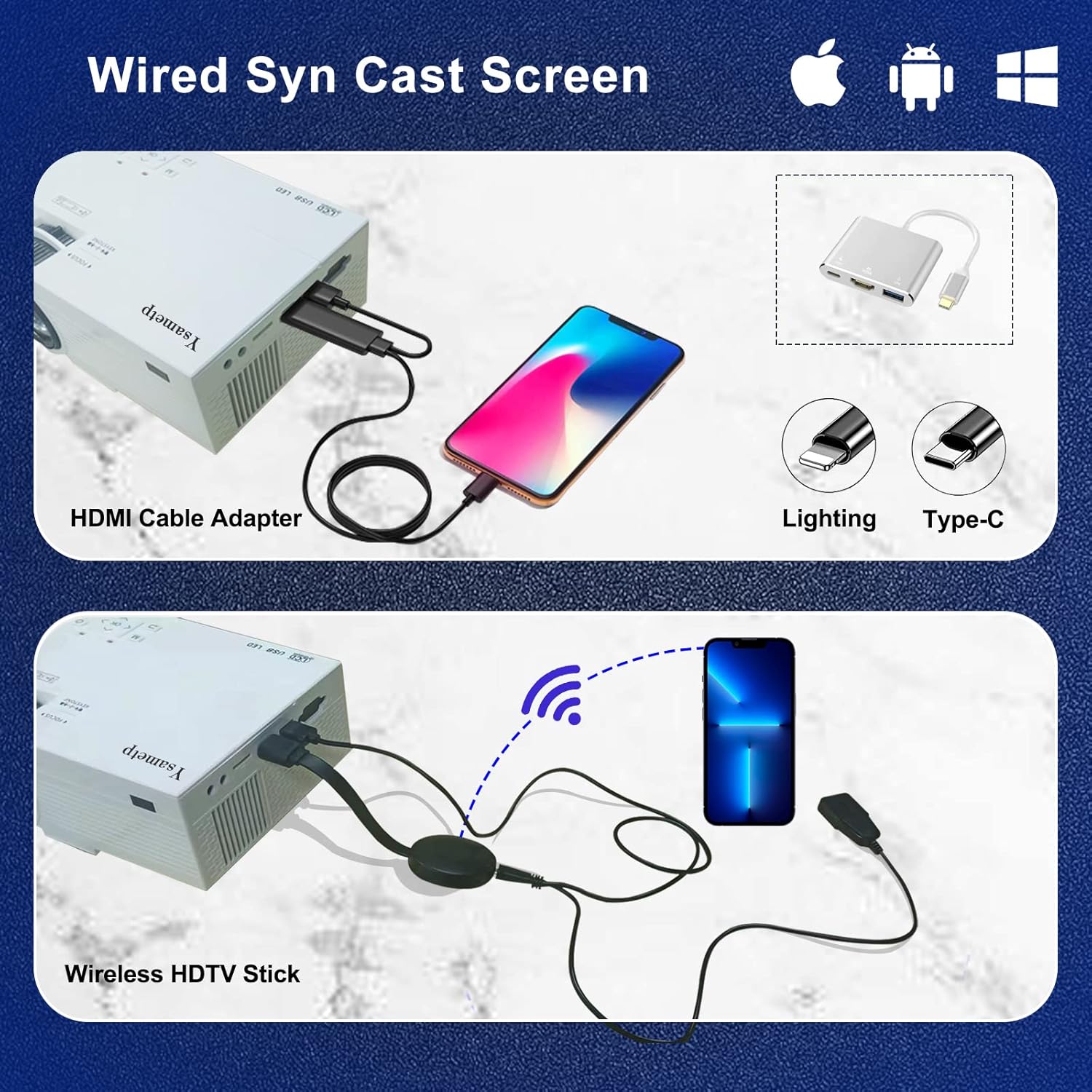
4. Wired Screen Mirroring (for Smartphones)
To mirror your smartphone screen, you will need an HDMI adapter (e.g., Lightning to HDMI for iPhone, USB-C to HDMI for Android) or a Miracast dongle/TV stick (like Roku, Fire TV Stick).

5. Audio Sòti
The projector has dual built-in stereo speakers. For external audio, connect headphones or external speakers to the 3.5mm audio jack.

Antretyen
1. Netwayaj
- Lantiy: Sèvi ak yon twal mou ki pa gen pousyè, espesyalman fèt pou lantiy optik. Pa sèvi ak pwodui netwayaj abrazif.
- Casing: Wipe the projector's exterior with a soft, dry cloth. Do not use liquid or aerosol cleaners.
- Vantilasyon: Regularly check and clean the ventilation openings to prevent dust buildup, which can affect cooling performance.
2. Depo
When not in use, store the projector in a cool, dry place, away from direct sunlight and extreme temperatures. Use the provided drawstring backpack for protection during storage or transport.
3. LED Lifespan
The built-in LED light source is designed to support up to 55,000 hours of use, providing long-lasting performance.
Depanaj
| Pwoblèm | Kòz posib / Solisyon |
|---|---|
| Pa gen imaj sou ekran an. |
|
| Imaj la twoub. |
|
| Imaj la se trapezoidal. |
|
| Pa gen son. |
|
| Remote kontwòl pa travay. |
|
Espesifikasyon
| Karakteristik | Detay |
|---|---|
| Mak | Ysametp |
| Modèl | M10 |
| Teknoloji ekspozisyon | LCD |
| Rezolisyon natif natal | 1920 x 1080 Piksèl (Sipòte Full HD) |
| Imaj klète | 11000 Lux |
| Pwopòsyon Imaj Kontrèman | 10000:1 |
| Aspè rapò | 4:3 |
| Gwosè pwojeksyon | 32 - 200 pous |
| Distans pwojeksyon | 3.6ft - 16.4ft |
| Dirije lavi | 55,000 èdtan |
| Nivo bri | 31 dB |
| Wattage | 60 wat |
| Entèfas Materyèl | VGA, USB, HDMI, 3.5mm Audio, TF Card |
| Dimansyon (L x W x H) | 23.88 x 15.49 x 8.13 cm |
| Pwa | 975.22 g (apeprè 2.15 liv) |
Garanti ak sipò
Ysametp provides a 3 ane garanti pwodwi for the Mini Projector M10.
If you encounter any problems or have questions regarding your projector, please do not hesitate to contact our customer support. Refer to the contact information provided on the product packaging or the official Ysametp websit pou asistans.
Ask a question about this manual
Ask about setup, troubleshooting, compatibility, parts, safety, or missing instructions. Manuals+ will review the question and use this page’s manual context to help answer it.