
Shargeek STM2E-1
Manyèl Itilizatè Chargeur Pòtab Shargeek STORM2 Slim
Modèl: STM2E-1
Entwodiksyon
This manual provides comprehensive instructions for the safe and efficient use of your Shargeek STORM2 Slim Portable Charger. Please read this manual thoroughly before operating the device and retain it for future reference.
The Shargeek STORM2 Slim is a high-capacity portable power bank featuring a unique transparent design and an IPS display screen. It offers 130W max output with 100W USB-C and 30W USB-A ports, suitable for charging various devices including laptops, tablets, and smartphones.

Image: The Shargeek STORM2 Slim portable charger, showcasing its transparent design that reveals internal components and the included yellow USB-C to USB-C cables.
Karakteristik pwodwi
- Konsepsyon transparan: The see-through casing reveals the internal battery and circuit layout, highlighting the device's engineering.
- IPS Display Screen: A clear screen provides real-time information on battery life, output distribution, temperature, operation hours, and active ports.
- Kapasite segondè: 20000mAh battery capacity, capable of multiple charges for various devices.
- Chaje rapid: Features a 100W USB-C PD port and a 30W USB-A port, supporting 130W max output for rapid charging.
- Inivèsèl konpatibilite: Charges laptops, phones, tablets, and other devices with USB-C or USB ports.

Imaj: Yon imaj detaye view of the Shargeek STORM2 Slim's IPS LCD screen, showing various data points such as input/output wattage, voltage, current, battery level, and temperatures.
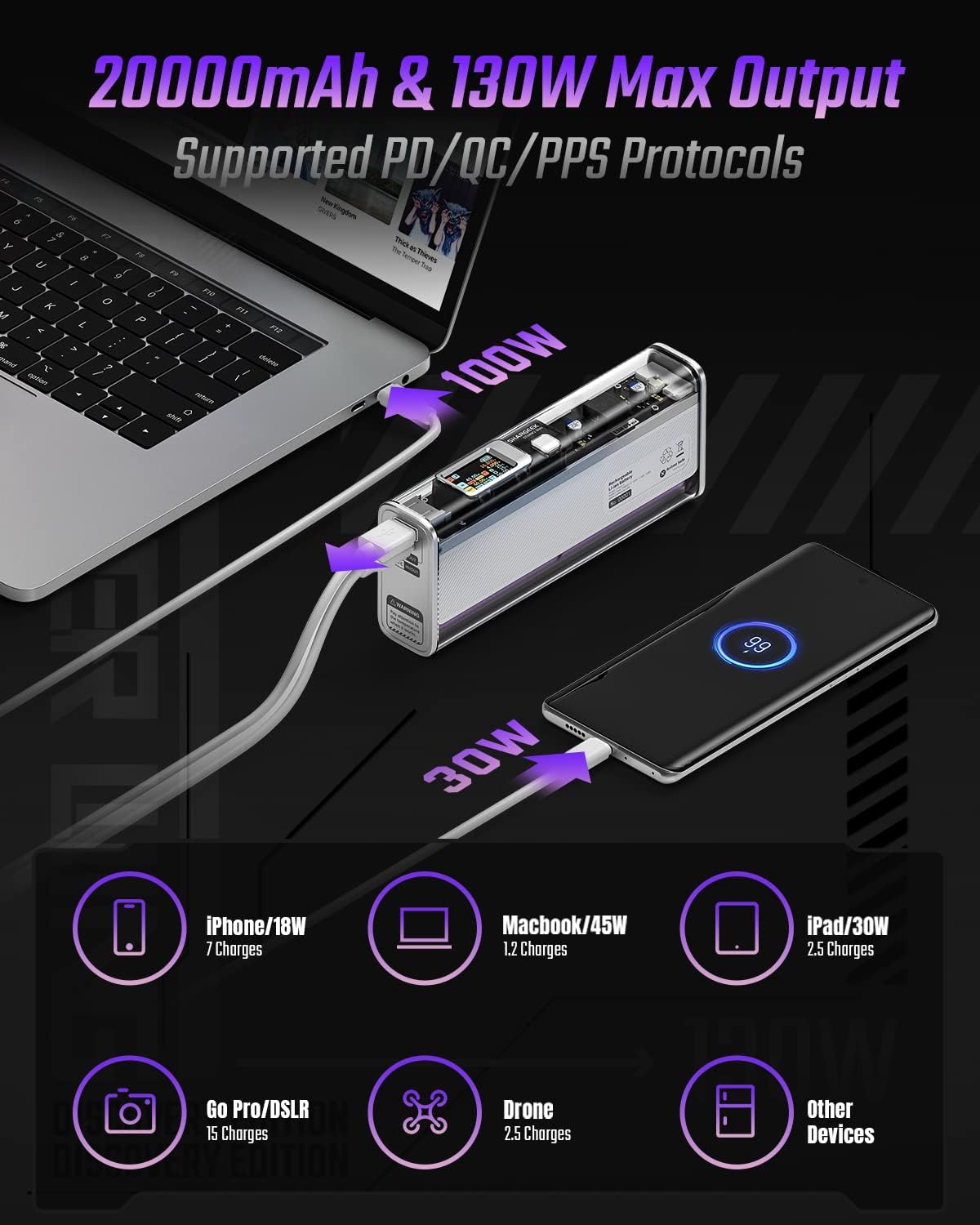
Image: The Shargeek STORM2 Slim connected via USB-C to a laptop for 100W charging and via USB-A to a smartphone for 30W charging, demonstrating its dual-port capability.
Enstalasyon ak Premye Itilizasyon
Kontni pake:
- Shargeek STORM2 Slim Portable Charger
- USB-C pou USB-C kab
- Manyèl Itilizatè (dokiman sa a)
Premye chaj:
- Before first use, fully charge your STORM2 Slim.
- Connect the provided USB-C to USB-C cable to the USB-C port on the STORM2 Slim.
- Connect the other end of the cable to a compatible USB-C power adapter (not included) with a minimum of 100W output for fastest charging.
- The IPS screen will display charging status and battery percentage. The device is fully charged when the screen indicates 100%.
- A full recharge typically takes approximately 90 minutes with a 100W power adapter.
Enstriksyon Operasyon
Chaje Aparèy:
- Identify the appropriate charging cable for your device (USB-C to USB-C or USB-A to device-specific cable).
- Connect one end of the cable to your device and the other end to the corresponding port (USB-C or USB-A) on the STORM2 Slim.
- The IPS screen will automatically activate and display the charging output (watts, volts, amps) for the connected device(s).
- The STORM2 Slim can charge two devices simultaneously using both the USB-C and USB-A ports.
Understanding the IPS Screen:
The IPS screen provides detailed real-time information. Use the physical button on the side of the power bank to navigate through different display modes or access settings.
- Input/Output Dashboard: Shows power input (IN) when charging the power bank and power output (OUT) when charging devices, including wattage, voltage, and current for each port.
- Nivo batri: Montre pousantaj batri ki rete atage and a visual icon.
- Voltage & Kouran: Detailed readings for the internal battery cells.
- Tanperati: Shows the internal circuit board and battery temperatures.
- Tan Kouri: A resettable timer indicating the duration of current operation.
To access menus: Long-press the button. To navigate: Short-press. Pou chwazi: Long-press.
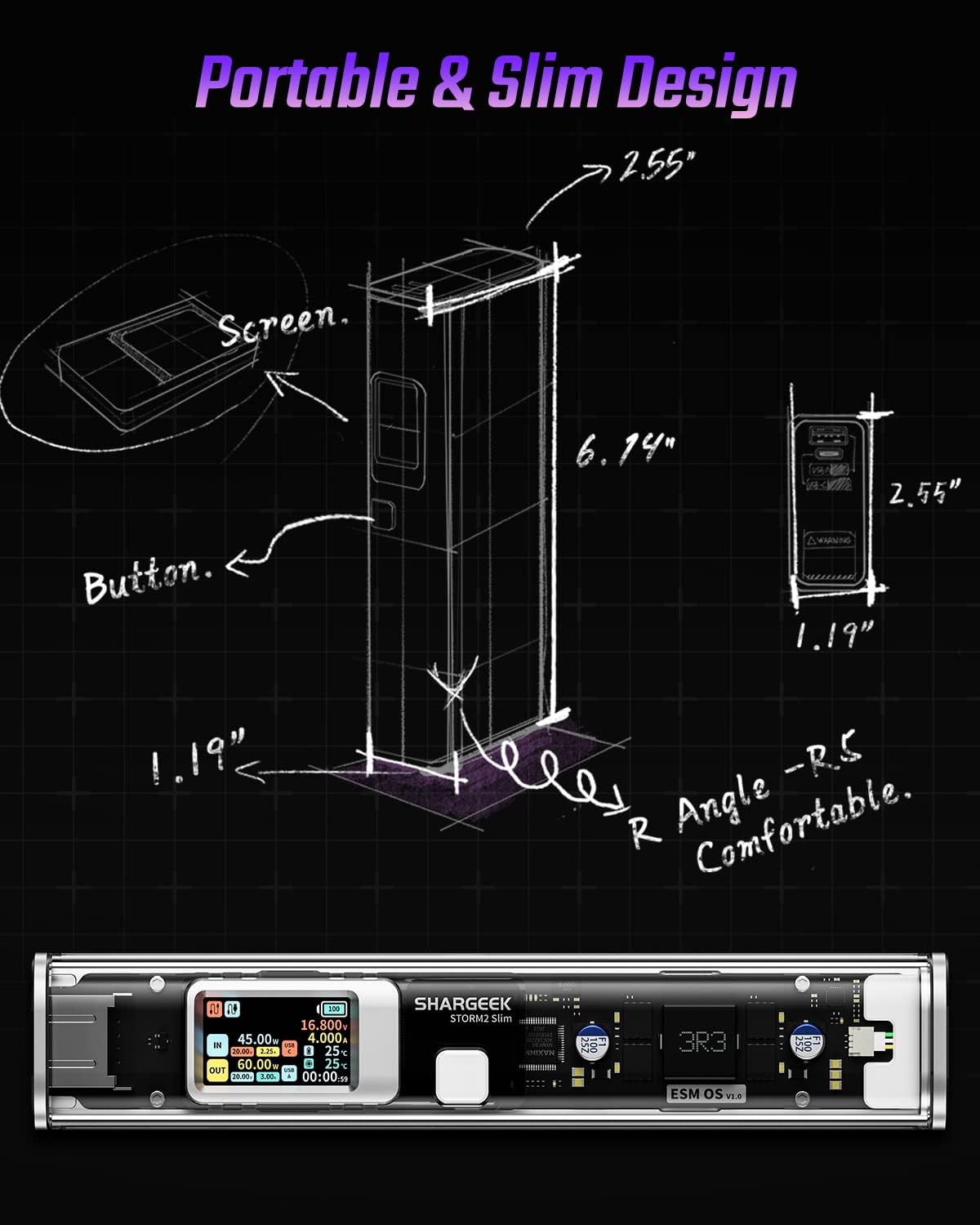
Image: A technical drawing illustrating the dimensions of the Shargeek STORM2 Slim and pointing out the screen and button locations.
Antretyen
- Netwayaj: Sèvi ak yon twal mou epi sèk pou netwaye deyò power bank lan. Evite itilize pwodui chimik ki agresif oswa materyèl abrazif.
- Depo: Sere aparèy la nan yon kote ki fre epi sèk, lwen limyè solèy dirèk, tanperati ekstrèm, ak imidite ki wo.
- Swen batri: To prolong battery life, avoid fully discharging the power bank frequently. Recharge it when the battery level is low. If storing for extended periods, charge it to approximately 50-70% every 3-6 months.
- Evite gout: While designed with an aluminum alloy frame for durability, avoid dropping the device as it may damage internal components or the transparent casing.
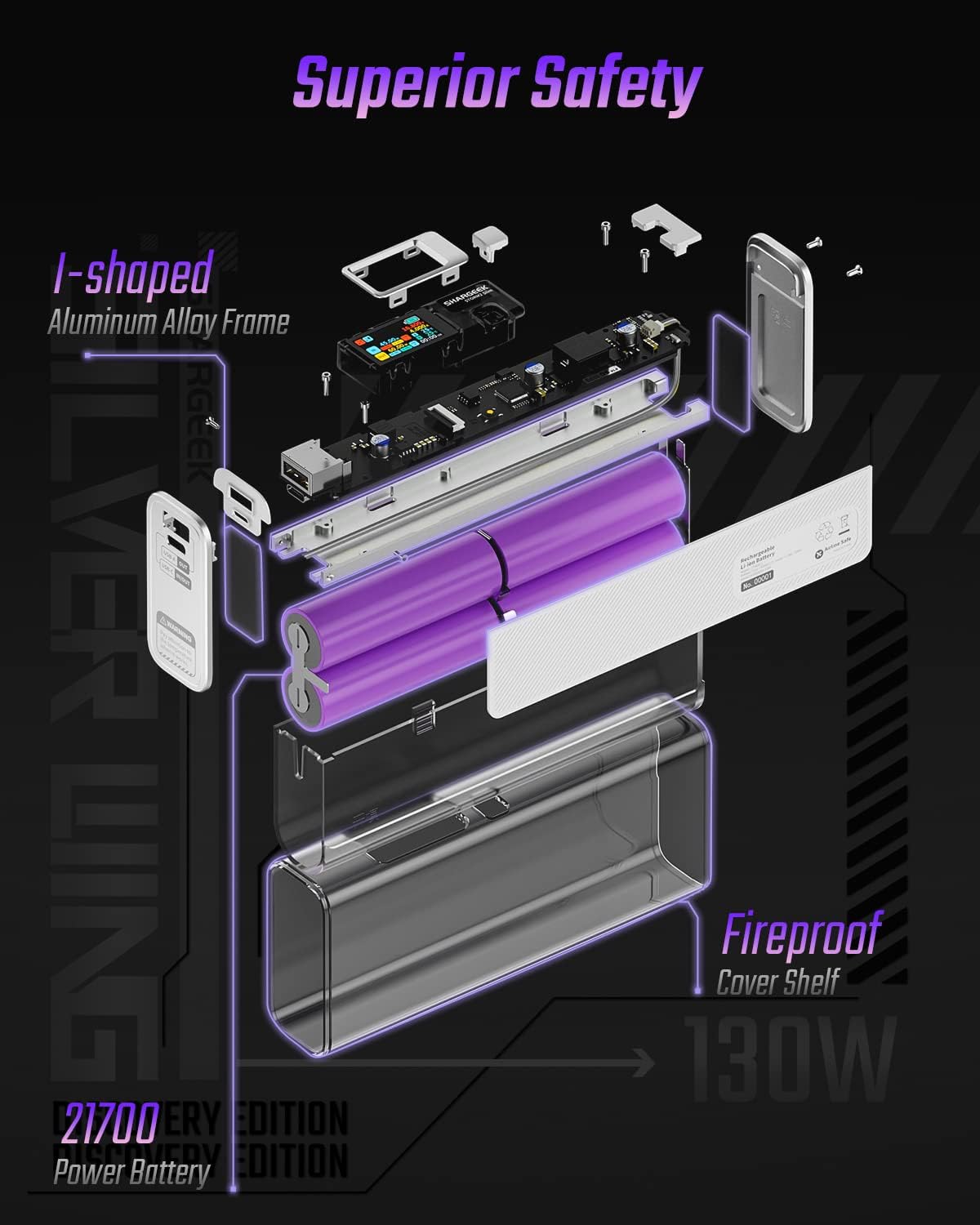
Image: An exploded diagram of the Shargeek STORM2 Slim, illustrating its internal structure including the I-shaped aluminum alloy frame, fireproof cover shelf, and 21700 power batteries, highlighting its robust construction.
Depanaj
| Pwoblèm | Kòz posib | Solisyon |
|---|---|---|
| Aparèy la pa chaje ak bank pouvwa a. | Low power bank battery; incompatible cable; device not properly connected; device requires more power than available. | Recharge the STORM2 Slim. Ensure cable is fully inserted and compatible. Check device power requirements against power bank output. Try a different cable or port. |
| Batri pouvwa a pa chaje. | Kab chajman an oswa adaptè a gen pwoblèm; pò bank pouvwa a domaje. | Try a different USB-C cable and power adapter. Ensure the adapter meets the recommended power output (e.g., 100W). If problem persists, contact support. |
| IPS screen is blank or unresponsive. | Power bank is off; temporary software glitch. | Press the button to activate the screen. If unresponsive, try connecting a device to charge or connecting the power bank to a charger to see if it activates. If problem persists, contact support. |
| Chaje dousman. | Kab la pa sipòte chaj rapid; aparèy la pa sipòte chaj rapid; plizyè aparèy konekte. | Ensure you are using a high-quality USB-C PD cable. Verify your device supports fast charging. Charging multiple devices simultaneously may reduce individual charging speeds. |
Espesifikasyon
- Nimewo Modèl: STM2E-1
- Kapasite batri: 20000mAh
- Pwodiksyon maksimòm: 130W
- USB-C Sòti: Jiska 100W pouvwa livrezon (PD)
- USB-A Sòti: Jiska 30W
- Antre: USB-C (up to 100W PD)
- Ekspozisyon: IPS ekran
- Dimansyon: 3 x 6.5 x 15.59 cm (apeprè 1.18 x 2.56 x 6.14 pous)
- Pwa: Apeprè 689 g (1.52 lbs)
- Kalite batri: Lityòm Ion
Garanti ak sipò
Enfòmasyon sou garanti:
Shargeek products are covered by a limited warranty against defects in materials and workmanship. Please refer to the warranty card included with your purchase or visit the official Shargeek websit la pou wè tèm ak kondisyon garanti detaye yo.
Sipò Kliyan:
For technical assistance, troubleshooting, or warranty claims, please contact Shargeek customer support through their official websit la oswa enfòmasyon kontak ki sou anbalaj pwodwi ou a.
Official Shargeek Store Link: Shargeek Official Store
Enfòmasyon sou Sekirite
- Pa ekspoze aparèy la nan dlo, imidite, oswa tanperati ekstrèm.
- Do not disassemble, modify, or attempt to repair the device yourself. This will void the warranty and may cause damage or injury.
- Kenbe soti nan atenn timoun yo.
- Sèvi ak sèlman kab ak adaptè chaje ki sètifye epi konpatib.
- Evite jete oswa sibi aparèy la nan gwo enpak.
- Dispose of the device responsibly according to local regulations for electronic waste.
Ask a question about this manual
Ask about setup, troubleshooting, compatibility, parts, safety, or missing instructions. Manuals+ will review the question and use this page’s manual context to help answer it.