
1. Entwodiksyon
This manual provides detailed instructions for the safe installation, operation, and maintenance of your Lucci Air Peregrine 56-inch White Ceiling Fan with Remote, Model 21328001. The Peregrine fan features a modern design with three blades, energy-efficient direct current (DC) technology, six speeds, and high airflow. It is rated for both indoor and outdoor use in covered areas. The fan includes a 6-inch warm white GX53 light kit with 3-step dimming functionality and comes with a remote control and wall mount bracket.

Imaj 1.1: Devan view of the Lucci Air Peregrine 56-inch White Ceiling Fan.
2. Enfòmasyon sou Sekirite
Please read all instructions carefully before beginning installation and retain this manual for future reference. Improper installation or use can lead to electric shock, fire, or personal injury.
- Sekirite elektrik: Ensure the power supply is disconnected at the circuit breaker before installation or maintenance. All electrical wiring must be performed by a qualified electrician and comply with local codes and regulations.
- Montaj: The ceiling fan must be mounted to a structurally sound ceiling joist or outlet box capable of supporting the fan's weight (15.92 lbs).
- Espas lam: Maintain a minimum clearance of 7 feet from the floor to the fan blades and 18 inches from the fan blades to any walls or obstructions.
- Twous limyè: Use only the specified GX53 12W 3000K bulb. Do not exceed the maximum wattage.
- Itilizasyon deyò: This fan is rated for indoor and outdoor use in covered areas. Do not expose to direct water spray.
- Kontwòl Remote: Keep the remote control away from water and extreme temperatures. Replace batteries as needed.
3. Pake kontni
Verify that all components are present and undamaged before proceeding with installation. If any parts are missing or damaged, contact customer support.
- Ceiling Fan Motor Housing with Downrod
- Lam fanatik (3)
- Kontwòl Remote
- Wall Mount Bracket for Remote
- GX53 12W 3000K Light Kit (pre-installed or separate)
- Optional Metal Cap (for non-light use)
- Mounting Materyèl
- Manyèl Enstriksyon

Imaj 3.1: Plis paseview of the remote control and its features, including 6 fan speeds, reverse switch, light on/off/dimming, fan on/off, and wall mount holster. A CP2032 battery is included.
4. Enstalasyon ak Enstalasyon
Professional installation is recommended for this ceiling fan. Ensure all power is disconnected at the main circuit breaker before beginning installation.
- Prepare Kote pou Monte a: Securely attach the mounting bracket to a suitable ceiling joist or fan-rated outlet box. Ensure the structure can support the fan's weight.
- Rasanble Downrod ak motè a: Attach the downrod to the fan motor housing. Carefully feed the electrical wires through the downrod.
- Pandye Asanble Vantilatè a: Lift the fan assembly and hang it from the mounting bracket.
- Koneksyon elektrik: Connect the fan's electrical wires to the household wiring according to the wiring diagram provided in the separate installation guide (not included in this manual). Ensure all connections are secure.
- Atache lam yo: Securely attach the three fan blades to the motor housing using the provided screws.
- Install Light Kit (Optional): If using the light, install the GX53 12W 3000K bulb into the light kit socket. Attach the light kit to the bottom of the fan motor housing. If not using the light, install the optional metal cap.
- Kanopi an sekirite: Slide the canopy up to the ceiling and secure it to the mounting bracket, covering all wiring.
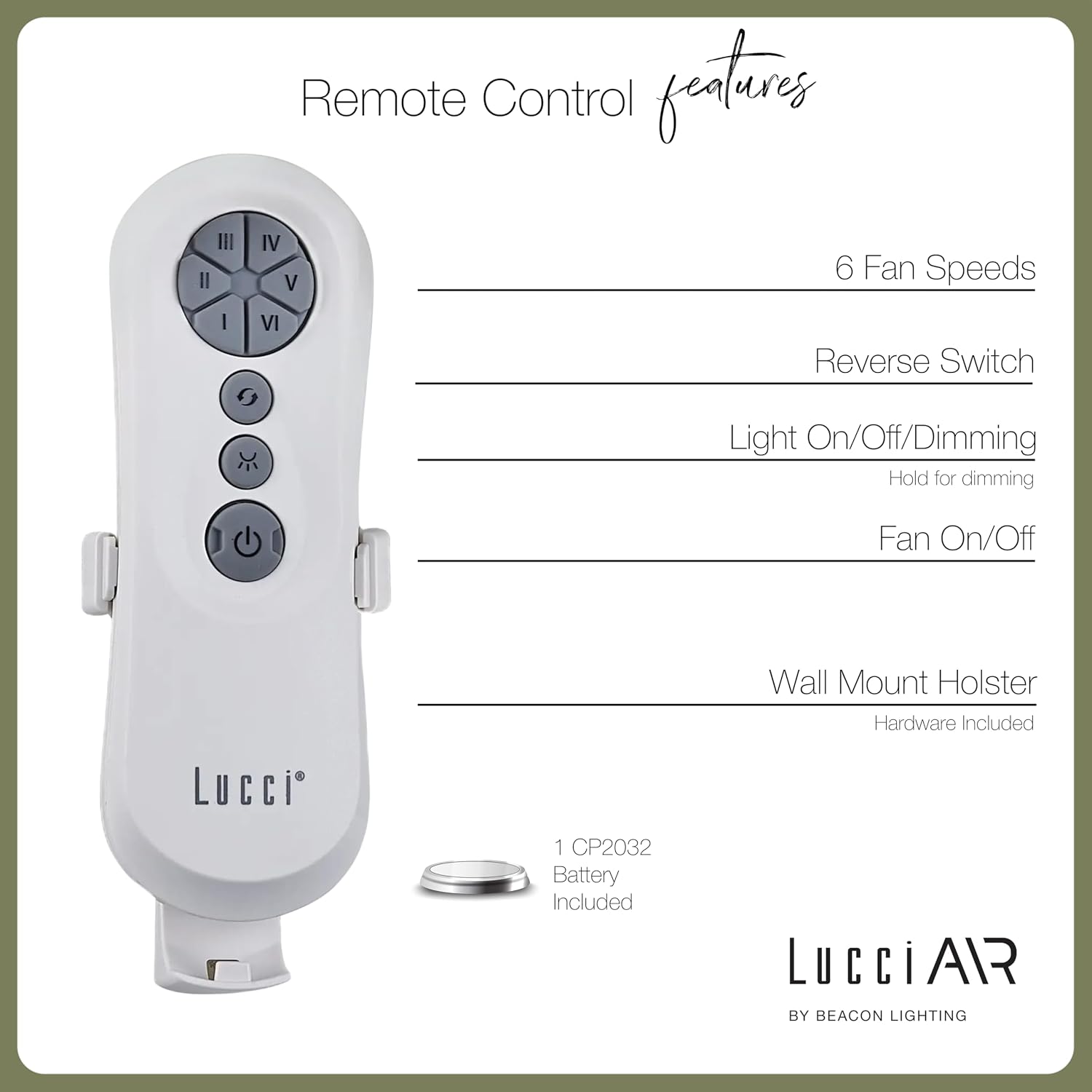
Image 4.1: Dimensional diagram of the Lucci Air Peregrine 56-inch Ceiling Fan, showing overall height, width, and blade length measurements.

Imaj 4.2: Anba view of the Lucci Air Peregrine fan, highlighting the integrated light kit.
5. Operasyon
The Lucci Air Peregrine fan is operated using the included remote control. Ensure the remote has a working CP2032 battery installed.
5.1 Fonksyon kontwòl Remote
- Fan On / Off: Press the power button (ⓘ) to turn the fan on or off.
- Vitès fanatik: Use buttons I, II, III, IV, V, VI to select one of the six available fan speeds. I is the lowest speed, VI is the highest.
- Chanjman ranvèse: Press the reverse button (↻) to change the direction of the fan blades. This function is typically used to switch between summer (downward airflow) and winter (upward airflow) modes. Note: Some models may have a manual switch on the motor housing for this function.
- Limyè Limen/Etenyen/Diminye: Press the light button (☀) to turn the light on or off. Hold the light button to dim or brighten the light through its 3-step dimming range.
5.2 Winter/Summer Mode
The fan features a manual switch on the motor housing to change between winter and summer modes. For summer operation, the blades should rotate counter-clockwise to push air downwards, creating a cooling breeze. For winter operation, the blades should rotate clockwise to draw cool air up, circulating warm air trapped near the ceiling. Adjust the switch accordingly.
6. Antretyen
Antretyen regilye asire pèfòmans optimal epi pwolonje lavi fanatik plafon ou a.
- Netwayaj: Detanzantan, retire pousyè sou lam vantilatè yo ak lojman motè a avèk yon twal mou.amp twal. Pa sèvi ak pwodui netwayaj abrazif oswa solvan, paske sa yo ka domaje fini an.
- Sere lam: Check all blade screws annually to ensure they are tight. Loose blades can cause wobbling and noise.
- Ranplasman anpoul: Disconnect power before replacing the GX53 light bulb. Allow the bulb to cool completely before handling.
- Batri Remote: Replace the CP2032 battery in the remote control when its range decreases or it stops responding.
NAN. Depanaj
Gade tablo ki anba a pou pwoblèm komen ak solisyon yo.
| Pwoblèm | Kòz posib | Solisyon |
|---|---|---|
| Fanatik pa kòmanse | Pa gen pouvwa nan fanatik la Koneksyon fil ki lach Batri kontwòl remote la mouri | Tcheke brekè Verifye tout koneksyon fil yo byen fèm (koupe kouran an) Ranplase batri kontwòl remote |
| Fanatik tranble | Vis lam ki lach Lam dezekilib Support aliye ki lach | Sere boulon tout vis lam yo Ensure blades are installed correctly and balanced Verify mounting bracket is securely fastened |
| Limyè pa travay | Anpoul la gen pwoblèm Loose wire connection to light kit | Ranplase anpoul Check light kit wiring (power off) |
| Remote kontwòl pa travay | Batri mouri Telekòmand pa konekte (si sa aplikab) | Ranplase batri Refer to separate remote pairing instructions (if provided with fan) |
8. Espesifikasyon
Key technical details for the Lucci Air Peregrine 56-inch White Ceiling Fan (Model 21328001).
| Karakteristik | Detay |
|---|---|
| Non modèl | Peregrine |
| Nimewo Modèl | 21328001 |
| Mak | Lucci Air |
| Koulè | Blan |
| Fan Design | Vantilatè plafon |
| Sous pouvwa | DC (kouran dirèk) |
| Dimansyon pwodwi | 56"D x 56"W x 15"H |
| Kantite lam | 3 |
| Longè lam | 31.1 pous |
| Kapasite Flow Air | 6363 pye kib pou chak minit (CFM) |
| Kantite vitès | 6 |
| Pouvwa konsomasyon (Mwayèn) | 38W |
| Voltage | 120Vac, 60Hz |
| Twous Limyè Enkli | 1x GX53 12W 3000K bulb, 1100 Lumens, 3-step dimmable |
| Metòd kontwòl | Kontwòl Remote |
| Itilizasyon Andedan kay la / Deyò | Indoor, Outdoor (covered areas) |
| Pwa atik | 15.92 liv |
| UPC | 811769032344 |
9. Garanti & Sipò
The Lucci Air Peregrine 56-inch White Ceiling Fan comes with a garanti pou tout lavi limite. For warranty claims, technical support, or replacement parts, please contact Lucci Air customer service. Keep your proof of purchase for warranty validation.
Pou plis asistans, tanpri vizite Lucci Air Store on Amazon or contact your retailer.