
1. Entwodiksyon
The My Arcade Gamer V Classic is a portable gaming system designed for on-the-go entertainment. This device comes preloaded with 220 classic video games, offering a wide variety of genres including entertainment, sports, and adventure. Its compact size and 2.5-inch color display make it suitable for use at home, during travel, or at social gatherings. This manual provides essential information for setting up, operating, maintaining, and troubleshooting your Gamer V Classic.
2. Ki sa ki nan bwat la
- Gamer V Classic Portable Gaming System
- Gid itilizatè (dokiman sa a)
3. Pwodwi Features
- Konsepsyon pou timoun yo: No console or controllers required.
- Excellent Gaming Experience: Perfect for travel, birthday parties, gifts, and more.
- Rich Collection of Classic Games: Includes 220 preloaded video games including various types such as entertainment, sports, and adventure.
- Pratik: 2.5" color display, suitable for playing portable games outdoors.
- Kontwòl Volim: Integrated volume control for adjustable audio.
- Ti ak lejè: Designed for easy portability.
- Sous pouvwa: Powered by 3 AAA batteries (not included).
4. Enstalasyon
4.1 Enstalasyon batri
- Locate the battery compartment on the back of the Gamer V Classic unit.
- Louvri kouvèti lòj batri a.
- Insert 3 new AAA batteries, ensuring correct polarity (+/-) as indicated inside the compartment.
- Fèmen kouvèti lòj batri a byen.
Nòt: Batteries are not included. Alternatively, the unit can be powered via a USB-C cable (not included) connected to a 5V power source.
4.2 Limen
Press and hold the power button (usually located on the top left of the device) for a few seconds until the screen illuminates and the My Arcade logo appears.

Image: The Gamer V Classic in use, showing its compact design and screen.
5. Operasyon Enstriksyon
5.1 Kontwòl souview
- D-Pad (Pad Direksyon): Located on the left, used for movement and menu navigation.
- Bouton A/B yo: Action buttons located on the right, used for jumping, firing, selecting, etc.
- Bouton kòmanse: Initiates games and pauses gameplay.
- Bouton Reyajiste: Returns to the main menu or restarts the current game.
- Bouton Kay: Returns to the game selection screen.
- Kontwòl Volim: Adjusts the audio level of the device.
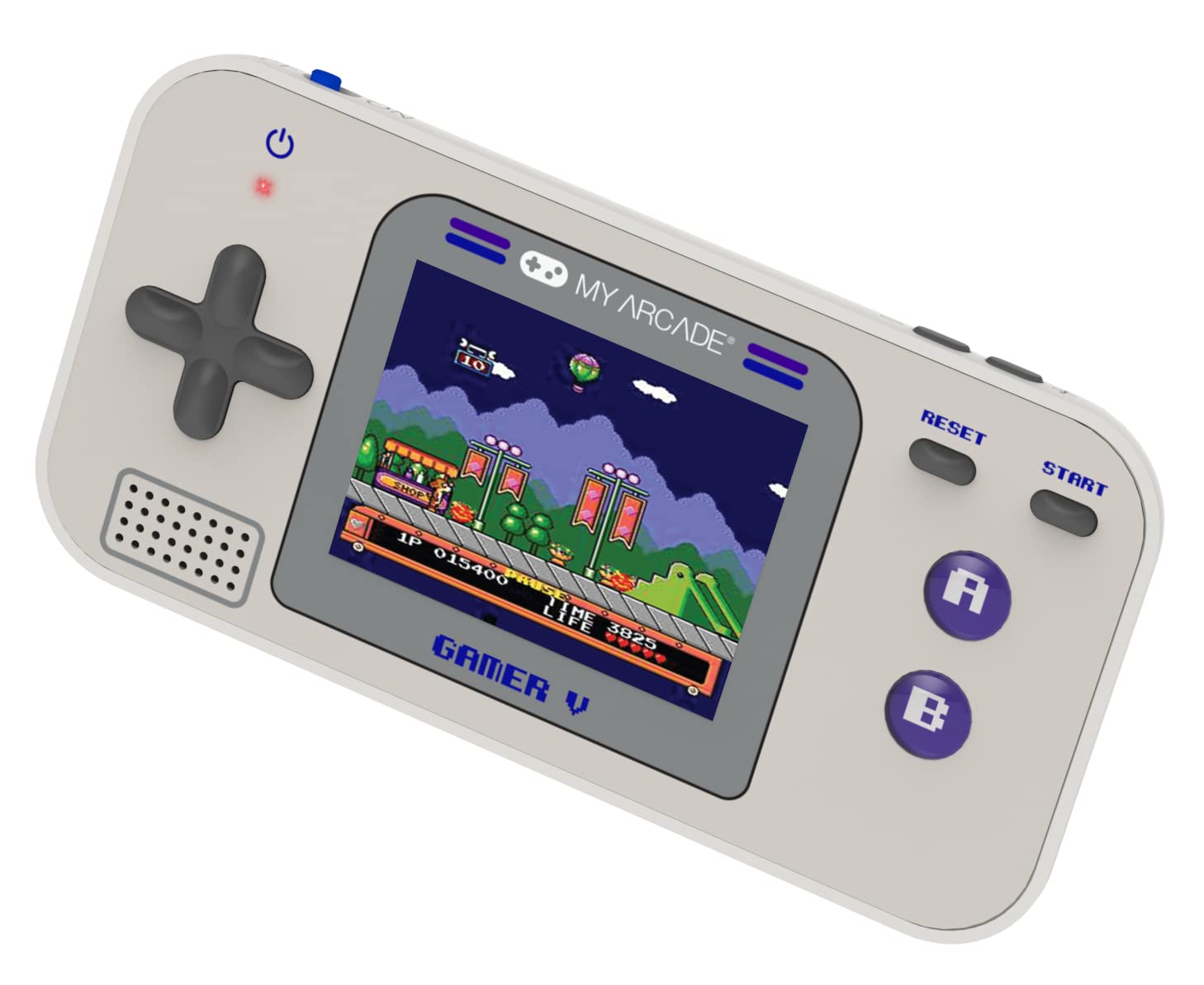
Imaj: Detaye view of the Gamer V Classic controls.
5.2 Game Selection and Play
- After powering on, the device will display the main game selection menu.
- Sèvi ak D-Pad la pou defile lis jwèt ki disponib yo.
- Press the 'A' button or 'Start' button to select and launch a game.
- Follow on-screen instructions for specific game controls.
- To return to the game selection menu, press the 'Home' button.
5.3 Ajiste Volim
Use the dedicated volume control buttons or switch (location may vary slightly by unit) to increase or decrease the sound output.
6. Antretyen
- Netwayaj: Sèvi ak yon twal mou epi sèk pou netwaye aparèy la. Pa sèvi ak pwodui netwayaj likid oswa ayewosòl.
- Depo: Store the device in a cool, dry place away from direct sunlight and extreme temperatures. If storing for an extended period, remove the batteries.
- Swen batri: Replace all batteries at the same time. Do not mix old and new batteries or different types of batteries. Dispose of used batteries responsibly.
- Evite enpak: Do not drop or subject the device to strong impacts, as this may damage internal components or the screen.
NAN. Depanaj
| Pwoblèm | Kòz posib | Solisyon |
|---|---|---|
| Aparèy la pa vire. | Pil ki fèb oswa ki mouri. Pil ki pa byen enstale. | Replace batteries with new ones, ensuring correct polarity. Try powering via USB-C cable. |
| Ekran an vid oswa li defòme. | Low battery power. Device malfunction. | Replace batteries or connect to USB-C power. If problem persists, contact customer support. |
| Pa gen son oswa volim nan ba. | Volume set too low. Mute function activated. | Adjust volume using the volume controls. Ensure no external headphones are connected if not intended. |
| Bouton yo pa reponn. | Device frozen. Low battery power. | Try pressing the 'Reset' button. Replace batteries. Power cycle the device (turn off and on). |
8. Espesifikasyon
- Dimansyon pwodwi: 5"L x 2.5"L x 0.75"H
- Kalite kontwolè: Kontwòl bouton
- Pwa atik: 0.15 kilogram (5.3 ons)
- Gwosè ekran: 2.5 pous
- Sous pouvwa: Batri Powered (3 pil AAA obligatwa, pa enkli)
- Entèfas pyès ki nan konpitè: Internal with removable media
- Ranje laj (Deskripsyon): Kid, Teen
- Kalite ekspozisyon: LCD oswa dirije
- Materyèl: Plastik
- Faktè fòm: Pòtatif
- Nimewo Modèl Atik: DGUN-3920
- Manifakti: Arcade mwen an
9. Garanti ak sipò
For warranty information and customer support, please refer to the official My Arcade websit la oubyen kontakte depatman sèvis kliyan yo. Kenbe resi acha w la kòm prèv acha.