
1. Entwodiksyon
The Sunshine DT-17N Digital Multimeter is a versatile and reliable tool designed for accurate electrical measurements. It is particularly suitable for phone repair technicians and general electronics work, capable of measuring various electrical parameters including voltage, current, resistance, capacitance, and temperature. Its compact design and user-friendly features make it an essential tool for diagnosing and repairing electronic devices.

Figure 1: The Sunshine DT-17N Digital Multimeter, demonstrating its compact size for portability.
2. Enfòmasyon sou Sekirite
To ensure safe operation and prevent damage to the meter, please read and follow all safety instructions carefully. This multimeter features double insulation protection for enhanced user safety.
- Always ensure the test leads are in good condition and properly connected before taking measurements.
- Pa aplike voltage or current that exceeds the maximum rated values for each range.
- Never use the multimeter if it appears damaged or if the test leads are frayed.
- Fè atansyon lè w ap travay ak volimtagki pi wo pase 30V AC RMS, 42V pik, oubyen 60V DC, paske sa yo poze yon danje pou elektrisite.
- Always disconnect power to the circuit and discharge high-voltage capacitors before measuring resistance, continuity, or diodes.
- Replace the battery promptly when the low battery indicator appears to ensure accurate readings.
3. Pwodwi souview
3.1. Multimeter Components

Figi 2: Devan view of the DT-17N Multimeter, highlighting its main display and controls.
3.2. Karakteristik ekspozisyon
The DT-17N features a large LCD display with a backlight, ensuring clear readability in various lighting conditions.

Figure 3: The multimeter's LCD display with its backlight feature, improving visibility in low-light environments.
- Gwo ekspozisyon LCD: Provides clear numerical readings.
- Ekleraj: Improves visibility in dark or low-light conditions. Activated by pressing and holding the HOLD button.
- Inite mezi: Displays the appropriate unit (e.g., V, A, Ω, °C/°F).
- Estati batri: Endike nivo batri aktyèl la.
- Automatic Polarity Display: Shows positive or negative polarity automatically.
3.3. Controls and Input Ports
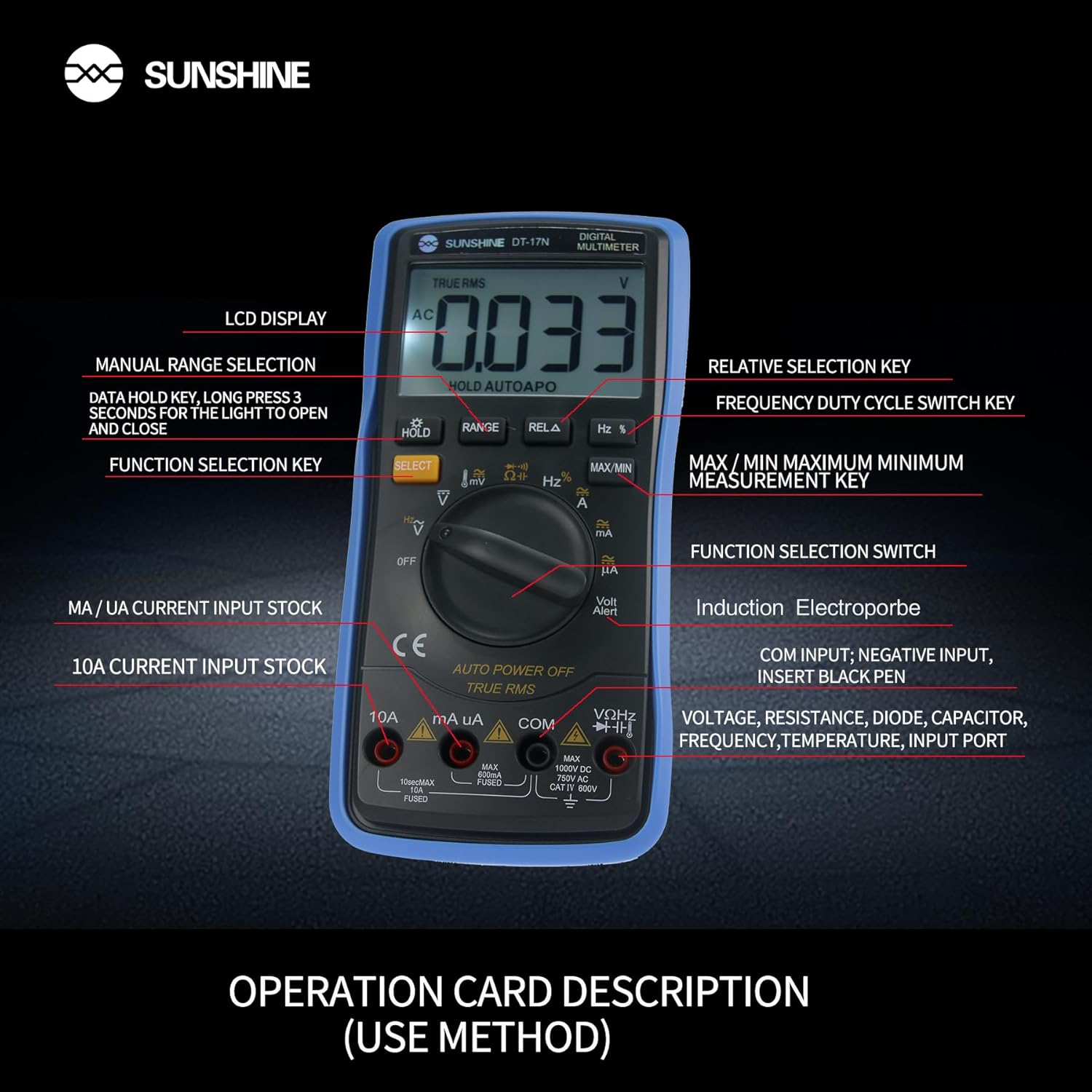
Figi 4: Detaye view of the multimeter's controls and input ports with their respective functions.
- Chanjman Fonksyon Rotary: Used to select the desired measurement function (e.g., Voltage, Current, Resistance, Temperature).
- Bouton SELECT: Toggles between different measurement modes within a single rotary switch position (e.g., AC/DC voltage, Diode/Continuity).
- Bouton HOLD: Freezes the current reading on the display. Press and hold to activate/deactivate the backlight.
- Bouton RANGE: Allows manual selection of measurement ranges, overriding the automatic ranging feature.
- RELA Button (Relative Selection Key): Mezire diferans ki genyen ant yon valè referans ki estoke ak lekti aktyèl la.
- Hz % Button (Frequency Duty Cycle Switch Key): Chanje ant mezi frekans ak sik devwa.
- Bouton MAX/MIN: Displays the maximum or minimum measured value during a measurement session.
- VΩHz Input Port: Connect the red test lead for voltage, resistance, frequency, capacitance, diode, and temperature measurements.
- COM Input Port: Connect the black test lead (common ground) for all measurements.
- mA/uA Input Port: Connect the red test lead for measuring small currents (milliamperes and microamperes).
- 10A Input Port: Connect the red test lead for measuring large currents (up to 10 Amperes).
- Volt Alert (NCV): Ki pa Peye-Kontakte Voltage detection feature.
4. Enstalasyon
4.1. Enstalasyon batri
The DT-17N is battery-powered. To install or replace the battery:
- Asire w ke miltimèt la etenn.
- Jwenn kouvèti konpatiman batri a sou dèyè aparèy la.
- Devise vis (yo) ki kenbe yo epi retire kouvèti a.
- Insert the new battery, observing correct polarity (+ and -).
- Remèt kouvèti konpatiman batri a epi byen sere l ak vis(yo).
4.2. Konekte fil tès yo
Always connect the black test lead to the COM input jack. Connect the red test lead to the appropriate input jack based on the measurement you intend to perform:
- Pou Voltage, Resistance, Capacitance, Frequency, Diode, and Temperature measurements: Connect the red test lead to the VΩHz Jack.
- For Current measurements (mA/uA): Connect the red test lead to the mA/uA Jack.
- For High Current measurements (10A): Connect the red test lead to the 10A Jack.
5. Operasyon Enstriksyon
The Sunshine DT-17N features automatic identification for most ranges, simplifying operation. Use the rotary switch to select the primary function and the SELECT button to toggle sub-functions.
5.1. Mezire Volimtage (AC/DC)
- Vire switch la Rotary nan la V pozisyon.
- Si sa nesesè, peze la CHWAZI button to toggle between AC (~) and DC (—) voltage.
- Konekte plon tès nwa a nan COM Jack ak fil tès wouj la nan VΩHz Jack.
- Konekte sond tès yo an paralèl ak sikwi a oswa konpozan ou vle mezire a.
- Li voltage valè sou ekspozisyon an.

Figure 5: The multimeter showing a DC millivolt measurement on its display.
5.2. Measuring Current (AC/DC)
Atansyon: Never connect the multimeter in parallel when measuring current, as this can damage the meter and the circuit. Always connect in series.
- Vire switch la Rotary nan la mA/uA or 10A position, depending on the expected current.
- Si sa nesesè, peze la CHWAZI button to toggle between AC (~) and DC (—) current.
- Konekte plon tès nwa a nan COM jack. Connect the red test lead to the mA/uA or 10A jack accordingly.
- Open the circuit and connect the test probes in series with the load.
- Li valè aktyèl la sou ekran an.
5.3. Mezire rezistans
- Vire switch la Rotary nan la Ω pozisyon.
- Konekte plon tès nwa a nan COM Jack ak fil tès wouj la nan VΩHz Jack.
- Asire w ke sikwi a pa gen enèji epi tout kondansateur yo dechaje.
- Konekte sond tès yo atravè konpozan an pou mezire rezistans li.
- Li valè rezistans nan ekspozisyon an.
5.4. Measuring Capacitance
- Vire switch la Rotary nan la Kapasite symbol (often shared with diode/continuity).
- Peze a CHWAZI button until the capacitance mode is active.
- Konekte plon tès nwa a nan COM Jack ak fil tès wouj la nan VΩHz Jack.
- Ensure the capacitor is fully discharged before connecting the test probes.
- Konekte sond tès yo atravè kondansateur la.
- Li valè a kapasite sou ekspozisyon an.
5.5. Measuring Frequency / Duty Cycle
- Vire switch la Rotary nan la Hz % pozisyon.
- Peze a Hz % button to toggle between frequency (Hz) and duty cycle (%).
- Konekte plon tès nwa a nan COM Jack ak fil tès wouj la nan VΩHz Jack.
- Connect the test probes in parallel to the signal source.
- Read the frequency or duty cycle value on the display.
5.6. Mezi Tanperati
The DT-17N can measure temperature using a K-type thermocouple (not always included, check package contents).

Figi 6: Egzample of temperature measurement using the DT-17N Multimeter with a thermocouple.
- Vire switch la Rotary nan la ° C / ° F. pozisyon.
- Si sa nesesè, peze la CHWAZI button to choose between Celsius or Fahrenheit.
- Connect the K-type thermocouple to the VΩHz epi COM jacks, obsève polarite.
- Place the thermocouple tip on or in the object whose temperature you wish to measure.
- Li valè tanperati a sou ekran an.
5.7. Diode Test and Continuity
- Vire switch la Rotary nan la Dyòd/Kontinuite senbòl.
- Peze a CHWAZI button to toggle between Diode Test and Continuity Test.
- Konekte plon tès nwa a nan COM Jack ak fil tès wouj la nan VΩHz Jack.
- For Diode Test: Connect the probes across the diode. The display will show the forward voltage drop. Reverse the probes to check for open circuit.
- For Continuity Test: Connect the probes across the circuit or component. A beep indicates continuity (low resistance).
5.8. Ki pa Peye-Kontak Voltage (NCV) Deteksyon
The NCV function allows detection of AC voltage san kontak dirèk ak kondiktè yo.
- Vire switch la Rotary nan la NCV position (often indicated by a Volt Alert symbol).
- Move the top part of the multimeter near the conductor.
- The meter will beep and/or flash an indicator light if AC voltage detekte.
5.9. Data Hold and Backlight
- Done kenbe: Peze a KENBE Peze bouton an yon ti moman pou bloke lekti aktyèl la sou ekran an. Peze ankò pou lage li.
- Ekleraj: Peze epi kenbe la KENBE button for approximately 3 seconds to turn the display backlight ON or OFF.
5.10. MAX/MIN Measurement
This function records the maximum and minimum values measured during a session.
- Select the desired measurement function (e.g., Voltagak).
- Peze a MAX/MIN button. The display will show 'MAX' and the maximum value recorded.
- Peze MAX/MIN again to cycle to 'MIN' and view the minimum value.
- Peze epi kenbe MAX/MIN pou sòti nan mòd sa a.
6. Antretyen
Bon antretyen asire lonjevite ak presizyon miltimèt ou a.
6.1. Netwayaj
Siye ka a ak anonsamp twal ak yon savon dou. Pa sèvi ak pwodui abrazif oswa solvan. Asire w ke mèt la byen sèk anvan w itilize li.
6.2. Ranplasman batri
Refer to Section 4.1 for battery replacement instructions. Always use the specified battery type.
6.3. Holster Care
The multimeter is protected by a thick rubber shockproof holster, designed for durability and a non-slip grip. Keep the holster clean and free from debris.

Figure 7: The durable rubber holster provides protection and a comfortable grip for the multimeter.
NAN. Depanaj
If you encounter issues with your DT-17N multimeter, refer to the table below for common problems and solutions.
| Pwoblèm | Kòz posib | Solisyon |
|---|---|---|
| Pa gen ekspozisyon oswa ekspozisyon fèb | Low or dead battery; Poor battery contact | Replace battery; Check battery contacts |
| Lekti ki pa kòrèk | Wrong function selected; Improper test lead connection; Damaged test leads; Out of range | Select correct function; Ensure leads are in correct jacks; Replace leads; Select higher range or check specifications |
| Pa gen bip kontinwite | Circuit resistance too high; Continuity mode not selected | Ensure resistance is below threshold; Press SELECT to enter continuity mode |
| Fuse blown (for current measurements) | Overcurrent applied | Replace fuse with specified type and rating; Ensure correct current measurement procedure |
8. Espesifikasyon
Technical specifications for the Sunshine DT-17N Digital Multimeter.
| Karakteristik | Spesifikasyon |
|---|---|
| Modèl | DT-17N |
| Kalite Mezi | Miltimèt |
| Ekspozisyon | 5999 (5 5/6) counts, Automatic Polarity Display, Backlit LCD |
| Sampling To | Apeprè 3 fwa pou chak dezyèm |
| Sous pouvwa | Batri Powered |
| Minimòm opere Voltage | 3 Vòlt (DC) |
| Ranje Mezi Tanperati | 0°C a 1000°C (32°F a 1832°F) |
| Induction Electroprobe Function | Yes (NCV) |
| Double entegral A / D Konvèsyon | Wi |
| Dimansyon atik | 5.51 x 2.76 x 1.18 pous |
| Pwa atik | 0.55 Kilogram |
| Koulè | Ble |
9. Garanti ak sipò
9.1. Enfòmasyon sou Garanti
This product comes with a warranty of 3 mwa apati dat acha aTanpri konsève prèv acha ou a pou reklamasyon garanti. Garanti a kouvri domaj fabrikasyon nan itilizasyon nòmal.
9.2. Sipò pou Kliyan
For technical assistance or inquiries regarding your Sunshine DT-17N Digital Multimeter, please contact your retailer or the manufacturer's customer service department. Refer to your purchase documentation for specific contact details.