
1. Entwodiksyon
This manual provides detailed instructions for the safe and effective operation of your Andoer 4K 48MP 60FPS WiFi Camcorder. Please read this manual thoroughly before using the device and retain it for future reference. This camcorder is designed for high-quality video recording and photography, featuring 4K Ultra HD resolution, 48-megapixel photos, a 3-inch IPS touchscreen, and infrared night vision capabilities. It is equipped with WiFi connectivity for easy file transfer and remote control, and comes with essential accessories such as an external microphone and a wide-angle macro lens.

Image 1.1: Andoer 4K Camcorder with included accessories.
2. Pake kontni
Verifye ke tout atik ki nan lis anba a yo enkli nan pakè ou a. Si gen nenpòt atik ki manke oswa ki domaje, tanpri kontakte machann ou an.

Imaj 2.1: Tout konpozan ki enkli nan pake a.
- Camcorder
- Mikwofòn
- Vit vit pou mikwofòn
- 3.5mm TRS pou TRS Audio Kab
- USB kab
- Manch
- Camera Lens (Wide-angle macro lens)
- Bag adaptè lantiy
- 2 x Lithium-polymer Batteries (2000mAh)
- Kontwòl Remote
- Camcorder Storage Bag
- Sak Depo Lantiy
- Camcorder User Manual
- Manyèl Itilizatè Mikwofòn
3. Pwodwi souview
Familyarize w ak diferan pati ak kontwòl kamera videyo w la.
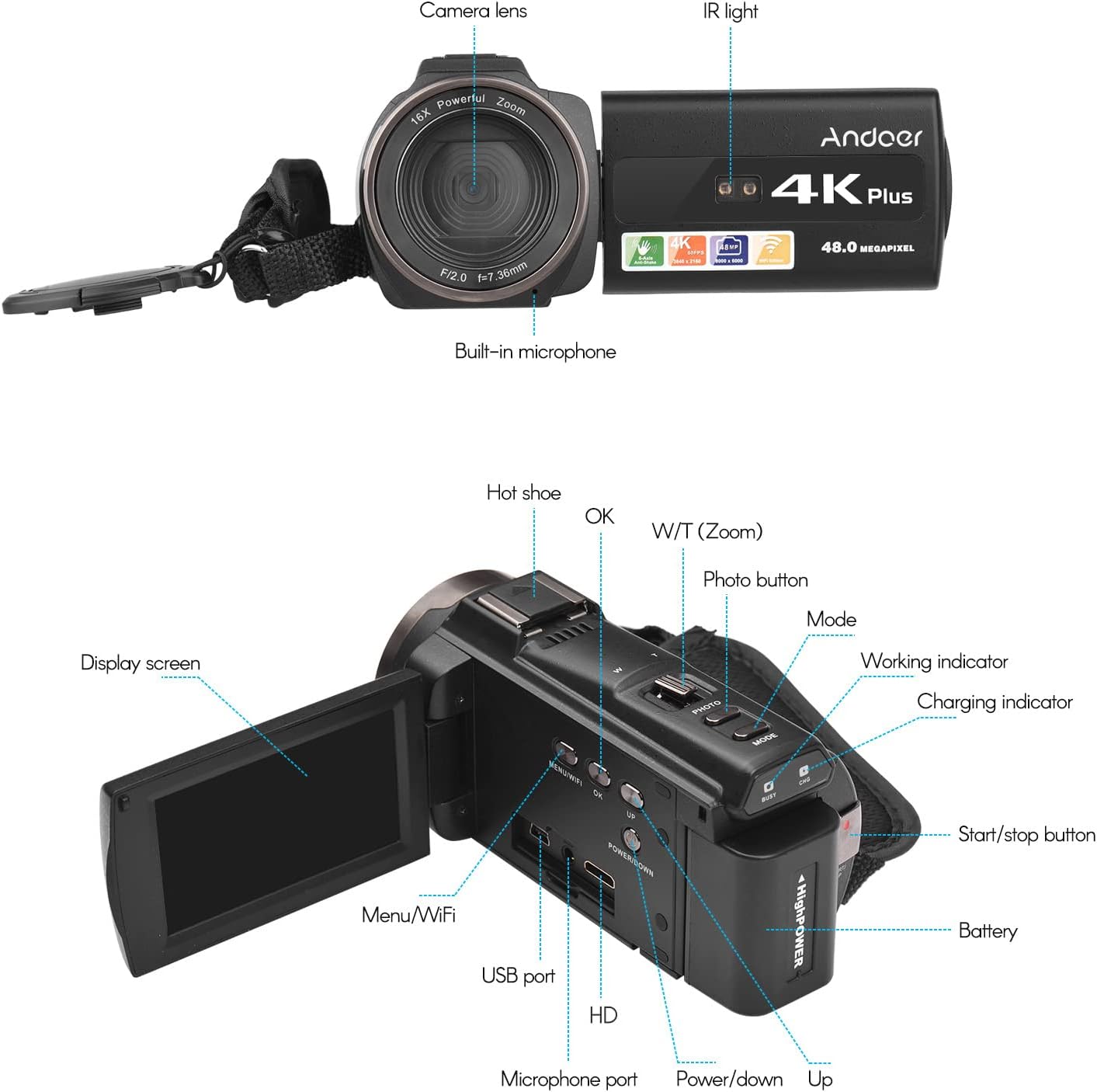
Imaj 3.1: Devan ak Dèyè View of the Camcorder with labeled components.
Konpozan kle:
- Lantiy kamera: Main optical component for capturing images and videos.
- IR Limyè: Emits infrared light for night vision recording.
- Mikwofòn entegre: Captures audio. An external microphone can be connected for enhanced sound quality.
- Soulye cho: Mount for external accessories like the included microphone or an LED video light.
- Display Screen (3" IPS Touch Screen): Pou viewing viv footage, playback, and navigating menus.
- Bouton kontwòl: Including Power, Mode, Photo, Zoom (W/T), OK, Menu/WiFi, Up/Down.
- Pò: USB, HD (HDMI), Microphone port.
- Lòj batri: Li gen pil rechargeable la.
4. Enstalasyon
4.1 Chaje batri a
Before first use, fully charge the included lithium-polymer batteries. Insert one battery into the camcorder's battery compartment. Connect the camcorder to a power source using the provided USB cable. The charging indicator will illuminate during charging and turn off when fully charged. A full charge typically takes several hours.

Image 4.1: Battery installation and charging indication.
4.2 Mete yon kat memwa
The camcorder supports TF (MicroSD) cards up to 128GB. Ensure the card is formatted before first use in the camcorder's settings. Insert the memory card into the designated slot until it clicks into place.
- Use a Class 10 or higher speed rating for optimal performance, especially for 4K video recording.
- The camcorder supports V60 video speed class.
4.3 Attaching the External Microphone
For improved audio quality, attach the external stereo microphone to the hot shoe mount on top of the camcorder. Connect the microphone's 3.5mm audio cable to the microphone input port on the camcorder.
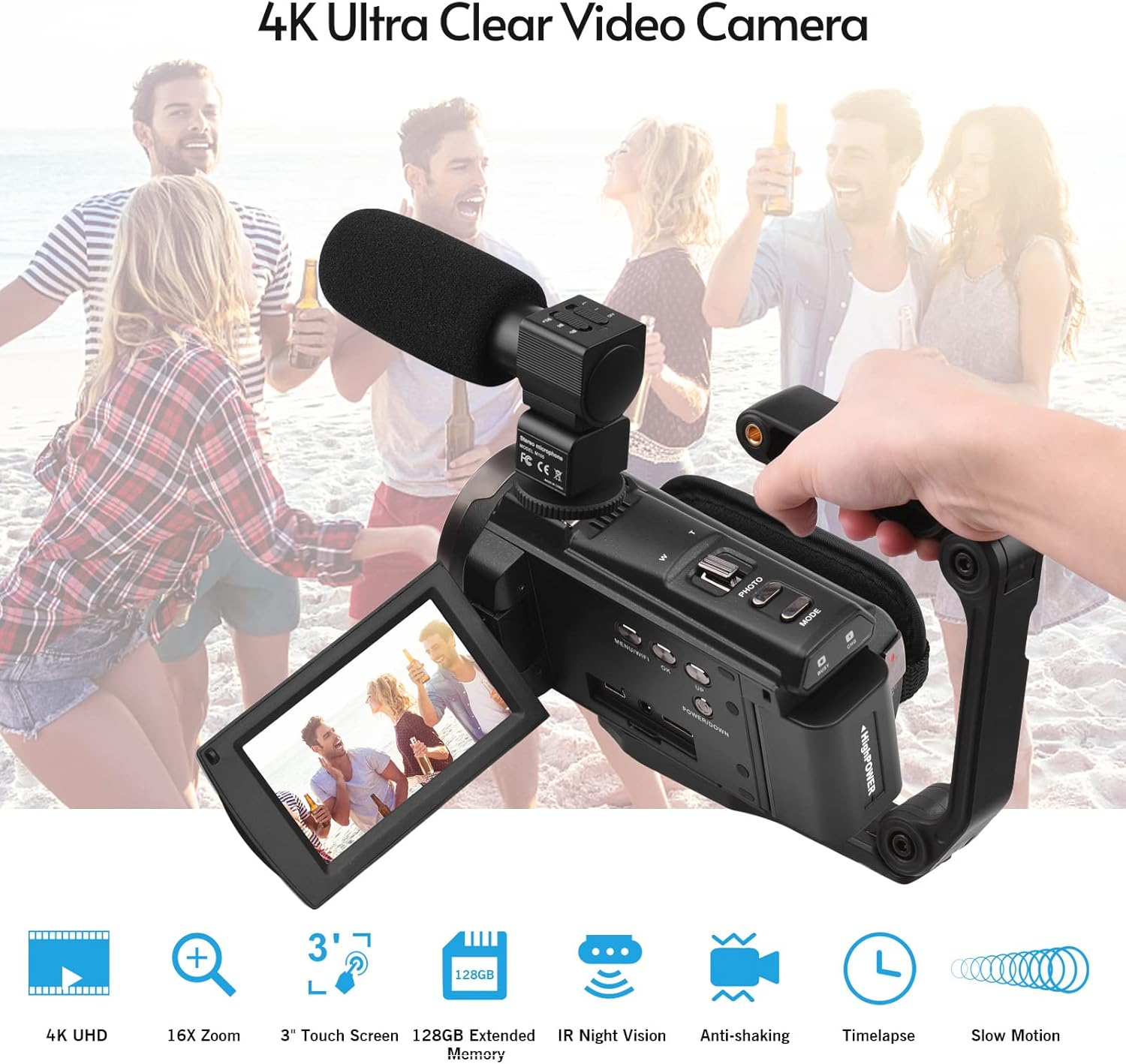
Image 4.2: External microphone attached to the camcorder.
4.4 Attaching the Wide-Angle Macro Lens
To use the wide-angle macro lens, first attach the lens adapter ring to the camcorder's main lens. Then, screw the wide-angle macro lens onto the adapter ring. This lens provides a broader perspective for your shots.

Image 4.3: Wide-angle macro lens for expanded field of view.
4.5 Attaching the Handgrip
The included handgrip can be attached to the bottom of the camcorder via the 1/4" screw hole for more stable handheld recording.
5. Operasyon Enstriksyon
5.1 Limen/Etenyen
To power on the camcorder, open the display screen and press the Power button. To power off, press and hold the Power button, or close the display screen.
5.2 Anrejistreman Videyo
- Limen kamera a.
- Peze a Mode button to select video recording mode.
- Peze a Kòmanse/Stop button to begin recording. The recording indicator will flash.
- Peze a Kòmanse/Stop bouton ankò yo sispann anrejistreman.
The camcorder supports 4K/60FPS video resolution for clear and smooth footage.
5.3 Pran Foto
- Limen kamera a.
- Peze a Mode button to select photo mode.
- Ankadre foto ou a lè l sèvi avèk ekran an.
- Peze a Foto button to capture a 48-megapixel image.
5.4 Using the 3" IPS Touch Screen
The capacitive touchscreen allows for intuitive navigation of menus and settings. Tap to select options, swipe to scroll, and pinch to zoom (if supported in specific modes).
5.5 WiFi Function
The built-in WiFi allows for wireless transmission of files to a compatible smartphone or tablet via a dedicated app. It also enables remote control of the camcorder from your mobile device.
- Activate WiFi on the camcorder via the menu.
- Download and install the specified app on your mobile device.
- Connect your mobile device to the camcorder's WiFi network.
- Use the app to control recording, view viv footage, ak transfè files.
5.6 IR Night Vision
For recording in low-light or dark conditions, activate the IR Night Vision feature. This utilizes infrared light to capture clear black and white footage.

Image 5.1: IR Night Vision in operation.
5.7 Zoom dijital
Use the W/T (Wide/Telephoto) button to adjust the 16x digital zoom. Note that digital zoom can reduce image quality compared to optical zoom.
5.8 Estabilizasyon Imaj
The camcorder features 6-axis image stabilization to reduce blur and shakiness in your recordings, especially during handheld use.
5.9 Karakteristik espesyal
- Deteksyon Mouvman: The camcorder can be set to automatically start recording when motion is detected.
- Face Detection/Recognition: Optimize fokus ak ekspozisyon pou figi ki nan kad la.
- Kontwòl Remote: Use the included remote control to operate the camcorder from a distance, useful for self-recording or group shots.
- Oto-revèy: Set a delay before capturing a photo or starting a video recording.

Image 5.2: Tripod mounting for self-timer and stable shots.
5.10 Konekte ak Aparèy Ekstèn
- USB: Konekte ak yon òdinatè pou file transfè.
- HD (HDMI): Connect to a TV or monitor to view anrejistreman ou yo sou yon ekran ki pi gwo.
6. Antretyen
- Netwayaj: Use a soft, dry cloth to clean the camcorder body. For the lens, use a specialized lens cleaning cloth and solution. Avoid harsh chemicals.
- Depo: Sere kamera videyo a nan yon kote ki fre epi sèk, lwen limyè solèy dirèk ak tanperati ekstrèm. Retire pil la si w ap sere l pou yon bon bout tan.
- Swen batri: Do not expose batteries to high temperatures. Recharge regularly even if not in use to maintain battery health.
- Mizajou mikrolojisyèl: Tcheke manifakti a webVizite sit la detanzantan pou nenpòt mizajou firmwèr ki disponib pou asire pèfòmans optimal ak nouvo fonksyonalite.
NAN. Depanaj
| Pwoblèm | Kòz posib | Solisyon |
|---|---|---|
| Kamera videyo a pa limen. | Batri a fin itilize oswa li pa byen mete. | Ensure battery is fully charged and correctly inserted. Try the second battery. |
| Pa ka anrejistre videyo/pran foto. | Memory card is full, not inserted, or corrupted. Incorrect mode selected. | Check memory card status, ensure it's inserted and has free space. Format if necessary (backup data first). Select the correct mode. |
| Move kalite imaj/videyo. | Lens is dirty. Low light conditions without IR. Digital zoom used excessively. | Clean the lens. Activate IR Night Vision in dark environments. Avoid excessive digital zoom. Ensure sufficient lighting. |
| Pwoblèm koneksyon WiFi. | Incorrect WiFi settings. App not installed or updated. | Ensure WiFi is enabled on camcorder and mobile device. Re-establish connection. Update or reinstall the mobile app. |
| Microphone not recording audio. | Microphone not connected properly or settings incorrect. | Check microphone cable connection. Verify audio input settings in the camcorder menu. |
8. Espesifikasyon
| Karakteristik | Detay |
|---|---|
| Nimewo Modèl | ZOH0150584179474NZ |
| Rezolisyon videyo | 4K (3840x2160) a 60FPS |
| Rezolisyon foto | 48 Megapixels (8000x6000) |
| Estabilizasyon Imaj | 6-aks |
| Ekspozisyon ekran | 3-inch IPS Capacitive Touch Screen |
| Zoom dijital | 16x |
| Koneksyon | USB, Wi-Fi, HDMI |
| Sipò pou kat memwa | TF (MicroSD) up to 128GB (Class 10, V60 recommended) |
| Karakteristik espesyal | IR Night Vision, Motion Detection, Face Detection, Remote Control |
| Batri | 2 x 2000mAh Lithium-polymer |
| Ouverture Lens | f/2.0 |
| Longè Fokal Minimòm | 39mm |
| Aparèy konpatib | Tripod, Microphone, TV, Computer, Smartphone |
| Sistèm operasyon konpatibilite | Windows |
| Dimansyon (Pake) | 18 x 15 x 11 cm |
| Pwa (Pakè) | 1.01 kg |
9. Garanti ak sipò
Andoer products are designed for reliability and performance. For any technical assistance, troubleshooting beyond this manual, or warranty inquiries, please contact Andoer customer support through their official websit oswa revandè ou.
Tanpri kenbe prèv ou achte pou reklamasyon garanti.