
1. Entwodiksyon
Thank you for choosing the Devoko Ergonomic Gaming Chair, model OCRC8900. This manual provides detailed instructions for the assembly, operation, and maintenance of your new chair. Please read this manual carefully before assembly and use to ensure proper function and longevity of the product.
The Devoko OCRC8900 is designed to provide comfort and support during extended periods of sitting, whether for gaming, work, or relaxation. Its ergonomic design includes multi-point support, an adjustable headrest, and lumbar cushion to conform to your spine.

Imaj 1.1: Devan view of the Devoko Ergonomic Gaming Chair OCRC8900 in black.
2. Enfòmasyon sou Sekirite
- Toujou swiv enstriksyon asanble yo ak anpil atansyon.
- Ensure all screws and bolts are securely tightened before using the chair. Periodically check and re-tighten if necessary.
- Pa kanpe sou chèz la oubyen sèvi avè l kòm yon ti mach eskalye.
- Pa depase kapasite pwa maksimòm 130 kg (286 lbs).
- Kenbe timoun yo lwen pati k ap deplase yo pandan asanblaj ak ajisteman.
- Sèvi ak chèz la sou yon sifas plat epi ki stab.
3. Pake kontni
Please check the package contents against the list below. If any parts are missing or damaged, please contact customer support.
- 1 x Devoko Ergonomic Gaming Chair (disassembled)
- 1 x Assembly Tool Kit (includes Allen wrench and screws)
- 1 x Manyèl Itilizatè (dokiman sa a)
4. Enstriksyon Asanble
Follow these steps to assemble your Devoko Ergonomic Gaming Chair. It is recommended to assemble the chair on a soft, clean surface to prevent damage.
- Mete wou yo nan baz la: Mete senk wou yo nan twou ki nan bout chak pye baz chèz la. Pouse byen fèm jiskaske yo fè yon klik pou yo anfòm.
- Mete asansè gaz la: Mete silenn asansè gaz la nan twou santral baz chèz la ki fin monte a. Asire w ke li byen chita.
- Asanble Mekanis Syèj la: Attach the seat mechanism to the underside of the seat cushion using the provided screws. Ensure the front of the mechanism faces the front of the seat.
- Tache akoudwar: Fikse akoudwar yo sou kote kousen chèz la avèk vis ki fèt pou sa yo. Pa sere yo nèt kounye a.
- Konekte Dossier la ak Syèj la: Align the backrest with the seat cushion's metal brackets. Secure them together using the remaining screws. Once aligned, tighten all screws for the armrests and backrest firmly. Ensure all screws are aligned with their holes before tightening.
- Mete Asanblaj Syèj la sou Asansè Gaz la: Carefully place the assembled seat and backrest onto the gas lift cylinder, ensuring the center hole of the seat mechanism aligns with the top of the gas lift.
- Attach Headrest and Lumbar Cushions: Position the headrest cushion and lumbar support cushion as desired. These are typically secured with straps.

Image 4.1: Diagram illustrating key dimensions and components for assembly.

Image 4.2: Detail of the gas lift cylinder, a key component for height adjustment.
5. Operasyon Enstriksyon
Your Devoko Ergonomic Gaming Chair offers several adjustable features to customize your seating experience.
5.1. Ajisteman Wotè Syèj
To adjust the seat height, locate the lever on the right side beneath the seat. While seated, pull the lever up to lower the seat. To raise the seat, stand up slightly and pull the lever up. Release the lever to lock the height in place. The gas lift allows for a height adjustment range of 33-43 cm.
5.2. Ajisteman Enklinasyon Do-kay la
The backrest can be reclined between 90° and 150°. To recline, pull the recline lever (typically located on the right side, near the height adjustment lever) and lean back to your desired angle. Release the lever to lock the backrest in position. To return to an upright position, pull the lever and lean forward.

Image 5.1: Illustration of the chair's recline angles (90°, 120°, 150°) and height adjustment mechanism.
5.3. Ajisteman akoudwa
The armrests are adjustable. Locate the buttons or levers on the side of the armrests to adjust their height. Adjust them to a comfortable position that supports your arms and shoulders.

Image 5.2: Detail showing the adjustable armrests and the tilt lock mechanism.
5.4. Lumbar and Headrest Cushions
The chair includes a removable headrest pillow and lumbar support cushion. Adjust their position along the backrest to find the most comfortable and supportive placement for your neck and lower back.

Image 5.3: Ergonomic design highlighting multi-point support for the spine.
5.5. Fonksyon pivotman
The chair features a 360-degree swivel function, allowing for easy rotation and access to your workspace without needing to move the entire chair.
6. Antretyen
- Netwayaj: Siye sifas chèz la ak yon twal mou,amp cloth. For tougher stains, use a mild soap solution and then wipe with a clean, damp twal. Evite pwodui chimik ki agresif oswa pwodui netwayaj abrazif.
- Woulèt: Tcheke wou yo detanzantan pou wè si yo gen cheve oswa debri ki ka anpeche yo deplase byen. Netwaye yo jan sa nesesè.
- Fastener: Regularly check all screws and bolts to ensure they are tight. Re-tighten any loose fasteners to maintain stability and safety.
NAN. Depanaj
| Pwoblèm | Kòz posib | Solisyon |
|---|---|---|
| Chèz la ap tranble oswa li pa estab. | Vis ki lach oswa move asanblaj. | Check all assembly screws and tighten them securely. Ensure the chair is on a flat surface. |
| Ajisteman wotè chèz la pa fonksyone. | Gas lift not properly engaged or damaged. | Ensure the gas lift is correctly inserted into the base and seat mechanism. If still not working, contact support. |
| Rou yo pa woule byen. | Debri kole nan wou yo oubyen wou yo domaje. | Inspect casters for hair, dust, or other obstructions and remove them. If damaged, consider replacement. |
| Backrest recline not locking. | Recline mechanism not engaged or damaged. | Ensure the recline lever is fully released to lock the position. If the issue persists, contact support. |
| Lumbar/Headrest cushions slide out of place. | Cushions not properly secured or straps are loose. | Adjust the straps to secure the cushions more firmly to the backrest. |
8. Espesifikasyon
| Karakteristik | Detay |
|---|---|
| Nimewo Modèl | OCRC8900 |
| Mak | Devoko |
| Koulè | Nwa |
| Materyèl | Alloy Steel frame, High-density foam, PU leather upholstery |
| Dimansyon Syèj (L x P) | 37 cm x 52 cm (14.6 pous x 20.5 pous) |
| Dimansyon Dosye (L x H) | 56 cm x 93 cm (22 pous x 36.6 pous) |
| Reglabl Wotè Syèj | 33 santimèt - 43 santimèt (13 pous - 17 pous) |
| Kapasite maksimòm pwa | 130 kg (286 liv) |
| Pwa pwodwi | 20 kg (44 liv) |
| Ang Enklinasyon | 90° pou 150° |
| Karakteristik espesyal | Ergonomic design, Adjustable height, Reclining backrest, Adjustable armrests, Lumbar support, Headrest pillow, 360° swivel, Silent casters |

Image 8.1: Indication of the chair's maximum weight capacity.
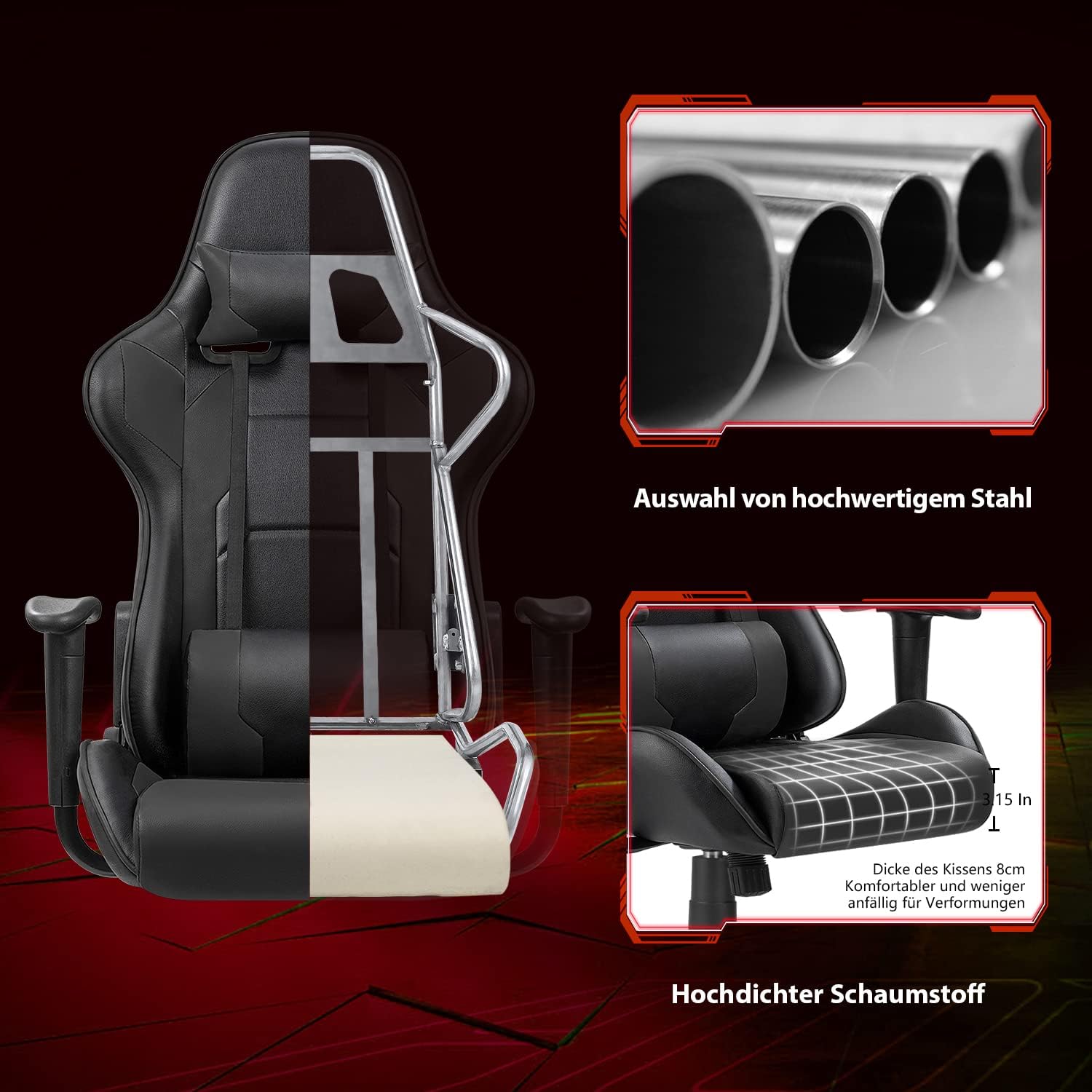
Image 8.2: Cutaway view illustrating the robust alloy steel frame and high-density foam construction.
9. Garanti ak sipò
Devoko is committed to providing high-quality products and customer satisfaction. While specific warranty details are not provided in this manual, please retain your proof of purchase for any warranty claims.
If you have any questions, require assistance with assembly, or encounter any issues with your Devoko Ergonomic Gaming Chair, please do not hesitate to contact our customer support team. We are here to help.
For support, please refer to the contact information provided with your purchase or visit the official Devoko websit.