
Entwodiksyon
This manual provides essential information for setting up, operating, maintaining, and troubleshooting your Xiaomi Redmi Note 11S smartphone. Please read this guide thoroughly to ensure optimal performance and longevity of your device.
Yon souview of the Redmi Note 11S, highlighting its 108MP pro-grade main camera, 90Hz FHD+ AMOLED DotDisplay, and 33W Pro fast charging capabilities.
Enstalasyon
1. Unboxing ak Inisyal Enspeksyon
Carefully unpack your Redmi Note 11S. Ensure all items are present:
- Xiaomi Redmi Remak 11S Smartphone
- Vit Machin Charger
- SIM Plato Ejector
- Mi Charger
2. Enstalasyon Kat SIM
The Redmi Note 11S supports dual nano SIM cards. To install:
- Jwenn plato kat SIM lan sou bò aparèy la.
- Mete zouti pou retire plato SIM lan nan ti twou ki akote plato a epi peze dousman jiskaske plato a soti.
- Place your nano SIM card(s) into the designated slots on the tray. Ensure the gold contacts face downwards.
- Remete plato a nan telefòn nan avèk prekosyon.
3. Premye Chaje ak Limen
Before first use, it is recommended to fully charge your device. Connect the wall charger to the phone and a power outlet. The Redmi Note 11S supports 33W Pro fast charging for quick recharging of its 5000mAh battery.

Illustration of the 33W Pro fast charging feature for the 5000mAh battery, showing charging efficiency and estimated usage times for video, calling, and music.
To power on, press and hold the power button located on the side of the device until the Xiaomi logo appears.
Enstriksyon Operasyon
1. Navigasyon debaz
The Redmi Note 11S features a responsive touchscreen. Use gestures such as tap, swipe, pinch, and spread to navigate the MIUI 12 operating system. The power button controls screen on/off and device power, while the volume buttons adjust audio levels.
2. Karakteristik ekspozisyon
Your device is equipped with a 6.43-inch FHD+ AMOLED DotDisplay with a 90Hz high refresh rate for smooth visuals. It also includes Sunlight Display for readability in bright conditions and Reading Mode 3.0 to reduce eye strain.

The 6.43-inch FHD+ AMOLED DotDisplay of the Redmi Note 11S, emphasizing its 90Hz high refresh rate for a responsive touchscreen experience.
3. Sistèm Kamera
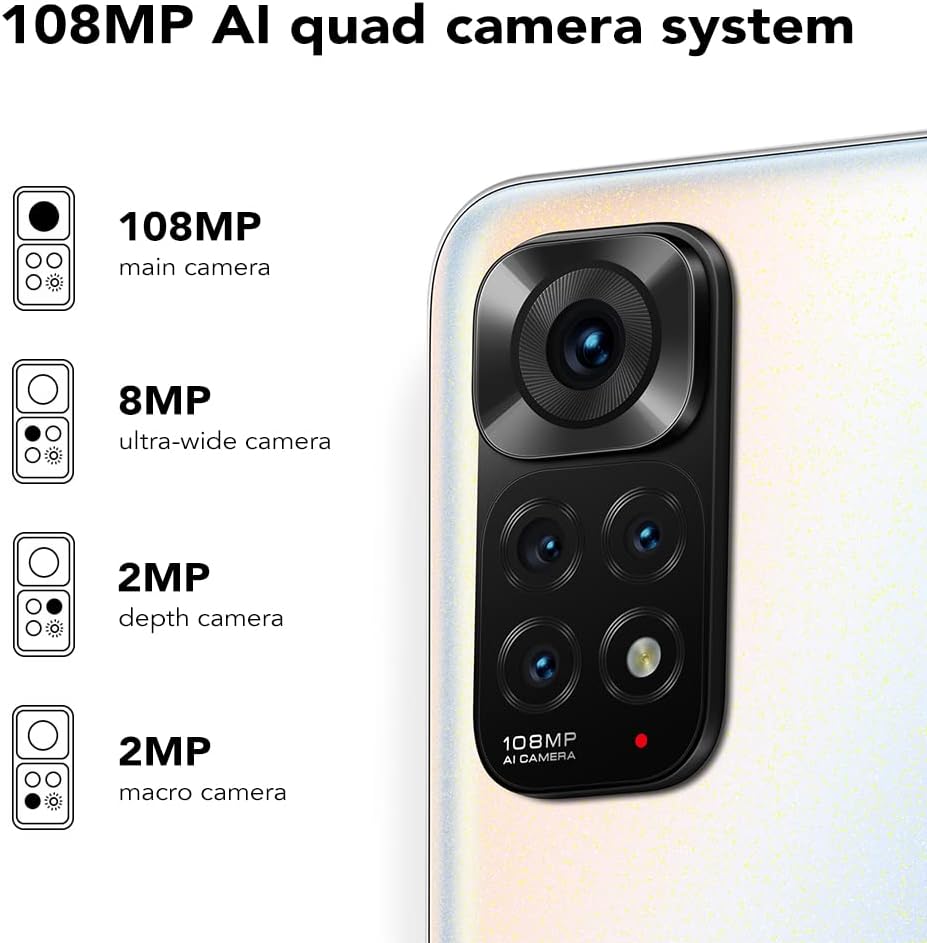
The Redmi Note 11S features a 108MP AI quad camera system on the rear and a 16MP selfie camera. The rear camera setup includes:
- 108MP Kamera prensipal
- 8MP Kamera ultra-lajè
- 2MP Kamera Macro
- 2MP Kamera pwofondè
Open the Camera application to access various modes such as Photo, Video, Portrait, Night Mode, and more.

Detaye view of the 108MP AI quad camera system on the Redmi Note 11S, featuring a 108MP main camera, 8MP ultra-wide camera, 2MP depth camera, and 2MP macro camera.
4. Depo ak Pèfòmans
The device comes with 128GB of internal storage, expandable up to 1TB via a microSD card (sold separately). It is powered by the MediaTek Helio G96 processor, ensuring smooth performance for daily tasks and gaming.
5. Koneksyon
The Redmi Note 11S supports 4G cellular networks, Wi-Fi, and GPS for navigation and location services.
Antretyen
1. Netwaye Aparèy Ou a
Sèvi ak yon twal mou ki pa gen pousyè pou netwaye ekran ak kò telefòn ou an. Evite itilize pwodui chimik ki agresif oswa materyèl abrazif. Pa ekspoze aparèy la a twòp imidite.
2. Mizajou lojisyèl
Tcheke epi enstale mizajou lojisyèl regilyèman pou asire aparèy ou an gen dènye karakteristik yo, patch sekirite yo ak amelyorasyon pèfòmans yo. Ale nan Anviwònman > Konsènan telefòn > Vèsyon MIUI pou tcheke pou mizajou.
3. Swen batri
Pou pwolonje lavi batri:
- Evite tanperati ekstrèm.
- Pa kite batri a dechaje nèt souvan.
- Sèvi ak plato orijinal ki vini ak aparèy la.
4. Dissipation chalè
The Redmi Note 11S incorporates LiquidCool technology with multiple layers of graphite and copper foil for efficient heat dissipation. Ensure proper airflow around the device during heavy usage to prevent overheating.

Yon entèn view illustrating the multi-dimensional heat dissipation system using LiquidCool technology, which incorporates multiple layers of graphite and copper foil for efficient cooling.
Depanaj
Seksyon sa a adrese pwoblèm komen ou ka rankontre ak Redmi Note 11S ou a.
Aparèy pa Limen
- Asire w batri a chaje. Konekte aparèy la nan plato a pou omwen 30 minit.
- Peze epi kenbe bouton pouvwa a pandan 10-15 segonn pou fòse rekòmanse.
Apps Freezing or Crashing
- Fèmen aplikasyon ki gen pwoblèm nan epi ouvri li ankò.
- Efase kach ak done aplikasyon an atravè Anviwònman > Aplikasyon > Jere aplikasyon yo > [Non aplikasyon an] > Efase done yo.
- Ensure your apps and operating system are up to date.
Pòv Batri lavi
- Adjust screen brightness and reduce screen timeout.
- Disable unused features like Wi-Fi, Bluetooth, or GPS when not needed.
- Idantifye epi fèmen aplikasyon ki konsome anpil enèji k ap fonksyone nan background nan.
Pwoblèm Koneksyon Rezo
- Rekòmanse aparèy ou an.
- Tcheke si kat SIM ou a byen mete.
- Reyajiste paramèt rezo yo atravè Anviwònman > Koneksyon ak pataj > Reyajiste Wi-Fi, rezo mobil ak Bluetooth.
Espesifikasyon
The following table outlines the key specifications for the Xiaomi Redmi Note 11S (Model: 2201117SY).
| Karakteristik | Spesifikasyon |
|---|---|
| Non modèl | NOTE 11s |
| Nimewo Modèl Atik | 2201117SY |
| Mak | XIAOMI |
| Sistèm operasyon | MIUI 12 |
| Gwosè ekran | 6.43 pous |
| Kalite ekspozisyon | FHD+ AMOLED DotDisplay, 90Hz Refresh Rate |
| Kamera dèyè | 108MP Main, 8MP Ultra-wide, 2MP Macro, 2MP Depth |
| Kamera devan | 16MP |
| RAM | 6 GB |
| Kapasite Depo memwa | 128 GB (Ekspansib jiska 1TB) |
| Kapasite batri | 5000 MiliampOrè (mAh) |
| Chaje | 33W Pro Fast Charging (58 minutes for full charge) |
| Teknoloji selilè | 4G |
| Wireless Carrier | Degaje pou tout konpayi asirans yo |
| Koneksyon teknoloji | Wi-Fi, Selilè |
| Karakteristik espesyal | Dual SIM, GPS, Smartphone |
| Dimansyon pwodwi | 2.9 x 0.32 x 6.29 pous |
| Pwa atik | 6.3 ons (179 gram) |
| Koulè | Pèl blan |

The aesthetic flat-frame design of the Redmi Note 11S, highlighting its slim profile (8.09mm thickness) and light weight (179g) for a comfortable grip.
Enfòmasyon sou Garanti
Specific warranty terms and conditions for the Xiaomi Redmi Note 11S may vary by region and retailer. Please refer to the warranty card included with your product packaging or visit the official Xiaomi website for detailed warranty information applicable to your purchase. Retain your proof of purchase for warranty claims.
Sipò
For further assistance, technical support, or service inquiries regarding your Xiaomi Redmi Note 11S, please visit the official Xiaomi support website or contact their customer service. You can typically find contact information and FAQs on the manufacturer's official websit.