
1. Entwodiksyon
The EVTSCAN Peakmeter PM8213C is a portable digital multimeter designed for various electrical measurements. This instrument offers stable performance, high precision, and low power consumption, making it a reliable tool for both professional and DIY users. Its compact appearance and comprehensive features ensure accurate readings for voltage, current, resistance, continuity, non-contact voltage (NCV), frequency, and duty cycle.
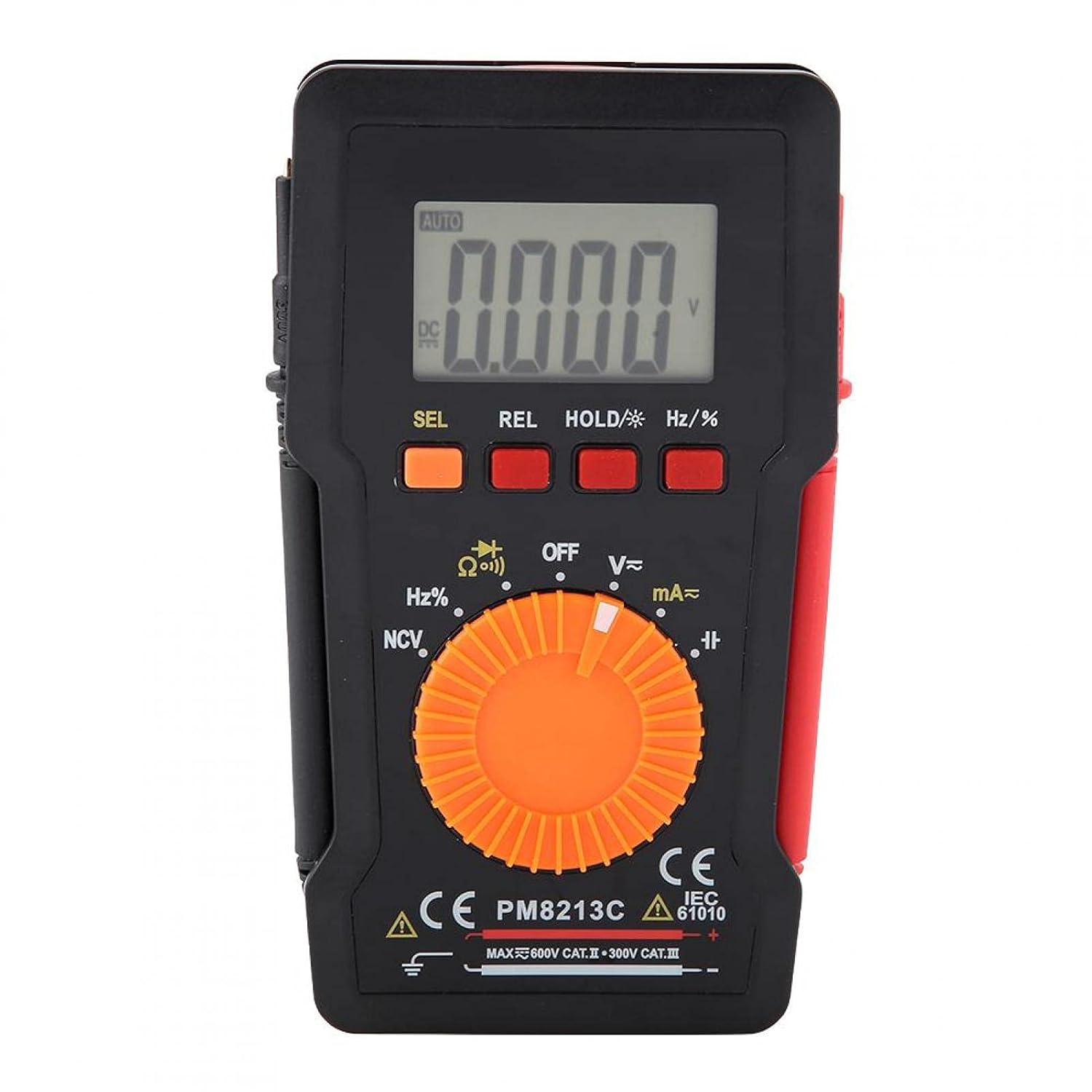
Figi 1: Devan view of the EVTSCAN Peakmeter PM8213C Digital Multimeter.
2. Enfòmasyon sou Sekirite
To ensure safe operation and service of the meter, please read this manual carefully before use. Failure to observe safety warnings can result in serious injury or death. Always adhere to local and national safety codes.
- Pa depase limit maksimòm opinyon yo pou okenn fonksyon.
- Pran prekosyon lè w ap travay ak voltagpi wo pase 30V AC RMS, 42V pik, oswa 60V DC. Volim sa yotages poze yon danje chòk.
- Before measuring current, ensure the meter's test leads are connected to the correct input jacks and the function switch is set to the appropriate current range.
- Toujou dekonekte fil tès yo nan sikwi a anvan ou chanje pozisyon switch fonksyon an.
- Ranplase pil la imedyatman lè endikatè pil ki fèb la parèt pou asire lekti ki egzak.
- Pa sèvi ak mèt la si li sanble domaje oswa si kouvèti pwoteksyon an...asinyo retire g.
- Kenbe men ak dwèt yo dèyè baryè sond yo pandan mezi yo.
3. Pwodwi souview
3.1. Eleman yo
The PM8213C multimeter consists of the following main components:
- Ekspozisyon LCD: Montre lekti mezi, inite, ak endikatè fonksyon.
- Bouton Fonksyon: SEL (Select), REL (Relative), HOLD (Data Hold), Hz/% (Frequency/Duty Cycle).
- Rotary switch: Used to select the desired measurement function (e.g., V~, V-, Ω, Continuity, NCV, Hz%, mA~, A~).
- Jack Antre: Terminals for connecting test leads (COM, VΩHz, mA, A).
- Plon tès: Red and black leads for connecting to the circuit under test.
- Ka pwoteksyon: Provides protection for the meter.

Figure 2: Key features of the PM8213C Multimeter, including LCD screen and compact design.
3.2. Ekspozisyon senbòl yo
Familiarize yourself with the symbols that may appear on the LCD display:
- OTO: Auto-ranging mode is active.
- DC/AC: Direct Current / Alternating Current.
- V: Volts (Voltagak).
- Ω: Ohms (Resistance).
- Hz: Hertz (Frequency).
- %: Sik Devwa.
- NCV: Ki pa Peye-Kontakte Voltage deteksyon.
- RETE: Data Hold function is active.
- REL: Relative measurement mode.
- Senbòl pil: Endike pouvwa batri ki ba.
- OOL: Over-range indication.
4. Enstalasyon
4.1. Enstalasyon batri
The PM8213C requires one CR2032 (3V) button cell battery for operation. The battery is typically not included in the package.
- Asire w ke miltimèt la etenn.
- Jwenn konpatiman pil la sou dèyè mèt la.
- Use a suitable tool (e.g., a small screwdriver) to open the battery compartment cover.
- Insert the CR2032 battery, observing the correct polarity (+ and - markings).
- Ranplase kouvèti lòj batri a epi an sekirite li.
4.2. Test Lead Connection
Connect the test leads to the appropriate input jacks before taking any measurements.
- Konekte a nwa plon tès la COM priz antre (komen).
- Pou pifò mezi (voltage, resistance, frequency, duty cycle, continuity), connect the wouj plon tès la VΩHz jack antre.
- For current measurements (mA), connect the wouj plon tès la mA jack antre.
- For higher current measurements (A), connect the wouj plon tès la A input jack (if available and distinct from mA). Note: The PM8213C typically uses a single current input for mA/A, check the dial for specific ranges.
5. Operasyon Enstriksyon
5.1. Power On/Off
To turn the multimeter ON, rotate the function switch from the OFF position to any desired measurement function. To turn the multimeter OFF, rotate the function switch to the OFF position. The meter features an automatic power-off function after approximately 30 minutes of inactivity to conserve battery life.
5.2. Seleksyon Fonksyon
Use the rotary switch to select the primary measurement function. For functions with multiple modes (e.g., AC/DC voltage, continuity/diode), press the SEL button to toggle between modes.
5.3. Mezire Volim DCtage (V-)
- Connect the red test lead to the VΩHz jack and the black test lead to the COM jack.
- Set the rotary switch to the V- position.
- Connect the test leads in parallel to the DC voltage source or component you wish to measure.
- Li voltage valè sou ekspozisyon LCD a.
5.4. Mezire AC Voltage (V~)
- Connect the red test lead to the VΩHz jack and the black test lead to the COM jack.
- Set the rotary switch to the V~ position.
- Konekte fil tès yo an paralèl ak vòltaj AC a.tage source or component.
- Li voltage valè sou ekspozisyon LCD a.
5.5. Mezire Rezistans (Ω)
- Asire w sikwi a pa gen enèji anvan ou mezire rezistans lan.
- Connect the red test lead to the VΩHz jack and the black test lead to the COM jack.
- Set the rotary switch to the Ω position.
- Connect the test leads across the component whose resistance you want to measure.
- Li valè rezistans lan sou ekran LCD a.
5.6. Tès Kontinuite (Ω))))
- Asire w ke sikwi a pa gen enèji.
- Connect the red test lead to the VΩHz jack and the black test lead to the COM jack.
- Set the rotary switch to the Continuity position (often shared with Resistance or Diode). Press SEL if needed to select continuity.
- Konekte fil tès yo atravè konpozan an oswa fil la.
- If continuity exists (low resistance), the meter will emit an audible beep.
5.7. Ki pa Peye-Kontak Voltage (NCV) Deteksyon
- Mete switch rotary a nan pozisyon NCV la.
- Move the top edge of the multimeter close to the conductor suspected of having AC voltage.
- Kontè a ap endike prezans vòltaj AC a.tage through an audible beep and/or visual indicator (e.g., LED).
5.8. Measuring Frequency (Hz) and Duty Cycle (%)
- Connect the red test lead to the VΩHz jack and the black test lead to the COM jack.
- Set the rotary switch to the Hz/% position.
- Konekte fil tès yo an paralèl ak sous siyal la.
- Peze a Hz /% button to toggle between frequency and duty cycle measurements.
- Li valè a sou ekspozisyon LCD a.
5.9. Measuring Current (mA~, A~)
- AVÈTISMAN: Never connect the meter in parallel to a voltage source when measuring current. This will blow the fuse and can damage the meter.
- Asire w ke sikwi a pa gen enèji.
- Konekte plon tès nwa a nan COM Jack la.
- Pou miliampere (mA) measurements, connect the red test lead to the mA jack. For ampere (A) measurements, connect the red test lead to the A jack (if separate).
- Set the rotary switch to the appropriate mA~ or A~ position.
- Open the circuit where you want to measure current and connect the meter in series with the load.
- Re-energize the circuit and read the current value on the LCD display.
6. Antretyen
6.1. Netwayaj
Siye bwat mèt la ak piblisiteamp twal ak yon savon dou. Pa sèvi ak pwodui abrazif oswa solvang. Kenbe tèminal antre yo pwòp kont pousyè tè ak imidite.
6.2. Ranplasman batri
When the low battery indicator appears on the display, replace the CR2032 battery promptly to ensure accurate measurements.
- Turn the multimeter OFF and disconnect all test leads.
- Louvri kouvèti lòj batri a sou do mèt la.
- Retire ansyen batri CR2032 la.
- Insert a new CR2032 (3V) button cell battery, ensuring correct polarity.
- Byen fèmen kouvèti lòj batri a.
6.3. Ranplasman Fuse
If the current measurement function stops working, the fuse may need replacement. The fuse specification is F 400mA/250V.
- Turn the multimeter OFF and disconnect all test leads.
- Open the meter's casing (refer to the battery replacement section for access, or consult the full service manual if necessary).
- Locate the blown fuse.
- Carefully remove the old fuse and replace it with a new fuse of the exact same type and rating (F 400mA/250V).
- Reassemble the meter's casing byen fèm.
NAN. Depanaj
If the meter does not function correctly, check the following points before seeking service:
- Pa gen ekspozisyon oswa ekspozisyon an fèb: Tcheke enstalasyon batri a epi ranplase si sa nesesè.
- Lekti ki pa kòrèk: Ensure test leads are correctly connected to the appropriate input jacks and the rotary switch is set to the correct function and range. Check battery level.
- Mezi aktyèl la pa fonksyone: Check and replace the fuse if blown. Ensure test leads are connected in series with the circuit.
- "OOL" displayed: The measured value exceeds the selected range. Switch to a higher range or ensure the input is within the meter's capabilities.
8. Espesifikasyon
| Altitid | Mwens pase 2000 m |
| Tanperati Fonksyònman | 0 ~ 40 °C |
| Operasyon Imidite | <80% RH (not considered at <10 °C) |
| Tanperati Depo | -10 ~ 60 °C |
| Depo Imidite | <70% RH (remove batteries) |
| Koefisyan Tanperati | 0.1 precision/°C |
| Max admisib Voltage (Input to Ground) | 600V DC oswa AC rms |
| Pwoteksyon Fuse | F 400mA/250V |
| Sampling To | Approximately 3 times/second |
| Auto Power Off | Apeprè 30 minit |
| Ekspozisyon | Maximum 3999 counts |
| Over-range Display | "OOL" |
| Pwovizyon pou pouvwa | CR2032 (3V) button cell battery |
| Pwa | Approximately 120 - 142 g |
| Dimansyon (L x W x H) | 127 x 70 x 12.5 mm (apeprè 12.8 x 7.5 x 1.3 cm) |
8.1. DC Voltage (PM8213C)
| Range | Rezolisyon | Presizyon |
|---|---|---|
| 4 V | 0.001 V | ±(0.1% + 3 chif) |
| 40 V | 0.01 V | ±(0.1% + 3 chif) |
| 400 V | 0.1 V | ±(0.1% + 3 chif) |
| 600 V | 1 V | ±(0.1% + 3 chif) |
8.2. Pake kontni
- 1 x Digital Multimeter (PM8213C)
- 2 x tès kondwi
- 1 x ka pwoteksyon
9. Garanti ak sipò
Pou enfòmasyon sou garanti a oswa sipò teknik, tanpri kontakte vandè a oswa manifakti a dirèkteman. Kenbe resi acha ou kòm prèv acha.