
1. Pwodwi souview
This replacement remote control is designed to function as a direct substitute for your original Yamaha remote. It comes pre-programmed with all the essential functions of the original RAV477, RAV501, RAV504, RX-A730, RX-V675, and RX-V773 remote controls, requiring no setup or pairing. Simply insert batteries, and it is ready for immediate use.
1.1 Modèl konpatib
This remote control is compatible with the following Yamaha models:
- YAMAHA RAV477
- YAMAHA RAV501
- YAMAHA RAV504
- YAMAHA RX-A730
- YAMAHA RX-V675
- YAMAHA RX-V773
2. Kòmanse
2.1 Enstalasyon batri
The remote control requires two AAA alkaline batteries (not included). Follow these steps to install them:
- Jwenn lòj batri a sou do a nan kontwòl remote la.
- Peze sou lokèt la epi glise kouvèti batri a anba pou ouvri li.
- Mete de pil AAA ladan l, asire w ke tèminal pozitif (+) ak negatif (-) yo byen aliyen ak mak ki anndan konpatiman an.
- Glise kouvèti batri a tounen nan plas li jiskaske li klike byen.
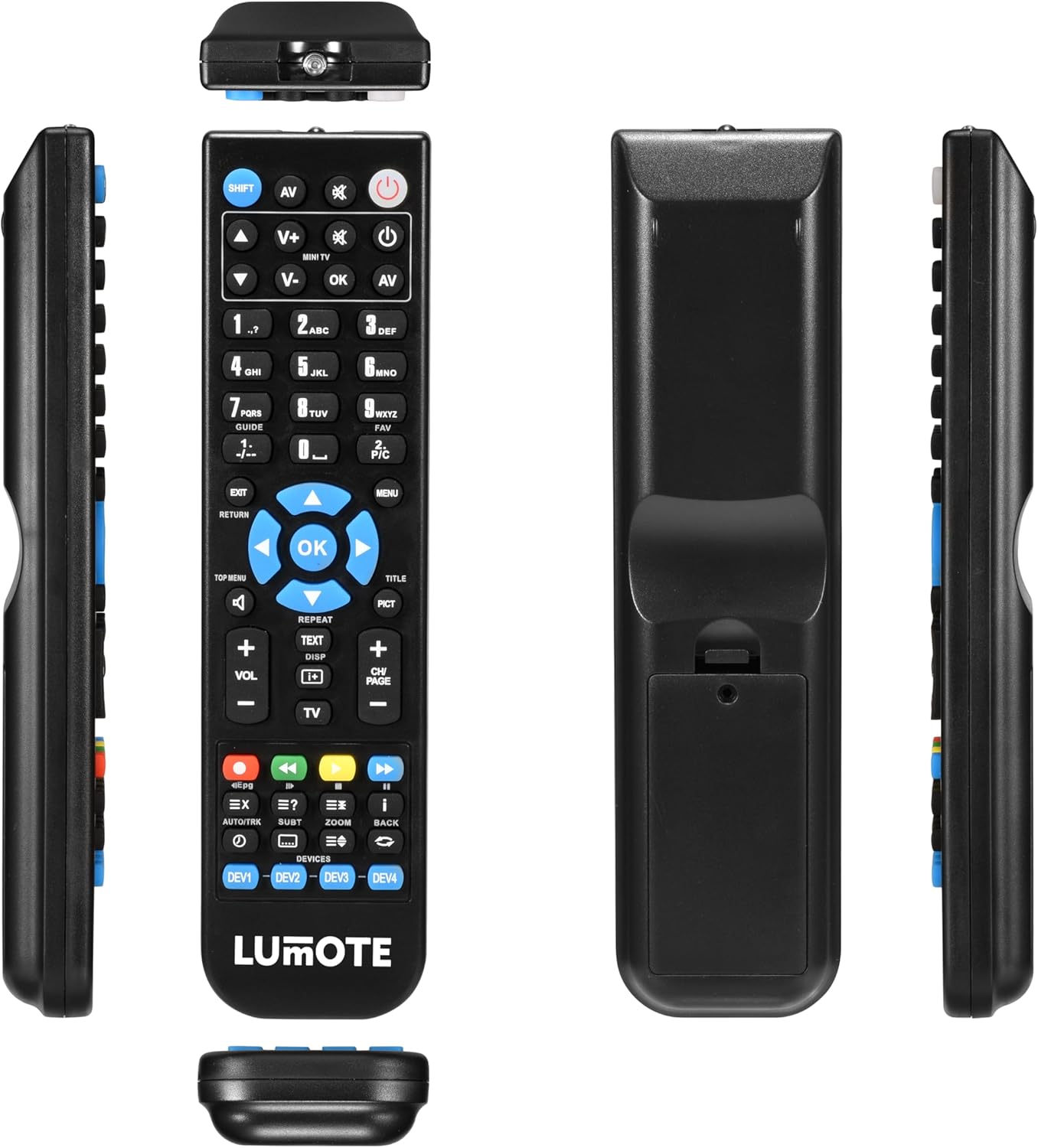
Image: The Generic Replacement Remote Control, displaying its front, back, and side profiles. The battery compartment is visible on the back.
3. Operasyon Enstriksyon
3.1 Operasyon debaz
Once batteries are installed, the remote control is ready for use. Point the remote directly at your Yamaha audio/video receiver or compatible device. Ensure there are no obstructions between the remote and the device's infrared sensor.
3.2 Fonksyon bouton
The remote control features a comprehensive set of buttons designed to replicate the functionality of your original Yamaha remote. Below is a general guide to common button groups:
- Bouton pouvwa (POUVWA): Limen oswa etenn aparèy la.
- Input Select Buttons (e.g., AV, TV, DVD): Selects the audio/video input source.
- Kontwòl Volim (VOL + / -): Ajiste nivo volim.
- Bouton bèbè (BÈN): Silenn oswa retire odyo a.
- Pav Nimerik (0-9): For direct input of channel numbers or other numerical selections.
- Bouton Navigasyon (MWEN, DESAN, GÒCH, DWA, OK): Itilize pou navige nan meni yo epi konfime seleksyon yo.
- Menu/Setup Buttons (MENU, SETUP, RETURN, EXIT): Accesses device menus, navigates back, or exits current screens.
- Media Control Buttons (PLAY, PAUSE, STOP, REW, FF, SKIP): Controls playback of media (e.g., CD, DVD, USB).
- Function Buttons (e.g., SHIFT, TOP MENU, TITLE, PICT): Specific functions related to device operation or display modes.
4. Swen ak Antretyen
- Netwayaj: Siye kontwòl remote la avèk yon twal mou epi sèk. Pa sèvi ak pwodui netwayaj abrazif, solvan, oswa alkòl, paske sa yo ka domaje sifas la.
- Ranplasman batri: Ranplase pil yo lè repons telekòmand lan vin ralanti oswa li sispann fonksyone. Toujou ranplase tou de pil yo an menm tan ak nouvo ki gen menm kalite.
- Depo: Si ou p ap itilize kontwòl remote la pou yon bon bout tan, retire pil yo pou evite flit ak domaj. Sere l nan yon kote ki fre epi sèk, lwen limyè solèy dirèk.
- Evite imidite: Keep the remote control away from water and high humidity.
NAN. Depanaj
Si w gen pwoblèm ak kontwòl remote ou a, tanpri al gade solisyon komen sa yo:
- Remote pa reponn:
- Tcheke si pil yo byen mete ak polarite ki kòrèk la.
- Ranplase pil yo ak pil alkalin AAA nèf.
- Asire w pa gen okenn obstak ant kontwòl remote la ak detèktè enfrawouj aparèy la.
- Make sure you are pointing the remote directly at the device.
- Kout ranje fonksyònman:
- Ranplase pil yo. Pil ki fèb ka diminye distans efikas telekòmand lan.
- Ensure the remote's infrared emitter and the device's sensor are clean and unobstructed.
- Fonksyon espesifik ki pa fonksyone:
- Verify that the function you are trying to use is supported by your specific Yamaha model.
- Some advanced functions might require specific settings on your Yamaha device. Refer to your Yamaha device's original manual.
6. Espesifikasyon teknik
| Mak | Jenerik |
| Koneksyon Teknoloji | Enfrawouj |
| Kalite kontwolè | Kontwòl Remote |
| Maksimòm Range | 10 mèt |
| Deskripsyon batri | Alkaline (AAA) |
| Kantite Atik | 1 |
| UPC | 037203302044 |
7. Enfòmasyon sou Garanti
Pwodwi sa a vini ak yon 12-mwa garanti from the date of purchase. This warranty covers manufacturing defects under normal use. It does not cover damage caused by misuse, accidents, unauthorized modifications, or battery leakage. Please retain your proof of purchase for warranty claims.
8. Sipò pou Kliyan
If you encounter any issues not covered in this manual or require further assistance, please contact your retailer or the point of purchase for support. Provide your product model and a detailed description of the issue to facilitate a quicker resolution.