
Entwodiksyon
The DJI RC Pro Smart Controller is engineered for professional-level aerial photography, offering enhanced stability and smoothness through its next-generation processor and increased storage capacity. It integrates powerful O3+ video transmission technology and features control sticks similar to those found on DJI FPV, providing precise and ultra-smooth control. This controller boasts a high-bright display, robust performance, efficient control mechanisms, and superior audio and video capabilities.
Enstalasyon
Debale ak Premye Enspeksyon
Upon receiving your DJI RC Pro, carefully unbox the contents. The package includes the DJI RC Pro controller and a USB 3.0 Type-C Cable. Please note that a USB Charger and the DJI Retail Box are not included.
- Inspect the controller for any visible damage.
- Asire w ke tout konpozan ki nan lis la prezan.
Attaching Control Sticks and Antennas
The control sticks for the DJI RC Pro are typically stored in the back of the controller for protection during transport. To prepare for use:
- Locate the control sticks on the back of the controller.
- Gently screw each control stick into its designated port on the front of the controller until secure.
- Extend the antennas located on the top rear of the controller to an appropriate angle for optimal signal transmission.

Figi 1: Devan view of the DJI RC Pro Smart Controller, showcasing the integrated display and control layout.
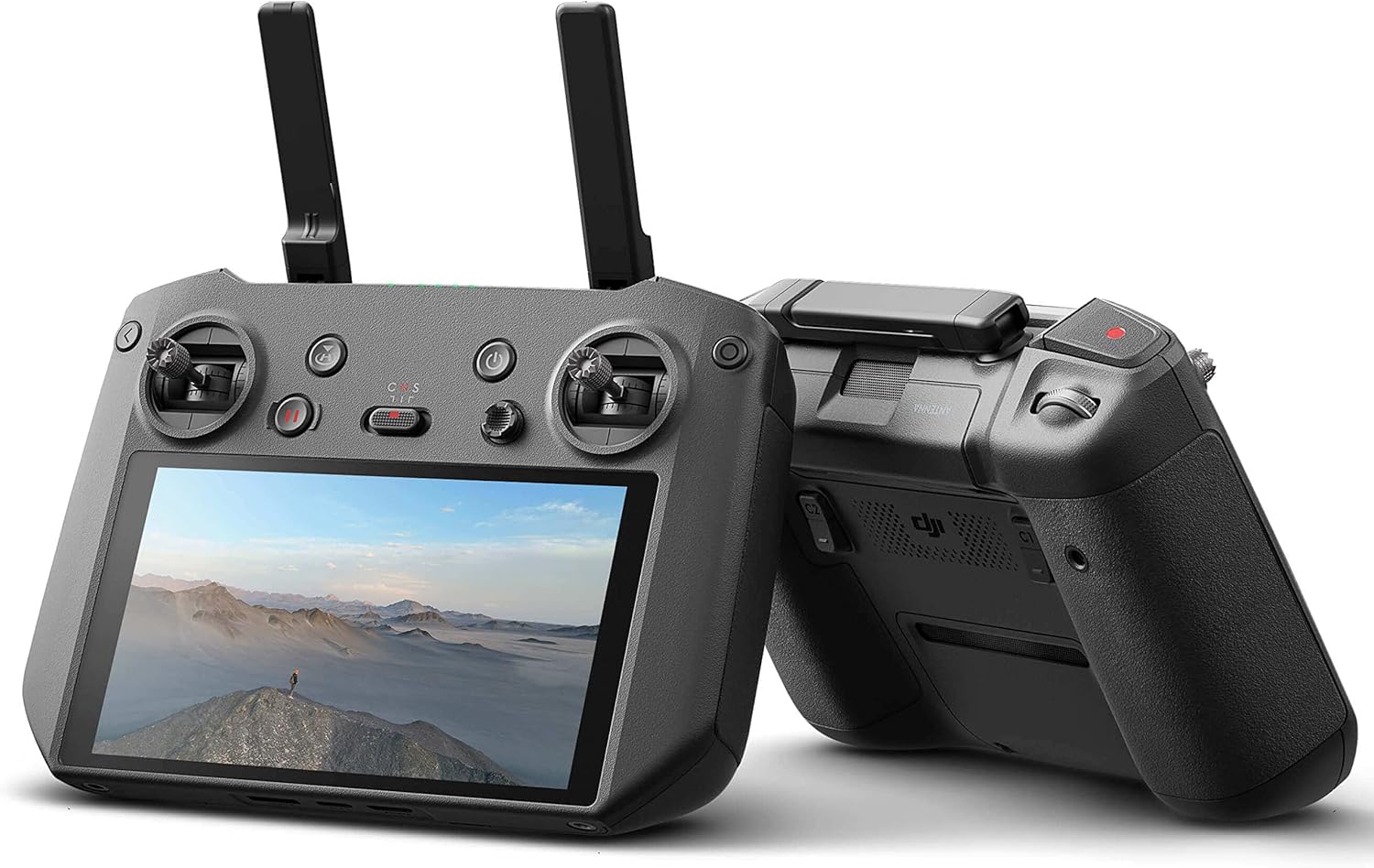
Figi 2: Side view of the DJI RC Pro Smart Controller, highlighting its ergonomic design and extended antennas.
Opere kontwolè a
Karakteristik ak Kontwòl kle yo
The DJI RC Pro is designed for intuitive operation, providing a seamless connection to your DJI drone. Familiarize yourself with the main controls:
- Bouton pouvwa: Located on the top right, used to turn the controller on and off.
- Bouton Retounen nan Kay (RTH): Initiates the drone's return to its takeoff point.
- Chanje mòd vòl: Allows selection between different flight modes (e.g., Normal, Sport, Cine).
- Toggle Joystick: Used for navigating menus and adjusting various functions within the controller's interface.
- Bouton dosye: Initiates and stops video recording.
- Camera Movement Toggles: Located on the back, these toggles allow for precise control over camera gimbal movements.
Ekspozisyon ak Pèfòmans
The integrated display is a 5.5-inch, 1080p screen with 1000 nits of brightness, ensuring clear visibility even in bright outdoor conditions. The powerful processor within the controller ensures a smooth and stable connection with your aircraft, enhancing the overall flight experience. The O3+ video transmission technology supports an extended range of up to 15 kilometers between the controller and your drone.
Enhanced Portability and Security
The DJI RC Pro features convenient attachment points on the bottom, allowing for the use of a strap. This feature helps prevent accidental drops and provides added security during operation.
Antretyen
To ensure the longevity and optimal performance of your DJI RC Pro Smart Controller, follow these general maintenance guidelines:
- Kenbe kontwolè a pwòp epi san pousyè ak debri. Sèvi ak yon twal mou epi sèk pou netwaye.
- Sere kontwolè a nan yon kote ki fre epi sèk, lwen limyè solèy dirèk ak tanperati ekstrèm.
- Evite ekspoze kontwolè a nan dlo oswa imidite twòp.
- Regularly check the control sticks and buttons for proper function and responsiveness.
Depanaj
If you encounter any issues with your DJI RC Pro Smart Controller, consider the following:
- Konpatibilite: Always verify that your DJI RC Pro is compatible with your specific DJI aircraft model. The DJI RC Pro is compatible with DJI Air 2S and DJI Mavic 3 drones.
- Pwoblèm Koneksyon: Ensure both the controller and the drone are fully charged and properly linked. Refer to the drone's manual for specific linking procedures.
- Ekspozisyon ekran: If the screen is dim or unresponsive, check the brightness settings and ensure the battery is adequately charged.
- Domaj Fizik: If the controller has been dropped or sustained impact, inspect for physical damage, especially to antennas or control sticks.
For persistent issues, please refer to the official DJI support resources or contact RotorLogic customer service.
Espesifikasyon
| Karakteristik | Detay |
|---|---|
| Dimansyon pwodwi | 8 x 2 x 6 pous |
| Pwa atik | 2.05 liv |
| Nimewo Modèl Atik | DJI RC Pro |
| Mak | RotorLogic |
| Manifakti | DJI |
| Karakteristik espesyal | Ergonomik |
| Koulè | Nwa |
| Max Kantite Aparèy Sipòte | 1 |
| Aparèy konpatib | DJI Air 2S, DJI Mavic 3 |
| Diagonal ekran | 6 pous / 14 santimèt |
Konpatibilite
The DJI RC Pro Smart Controller is specifically designed for use with the DJI Air 2S epi DJI Mavic 3 drones. It is not compatible with other DJI drone models.
Ki sa ki nan bwat la
The standard package for the DJI RC Pro Smart Controller includes the following items:
- DJI RC Pro Controller x 1
- USB 3.0 Type-C Cable x 1
Please note: USB Charger and Retail Box are not included.
Garanti ak sipò
For information regarding warranty coverage and technical support for your DJI RC Pro Smart Controller, please refer to the official documentation provided by DJI or visit the RotorLogic store on Amazon. You may also contact RotorLogic customer service directly for assistance with product-related inquiries.