
JZAQ BT40
JZAQ Motorcycle Helmet Bluetooth Headset User Manual
Modèl: BT40
Bluetooth 5.0 Waterproof Sports Headset Music Control, 80 Hours Playtime, Ultra Thin Earphones for Cycling/Skiing/Riding
1. Entwodiksyon
Thank you for choosing the JZAQ BT40 Motorcycle Helmet Bluetooth Headset. This manual provides detailed instructions for the proper installation, operation, and maintenance of your device. Please read this manual thoroughly before use to ensure optimal performance and safety. Keep this manual for future reference.
2. Pwodwi souview
2.1 Karakteristik kle
- Konsepsyon ultra-mens: Only 0.35 inches thick, designed to fit comfortably in all helmet types without squeezing the ears.
- Koneksyon Bluetooth 5.0: Ensures a strong, stable signal connection and automatic pairing. Can connect wirelessly to two mobile devices simultaneously.
- Tan pou jwe pwolonje: Built-in 600mAh rechargeable Li-ion battery provides up to 80 hours of continuous talking/playing time and 500 hours of standby time. Full charge in approximately 2 hours.
- IPX7 Waterproof & Dustproof: Nano coating technology protects the headset from rain, snow, and dust, making it suitable for various outdoor conditions.
- Kalite son klè: Features DSP noise-canceling technology and windproof foam pads for crystal-clear stereo music and calls.
- Operasyon senp: Easy-to-use controls for music, calls, and voice assistant. Automatic answering for safer riding.
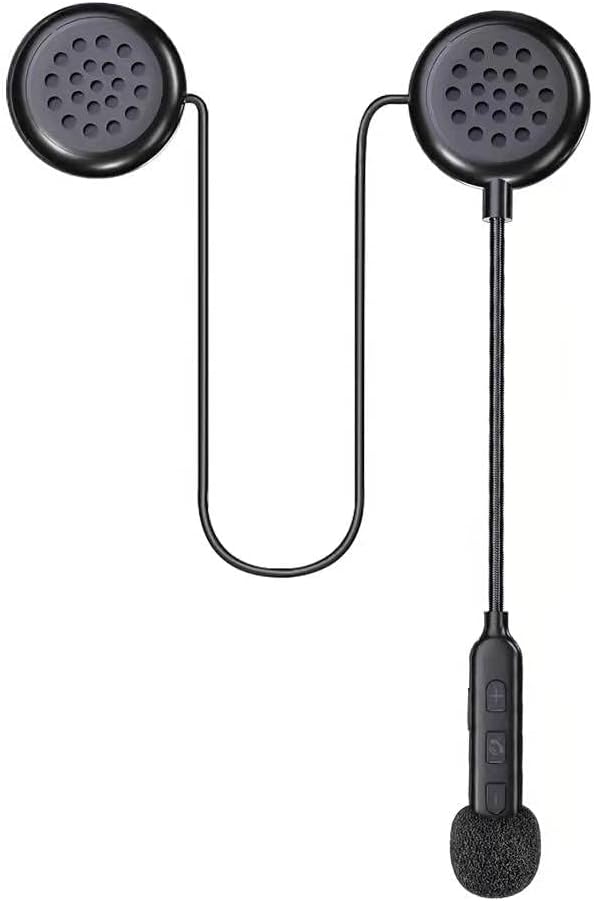
Figure 1: The JZAQ BT40 Motorcycle Helmet Bluetooth Headset, showcasing its compact design with two earpieces, a flexible microphone boom, and integrated control buttons.

Figure 2: Image highlighting the ultra-thin profile of the headset speakers, measuring 0.35 inches (8.7mm), ensuring they do not press against the ears inside a helmet.
2.2 Sa ki enkli
- Headset kas
- USB kab
- Manyèl Itilizatè (dokiman sa a)
- Fichye meditativ
3. Enstalasyon
3.1 Installation into Helmet
- Identify suitable locations within your helmet for the speakers. Most helmets have designated pockets or areas near the ears.
- Attach the speakers to the helmet's interior using the provided detachable Velcro pads. Ensure the speakers are positioned directly over your ears for optimal sound and comfort.
- Route the microphone boom and control unit to a convenient location near your mouth, ensuring it does not obstruct your vision or helmet closure. Secure any loose wires.

Figure 3: An illustration demonstrating the simple installation process of the headset into a helmet, emphasizing the ease of attaching the components.
3.2 Chaje kas ekoutè a
Before first use, fully charge the headset. Connect the provided USB cable to the charging interface on the control unit and plug the other end into a USB power source (e.g., computer, wall adapter). The charging time is approximately 2 hours. The headset supports displaying battery status on your connected phone.

Figure 4: A smartphone screen displaying the battery level indicator for the connected JZAQ BT40 headset, allowing users to monitor charge status.
3.3 Bluetooth Pairing
- Asire w ke kas ekoutè a chaje epi li etenn.
- Press and hold the Power ON/Play/Pause button on the control unit until the indicator light flashes, indicating pairing mode.
- On your mobile device, enable Bluetooth and search for available devices. Select "JZAQ BT40" (or similar name) from the list.
- Once connected, the indicator light will change, and you will hear an audible confirmation. The headset can connect to two mobile phones simultaneously.

Figure 5: The JZAQ BT40 headset shown connected simultaneously to two different mobile phones, illustrating its smart connection capability.
4. Operasyon Enstriksyon

Figure 6: A detailed diagram illustrating the components of the JZAQ BT40 headset, including earpiece dimensions, speaker, microphone hole, charging interface, and the functions of each control button (Power ON/Play/Pause, Volume +/Previous Song, Volume -/Next Song).
4.1 Power On/Off
- Pouvwa sou: Press and hold the central button (Power ON/Play/Pause) until the indicator light illuminates and you hear a power-on prompt.
- Pouvwa Off: Press and hold the central button (Power ON/Play/Pause) until the indicator light turns off and you hear a power-off prompt.
4.2 Kontwòl Mizik
- Jwe/Poz: Short press the central button (Power ON/Play/Pause).
- Volim moute: Peze bouton "+" la yon ti kras.
- Volim desann: Peze bouton "-" la yon ti moman.
- Pwochen chante: Peze bouton "-" la pandan yon bon bout tan.
- Chante Previous: Peze bouton "+" la pandan yon bon bout tan.
4.3 Jesyon Apèl
- Reponn apèl: Short press the central button (Power ON/Play/Pause) when an incoming call is received. The headset supports automatic answering.
- Fini apèl: Short press the central button (Power ON/Play/Pause) during a call.
- Rejte apèl: Long press the central button (Power ON/Play/Pause) when an incoming call is received.
4.4 Asistan Vwa
- Aktive Asistan Vwa: Double-click the central button (Power ON/Play/Pause) to activate your phone's voice assistant (e.g., Siri, Google Assistant).
5. Antretyen
5.1 Netwayaj
Wipe the headset and control unit with a soft, damp twal. Pa sèvi ak pwodui chimik ki agresif oswa pwodui netwayaj abrazif. Asire w pò chaje a sèk anvan ou chaje.
5.2 Enpèmeyablite
The JZAQ BT40 headset features IPX7 waterproofing, protecting it from immersion in water up to 1 meter for 30 minutes. While it is designed to withstand rain and snow, avoid prolonged submersion. Always ensure the charging port cover is securely closed when not charging to maintain water resistance.

Figure 7: The JZAQ BT40 headset shown with water droplets, emphasizing its IPX7 waterproof capability, suitable for use in wet conditions.
5.3 Depo
Store the headset in a cool, dry place away from direct sunlight and extreme temperatures. When storing for extended periods, ensure the battery is partially charged (around 50%) to prolong its lifespan.
NAN. Depanaj
- Pa gen pouvwa: Ensure the headset is fully charged. Connect to a power source and check the charging indicator.
- Pa ka konekte: Make sure the headset is in pairing mode (indicator light flashing). Turn off and on your phone's Bluetooth. If issues persist, try resetting the headset (refer to manufacturer's websit la pou enstriksyon espesifik pou reyajiste si li pa nan manyèl la).
- Volim ki ba/Kalite son ki pa bon: Adjust the volume on both the headset and your connected device. Ensure speakers are correctly positioned over your ears inside the helmet. Check for obstructions or damage to the speakers.
- Koneksyon tanzantan: Ensure your device is within the Bluetooth range (up to 20 meters). Avoid environments with strong electromagnetic interference.
- Mikwofòn pa travay: Ensure the microphone is positioned correctly and not obstructed. Check your phone's privacy settings for microphone access.
7. Espesifikasyon teknik
| Karakteristik | Spesifikasyon |
|---|---|
| Non modèl | BT40 |
| Bluetooth vèsyon | 5.0 |
| Gamme Bluetooth | 20 mèt |
| Kapasite batri | 600mAh Li-ion |
| Dire batri (tan lekti) | Jiska 80 èdtan |
| Tan sibstiti | 500 èdtan |
| Tan pou chaje | 2 èdtan |
| Nivo rezistans dlo | IPX7 |
| Kontwòl bri | Active Noise Cancellation (DSP) |
| Earphone Thickness | 0.35 pous (9mm) |
| Koneksyon Teknoloji | San fil |
| Aparèy konpatib | Telefòn selilè |
| Materyèl | Plastik, Elastomè Tèmoplastik (TPE) |
| Pwa atik | 3.84 ons |
8. Garanti ak sipò
This JZAQ product is covered by a standard manufacturer's warranty. For specific warranty details, duration, and terms, please refer to the product packaging or contact JZAQ customer support directly. If you encounter any issues or require assistance, please reach out to the retailer where you purchased the product or visit the official JZAQ websit pou resous sipò ak enfòmasyon pou kontakte yo.
Ask a question about this manual
Ask about setup, troubleshooting, compatibility, parts, safety, or missing instructions. Manuals+ will review the question and use this page’s manual context to help answer it.