
TRUSTECH WTF-010L
TRUSTECH Evaporative Air Cooler User Manual
Model: WTF-010L
1. Pwodwi souview
The TRUSTECH Evaporative Air Cooler is a versatile indoor cooling solution designed to provide comfort with its oscillating fan, multiple modes, and speeds. It features a bladeless design for safety and includes ice boxes for enhanced cooling. This manual provides essential information for the safe and efficient operation of your air cooler.
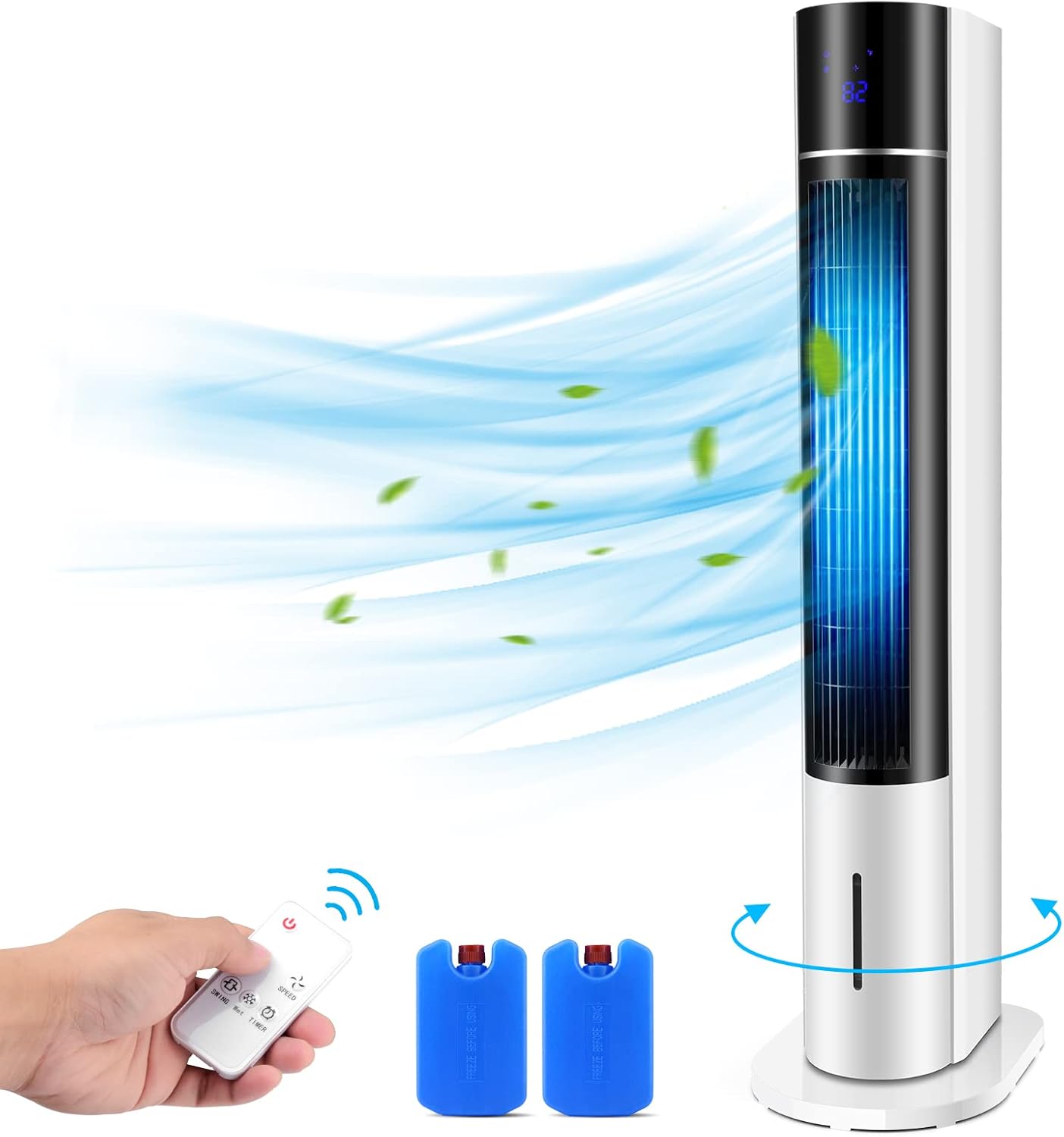
Figure 1: Evaporative Air Cooler with remote control and ice boxes.
2. Karakteristik kle
- Efficient Water Refilling & 2 Ice Boxes: Designed for easy water addition without bending. Includes two ice boxes for double cooling effect.
- 3 Wind Speeds & Modes: Offers Low, Medium, and High wind speeds, along with Normal, Natural, and Sleep modes to suit various preferences and situations.
- Larger Coverage with Oscillation: Features 20-inch long air outlets and an oscillation function to distribute cool air over a wider area.
- User-friendly with LED Display & Remote: Equipped with an intuitive control panel and a portable remote control for convenient adjustments. The LED display shows current settings.
- San danje epi fasil pou netwaye: Bladeless design ensures safety for children and pets. The unit is designed for easy cleaning and provides clean airflow.
3. Enstriksyon Enstalasyon
- Debake: Carefully remove all components from the packaging. Ensure all parts are present: main unit, base, remote control, and 2 ice boxes.
- Asanble baz: Place the main unit onto the provided stand/base. Ensure it is securely seated and stable.
- Koneksyon pouvwa: Extend the power cord and plug it into a standard 120V AC electrical outlet.
- Adding Water/Ice Boxes:
- Louvri kouvèti tank dlo a ki sitiye anlè aparèy la.
- Pour clean water into the tank, ensuring it does not exceed the maximum fill line.
- For enhanced cooling, place the two included ice boxes (pre-frozen) into the designated compartments within the water tank.

Figi 2: Tank dlo ki fasil pou ranpli pa anwo pou yon ranpli fasil.

Figure 3: Inserting frozen ice boxes into the water tank for cooler air.
4. Operasyon Enstriksyon
Your TRUSTECH Evaporative Air Cooler can be operated using the control panel on top of the unit or the included remote control.
4.1 Control Panel & Remote

Figure 4: Control Panel and Remote Display with button functions.
- Bouton pouvwa: Li vire inite a ON/OFF.
- Bouton refwadisman: Activates the evaporative cooling function. Use with ice boxes for maximum effect.
- bouton mòd: Cycles through Normal, Natural, and Sleep modes.
- Bouton vitès: Adjusts fan speed between Low, Medium, and High.
- Oscillating Button: Aktive oswa dezaktive fonksyon osilasyon an pou yon distribisyon lè ki pi laj.
- Bouton revèy: Li fikse revèy fonksyònman an soti nan 1 a 12 èdtan.
4.2 Mòd ak Vitès

Figure 5: The air cooler offers three wind speeds: Low, Medium, and High.

Figure 6: Sleep mode provides quiet operation for comfortable rest.
- Mòd nòmal: Provides a consistent airflow at the selected speed.
- Mòd natirèl: Simile yon briz natirèl lè li varye vitès vantilatè a tanzantan.
- Mòd dòmi: Operates at a lower, quieter speed, often gradually decreasing, ideal for nighttime use.
4.3 osilasyon
Press the oscillation button to activate the wide-angle oscillation feature, allowing the unit to distribute cool air across a larger area of the room.

Figure 7: The 20-inch long air outlets combined with oscillation provide expanded coverage.
5. Antretyen
Antretyen regilye asire pèfòmans optimal ak lonjevite refwadisè lè ou la.
- Netwayaj tank dlo: Regularly drain and clean the water tank to prevent mold and mildew buildup. Use a soft cloth and mild detergent if necessary, then rinse thoroughly.
- Netwayaj filtè: The unit features a filter at the back. Periodically remove and clean the filter to maintain air quality and airflow efficiency. Refer to the diagram below for filter location.
- Netwayaj eksteryè: Siye eksteryè inite a ak yon mou, damp twal. Pa sèvi ak pwodui netwayaj abrazif oswa solvang.

Figi 8: Dèyè view showing the air filter for easy maintenance.
NAN. Depanaj
If you encounter issues with your air cooler, refer to the following common problems and solutions:
| Pwoblèm | Kòz posib | Solisyon |
|---|---|---|
| Inite pa limen | Pa gen kouran; Bouton pouvwa a pa peze. | Check power cord connection and wall outlet; Press the Power button. |
| Flux lè fèb | Air filter is dirty; Water tank is empty (for cooling function). | Clean the air filter; Refill the water tank. |
| Pa gen efè refwadisman | Water tank is empty; Cooling function not activated; Ice boxes not used/frozen. | Refill water tank; Press the Cooling button; Ensure ice boxes are frozen and placed in tank. |
| Bri etranj | Unit not on a flat surface; Obstruction in fan area. | Place unit on a stable, flat surface; Check for and remove any obstructions. |
7. Espesifikasyon
| Karakteristik | Detay |
|---|---|
| Mak | TRUSTECH |
| Non modèl | WTF-010L |
| Kalite aliye | Otonòm |
| Karakteristik espesyal | Oscillating Fan, Timer |
| Koulè | Blan |
| Kontwòl Kalite | Remote |
| Kapasite rezèvwa | 3 Liters (as per product title, JSON says 12 Liters, using title for consistency) |
| Dimansyon pwodwi | 20"D x 20"W x 42.52"H |
| Voltage | 120 Vòlt (AC) |
| Pwa atik | 13 liv |
8. Garanti ak sipò
For warranty information, technical support, or service inquiries, please contact TRUSTECH customer service. Keep your purchase receipt as proof of purchase for any warranty claims.
Sèvis Kliyan: Please refer to the product packaging or the official TRUSTECH websit la pou jwenn enfòmasyon kontak ki pi resan yo.
Ask a question about this manual
Ask about setup, troubleshooting, compatibility, parts, safety, or missing instructions. Manuals+ will review the question and use this page’s manual context to help answer it.