
1. Entwodiksyon
The AC Infinity IONBOARD S24 is an advanced LED grow light system designed for indoor plant cultivation. It features full-spectrum Samsung LM301H diodes and an optimized design for deeper canopy penetration and maximum plant yields across all growth stages. This manual provides essential information for the safe and effective use of your IONBOARD S24.

Image: The AC Infinity IONBOARD S24 LED Grow Light mounted inside a grow tent, demonstrating its application for indoor plant cultivation.
2. Enfòmasyon sou Sekirite
Please read all safety instructions before operating the AC Infinity IONBOARD S24. Failure to follow these instructions may result in electric shock, fire, or serious injury.
- Sekirite elektrik: Asire ke ekipman pou pouvwa a matche ak voltage requirements of the light. Do not operate with damaged cords or plugs. Disconnect power before installation or maintenance.
- Pwoteksyon je: The LED light is very bright. Avoid direct eye exposure to the light source when it is operating. Wear appropriate eye protection if prolonged exposure is necessary.
- Jesyon Chalè: While designed for efficient heat dissipation, the light fixture can become warm during operation. Ensure adequate ventilation around the unit. Do not cover the light.
- Dlo ak Imidite: The light is IP-65 rated for grow environments with higher humidity. However, avoid direct water spray or submersion. Ensure all connections are dry before powering on.
- Enstalasyon: Mount the light securely using the provided hanging hardware. Ensure the mounting surface can support the weight of the fixture.
- Timoun ak bèt kay: Kenbe aparèy la lwen timoun ak bèt kay.
3. Enstalasyon
3.1 Kontni pake a
Verifye ke tout konpozan yo prezan nan pake a:
- IONBOARD S24 LED Grow Light Fixture
- Kontwolè dimmable
- Hanging Kit (Rope Hangers, Carabiners)
- Kòd pouvwa
3.2 Mounting the Grow Light
- Attach the carabiners to the mounting points on the top of the IONBOARD S24 fixture.
- Connect the rope hangers to the carabiners.
- Hang the light fixture from a sturdy support structure (e.g., grow tent crossbars) using the rope hangers. Adjust the height as needed for your specific growth stage.
3.3 Connecting the Dimmable Controller
The IONBOARD S24 includes a dimmable controller for adjusting light intensity.
- Locate the dimmer port on the light fixture.
- Connect the cable from the dimmable controller to this port.
- Asire w koneksyon an an sekirite.

Image: The dimmable controller with percentage markings (0-100%) and connection points, highlighting its robust aluminum body and certifications.
3.4 Koneksyon pouvwa
- Connect the power cord to the light fixture.
- Ploge kòd elektrik la nan yon priz elektrik estanda.
3.5 AC Infinity Ecosystem Integration (Optional)
The IONBOARD S24 can be integrated with AC Infinity UIS controllers for advanced climate and time-based programming via an app.
- Connect the light's dimmer cable to a UIS controller (sold separately).
- Refer to your UIS controller's manual for specific connection and app setup instructions.

Image: A diagram illustrating how the IONBOARD Series LED Grow Lights connect to a UIS controller, alongside other AC Infinity devices like CLOUDRAY fans and CLOUDLINE exhaust fans, for integrated environmental control.
4. Operasyon Enstriksyon
4.1 Limen/Etenyen
Once connected to power, the light will turn on. To turn off, unplug the power cord or use a connected smart controller.
4.2 Using the Dimmable Controller
The included dimmer allows for precise control of light intensity from 0% to 100%.
- Rotate the knob on the dimmer to increase or decrease brightness.
- Adjust the intensity according to your plants' specific growth stage ak kondisyon limyè.
4.3 Understanding the Optimized Spectrum
The IONBOARD S24 utilizes full-spectrum Samsung LM301H LEDs with specific ratios of white, red, and IR diodes to optimize growth.
- 3000K: Ankouraje jèminasyon plant yo.
- 5000K: Boosts plant vegetative growth.
- 730nm (IR): Improves yields.
- 660nm (DR): Ankouraje flè plant yo.

Image: A visual representation of the optimized light spectrum, showing different color temperatures and wavelengths (3000K, 5000K, 730nm, 660nm) and their effects on plant growth stages, along with a PAR distribution graph.
4.4 Recommended Hanging Heights and Coverage
The IONBOARD S24 is designed for uniform PAR distribution and deep canopy penetration. Adjust the hanging height based on the plant's growth stage and desired light intensity.
- Vejetatif Stage: Typically higher hanging height, lower intensity.
- Flè Stage: Typically lower hanging height, higher intensity.
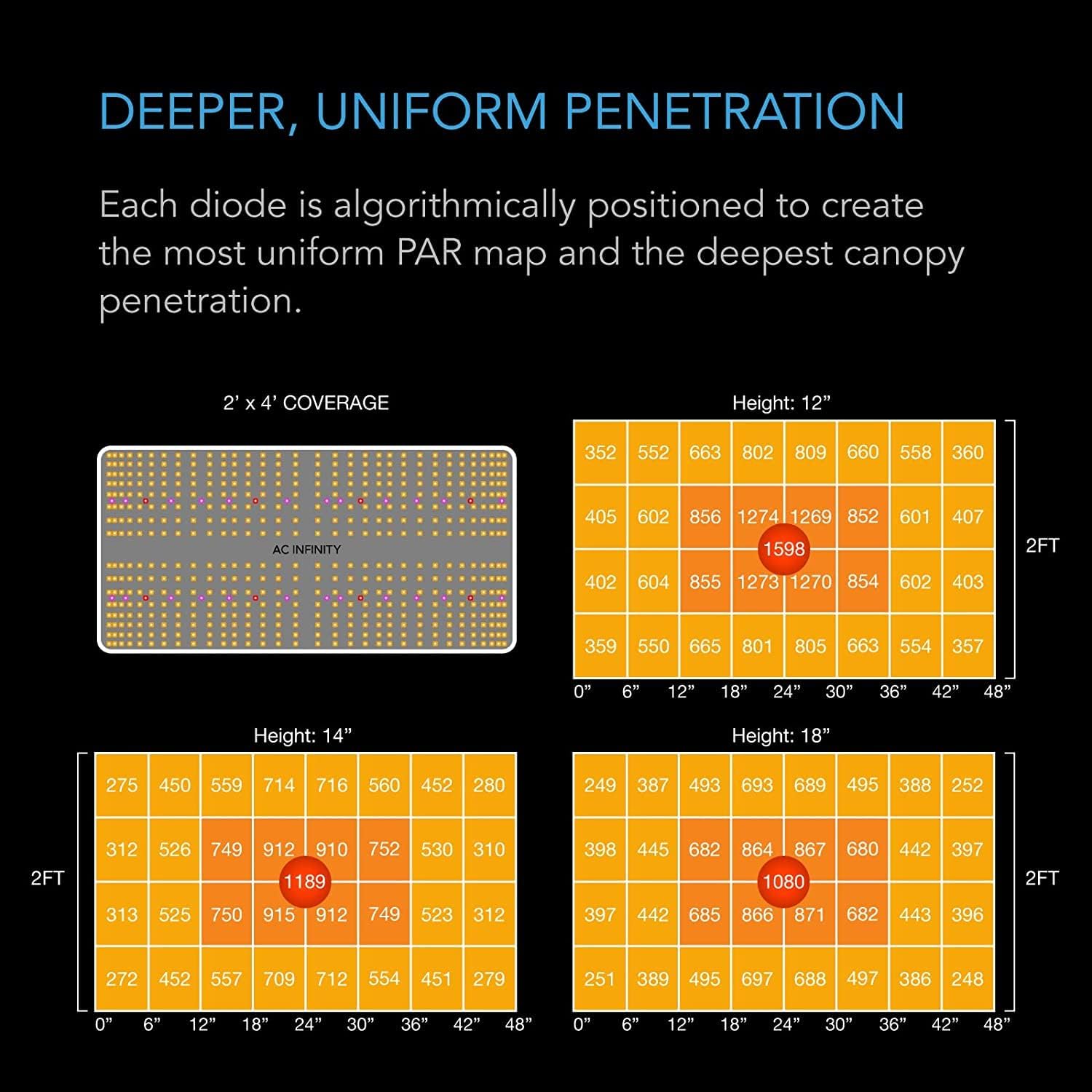
Image: PAR (Photosynthetically Active Radiation) maps illustrating the light distribution and intensity at various hanging heights (12", 14", 18") over a 2' x 4' coverage area, demonstrating uniform penetration.
5. Antretyen
Antretyen regilye asire pèfòmans optimal ak lonjevite limyè kwasans ou an.
- Netwayaj: Periodically wipe the light fixture with a soft, dry cloth to remove dust and debris. Ensure the light is unplugged and cool before cleaning. Do not use harsh chemicals or abrasive materials.
- Enspeksyon: Regularly check the power cord and connections for any signs of damage.
- Kondisyon anviwònman: Maintain appropriate temperature and humidity levels in your grow environment to prevent stress on the light fixture and ensure efficient operation.
NAN. Depanaj
| Pwoblèm | Kòz posib | Solisyon |
|---|---|---|
| Limyè pa limen | No power, loose connection, faulty outlet | Check power cord connection, try a different outlet, ensure dimmer is not set to 0%. |
| Limyè flickers | Unstable power, loose dimmer connection, internal issue | Ensure stable power supply, check dimmer connection. If problem persists, contact support. |
| Dimmer pa reponn | Loose connection, faulty dimmer | Check dimmer cable connection to the light. |
| Limyè a twò cho | Insufficient ventilation, ambient temperature too high | Ensure proper airflow in the grow space. Consider using exhaust fans. |
7. Espesifikasyon
| Karakteristik | Detay |
|---|---|
| Modèl | AC-IBS24 |
| Zòn Kouvèti | 2 x 4 pye |
| Itilizasyon pouvwa | 200 Watts |
| Efikasite | 2.65 µmol/J |
| Dyòd | Samsung LM301B |
| Konte ki ap dirije | 544 Dyòd |
| Nivo klète | 5 (via dimmer) |
| Voltage | 15.7 Volts |
| Ampepòk | 1.84 Amps |
| Materyèl | Aliminyòm |
| Evalyasyon IP | IP 65 |
| Dimansyon pwodwi | 26"L x 14"L x 4"H (66cm L x 35.5cm L x 10cm H) |
| Pwa atik | 12.27 liv (5.57 kg) |

Image: A graphic displaying the key specifications and physical dimensions of the IONBOARD S24, including length, width, height, and cable lengths.
7.1 Etikèt Enèji

Image: EU Energy Label for the AC Infinity AC-IBS24, indicating an energy efficiency class of D and 220 kWh/1000h consumption. For more details, visit https://eprel.ec.europa.eu/qr/1879938.
8. Garanti ak sipò
AC Infinity products are designed for quality and durability. This product comes with a manufacturer's warranty. Please refer to the official AC Infinity websit entènèt la oswa dokiman acha ou a pou jwenn detay sou tèm ak kondisyon garanti a.
8.1 Sipò pou Kliyan
If you encounter any issues or have questions regarding your IONBOARD S24, please contact AC Infinity customer support:
- Websit: Visit the official AC Infinity websit pou FAQ, gid depanaj, ak enfòmasyon kontak.
- Imèl/Telefòn: Specific contact details can be found on the AC Infinity support page.
Please have your model number (AC-IBS24) and purchase date ready when contacting support.