
Edifier W280NB
Edifier W280NB Bluetooth Wireless Neckband Earbuds Instruction Manual
Model: W280NB | Brand: Edifier
1. Entwodiksyon
Thank you for choosing the Edifier W280NB Bluetooth Wireless Neckband Earbuds. These earbuds are designed to provide a high-quality audio experience with features like Active Noise Cancellation (ANC), Ambient Sound Monitoring, and AI call noise reduction. Their lightweight, comfortable design and IP55 water resistance make them ideal for various activities, including gym workouts and running.
2. Ki sa ki nan bwat la
- Edifier W280NB Earbuds
- Chaje kab
- Multiple Sizes of Eartips and Ear Wings
3. Pwodwi souview
Familiarize yourself with the components of your Edifier W280NB earbuds:

Figi 3.1: Edifier W280NB Neckband Earbuds. The image shows the black neckband-style earbuds with the control module visible on the right side of the neckband.
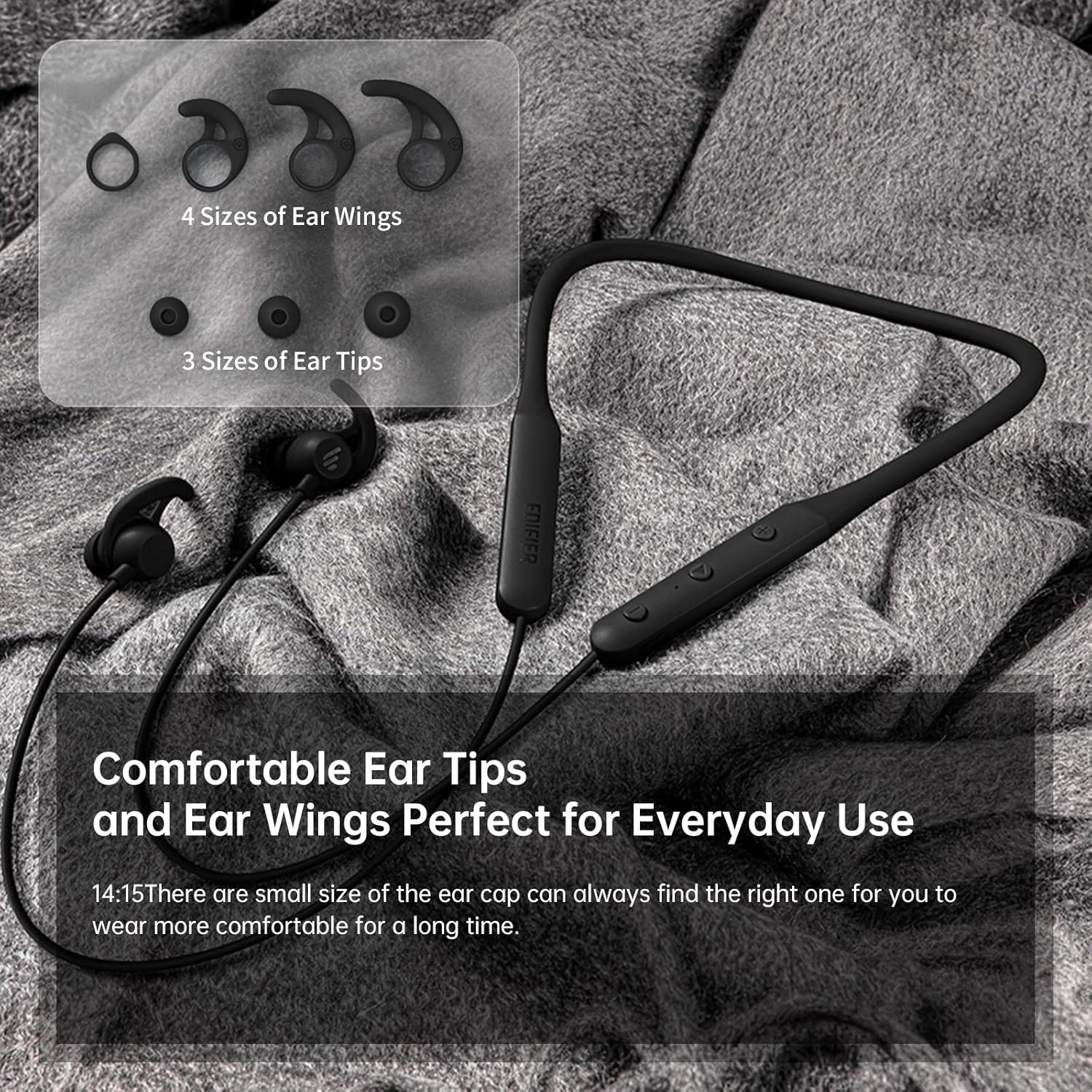
Figi 3.2: Comfortable Ear Tips and Ear Wings. This image displays different sizes of silicone ear tips and ear wings, highlighting the customizable fit for user comfort.
The earbuds feature a flexible neckband for secure wear, with integrated controls for easy access to functions like volume, playback, and call management. The ear tips and ear wings are designed for a comfortable and stable fit during various activities.
4. Enstalasyon
4.1 Chaje ekoutè yo
Before first use, fully charge the earbuds. Connect the provided charging cable to the charging port on the neckband and to a USB power source. The indicator light will show charging status. A full charge provides up to 13 hours of playtime (ANC off). For quick use, a 2-minute charge can provide approximately 2 hours of playtime.

Figi 4.1: Fast Charge and Long Playback Time. This image illustrates the battery life with ANC on (11 hours) and ANC off (13 hours), and the quick charge capability (10 minutes charge for 2.5 hours use).
4.2 Bluetooth Pairing
- Asire w ke ekoutè yo chaje epi etenn.
- Peze epi kenbe bouton pouvwa a jiskaske limyè endikatè a flache ble ak wouj, sa ki endike mòd koneksyon an.
- Sou aparèy ou an (telefòn entelijan, tablèt, òdinatè pòtab), aktive Bluetooth epi chèche aparèy ki disponib yo.
- Select "Edifier W280NB" from the list of found devices.
- Yon fwa konekte, limyè endikatè a ap vin ble fiks.
5. Operasyon Enstriksyon
5.1 Kontwòl
The control module on the neckband allows you to manage various functions:
- Bouton pouvwa: Peze epi kenbe pou limen/etenn li. Peze yon ti kras pou jwe/pran yon poz mizik oubyen reponn/fini apèl.
- Volim moute (+): Peze yon ti kras pou ogmante volim nan. Peze lontan pou pwochen mizik la.
- Volim desann (-): Peze yon ti kras pou diminye volim nan. Peze lontan pou ale nan mizik anvan an.
- Bouton Fonksyon: (Specific button for ANC/Ambient mode, refer to product diagram if available, otherwise assume integrated with power/volume)
5.2 Anilasyon aktif bri (ANC)
The ANC feature reduces ambient noise, providing a more immersive listening experience. Activate or deactivate ANC using the designated control button (often a long press on the power button or a dedicated button).

Figi 5.1: Active Noise Cancellation. A man is shown wearing the earbuds, with text indicating the ANC technology for a quieter experience.
5.3 Ambient Sound Monitoring
This mode allows you to hear your surroundings without removing the earbuds, enhancing safety and awareness. Toggle this mode on/off via the control module.

Figi 5.2: Ambient Sound Mode. A woman is shown wearing the earbuds, with text explaining the real-time sensation of ambient sound monitoring.
5.4 Fonksyon Rele
The earbuds support hands-free calling with AI call noise reduction technology, ensuring clear conversations by filtering out ambient noise.
- Reponn/Fen Apèl: Kout peze bouton pouvwa a.
- Rejte apèl: Long peze bouton pouvwa a.

Figi 5.3: Call Noise Cancellation. A woman is shown wearing the earbuds, with text describing the AI call noise-cancelling technology for clear calls.
6. Antretyen
6.1 Netwayaj
- Netwaye pwent zòrèy yo regilyèman avèk yon twal mou epi sèk.
- If necessary, remove the ear tips and wash them with mild soap and water, ensuring they are completely dry before reattaching.
- Wipe the neckband and earbud surfaces with a slightly damp twal. Evite itilize pwodwi chimik piman bouk oswa materyèl abrazif.
6.2 Rezistans dlo ak pousyè (IP55)
The Edifier W280NB earbuds are IP55 rated, meaning they are protected against dust ingress and low-pressure water jets from any direction. This makes them suitable for use during workouts and in light rain. However, they are not designed for submersion in water.

Figi 6.1: IP55 Dust and Water Resistance. A man is shown wearing the earbuds, with text highlighting their IP55 protection against dust and water.
6.3 Depo
Store the earbuds in a cool, dry place away from direct sunlight and extreme temperatures. Avoid tangling the neckband to prevent damage.
NAN. Depanaj
| Pwoblèm | Kòz posib | Solisyon |
|---|---|---|
| Ekoutè yo pa soumen | Batri ki ba | Chaje ekoutè yo nèt. |
| Pa ka konekte ak aparèy la | Earbuds not in pairing mode; Bluetooth off on device; too far from device | Ensure earbuds are in pairing mode (flashing blue/red). Turn on Bluetooth on your device. Move earbuds closer to your device (within 10 meters). |
| Pa gen son oswa volim ki ba | Volume too low; earbuds not connected; incorrect audio output selected | Increase volume on earbuds and device. Reconnect earbuds. Check your device's audio output settings. |
| Kalite son se pòv | Interference; ear tips not sealed properly; dirty earbuds | Move away from sources of interference. Adjust ear tips for a secure fit. Clean ear tips and earbud nozzles. |
8. Espesifikasyon
| Karakteristik | Detay |
|---|---|
| Nimewo Modèl | W280NB |
| Koneksyon Teknoloji | San fil |
| Teknoloji kominikasyon san fil | Bluetooth 5.0 |
| Konpozan ki enkli | Cable, Eartip |
| Materyèl | Silicone |
| Itilizasyon espesifik pou pwodwi | Espò ak Egzèsis |
| Itilizasyon Rekòmande Pou Pwodwi | Apèl, Kouri |
| Aparèy konpatib | Telefòn entelijan, Tablèt, Laptop, Odinatè Desktop |
| Kalite kontwòl | Kontwòl Medya |
| Kab Karakteristik | San kab |
| Nivo rezistans dlo | Ki enpèmeyab (IP55) |
| Gamme frekans | 20Hz - 20KHz |
| Metòd kontwòl | Manyen |
| Kantite Atik | 1 |
| Lavi batri | 13 Hours (ANC off) |
| Kalite chofè odyo | Chofè dinamik |
| Gamme Bluetooth | 10 mèt |
| Fòm ekoutè | Nan-zòrèy |
| Kantite USB 2 pò | 1 |
| UPC | 875674006623 |
9. Garanti ak sipò
Edifier products typically come with a limited warranty. Please refer to the warranty card included with your product or visit the official Edifier website for detailed warranty terms and conditions. For technical support, product inquiries, or service requests, please contact Edifier customer service through their official channels.
Ask a question about this manual
Ask about setup, troubleshooting, compatibility, parts, safety, or missing instructions. Manuals+ will review the question and use this page’s manual context to help answer it.