
Entwodiksyon
This manual provides comprehensive instructions for the setup, operation, and maintenance of your Reloop RP-7000 MK2 Professional Upper Torque Turntable System. Please read this manual thoroughly before using the product to ensure proper functionality and longevity.
Enstriksyon Sekirite
- Ensure the turntable is placed on a stable, level surface away from direct sunlight, heat sources, and excessive moisture.
- Pa ekspoze aparèy la anba lapli oswa imidite pou evite dife oswa chòk elektrik.
- Always disconnect the power cord from the outlet before cleaning or performing any maintenance.
- Pa eseye fè antretyen aparèy la tèt ou. Konfye tout antretyen bay pèsonèl sèvis kalifye.
- Kenbe soti nan atenn timoun yo.
Kontni pake
Your Reloop RP-7000 MK2 Professional Upper Torque Turntable System package should include the following items:
- 2 x Reloop RP-7000 MK2 Professional Upper Torque Turntable System
- 2 x Reloop Dust Cover for RP-7000/8000
- Knox Gear Vinyl Record Care System (includes brush, velvet cleaner, stylus brush, and cleaning solution)
- Pouvwa Câbles
- RCA Câbles
- Kontrepoids
- Slipmats
- Manyèl itilizatè

Image: The complete bundle including two Reloop RP-7000 MK2 turntables, two dust covers, and the Knox Gear vinyl record care solution.
Enstalasyon
1. Debalaj ak Plasman
Carefully remove all components from the packaging. Place the turntable on a flat, stable surface. Ensure there is adequate space around the unit for ventilation and cable connections.

Imaj: Yon angilè view of the Reloop RP-7000 MK2 turntable, highlighting its main components.
2. Attaching the Dust Cover
Gently place the dust cover onto the turntable. The dust cover helps protect the platter and tonearm from dust and debris when the turntable is not in use.
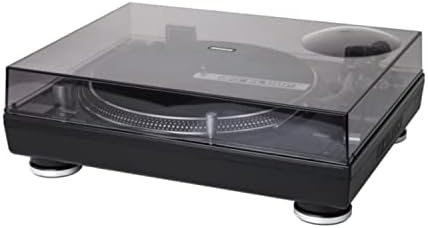
Image: The Reloop RP-7000 MK2 turntable with its protective dust cover in place.
3. Connecting Audio Cables
Connect the RCA cables from the turntable's output to the appropriate input on your mixer or amplifier. Ensure the ground wire is also connected to prevent hum.

Image: Rear panel of the Reloop RP-7000 MK2, displaying the RCA audio outputs, ground terminal, and power connection.
4. Koneksyon pouvwa
Connect the power cable to the turntable and then to a suitable power outlet. Ensure the power switch is in the OFF position before connecting.
Enstriksyon Operasyon
1. Limen ak Off
To power on the turntable, flip the power switch located on the front left side to the ON position. To power off, flip the switch back to OFF.

Imaj: Anlè view of the Reloop RP-7000 MK2 turntable, illustrating the arrangement of its controls and components.
2. Jwe yon Dosye
- Mete yon dosye sou plato a.
- Select the appropriate speed (33, 45, or 78 RPM) using the speed buttons.
- Peze a KÒMANSE/KANPE bouton pou kòmanse wotasyon plato a.
- Carefully lower the tonearm onto the record using the cue lever.

Image: The Reloop RP-7000 MK2 turntable with a record playing, demonstrating the tonearm's position.
3. Pitch Control and Reverse Function
Use the pitch fader to adjust the playback speed. The RAVE button allows for reverse playback of the record.
Antretyen
1. Netwaye platin an
Regularly wipe the turntable's surface with a soft, dry cloth. For the dust cover, use a slightly damp cloth and avoid abrasive cleaners. The included Knox Gear Vinyl Record Care System can be used for cleaning records and the stylus.

Image: The Knox Gear Vinyl Record Care System, showing the velvet record brush, stylus brush, and cleaning solution bottle.
2. Swen Stylus
Gently clean the stylus using the provided stylus brush. Always brush from back to front. A dirty stylus can degrade sound quality and damage records.
Depanaj
| Pwoblèm | Kòz posib | Solisyon |
|---|---|---|
| Pa gen pouvwa | Kab kouran an pa konekte; Priz kouran an gen pwoblèm | Tcheke koneksyon kab kouran an; Eseye yon lòt priz kouran |
| Pa gen son | RCA cables not connected; Amplifier/mixer input incorrect; Stylus damaged | Check RCA connections; Select correct input on amplifier/mixer; Inspect and replace stylus if necessary |
| Chanson bri | Ground wire not connected; Interference | Ensure ground wire is securely connected; Move turntable away from other electronic devices |
| Vitès lekti ki pa kòrèk | Wrong speed selected; Pitch fader not centered | Select correct RPM; Adjust pitch fader to center position |
Espesifikasyon
- Mak: Reloop
- Modèl: RP-7000 MK2
- Koneksyon Teknoloji: Branche
- Karakteristik espesyal: Balanced S-shaped Tone Arm, Dual Start/Stop Buttons, Precise Motor Control, Reverse Function, Freely Movable Aluminum LED Target Light
- Materyèl: Plastik
- Pwa atik: 4.5 Kilograms (per turntable)
- Koulè: Deep black or classic silver metallic
- Aparèy konpatib: Oratè, kas ekoutè
Garanti ak sipò
Reloop products are designed and manufactured to the highest quality standards. For warranty information and technical support, please refer to the official Reloop websit la oubyen kontakte distribitè lokal ou a. Kenbe prèv acha ou pou reklamasyon garanti.
Pou plis asistans, vizite Reloop Store on Amazon.