
1. Entwodiksyon
This manual provides essential information for the safe and effective use of your Canon PowerShot G1 X Mark III Digital Camera. Please read this manual thoroughly before using the camera and retain it for future reference.

Figi 1.1: Devan view of the Canon PowerShot G1 X Mark III Digital Camera with the lens extended. This image displays the camera's compact body, the integrated zoom lens, and the Canon branding.
The PowerShot G1 X Mark III is an advanced compact camera featuring a 24.2MP APS-C CMOS sensor and a DIGIC 7 image processor. It is designed for high-quality still photography and Full HD video recording, offering a versatile 3x optical zoom lens and Dual Pixel CMOS AF for precise focusing.
2. Ki sa ki nan bwat la
Verifye ke tout atik sa yo enkli nan pakè ou a:
- Canon PowerShot G1 X Mark III Digital Camera
- Canon NB-13L Lithium-Ion Battery Pack (3.6V, 1250mAh)
- Canon CB-2LH Battery Charger for NB-13L Li-Ion Batteries
- Lens Cap
- Lantiy bouchon kòd
- NS-DC12 Espageti pou kou
- Strap Adapter for NS-DC12
- Mikwo HDMI kab
3. Enstalasyon
3.1. Chaje epi enstale batri a
- Insert the NB-13L battery into the CB-2LH charger.
- Branche chargeur a nan yon priz kouran. Endikatè chaj la ap limen.
- Once charging is complete, the indicator will change or turn off. Remove the battery.
- Louvri kouvèti konpatiman batri a sou kamera a.
- Insert the charged battery into the camera, ensuring correct orientation. Close the cover securely.
3.2. Mete yon kat memwa
The camera supports SD, SDHC, and SDXC memory cards. For optimal performance, especially with video recording and continuous shooting, use a UHS Speed Class 3 (U3) card.
- Louvri kouvèti emplacement kat memwa a.
- Mete kat memwa a avèk etikèt la anfas devan kamera a jiskaske li fè yon klik pou l antre nan plas li.
- Fèmen kouvèti fant kat memwa a byen fèm.
3.3. Mete senti kou a
Thread the NS-DC12 neck strap through the strap adapters and then through the camera's strap mounts. Ensure both ends are securely fastened to prevent accidental drops.
3.4. Premye Limen ak Paramèt Debaz yo
Peze a ON/OFF button to power on the camera. Follow the on-screen prompts to set the date, time, and language. These settings are crucial for proper image file jesyon.
4. Itilizasyon Kamera a
4.1. Camera Controls Overview

Figi 4.1: Top view of the camera, illustrating the mode dial, hot shoe, and various control dials for quick adjustments.

Figi 4.2: Dèyè view of the camera, highlighting the LCD screen, electronic viewfinder, and the arrangement of control buttons for menu navigation and settings.
Familiarize yourself with the camera's buttons and dials. The mode dial on the top allows selection of various shooting modes, including Program AE, Shutter-priority AE, Aperture-priority AE, Manual, and Automatic modes. Dedicated dials provide direct adjustment of exposure compensation and other settings.
4.2. Fotografi debaz
Pou pran yon foto:
- Turn the mode dial to your desired shooting mode (e.g., OTO for automatic settings).
- Frame your subject using the electronic viewChèche oswa ekran LCD a.
- Press the shutter button halfway down to focus. The camera uses Dual Pixel CMOS AF for fast and accurate phase-detection autofocus.
- Peze bouton deklanchè a nèt pou pran foto a.
4.3. Anrejistreman Videyo
The camera supports Full HD 1080p video recording at up to 60 frames per second in MP4 format.
- Set the camera to video recording mode (if applicable, or press the dedicated video record button).
- Peze bouton dosye videyo a pou kòmanse anrejistreman.
- Peze bouton an ankò yo sispann anrejistreman.
4.4. Using the LCD Monitor and Electronic Viewjwenn

Figi 4.3: Side view of the camera with the vari-angle touchscreen LCD extended, demonstrating its flexibility for various shooting angles.
The camera features a 3.0-inch vari-angle touchscreen LCD, allowing for flexible shooting angles and intuitive control. You can also use the built-in 2.36m-dot OLED electronic viewfinder for a clear view, especially in bright conditions.
4.5. Built-in Flash
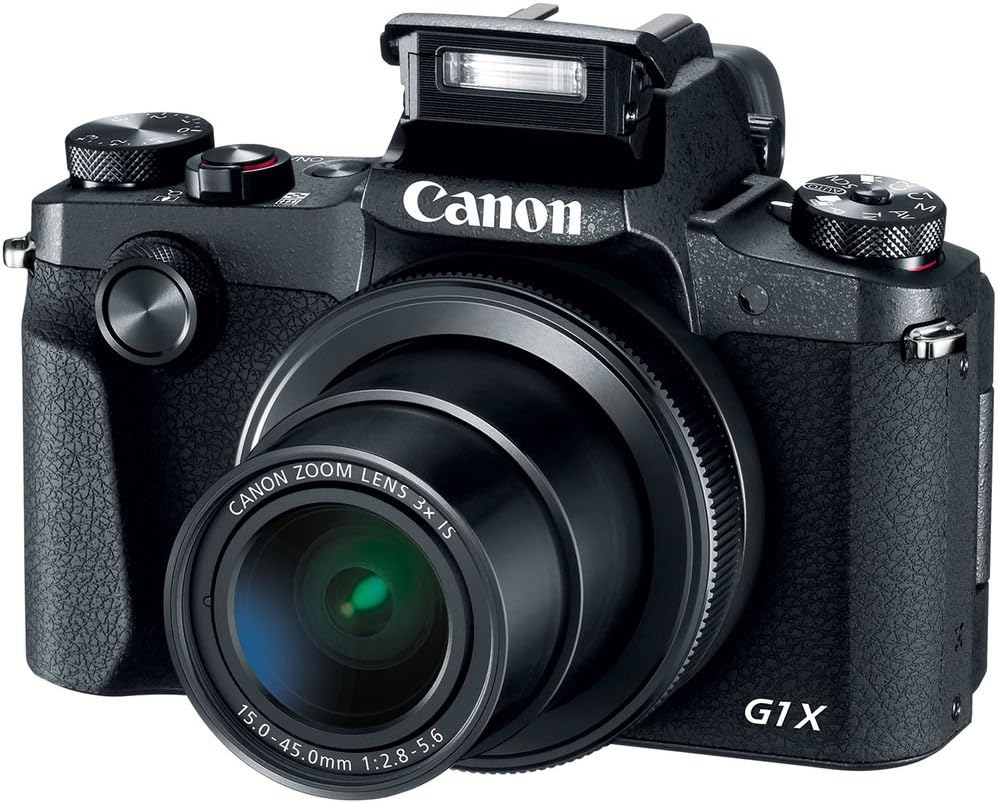
Figi 4.4: Devan view of the camera with the pop-up flash in the raised position, ready for use in low-light conditions.
The camera includes a built-in pop-up flash. To activate it, press the flash release button. Flash modes include Auto, On, Slow Synch, and Off. The hot shoe allows for external flash units.
4.6. Koneksyon
The PowerShot G1 X Mark III offers Wi-Fi, NFC, and Bluetooth connectivity for transferring images to smart devices and remote control. Refer to the camera's menu for pairing instructions.
5. Antretyen
5.1. Netwaye Kamera a
- Sèvi ak yon twal mou ki pa gen pousyè pou netwaye kò kamera a.
- Pou lantiy la ak ekran LCD a, sèvi ak yon twal espesyal ak yon solisyon pou netwaye lantiy. Evite pwodui chimik ki agresif.
- Use a blower brush to remove dust from the lens and sensor area (when exposed).
5.2. Swen batri
- Chaje batri a konplètman anvan chak itilizasyon.
- Sere pil yo nan yon kote ki fre, sèk lè yo pa itilize yo.
- Evite ekspoze pil yo a tanperati ekstrèm.
5.3. Depo
Lè w ap sere kamera a pou yon bon bout tan, retire batri a ak kat memwa a. Sere kamera a nan yon anviwònman sèk, san pousyè, de preferans nan yon sak kamera.
NAN. Depanaj
| Pwoblèm | Kòz posib / Solisyon |
|---|---|
| Kamera a pa limen. | Batri a ka fin itilize oswa li mal mete. Asire w ke batri a chaje epi li byen mete. |
| Pa ka pran foto. | Memory card may be full, locked, or not inserted. Check card status and free space. |
| Imaj yo flou. | Check focus settings. Ensure sufficient light. Use image stabilization or a tripod if necessary. |
| Flash la pa tire. | Flash may be set to 'Off' or in a mode where it does not fire automatically. Check flash settings. |
7. Espesifikasyon
- Capteur: 24.2 MP APS-C CMOS Sensor
- Pwosesis imaj: DIGIK 7
- Lantiy: 24-72mm (35mm Equivalent) 3x Optical Zoom, f/2.8-5.6
- Estabilizasyon imaj: Optik
- Otofokus: Dual Pixel CMOS AF (Phase Detection)
- ISO Gamme: 100-25600 (Elaji)
- Fiziyad kontinyèl: Jiska 9 fps
- Anrejistreman videyo: Full HD 1080p a 60 fps (MP4)
- ViewChèche: OLED elektwonik 2.36m pwen Viewjwenn
- LCD: 3.0" Vari-Angle Touchscreen LCD (1280 x 720 resolution)
- Koneksyon: Built-In Wi-Fi, NFC, Bluetooth, Micro HDMI
- Medya Depo: SD, SDHC, SDXC (konpatib ak UHS-I)
- Batri: NB-13L Lityòm-Ion
- Dimansyon (apeprè): 4.53 x 3.00 x 2.36 pous (115 x 76 x 60 mm)
- Pwa (Apeprè): 14.0 oz (399 g) with battery and memory card
- Konstriksyon: Dust- and Water-Resistant
8. Garanti ak sipò
This product is covered by a 90-day limited warranty. For warranty claims or technical support, please refer to the official Canon support channels or contact your retailer.