
1. Pwodwi souview
The USX MOUNT Soundbar Mount (Model XAS009) is designed to securely attach your soundbar either above or below your television. This versatile bracket supports soundbars weighing up to 16 lbs (7.26 kg) and is compatible with various TV wall mounts, including fixed, tilt, and full-motion types. It accommodates TVs with VESA patterns up to 600x400 mm. The design features detachable extension plates that swivel up to 180 degrees, allowing for flexible soundbar positioning.
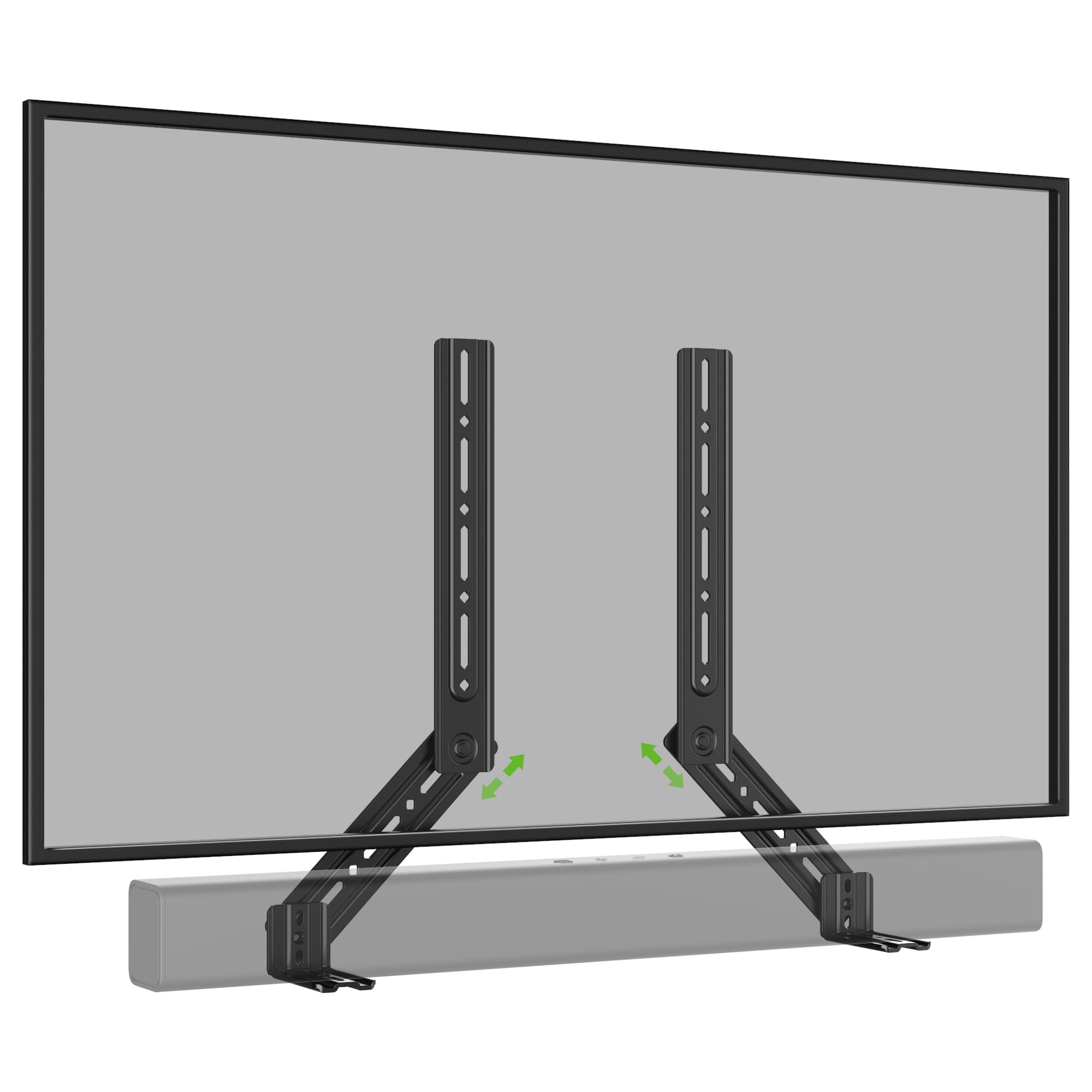
Imaj 1: Plis paseview of the USX MOUNT Soundbar Mount XAS009.
2. Enfòmasyon sou Sekirite
Please read and understand all instructions before installation and use. Failure to follow these instructions may result in property damage, serious injury, or death. If you have any questions, contact customer service.
- Kapasite pwa: Pa depase kapasite pwa maksimòm lan ki se 16 liv (7.26 kg).
- Gwosè televizyon: This mount may not fit TVs larger than 83 inches.
- VESA konpatibilite: Ensure your TV's VESA pattern is within 600x400 mm.
- Soundbar Mounting Holes: Verify your soundbar's mounting hole specifications match the bracket.
- Sifas enstalasyon: Ensure the wall or TV mount can safely support the combined weight of the TV, soundbar, and mount.
- Zouti: Sèvi ak zouti apwopriye pou enstalasyon.
3. Pake kontni
Carefully unpack the box and ensure all parts are present and undamaged. If any parts are missing or damaged, do not attempt to install. Contact customer support for assistance.
- Soundbar Mount Brackets (2 pieces)
- Detachable Extension Plates (L-shaped brackets)
- Assorted Screws, Washers, and Spacers for various VESA sizes and soundbar types
- Manyèl Enstriksyon

Image 2: Illustration of universal compatibility, maximum load, and VESA size support.
4. Espesifikasyon
| Karakteristik | Spesifikasyon |
|---|---|
| Nimewo Modèl | XAS009 |
| Kapasite chaj maksimòm | 16 liv (7.26 kg) |
| Compatible TV VESA Patterns | Up to 600x400 mm |
| Ajisteman Swivel | Jiska 180 degre |
| Kalite aliye | Above or Under TV (compatible with TV wall mounts) |
| Materyèl | Steel (implied by "sturdy") |
| Koulè | Gri |
5. Enstalasyon
The USX MOUNT Soundbar Mount offers flexible installation options, allowing you to attach your soundbar above or below your TV. The interlocking teeth on the arm connections ensure a secure fit.
5.1. Determine Mounting Position
Decide whether you want to mount the soundbar above or below your television. The brackets are designed to accommodate both configurations.

Image 3: Visual guide for installing the soundbar mount above or below the TV.
5.2. Attach Brackets to TV Mount
The soundbar mount brackets attach directly to your existing TV wall mount. They are compatible with full-motion, fixed, and tilting TV mounts. The brackets are designed to slide into place with the TV's VESA mounting arms.
Video 1: Demonstration of attaching the soundbar brackets to a TV mount, showing how they integrate with the TV's mounting arms.
5.3. Attach Soundbar to Brackets
Depending on your soundbar's design, you can attach it to the brackets using various methods:
- Back Hole Mounting: Use the provided screws and washers to secure the soundbar through its back mounting holes to the brackets.
- Key Hole Mounting: For soundbars with keyhole slots, align them with the bracket's keyhole screws and slide to lock.
- Bottom Hole Mounting (with L-shaped brackets): If your soundbar requires mounting from the bottom, use the included L-shaped brackets. Attach the L-shaped brackets to the main soundbar brackets, then secure your soundbar to the L-shaped brackets.

Imaj 4: Detaye view of different soundbar attachment methods: back hole, keyhole, and bottom hole using L-shaped brackets.
Image 5: Dimensions and design of the practical L-shaped hooks for bottom-mounted soundbars.

Image 6: Visual guide for connecting various soundbars using back, key, or bottom holes.
5.4. Ajisteman Final yo
Once the soundbar is attached, you can make final adjustments to its position. The detachable extension plates allow for up to 180 degrees of swivel, ensuring optimal placement and sound projection.

Image 7: Diagram illustrating the 360-degree swivel capability of the soundbar mount for precise positioning.

Image 8: The soundbar mount allows the soundbar to move in conjunction with a full-motion TV mount, maintaining alignment.
6. Operasyon Enstriksyon
The USX MOUNT Soundbar Mount is designed for a set-and-forget installation. Once installed, the primary operation involves adjusting the soundbar's angle or position if your TV mount allows for movement.
- Ajisteman Swivel: The extension plates can swivel up to 180 degrees. Loosen the locking mechanism, adjust the angle, and then re-tighten to secure the soundbar in your desired position.
- TV Mount Movement: If your TV is on a full-motion mount, the soundbar will move in conjunction with the TV, maintaining its relative position.
7. Antretyen
The soundbar mount requires minimal maintenance to ensure its longevity and continued performance.
- Netwayaj: Siye montur la avèk yon twal mou epi sèk pou retire pousyè a. Evite pwodui netwayaj abrazif oswa solvan.
- Tèks Peryodik: Tcheke tout vis ak koneksyon yo detanzantan pou asire yo rete sere epi byen fèm. Sere yo ankò si sa nesesè.
- Limit pwa: Do not place additional weight on the soundbar or mount beyond the specified capacity.
NAN. Depanaj
If you encounter any issues during or after installation, refer to the following common solutions:
- Ba son an pa anfòm: Double-check your soundbar's weight and mounting hole pattern against the specifications. Ensure you are using the correct screws and spacers.
- Mòn nan santi l enstab: Verify that all screws are securely tightened, especially those connecting the mount to the TV and the soundbar to the mount. Ensure the TV mount itself is properly installed on the wall.
- Difficulty with swivel adjustment: Loosen the adjustment knobs or bolts slightly before attempting to swivel. Do not force the movement.
- Pati ki manke: Refer to the "Package Contents" section. If parts are missing, contact USX MOUNT customer support.
9. Garanti ak sipò
USX MOUNT products are manufactured with quality and durability in mind. For warranty information or technical support, please refer to the official USX MOUNT websit la oubyen kontakte sèvis kliyan yo dirèkteman. Kenbe resi acha w la pou reklamasyon garanti.
Enfòmasyon pou kontakte: Tanpri vizite a USX MOUNT Store on Amazon for further details and support resources.