
1. Enstriksyon Sekirite
Always observe basic safety precautions when using electric tools to reduce the risk of fire, electric shock, and personal injury. Read all instructions before operating this tool.
Avètisman jeneral sou sekirite zouti elektrik
- Sekirite Zòn Travay: Kenbe zòn travay pwòp epi byen limen. Zòn ankonbre oswa nwa yo envite aksidan. Pa opere zouti elektrik nan atmosfè eksplozif, tankou nan prezans likid ki ka pran dife, gaz oswa pousyè. Zouti elektrik kreye etensèl ki ka limen pousyè oswa lafimen. Kenbe timoun yo ak moun ki t ap gade yo lwen pandan w ap opere yon zouti elektrik. Distraksyon ka lakòz ou pèdi kontwòl.
- Sekirite elektrik: Priz zouti elektrik yo dwe koresponn ak priz la. Pa janm modifye priz la nan okenn fason. Pa sèvi ak okenn priz adaptè ak zouti elektrik ki gen fil tè. Priz ki pa modifye ak priz ki koresponn ap diminye risk chòk elektrik. Evite kontak kò ak sifas ki gen fil tè oswa ki gen fil tè, tankou tiyo, radyatè, recho ak frijidè. Gen yon risk chòk elektrik ki ogmante si kò w gen fil tè oswa ki gen fil tè. Pa ekspoze zouti elektrik yo nan lapli oswa nan kondisyon mouye. Dlo k ap antre nan yon zouti elektrik ap ogmante risk chòk elektrik. Pa maltrete kòd la. Pa janm sèvi ak kòd la pou pote, rale oswa debranche zouti elektrik la. Kenbe kòd la lwen chalè, lwil, bor byen file oswa pati k ap deplase. Kòd ki domaje oswa ki mele ogmante risk chòk elektrik.
- Sekirite Pèsonèl: Stay alert, watch what you are doing and use common sense when operating a power tool. Do not use a power tool while you are tired or under the influence of drugs, alcohol or medication. A moment of inattention while operating power tools may result in serious personal injury. Use personal protective equipment. Always wear eye protection. Protective equipment such as dust mask, non-skid safety shoes, hard hat, or hearing protection used for appropriate conditions will reduce personal injuries. Prevent unintentional starting. Ensure the switch is in the off-position before connecting to power source, picking up or carrying the tool. Carrying power tools with your finger on the switch or energising power tools that have the switch on invites accidents. Remove any adjusting key or wrench before turning the power tool on. A wrench or a key left attached to a rotating part of the power tool may result in personal injury. Do not overreach. Keep proper footing and balance at all times. This enables better control of the power tool in unexpected situations. Dress properly. Do not wear loose clothing or jewellery. Keep your hair and clothing away from moving parts. Loose clothes, jewellery or long hair can be caught in moving parts. If devices are provided for the connection of dust extraction and collection facilities, ensure these are connected and properly used. Use of dust collection can reduce dust-related hazards.
- Itilizasyon ak swen zouti elektrik: Do not force the power tool. Use the correct power tool for your application. The correct power tool will do the job better and safer at the rate for which it was designed. Do not use the power tool if the switch does not turn it on and off. Any power tool that cannot be controlled with the switch is dangerous and must be repaired. Disconnect the plug from the power source and/or the battery pack from the power tool before making any adjustments, changing accessories, or storing power tools. Such preventive safety measures reduce the risk of starting the power tool accidentally. Store idle power tools out of the reach of children and do not allow persons unfamiliar with the power tool or these instructions to operate the power tool. Power tools are dangerous in the hands of untrained users. Maintain power tools and accessories. Check for misalignment or binding of moving parts, breakage of parts and any other condition that may affect the power tool’s operation. If damaged, have the power tool repaired before use. Many accidents are caused by poorly maintained power tools. Keep cutting tools sharp and clean. Properly maintained cutting tools with sharp cutting edges are less likely to bind and are easier to control. Use the power tool, accessories and tool bits etc. in accordance with these instructions, taking into account the working conditions and the work to be performed. Use of the power tool for operations different from those intended could result in a hazardous situation.
- Itilizasyon ak swen zouti batri: Rechaje sèlman ak plato a espesifye pa manifakti a. Yon plato ki apwopriye pou yon kalite pake batri ka kreye yon risk dife lè yo itilize ak yon lòt pake batri. Sèvi ak zouti elektrik sèlman ak pake batri ki deziyen espesyalman. Sèvi ak nenpòt lòt pake batri ka kreye yon risk pou blese ak dife. Lè pake batri a pa itilize, kenbe l lwen lòt objè metal, tankou klip papye, pyès monnen, kle, klou, vis oswa lòt ti objè metal, ki ka fè yon koneksyon soti nan yon tèminal nan yon lòt. Kout tèminal batri yo ansanm ka lakòz boule oswa yon dife. Nan kondisyon abizif, likid ka soti nan batri a; evite kontak. Si kontak aksidan rive, lave ak dlo. Si likid an kontak ak je, anplis chèche èd medikal. Likid ki soti nan batri a ka lakòz iritasyon oswa boule.
- Sèvis: Fè reparasyon zouti elektrik ou a pa yon moun ki kalifye ki sèvi ak pati ranplasman ki idantik sèlman. Sa a pral asire ke sekirite zouti elektrik la konsève.
2. Pwodwi souview
The POWERPLUS POWDP15200 is a versatile 20V cordless impact drill driver designed for various drilling and screwing applications. It is part of the Dual Power range, meaning its battery and charger (sold separately) are compatible with other Dual Power tools.
Karakteristik kle:
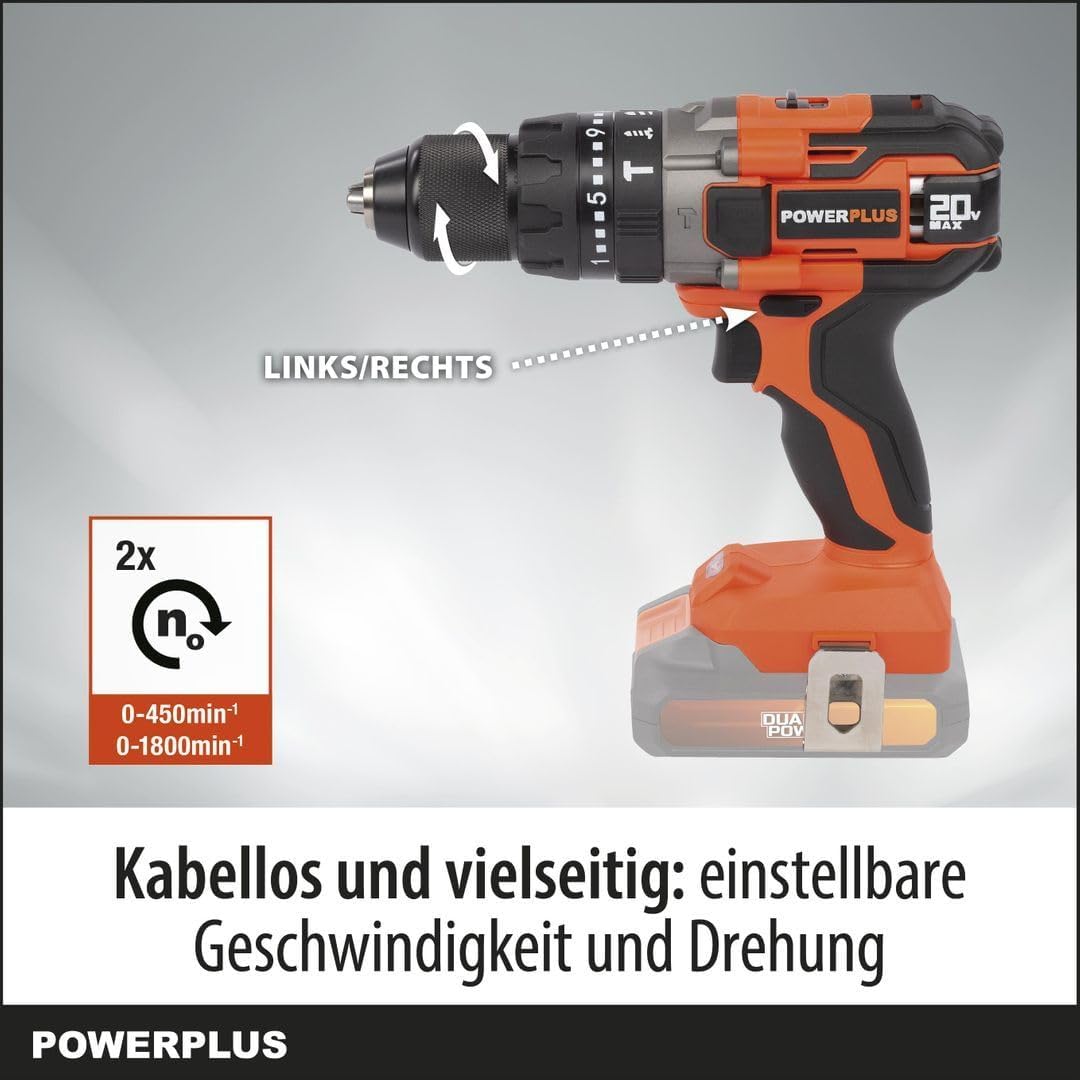
- Adjustable Speed and Rotation: Two-speed gearbox (0-450 min-1 / 0-1800 min-1) and a forward/reverse switch for optimal control.
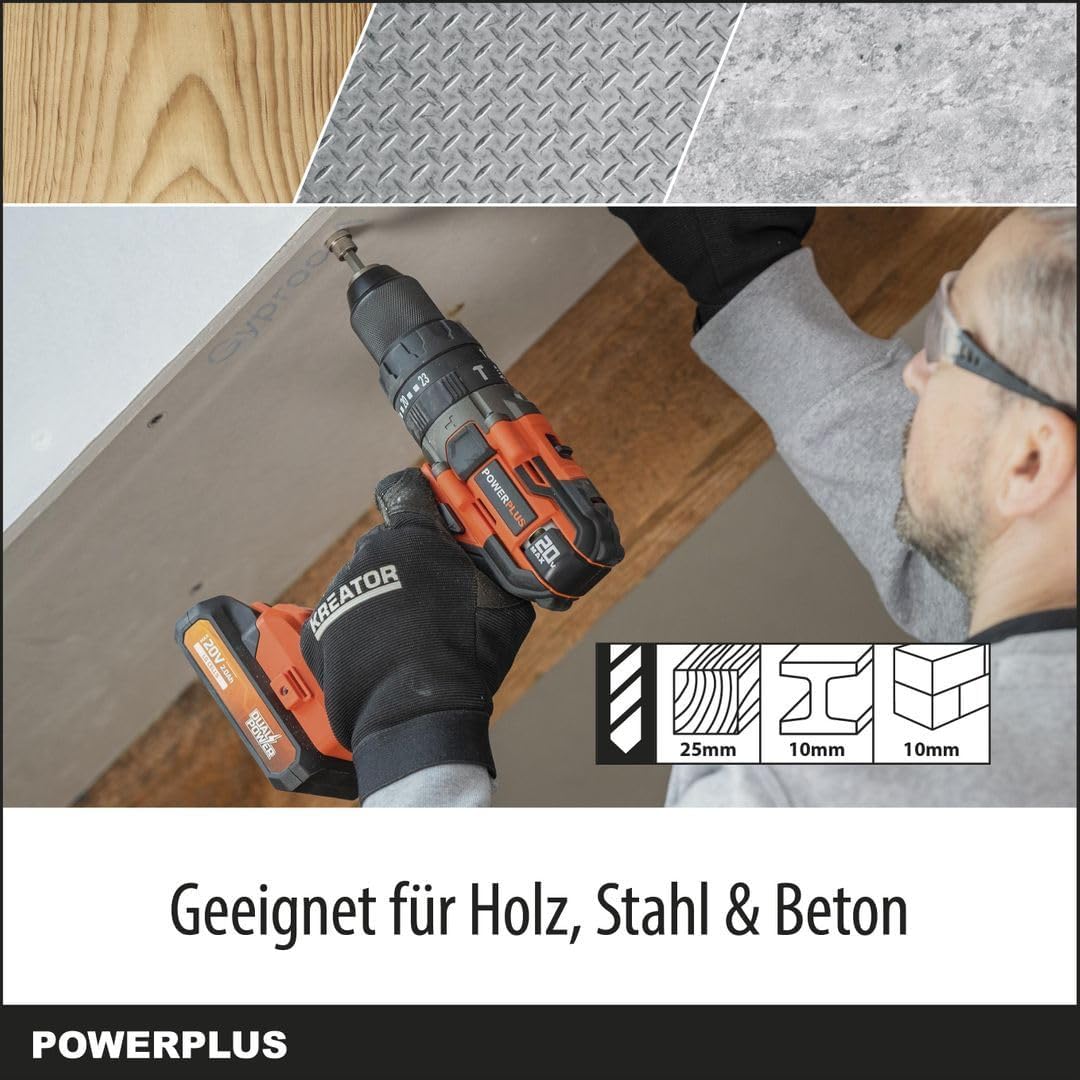
- Multi-Material Capability: Drills up to 25 mm in wood, 10 mm in steel, and 10 mm in concrete.
- Fonksyonalite 3-an-1: Offers screwing, drilling, and impact drilling modes with 23+2 torque settings.
- Pèfòmans pwisan: Delivers up to 50 Nm of torque and an impact rate of 7200-28800 strokes per minute.
- Vizibilite Amelyore: Integrated LED work light illuminates the work area.
- Mekanis sekirite: Features soft start, quick stop, and overload protection.
- Quick Accessory Change: Spindle lock for easy chuck and bit changes.
Figi 2.1: Devan view of the POWERPLUS POWDP15200 Cordless Impact Drill Driver. This image shows the overall design of the tool, including the chuck, speed selector, and handle.
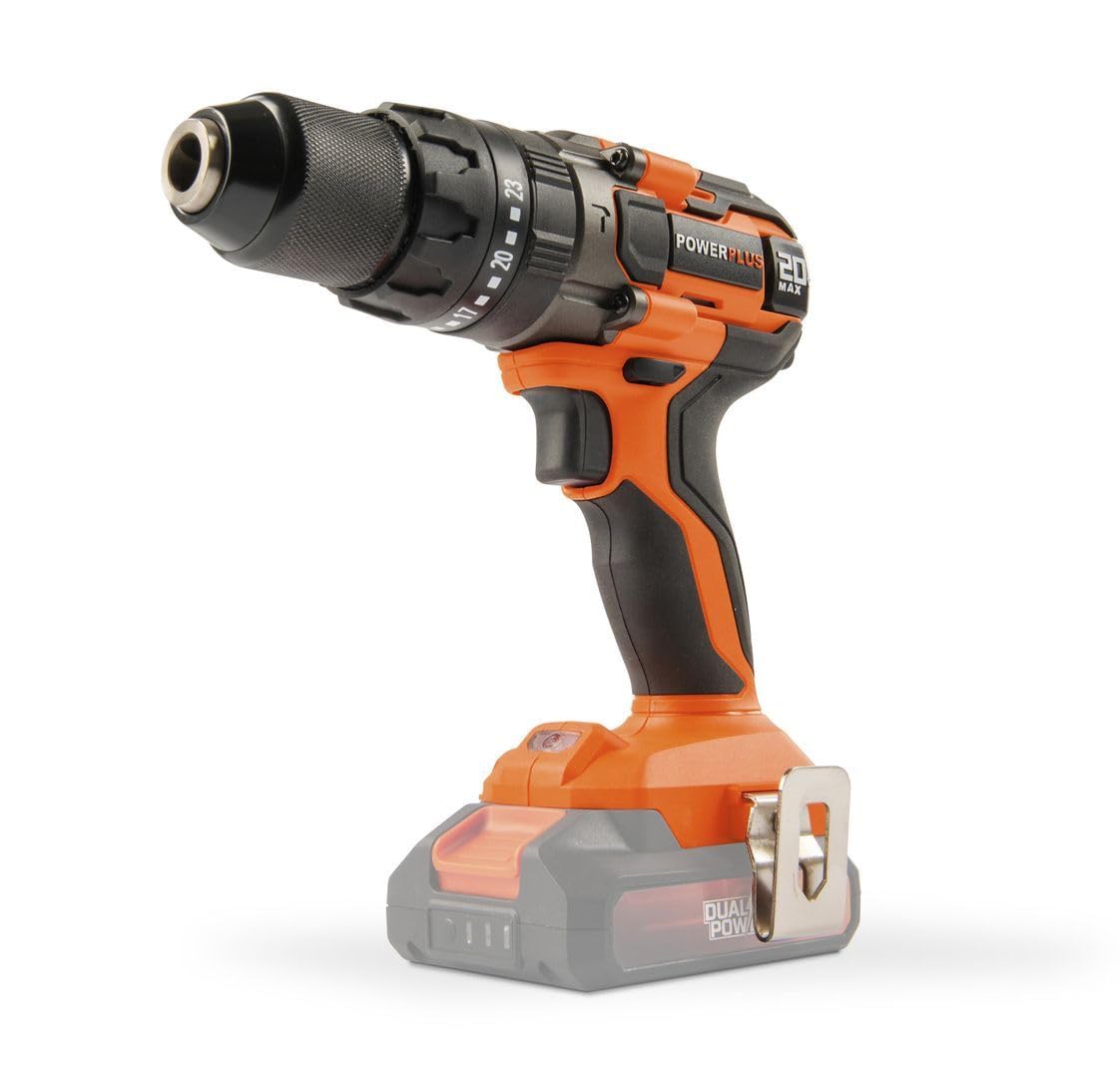
Figure 2.2: The POWERPLUS POWDP15200 drill driver with a compatible Dual Power battery attached. Note that the battery and charger are sold separately.
3. Enstalasyon
3.1. Enstalasyon ak Chaje Batri
This tool requires a 20V Dual Power battery and a compatible charger, which are not included and must be purchased separately. Ensure the battery is fully charged before first use.
- To install the battery, align the battery pack with the slot in the base of the drill handle.
- Glise batri a nan plas li jiskaske li klike byen.
- Pou retire batri a, peze bouton(yo) lage a sou kote pake batri a epi glise l soti.

Figi 3.1: Dèyè view of the drill driver, showing the battery compartment where the Dual Power battery slides in.
Figi 3.2: Side view of the drill driver, illustrating the ergonomic handle and the battery interface.

Figure 3.3: Close-up of the drill chuck and torque adjustment ring. This ring allows selection of 23 torque settings for screwing, a drill mode, and an impact drill mode.
3.2. Installing Drill Bits or Screwdriver Bits
- Pou sekirite, asire w ke zouti a etenn epi batri a retire.
- Vire mandrin lan nan sans kontrè ak zegwi mont lan pou louvri machwè yo.
- Insert the desired drill bit or screwdriver bit into the chuck. Ensure the bit is centered and fully inserted.
- Rotate the chuck clockwise to tighten the jaws firmly around the bit. The spindle lock feature assists in holding the chuck steady during this process.
- Pull on the bit to ensure it is securely fastened.
4. Operasyon
4.1. Selecting Speed and Rotation Direction
The drill driver features a two-speed gearbox and a forward/reverse selector.
- Seleksyon vitès: Use the switch on top of the drill to select between two speeds:
- Position 1 (Low Speed): 0-450 min-1, ideal for screwing and larger drilling diameters.
- Position 2 (High Speed): 0-1800 min-1, suitable for smaller drilling diameters and faster work.
- Chanjman pou pi devan/pou dèyè: Located above the trigger, this switch controls the rotation direction.
- Push left for forward rotation (screwing in, drilling).
- Push right for reverse rotation (unscrewing, removing bits).
- Center position locks the trigger for safety during storage or bit changes.

Figure 4.1: Illustration of the speed selector (2x n0) and the forward/reverse switch (LINKS/RECHTS). The image highlights the two speed ranges: 0-450 min-1 and 0-1800 min-1.
4.2. Adjusting Torque and Mode
The torque adjustment ring allows you to select the appropriate torque for screwing or switch to drilling or impact drilling modes.
- Mòd vise: Rotate the ring to select one of the 23 torque settings. Lower numbers are for smaller screws and softer materials, higher numbers for larger screws and harder materials. This prevents over-tightening and stripping screw heads.
- Mòd Forage (Ikòn Bit Drill): Select this mode for general drilling without impact. The clutch will not engage, providing full power.
- Impact Drilling Mode (Hammer Drill Icon): Select this mode for drilling into masonry or concrete. This mode combines rotation with a hammering action.
Figure 4.2: Close-up of the chuck and torque adjustment ring, showing the 23 torque settings, drill icon, and impact drill icon.
4.3. Kòmanse epi kanpe zouti a
- To start the tool, press the trigger switch. The tool features a soft start mechanism for controlled acceleration.
- The integrated LED work light will illuminate when the trigger is pressed, providing visibility to the work area.
- To stop the tool, release the trigger switch. The quick stop feature will rapidly halt the chuck's rotation.

Figure 4.3: The drill driver with its LED work light activated, illuminating the area in front of the chuck for improved visibility.
4.4. Drilling and Screwing Tips
- Always use sharp, appropriate bits for the material and task.
- For drilling, apply steady, even pressure. Do not force the tool.
- For screwing, start with a lower torque setting and increase if necessary to avoid stripping screw heads.
- When drilling into hard materials or concrete, use the impact drilling mode and ensure the bit is designed for impact use.
- The tool is suitable for drilling up to 25mm in wood, 10mm in steel, and 10mm in concrete.

Figure 4.4: The drill driver being used to drill into a wooden surface, demonstrating its capability for wood applications up to 25mm.

Figure 4.5: The drill driver in operation, illustrating its powerful 50 Nm torque and controlled performance for various tasks.
5. Antretyen
Regular maintenance ensures the longevity and optimal performance of your POWERPLUS POWDP15200 drill driver.
5.1. Netwayaj
- Toujou dekonekte batri a anvan ou netwaye li.
- Kenbe ouvèti vantilasyon yo pwòp pou anpeche yo chofe twòp. Sèvi ak yon bwòs mou oswa lè konprese pou retire pousyè ak debri.
- Siye lojman zouti a ak yon twal mou, damp twal. Pa sèvi ak pwodui chimik piman bouk oswa pwodui netwayaj abrazif.
- Netwaye machwa mandrin lan regilyèman pou asire ke moso yo byen priz.
5.2. Depo
- Sere zouti a nan yon kote ki sèk, an sekirite, kote timoun yo pa ka rive.
- Remove the battery from the tool before storing for extended periods.
- Sere pil yo nan yon kote ki fre epi sèk, lwen limyè solèy dirèk ak tanperati ekstrèm.
NAN. Depanaj
Si ou rankontre pwoblèm ak zouti perçage ou a, gade pwoblèm ak solisyon komen sa yo:
| Pwoblèm | Kòz posib | Solisyon |
|---|---|---|
| Zouti pa kòmanse. | Battery not installed correctly or discharged. Trigger lock engaged. | Ensure battery is fully charged and properly inserted. Check that the forward/reverse switch is not in the center (locked) position. |
| Reduced power or stops during operation. | Battery low. Overload protection activated. | Recharge the battery. Reduce pressure on the tool or use a lower speed/torque setting. Allow the tool to cool down if it has overheated. |
| Bit la glise nan mandrin lan. | Mandren an pa byen sere. Tij bit la sal oswa domaje. | Tighten the chuck firmly. Clean the bit shank or replace damaged bits. |
| Twòp vibrasyon oswa bri. | Damaged bit. Loose components. | Replace the bit. Check for any loose parts. If the problem persists, contact customer support. |
7. Espesifikasyon
| Karakteristik | Spesifikasyon |
|---|---|
| Nimewo Modèl | POWDP15200 |
| Mak | POWERPLUS |
| Nominal Voltage | 20 V |
| Max. Koupl | 50 Nm |
| No-load Speed (Gear 1) | 0 - 450 min-1 |
| No-load Speed (Gear 2) | 0 - 1800 min-1 |
| Impact Rate (Gear 1) | 0 - 7200 strokes/min |
| Impact Rate (Gear 2) | 0 - 28800 strokes/min |
| Kapasite Chuck | Max. Ø13 mm |
| Anviwònman koupl | 23 + 1 (Drill) + 1 (Impact Drill) |
| Kapasite Forage (Bwa) | 25 mm |
| Kapasite Forage (Asye) | 10 mm |
| Kapasite Forage (Beton) | 10 mm |
| Pwa (san batri) | 1.36 kg |
| Dimansyon (L x W x H) | 22 x 8 x 19.8 cm |
| Material (Motor winding) | Kwiv |
| Materyèl (Lojman) | PA6-GF30 |
| Material (Gear housing) | Aliminyòm |
| Karakteristik espesyal | Automatic stop, Integrated LED work light, Soft start, Quick stop, Overload protection, Spindle lock |
| Konpozan ki enkli | 1x belt clip, 1x instruction manual, 1x screw |
| Batri / Charger | Not included, required (Dual Power compatible) |
8. Garanti ak sipò
For warranty information, please refer to the documentation provided with your purchase or visit the official POWERPLUS websit la. Kenbe prèv acha ou a pou nenpòt reklamasyon garanti.
For technical support, spare parts, or service inquiries, please contact your local POWERPLUS dealer or authorized service center. Contact information can typically be found on the manufacturer's websit la oubyen nan dokimantasyon ki enkli a.