
1. Entwodiksyon
This manual provides essential instructions for the safe and effective operation of your Generic DSO4102S Digital Storage Oscilloscope with an integrated Signal Generator. The DSO4102S is a versatile 2-channel instrument designed for various applications in electronics, including testing, measurement, and analysis. Please read this manual thoroughly before using the device to ensure proper functionality and to prevent damage.
2. Enfòmasyon sou Sekirite
Always observe the following safety precautions to prevent injury and avoid damage to the instrument or other devices connected to it.
- Sous pouvwa: Connect the instrument only to a power source that meets the specifications listed in this manual.
- Atè: Ensure the instrument is properly grounded to prevent electric shock. Do not defeat the grounding feature of the power cord.
- Kondisyon anviwònman: Operate the instrument in a dry environment, away from moisture, dust, and extreme temperatures.
- Vantilasyon: Ensure adequate ventilation around the instrument to prevent overheating. Do not block ventilation openings.
- Probes and Accessories: Use only probes and accessories supplied or recommended by the manufacturer. Ensure probes are rated for the voltage and current being measured.
- Sèvis: Do not attempt to service the instrument yourself. Refer all servicing to qualified service personnel.
- Enspeksyon: Before each use, inspect the instrument, power cord, and accessories for any signs of damage. Do not use if damaged.
3. Pwodwi souview
3.1 Karakteristik kle
- Designed with built-in digital control technology.
- Integrates the functions of a Digital Storage Oscilloscope and a Signal Generator.
- Suitable for a wide range of applications including manufacturing, research, testing, education, and electronic product repair.
- 2-channel input for simultaneous signal analysis.
- Segondè sampling rate of 1 GS/s for detailed waveform capture.
- Bandwidth of 100 MHz (for DSO4102S model).
3.2 Konpozan Enstriman yo
The following images illustrate the main components and accessories of the DSO4102S oscilloscope.
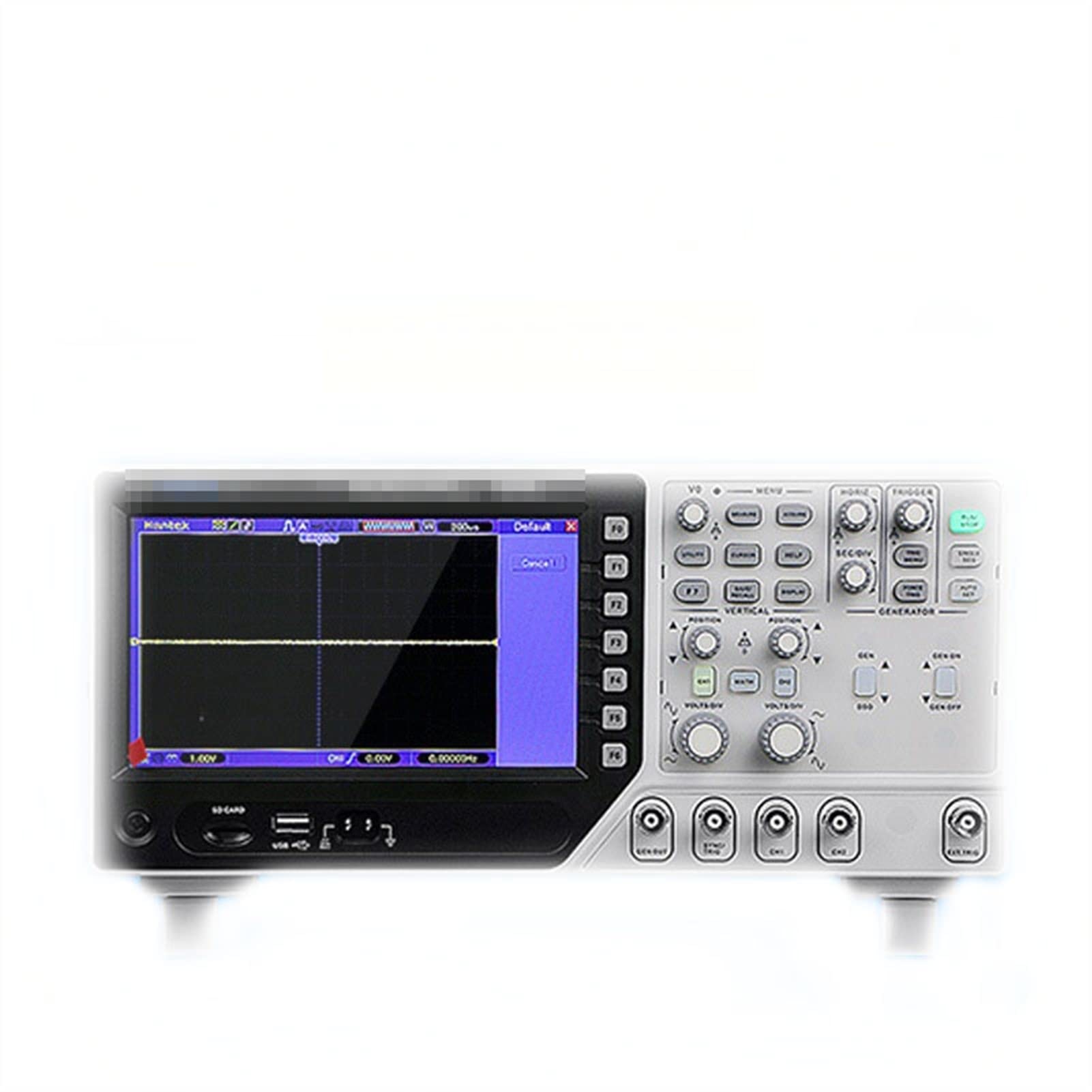
Figi 1: Devan view of the DSO4102S Digital Storage Oscilloscope. This image shows the main display screen, control knobs for vertical and horizontal adjustments, trigger controls, and input BNC connectors for channels 1 and 2, along with the signal generator output.

Figi 2: Angle view of the DSO4102S, highlighting the side profile and the arrangement of the front panel controls and connectors.

Figi 3: Tèt ak dèyè view of the DSO4102S, showing ventilation slots and the power input port. The rear panel typically includes additional connectivity options such as USB for data transfer.

Figi 4: Included accessories for the DSO4102S, which typically comprise oscilloscope probes, a USB cable for PC connection, a power cord, and a BNC cable for signal generator output or other connections.
4. Enstalasyon
- Debake: Carefully remove the oscilloscope and all accessories from the packaging. Verify that all components listed in Section 3.2 are present and undamaged.
- Koneksyon pouvwa: Connect the provided power cord to the power input port on the rear panel of the oscilloscope and then to a suitable AC power outlet. Ensure the power outlet is properly grounded.
- Pouvwa sou: Press the power button, usually located on the front or side panel, to turn on the oscilloscope. The display should illuminate, and the system will perform a self-test.
- Koneksyon sonde: For signal measurement, connect the oscilloscope probes to the CH1 and/or CH2 BNC input connectors on the front panel. Ensure the probe's ground clip is securely connected to the circuit's ground.
- Konpansasyon Sond: Before taking measurements, it is recommended to compensate the probes to ensure accurate readings. Connect the probe tip to the probe compensation test point (usually a square wave output) on the oscilloscope and adjust the probe compensation trimmer until a flat-top square wave is displayed.
5. Operasyon Enstriksyon
This section provides general guidance on operating the DSO4102S. Refer to the on-screen menus and specific function buttons for detailed control.
5.1 Oscilloscope Functions
- Vertical Controls (VOLTS/DIV): Use the VOLTS/DIV knobs for each channel to adjust the vertical scale (voltage per division) of the displayed waveform. The POSITION knob adjusts the vertical position.
- Horizontal Controls (SEC/DIV): Use the SEC/DIV knob to adjust the horizontal scale (time per division) of the displayed waveform. The HORIZ POSITION knob adjusts the horizontal position.
- Sistèm deklanche: The trigger controls (LEVEL, MODE, TYPE) stabilize repetitive waveforms. Adjust the TRIGGER LEVEL to set the voltage point at which the oscilloscope starts acquiring data. Select the appropriate trigger MODE (e.g., Auto, Normal, Single) and TYPE (e.g., Edge, Pulse).
- Fonksyon Mezi: Most digital oscilloscopes include automatic measurement functions (e.g., Vpp, Vrms, Frequency, Period). Access these through the menu system to quickly analyze waveform parameters.
- Storage and Recall: Use the instrument's storage functions to save waveforms, setups, or screenshots to internal memory or a connected USB drive.
5.2 Signal Generator Functions
The integrated signal generator allows you to output various waveforms for testing circuits.
- Koneksyon Sòti: Connect a BNC cable from the signal generator output port (labeled "GENERATOR" or similar) to the circuit under test.
- Seleksyon Fòm Vag: Use the dedicated signal generator controls or menu options to select the desired waveform type (e.g., sine, square, triangle, pulse).
- Frekans ak AmpAjisteman Lititid: Ajiste frekans lan ak amplitude of the output signal using the corresponding controls or menu settings.
- Output Enable/Disable: Use the ON/OFF button for the generator to enable or disable the signal output.
6. Antretyen
- Netwayaj: Disconnect the power cord before cleaning. Use a soft, damp cloth with a mild detergent to clean the exterior of the instrument. Do not use abrasive cleaners or solvents. Avoid getting moisture into any openings.
- Depo: When not in use, store the oscilloscope in a clean, dry environment, away from direct sunlight and extreme temperatures. Protect it from dust and vibrations.
- Kalibrasyon: For optimal performance and accuracy, periodic calibration by qualified service personnel is recommended. Refer to the manufacturer's guidelines for calibration intervals.
- Mizajou mikrolojisyèl: Tcheke manifakti a website periodically for any available firmware updates to ensure your device has the latest features and bug fixes.
NAN. Depanaj
Seksyon sa a adrese pwoblèm komen ou ka rankontre. Pou pwoblèm ki pa nan lis la a, kontakte sèvis kliyan.
| Pwoblèm | Kòz posib | Solisyon |
|---|---|---|
| No power when turned on. | Power cord not connected; power outlet faulty; instrument fuse blown. | Check power cord connection; test power outlet; contact service for fuse replacement. |
| Pa gen okenn fòm ond ki parèt. | Probe not connected; input signal too small/large; trigger settings incorrect; channel disabled. | Ensure probe is connected and making contact; adjust VOLTS/DIV; adjust trigger level/mode; enable channel. |
| Waveform is unstable or rolling. | Incorrect trigger settings (level, mode, type). | Adjust trigger level to a stable point on the waveform; select appropriate trigger mode (e.g., Normal for stable signals); ensure trigger source is correct. |
| Incorrect measurements. | Probe compensation incorrect; probe attenuation setting incorrect; instrument not calibrated. | Perform probe compensation; ensure probe attenuation (e.g., 1X, 10X) matches oscilloscope setting; consider professional calibration. |
8. Espesifikasyon
| Paramèt | Valè |
|---|---|
| Modèl | DSO4102S (100M) |
| Kalite | Digital Depo osiloskop |
| Kantite Chanèl | 2 |
| Bandwidth | 100 MHz (for DSO4102S) |
| Sampling To | 1 GS/s |
| Pwa atik | 4 kg (4500 gram) |
| ASIN | B09KCBDQRL |
| Premye Dat ki disponib | 26 oktòb 2021 |
Note: Specifications are subject to change without notice. For the most current specifications, please refer to the manufacturer's official documentation.
9. Garanti ak sipò
For warranty information, please refer to the documentation provided at the time of purchase or contact your seller directly. The manufacturer typically offers a limited warranty against defects in materials and workmanship.
If you encounter any issues or have questions regarding the operation or maintenance of your DSO4102S, please contact the seller or manufacturer's customer support. When contacting support, please have your model number (DSO4102S) and purchase details readily available.