
Entwodiksyon
Mèsi pou acha aasing the GEPRC TinyGO 4K FPV Whoop RTF Drone. This comprehensive kit is designed for beginners and experienced pilots alike, offering a ready-to-fly solution for immersive FPV (First Person View) flying and high-quality 4K video capture. Please read this manual thoroughly before operating the drone to ensure safe and optimal performance.
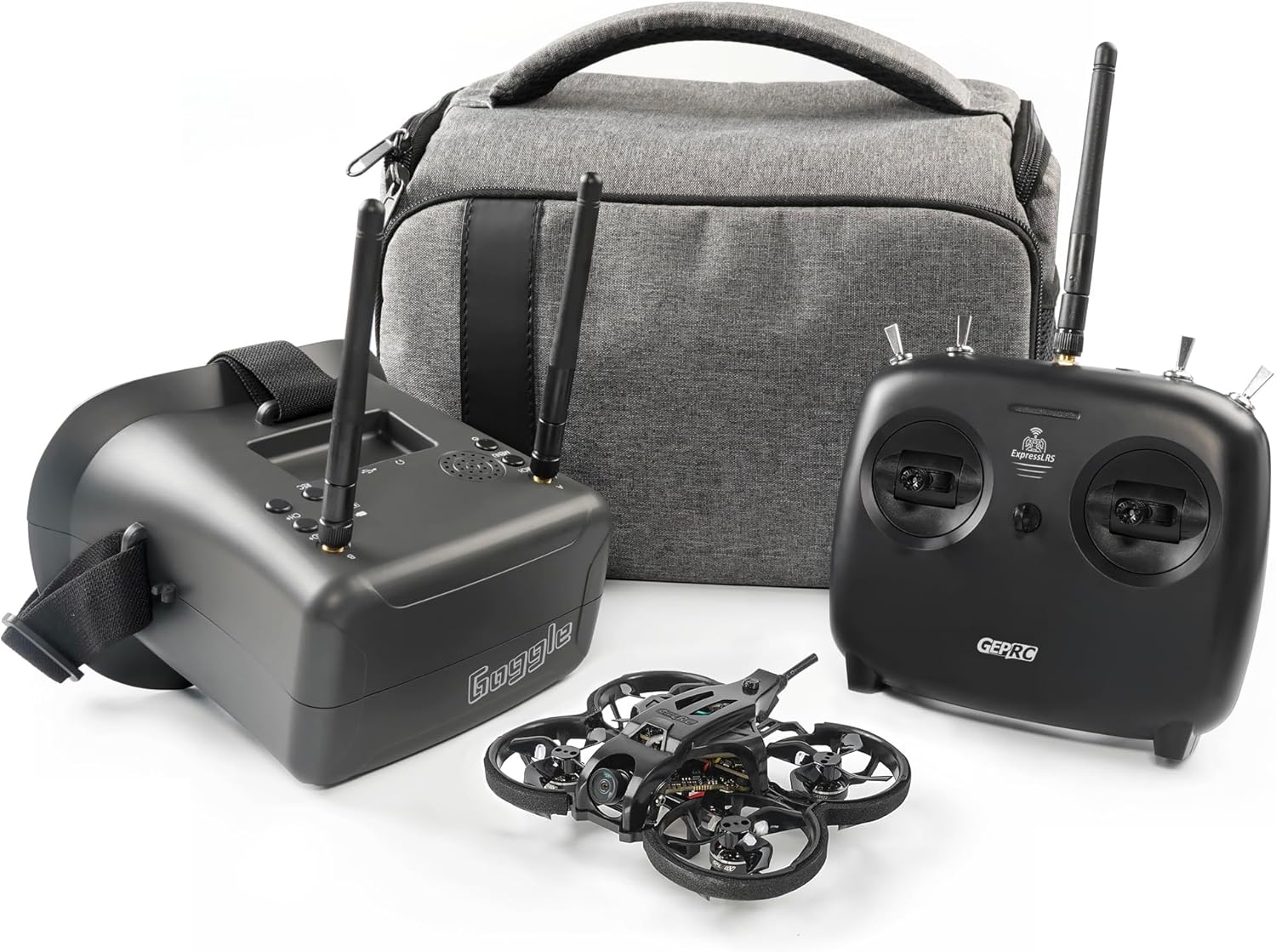
Figure 1: Complete GEPRC TinyGO 4K FPV Whoop RTF Drone Kit.
The complete kit includes the TinyGO 4K FPV Whoop Drone, GEPRC GR8 Remote Controller, FPV Goggles, multiple batteries, a multi-charger, spare propellers, and a convenient carrying case, providing everything needed to start flying.
Gid Sekirite
Operating FPV drones requires adherence to strict safety protocols. Failure to follow these guidelines may result in injury, property damage, or legal consequences.
- Sipèvizyon granmoun: This product is intended for adults only. Minors should only operate under direct adult supervision.
- Tcheke anvan vòl: Always perform a thorough pre-flight inspection of the drone, remote, and goggles. Ensure all components are securely attached and free from damage.
- Sekirite batri: Use only recommended batteries and chargers. Do not overcharge or discharge batteries. Store batteries in a fireproof bag away from flammable materials. Discontinue use if batteries show signs of swelling or damage.
- Anviwònman vòl: Fly in open areas, away from people, animals, buildings, and obstacles. Avoid flying near airports, restricted airspace, or in adverse weather conditions (strong winds, rain).
- Sekirite Elis: Keep hands and face clear of rotating propellers. Always remove propellers before performing maintenance or handling the drone indoors.
- Liy Vizyon: Maintain visual line of sight with the drone at all times, even when using FPV goggles.
- Règleman lokal yo: Familiarize yourself with and adhere to all local drone regulations and laws.
Kontni pake
Verifye ke tout atik ki nan lis anba a yo prezan nan pakè ou a:
| Atik | Kantite | Deskripsyon |
|---|---|---|
| TinyGO 4K FPV Whoop Drone | 1 | Compact FPV drone with propeller guards. |
| GEPRC GR8 Remote Controller | 1 | Ergonomic remote for precise control. |
| FPV linèt | 1 | Immersive first-person view eksperyans. |
| LiPo batri | Plizyè | High-capacity Lithium Polymer batteries for extended flight time. |
| USB Battery Charger | 1 | Multi-port charger for LiPo batteries. |
| Elis rezèv | 4 ansanm | Replacement propellers for maintenance. |
| Ka pote | 1 | Protective case for transport and storage. |
| USB Chaje Kab | 1 | For charging the remote controller and goggles. |
| Screwdriver & Screws | 1 seri | Tools for minor adjustments and repairs. |

Figi 2: Detaye view nan tout konpozan ki enkli yo.
This image displays all the items you should find in your GEPRC TinyGO 4K FPV Whoop RTF Drone package, including the drone, remote, goggles, batteries, charger, and accessories.
Gid Enstalasyon
1. Chaje pil
Before first use, fully charge all batteries. The kit includes a USB multi-charger for the drone's LiPo batteries. Connect the charger to a USB power source (e.g., computer USB port, USB wall adapter).
- Connect the drone batteries to the appropriate ports on the USB charger. Ensure the connectors are aligned correctly.
- The indicator lights on the charger will show charging status (e.g., red for charging, green for fully charged).
- Charge the remote controller and FPV goggles using their respective USB charging cables.

Figure 3: The TinyGO drone weighs approximately 54 grams.
This image shows the lightweight design of the TinyGO drone, weighing only 54 grams, which contributes to its agility and flight performance.
2. Preparasyon Dròn
- Inspect the propellers for any damage or cracks. Replace if necessary.
- Ensure the battery is securely inserted into the drone's battery compartment.
- Verifye si lantiy kamera a pwòp epi li pa gen obstak.

Figi 4: Devan-anwo view of the TinyGO drone.
This image highlights the compact design and integrated propeller guards of the TinyGO drone, designed for durability and safe indoor/outdoor flight.
3. Remote Controller Setup
- Power on the GEPRC GR8 Remote Controller.
- Ensure the remote is bound to the drone. Refer to the binding instructions if the drone and remote are not already paired.
- Familiarize yourself with the control sticks and buttons.
4. FPV Goggles Setup
- Power on the FPV Goggles.
- Adjust the head strap for a comfortable fit.
- Scan for the drone's video feed. Ensure a clear and stable video signal before flight.
Enstriksyon Operasyon
1. Verifikasyon anvan vòl la
- Ensure all batteries (drone, remote, goggles) are fully charged.
- Tcheke elis yo pou wè si yo domaje epi asire w yo byen tache.
- Verify that the flight area is clear of obstacles, people, and animals.
- Confirm a strong video signal in the FPV goggles.
2. Arming the Drone
To arm the drone (start the motors), typically move both control sticks to the bottom-outer corners simultaneously. Refer to the remote controller's specific instructions for exact arming procedures.
3. Takeoff and Flight
- Gently increase the throttle (left stick up) to lift off.
- Use the right stick to control pitch (forward/backward) and roll (left/right).
- Use the left stick to control yaw (rotation) and throttle (altitude).
- Practice hovering and gentle maneuvers in a safe, open space before attempting advanced flights.
4. Aterisaj
Slowly decrease the throttle until the drone gently lands. Once on the ground, disarm the motors immediately by moving both control sticks to the bottom-inner corners (or as per your remote's specific disarming procedure).
5. Anrejistreman Videyo
The TinyGO 4K drone is capable of 4K video capture. Consult the drone's specific documentation or the GEPRC website for instructions on how to initiate and stop video recording, and how to access recorded footage. Ensure a compatible microSD card (not included) is inserted into the drone's camera slot.
Antretyen
Regular maintenance ensures the longevity and performance of your TinyGO drone.
- Enspeksyon elis: After every crash or hard landing, inspect propellers for bends, cracks, or chips. Replace damaged propellers immediately.
- Netwayaj motè: Keep motors free from dirt, dust, and debris. Use compressed air or a soft brush to clean.
- Enspeksyon ankadreman: Check the drone frame for any cracks or damage. Minor cracks can sometimes be repaired with specialized adhesives, but severe damage may require part replacement.
- Swen batri: Store LiPo batteries at storage voltage (around 3.8V per cell) if not used for extended periods. Do not leave batteries fully charged or fully discharged for long durations.
- Mizajou mikrolojisyèl: Periodically check the GEPRC official website for firmware updates for the drone, remote, and goggles. Keeping firmware updated can improve performance and add new features.
Depanaj
| Pwoblèm | Kòz posib | Solisyon |
|---|---|---|
| Drone does not arm/motors do not spin. | Low battery on drone or remote; remote not bound; arming procedure incorrect; safety mode engaged. | Charge batteries; re-bind remote; review arming sequence; check flight controller status lights. |
| No video feed in FPV goggles. | Goggles not powered on; wrong frequency/channel selected; drone not powered on; damaged video transmitter/camera. | Ensure goggles and drone are on; scan for channels; check antenna connections; contact support if hardware is damaged. |
| Dron an ap derive pandan vòl la. | Uncalibrated accelerometer; bent propeller; uneven motor thrust. | Calibrate accelerometer (refer to flight controller software); replace bent propellers; check motor connections. |
| Tan vòl kout. | Battery degradation; over-discharging; heavy payload. | Replace old batteries; avoid over-discharging; reduce unnecessary weight. |
Espesifikasyon
| Karakteristik | Detay |
|---|---|
| Mak | GEPRC |
| Modèl | TinyGO 4K FPV Whoop RTF Drone |
| Nivo konpetans | debutan |
| Fòma Capture Videyo | 4K |
| Rezolisyon Sòti Videyo | 854x480 Pixels (FPV Goggles) |
| Koneksyon Teknoloji | Radyo Frekans |
| Kapasite Batri Dròn | 2000 Miliamp Hours (Main Battery) |
| Konpozisyon selil batri | Lityòm Polymère |
| Drone Material | Plastik |
| Pwa abèy | Approx. 54 grams (0.12 lbs) |
| Dimansyon pake | 11.81 x 9.41 x 7.83 pous |
| Premye Dat ki disponib | 30 oktòb 2021 |
Garanti ak sipò
For warranty information, technical support, or service inquiries, please visit the official GEPRC websit la oubyen kontakte sèvis kliyan yo dirèkteman. Kenbe resi acha w la kòm prèv acha pou reklamasyon garanti.
Ofisyèl GEPRC Websit: www.geprc.com
For additional resources and community support, consider visiting online FPV forums and communities.