
1. Entwodiksyon
This manual provides instructions for the HCDZ Replacement Remote Control, designed for use with various Epson 3LCD 4K Large Venue Laser Projectors. This remote offers direct functionality without the need for programming.
Kontni pake:
- 1 x HCDZ Replacement Remote Control
Note: Batteries and additional instructions are not included in the package.
2. Enstalasyon
2.1 Enstalasyon batri
Telekòmand lan bezwen de pil AAA (pa enkli). Swiv etap sa yo pou enstale yo:
- Jwenn kouvèti lòj batri a sou do kontwòl remote la.
- Glise kouvèti a anba oubyen peze lokèt la epi leve l pou ouvri konpatiman an.
- Mete de pil AAA ladan l, asire w ke tèminal pozitif (+) ak negatif (-) yo byen aliyen ak mak ki anndan konpatiman an.
- Remèt kouvèti konpatiman batri a, glise l tounen nan plas li jiskaske li fè yon klik byen fèm.

Image: Back of the remote control with the battery compartment open, illustrating correct AAA battery placement.
2.2 Premye Itilizasyon
Once batteries are correctly installed, the remote control is ready for immediate use. No programming or pairing is required. Point the remote directly at your Epson projector's infrared (IR) sensor.
3. Opere kontwòl Remote a
This remote control provides full functionality for your compatible Epson projector. Refer to your projector's original user manual for specific functions of each button.
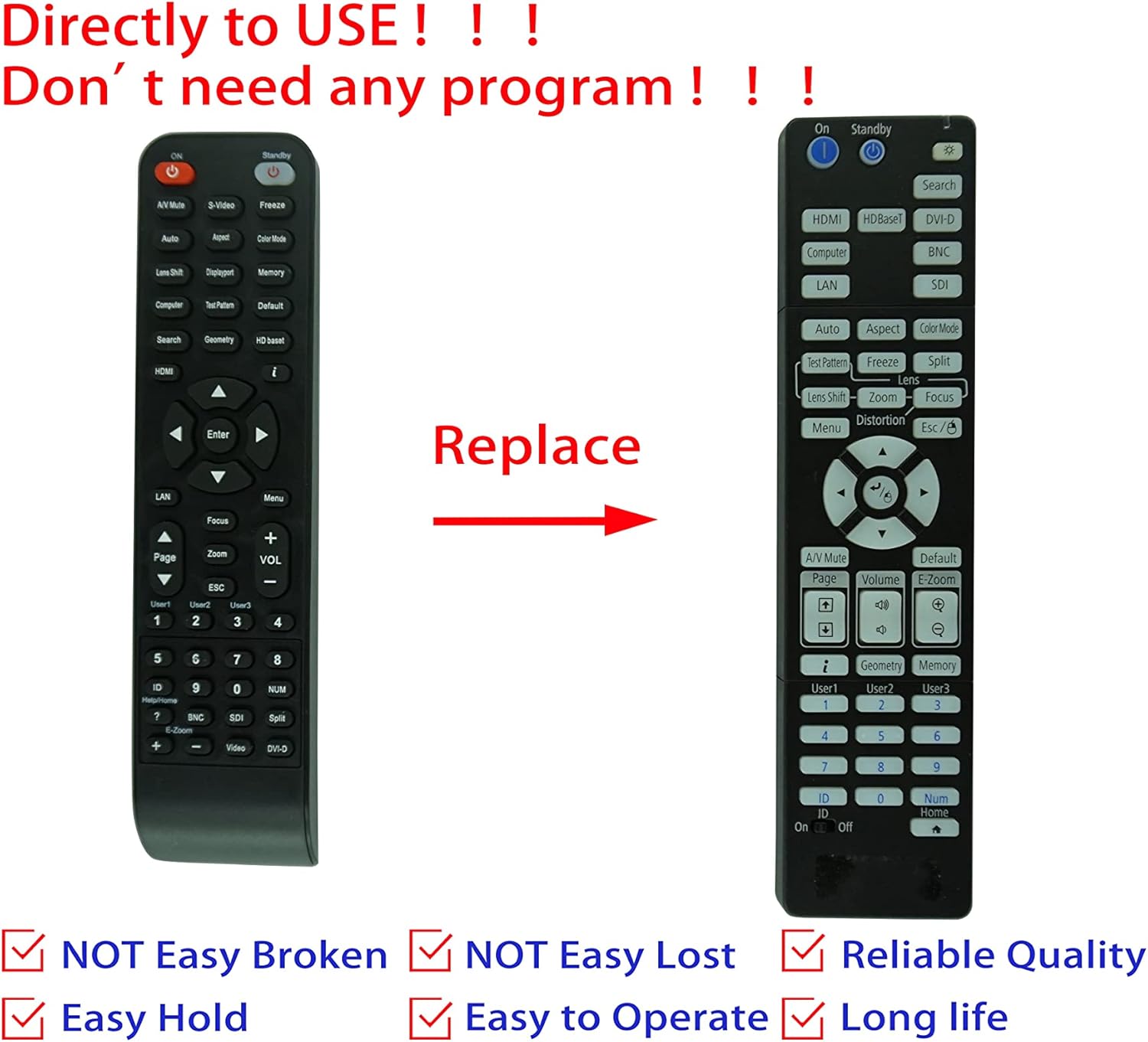
Image: Comparison of an original Epson remote (left) and the HCDZ replacement remote (right), highlighting the replacement functionality.
3.1 Key Functions (General)
- Limen/Etenyen: Typically a dedicated button, often red or clearly marked.
- Seleksyon Antre: Buttons for HDMI, Computer, Video, etc., to switch input sources.
- Navigasyon: Arrow keys (Up, Down, Left, Right) and an Enter/OK button for menu navigation.
- Meni: Accesses the projector's on-screen display (OSD) menu.
- Volim: Adjusts audio output if the projector has built-in speakers or audio pass-through.
- Zoom/Konsantre: Adjusts the projected image size and clarity.
- Klavye nimerik: For direct input or selecting specific functions.
4. Antretyen ak Swen
To ensure the longevity and proper functioning of your remote control, observe the following guidelines:
- Netwayaj: Siye telekòmand lan avèk yon twal mou epi sèk. Pa sèvi ak pwodui netwayaj likid oswa materyèl abrazif.
- Anviwònman: Avoid exposing the remote to extreme temperatures, high humidity, or direct sunlight.
- Ranplasman batri: Replace both batteries simultaneously. Do not mix new and old batteries, or different types of batteries.
- Depo: Si ou pa pral itilize telekòmand lan pou yon peryòd tan pwolonje, retire pil yo pou anpeche flit ak domaj potansyèl.
- Enpak: Evite lage telekòmand lan oswa sibi gwo enpak.

Imaj: Dèyè view of the HCDZ remote control, illustrating its design.
NAN. Depanaj
Si w gen pwoblèm ak kontwòl remote ou a, eseye etap depanaj sa yo:
- Remote pa reponn:
- Asire w ke pil yo byen mete ak polarite ki kòrèk la.
- Ranplase pil ansyen yo ak pil AAA fre.
- Check for any obstructions between the remote and the projector's IR sensor.
- Ensure you are within the effective range and pointing the remote directly at the projector.
- Fonksyonalite tanzantan:
- Strong light sources (e.g., direct sunlight, fluorescent lights) can interfere with IR signals. Try operating the remote in a different lighting condition.
- Asire ke kontak batri yo pwòp epi yo pa korozyon.
6. Espesifikasyon
| Karakteristik | Detay |
|---|---|
| Mak | HCDZ |
| Konpatibilite | Epson EB-PU2010B, EB-PU1007B, EB-PU2010W, EB-PU1007W, EB-PU1008B, EB-PU1006W, EB-PU1008W Projectors |
| Koneksyon Teknoloji | Enfrawouj (IR) |
| Sous pouvwa | 2 x AAA pil (pa enkli) |
| Pwogramasyon obligatwa | Non |
| Koulè | Nwa |
7. Garanti ak sipò
This HCDZ replacement remote control comes with a 90-day warranty from the date of purchase. This warranty covers manufacturing defects under normal use.
For warranty claims or technical support, please contact your retailer or the HCDZ customer service department with your purchase details.
Tanpri konsève prèv acha ou a pou rezon garanti.