
AOSHIDA RC-15A
Topping RC-15A Remote Control User Manual
Model: RC-15A
Brand: AOSHIDA
1. Entwodiksyon
This manual provides detailed instructions for the proper use and maintenance of your Topping RC-15A Remote Control. The RC-15A is designed to provide convenient wireless control over various Topping Digital-to-Analog Converters (DACs) and Headphone Amplifiers, enhancing your audio experience.
Please read this manual thoroughly before operating the device to ensure optimal performance and longevity.
2. Pwodwi souview
The Topping RC-15A is a compact infrared remote control. It features a range of buttons for power, volume adjustment, input selection, and other specific functions depending on the connected Topping device.
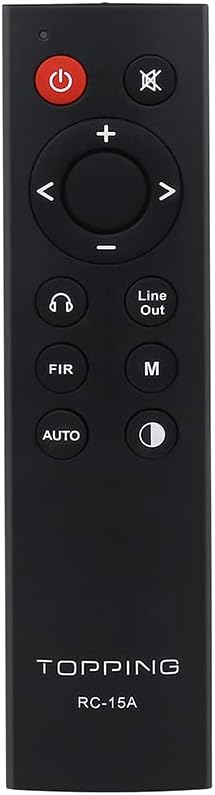
Figi 2.1: Devan view of the RC-15A remote control, displaying the button layout including power, mute, volume up/down, navigation, input selection, and mode buttons.
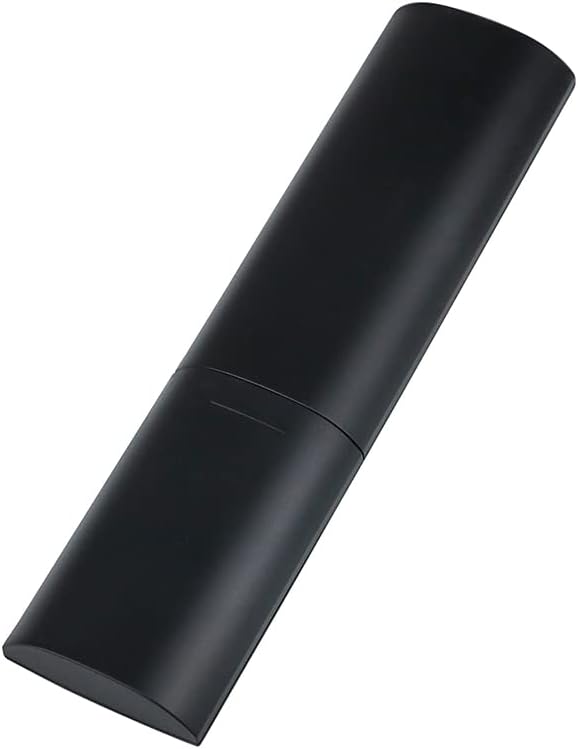
Figi 2.2: Bò ak dèyè view of the RC-15A remote control, highlighting its sleek, black casing and ergonomic design.
Fonksyon bouton:
- Bouton pouvwa (●): Turns the connected Topping device on or off.
- Bouton bèbè (✕): Silenn oswa dekole pwodiksyon odyo a.
- Volim monte/desann (+/-): Ogmante oswa diminye nivo volim la.
- Navigation Buttons (◀ ▶ ▲ ▼): Used for menu navigation or input selection, depending on the device.
- Headphone Output Button (♫): Switches to headphone output mode (if supported by the device).
- Line Out Button: Switches to line output mode (if supported by the device).
- FIR Button: Function varies by device, often related to filter settings.
- M bouton: Mode or Menu button, function varies by device.
- Bouton OTO: Automatic input selection or mode (function varies by device).
- Display Brightness Button (☽): Adjusts the display brightness of the connected device.
3. Enstalasyon
Enstalasyon batri:
The RC-15A remote control requires batteries for operation. Batteries are not included and must be purchased separately. It typically uses two AAA batteries (Lithium recommended for longer life).
- Jwenn lòj batri a sou do a nan kontwòl remote la.
- Glise kouvèti batri a anba oswa nan direksyon flèch la endike a pou ouvri li.
- Mete de pil AAA ladan l, asire w ke tèminal pozitif (+) ak negatif (-) yo byen aliyen ak mak ki anndan konpatiman an.
- Fèmen kouvèti batri a lè w glise l tounen nan plas li jiskaske li fè yon klik byen fèm.
Nòt: Retire pil yo si ou pa pral itilize kontwòl remote la pou yon peryòd tan pwolonje pou anpeche flit ak domaj.
4. Operasyon Enstriksyon
The RC-15A remote control operates via infrared (IR) signals. Ensure there is a clear line of sight between the remote control and the IR receiver on your Topping device.
Aparèy konpatib:
The RC-15A is pre-programmed to work with a range of Topping DACs and audio devices, including but not limited to:
- Topping E30, E30 II, E50, E70, E70V
- Topping DX3 Pro, DX3 Pro+, DX5, DX5 Lite, DX7 Pro, DX7 Pro+
- Topping D30 Pro, D50s, D90se, D90
Operasyon debaz:
- Limen/Etenyen: Point the remote at your Topping device and press the Pouvwa bouton.
- Kontwòl Volim: Sèvi ak la + bouton pou ogmante volim nan ak la - bouton pou diminye volim.
- Bèbè: Peze a bèbè button to temporarily silence the audio. Press again to unmute.
- Seleksyon Antre: Use the navigation buttons (left/right arrows) or dedicated input buttons (if available on your device) to cycle through available inputs.
- Navigasyon nan meni: For devices with on-screen menus, use the navigation arrows (up/down/left/right) and potentially the 'M' or 'AUTO' button for selection or confirmation. Refer to your specific Topping device's manual for detailed menu operations.
Enpòtan: The specific functions of some buttons (e.g., FIR, M, AUTO, Headphone Output, Line Out) may vary depending on the model and firmware version of your Topping DAC or amplifier. Always consult the user manual of your specific Topping audio device for detailed compatibility and functionality.
5. Antretyen
Proper maintenance ensures the longevity and reliable operation of your RC-15A remote control.
- Netwayaj: Wipe the remote control with a soft, dry cloth. Do not use abrasive cleaners, waxes, or solvents as they may damage the finish or internal components.
- Ranplasman batri: Ranplase pil yo lè distans kontwòl la diminye oswa li pa reponn. Toujou ranplase tout pil yo an menm tan ak nouvo pil ki gen menm kalite a.
- Depo: Sere kontwòl remote la nan yon kote ki fre, sèk lwen limyè solèy la dirèk ak tanperati ekstrèm.
- Evite gout: Pwoteje telekòmand lan kont chòk fizik ak tonbe, ki ka domaje sikui entèn yo.
NAN. Depanaj
If you encounter issues with your RC-15A remote control, try the following troubleshooting steps:
| Pwoblèm | Kòz posib | Solisyon |
|---|---|---|
| Telekòmand lan pa reponn. | Batri ki mouri oswa ki ba. | Ranplase pil ak pil nouvo. |
| Telekòmand lan pa reponn. | No clear line of sight to device. | Ensure no obstructions between remote and device's IR receiver. Point directly at the device. |
| Pòte a distans lan fèb. | Batri fèb. | Ranplase pil. |
| Specific button not working. | Bouton an kole oswa domaje. | Gently press the button multiple times. If still unresponsive, the remote may be faulty. |
| Remote works for some functions but not others. | Function not supported by your specific Topping device model. | Refer to the user manual of your Topping DAC/amplifier to confirm supported remote functions. |
7. Espesifikasyon
| Karakteristik | Detay |
|---|---|
| Modèl | RC-15A |
| Mak | AOSHIDA (Manufacturer: TOPPING) |
| Koneksyon Teknoloji | Enfrawouj (IR) |
| Karakteristik espesyal | Pre-programmed for Topping devices |
| Aparèy konpatib | Topping E30, E30 II, E50, E70, E70V, DX3 Pro, DX3 Pro+, DX5, DX5 Lite, DX7 Pro, DX7 Pro+, D30 Pro, D50s, D90se, D90 |
| Batri obligatwa | Yes (2 x AAA, not included) |
| Dimansyon (Apeprè) | 21.6 x 11.7 x 9.1 cm (Dimansyon pakè) |
| Pwa (Apeprè) | 40 g |
8. Garanti ak sipò
Information regarding the specific warranty period and support contact for the Topping RC-15A remote control is typically provided with the original purchase of your Topping audio device or on the manufacturer's official websit.
For technical support, warranty claims, or further inquiries, please refer to the documentation included with your Topping DAC/amplifier or visit the official Topping or AOSHIDA websit.
Ask a question about this manual
Ask about setup, troubleshooting, compatibility, parts, safety, or missing instructions. Manuals+ will review the question and use this page’s manual context to help answer it.