
1. Entwodiksyon
The Phomemo P12 PRO is a compact, portable Bluetooth thermal label maker designed for various labeling needs in home, office, and school environments. This device utilizes thermal printing technology, eliminating the need for ink or toner. It connects wirelessly to your smartphone or tablet via Bluetooth, allowing you to design and print labels using the dedicated 'Print Master' application.
The P12 PRO supports a variety of label materials, including standard plastic labels, satin ribbons, and iron-on labels, offering versatility for organizing, crafting, and personalizing items. Its built-in rechargeable battery ensures portability and convenience.

Figure 1: Phomemo P12 PRO Label Maker with a roll of label tape and a smartphone displaying the 'Print Master' app.
2. Enstalasyon
2.1. Ki sa ki nan bwat la
- Phomemo P12 PRO Label Maker
- Label Tape Roll (pre-installed or included separately)
- USB Kalite-C Chaje Kab
- Manyèl Itilizatè (dokiman sa a)
2.2. Chaje Aparèy la
Before initial use, fully charge the P12 PRO. Connect the provided USB Type-C cable to the charging port on the device and to a standard USB power adapter (not included) or a computer's USB port. The charging indicator light will provide feedback on the charging status.
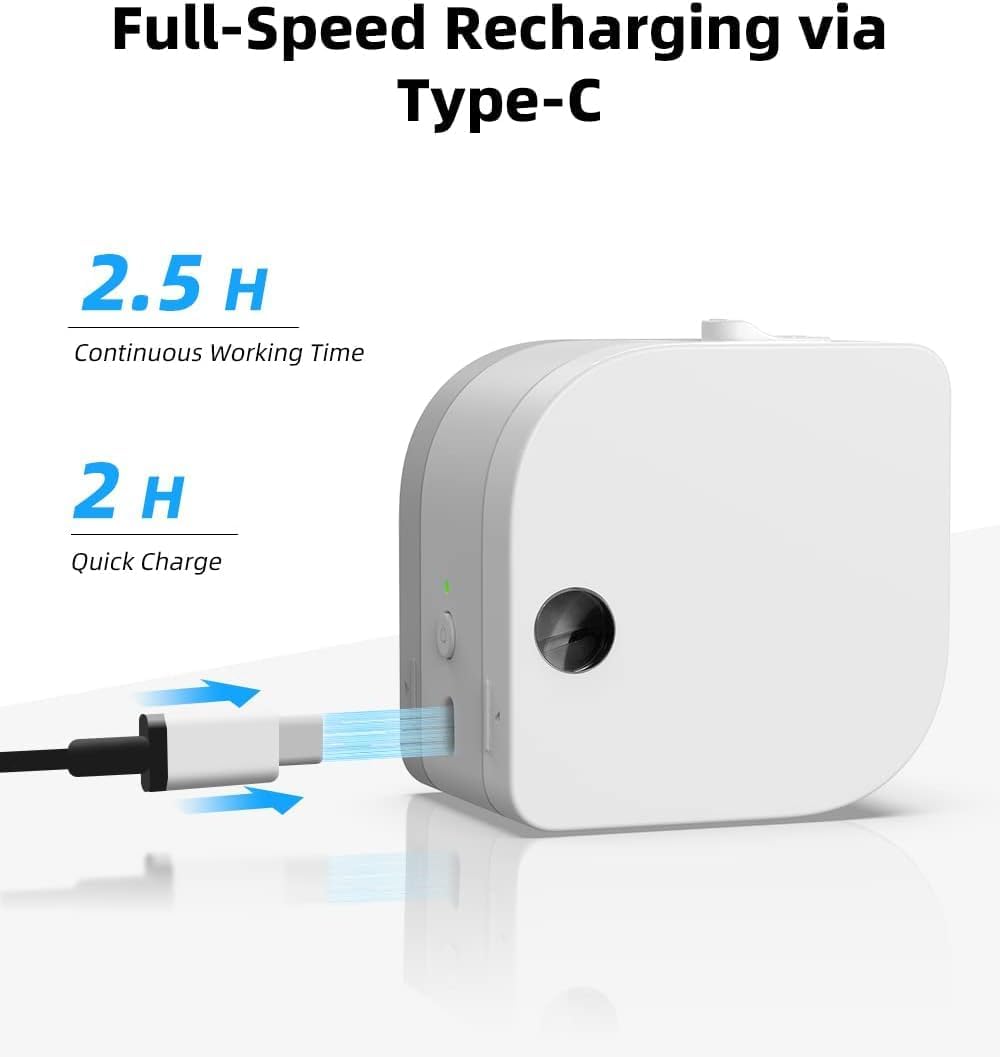
Figure 2: The P12 PRO charging via its Type-C port. A full charge takes approximately 2 hours and provides up to 2.5 hours of continuous working time.
2.3. Enstalasyon Aplikasyon an ak Koneksyon Bluetooth
The Phomemo P12 PRO operates via the 'Print Master' application. Follow these steps to install the app and pair your device:
- Telechaje App a: Chèche pou 'Print Master' in the Apple App Store (for iOS devices) or Google Play Store (for Android devices) and install it.
- Pouvwa sou: Press and hold the power button on the P12 PRO until the indicator light turns on.
- Pèmèt Bluetooth: Asire w ke Bluetooth aktive sou telefòn entelijan oswa tablèt ou.
- Open App and Connect: Open the 'Print Master' app. The app will automatically search for available Phomemo devices. Select 'P12 PRO' from the list to establish a connection. The device indicator light will change to confirm a successful connection.

Figure 3: The 'Print Master' app interface, demonstrating Bluetooth connectivity and options for customizing labels with borders and icons.
3. Operasyon Enstriksyon
3.1. Chaje tep etikèt la
- Louvri Kouvèti a: Gently push the cover release button (if present) or lift the top cover of the device.
- Mete tep: Place the label tape roll into the compartment with the label end extending out through the printer's output slot. Ensure the tape is aligned correctly.
- Fèmen Kouvèti a: Close the cover firmly until it clicks into place.
3.2. Kreye ak Enprime Etikèt
The 'Print Master' app provides extensive customization options for your labels:
- Antre tèks: Enter your desired text. The app supports multiple lines of text.
- Fonts and Styles: Choose from over 154 fonts and adjust text size, bolding, italics, and alignment.
- Borders and Icons: Select from 78 frames and thousands of icons, graphics, and symbols to enhance your labels.
- Karakteristik espesyal: Create barcodes, QR codes, and utilize various templates for specific applications (e.g., date labels, price tags).

Figi 4: Egzamples of labels with clear text and icons, suitable for school items and organization.

Figure 5: The P12 PRO's versatility in creating labels for kitchen organization, including date and content labels.
3.3. Supported Label Types
The P12 PRO is compatible with 12mm wide label tapes and supports various materials:
- Plastic Labels: Water-resistant, abrasion-resistant, oil-resistant, and strong adhesive for general use.
- Satin Ribbon Labels: Ideal for gift wrapping, crafts, and decorative purposes.
- Iron-on Labels: For labeling clothing and fabric items.
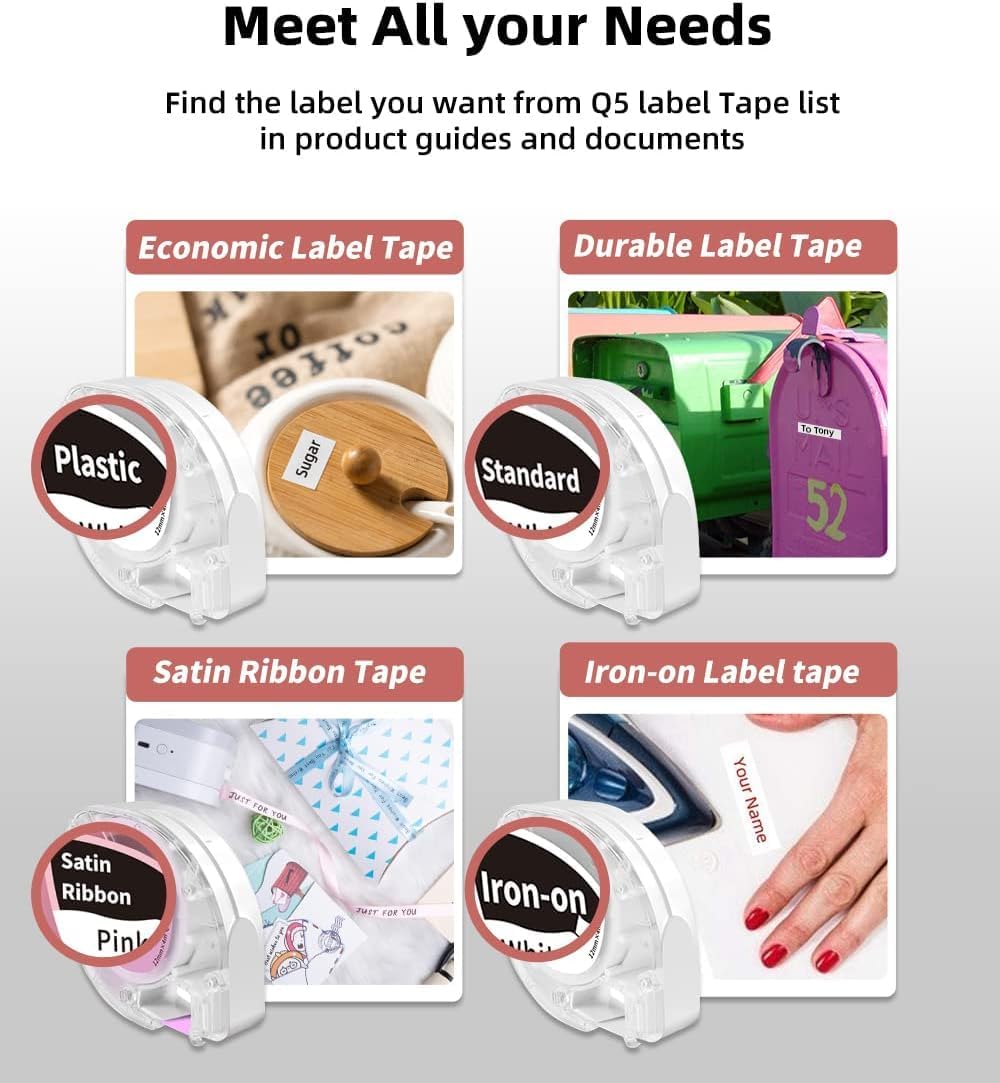
Figure 6: A selection of label tape types compatible with the Phomemo P12 PRO, including plastic, standard, satin ribbon, and iron-on options.

Figure 7: Demonstrating the application of an iron-on label for clothing, a feature supported by the P12 PRO.
3.4. Koupe Etikèt
After printing, use the built-in serrated tear-off knife to cleanly cut the label from the tape roll. This ensures a smooth and quick cut.
4. Antretyen
4.1. Netwaye tèt enpresyon an
Pou kenbe yon bon jan kalite enprime optimal, netwaye tèt enprime a detanzantan. Sèvi ak yon twal mou ki pa gen pousyè siye l yon ti kras.ampened with isopropyl alcohol. Gently wipe the print head surface. Ensure the device is powered off before cleaning.
4.2. Swen batri
The P12 PRO features a built-in lithium-ion battery. To prolong battery life:
- Evite dechaje batri a nèt souvan.
- Sere aparèy la nan yon kote ki fre epi sèk lè w pa itilize li pou yon bon bout tan.
- If the device will not be used for a long time, charge it to about 50% every few months.
NAN. Depanaj
5.1. Aparèy la pa limen
- Ensure the device is fully charged. Connect it to a power source using the Type-C cable.
- Peze epi kenbe bouton pouvwa a pou kèk segond.
5.2. Cannot Connect via Bluetooth
- Verify that the P12 PRO is powered on and within range of your mobile device.
- Asire w ke Bluetooth aktive sou aparèy mobil ou.
- Restart the 'Print Master' app and try connecting again.
- If issues persist, try restarting both the P12 PRO and your mobile device.
5.3. Kalite enprime pòv
- Check if the label tape is correctly installed and not jammed.
- Netwaye tèt enprime a jan sa dekri nan seksyon Antretyen an.
- Ensure you are using genuine Phomemo label tapes.
- Check the battery level; low battery can affect print quality.
5.4. Label Jamming
- Kouran aparèy la imedyatman.
- Open the cover and carefully remove any jammed label tape.
- Reinstall the label tape, ensuring it is properly aligned.
6. Espesifikasyon
| Karakteristik | Detay |
|---|---|
| Non modèl | Phomemo P12 Pro |
| Teknoloji Enpresyon | Tèmik |
| Rezolisyon | 203 dpi |
| Koneksyon | Bluetooth 4.0 or above, USB Type-C |
| Sistèm konpatib yo | Android, iOS |
| Max Label Width | 12mm |
| Kapasite batri | 1000mAh ityòm iyon (rechargeable) |
| Tan pou chaje | Apeprè. 2 èdtan |
| Tan travay kontinyèl | Apeprè. 2.5 èdtan |
| Auto fèmen | Apre 15 minit inaktivite |
| Dimansyon | 4.8 x 4.5 x 2.67 pous |
| Pwa atik | 7.8 ons |
7. Garanti ak sipò
7.1. Enfòmasyon sou Garanti
The Phomemo P12 PRO Label Maker Machine comes with a 2-ane garanti apati dat acha a. Garanti sa a kouvri domaj fabrikasyon ak fonksyònman ki pa kòrèk nan itilizasyon nòmal. Tanpri konsève prèv acha ou pou reklamasyon garanti.
7.2. Sipò pou Kliyan
For technical assistance, troubleshooting not covered in this manual, or warranty inquiries, please contact Phomemo customer support through their official website or the contact information provided with your product packaging. Please have your model number (P12 Pro) and purchase details ready when contacting support.