
1. Entwodiksyon
Mèsi pou acha aasing the VILINICE BL89 Native 1080P Projector. This manual provides essential information for the safe and efficient operation of your projector. Please read it thoroughly before use and retain it for future reference.
The VILINICE BL89 projector delivers a native 1920x1080P resolution, 9000 Lux brightness, and an 8000:1 contrast ratio, designed for a high-quality viewing experience. It features a long-lasting LED lamp and versatile connectivity options.

Image: The VILINICE BL89 Native 1080P Projector set up for a home theater experience, including a 100-inch screen.
2. Enfòmasyon sou Sekirite
To ensure safe operation and prolong the life of your projector, please observe the following precautions:
- Pa bloke ouvèti vantilasyon yo. Asire w ke gen ase lè k ap sikile toutotou pwojektè a pou anpeche l chofe twòp.
- Pa gade dirèkteman nan lantiy pwojektè a lè l ap limen.amp Limyè klere a ka lakòz domaj nan je yo.
- Keep the projector away from water or any liquids. Do not operate in damp anviwònman.
- Mete pwojektè a sou yon sifas ki estab e plat pou anpeche l tonbe.
- Sèvi sèlman ak adaptè kouran ki vini ak pwojektè a.
- Unplug the projector during lightning storms or when unused for extended periods.
- Pa eseye repare pwojektè a tèt ou. Konfye tout antretyen bay pèsonèl kalifye.
- This projector is less harmful to children's eyesight than television due to diffuse reflection imaging, but direct viewing of the lens should still be avoided.
3. Pake kontni
Tanpri verifye ke tout atik yo prezan lè w ap debale l:
- VILINICE BL89 Projector
- Pouvwa kab
- Kontwòl Remote
- HDMI kab
- AV Kab
- Manyèl itilizatè
- 100-pous ekran pwojektè
4. Pwodwi souview
Familiarize yourself with the various parts and connections of your VILINICE BL89 projector.
Devan View

Imaj: Devan view of the VILINICE BL89 projector, highlighting the projection lens.
Dèyè ak Side Views (Ports and Controls)

Imaj: Dèyè ak bò view of the VILINICE BL89 projector, illustrating the power input, HDMI ports, USB ports, VGA port, AV port, and control panel.
- Lantiy: Pwojte imaj la sou ekran an.
- Bag konsantre: Ajiste klète imaj la.
- Koreksyon Keystone: Korije distòsyon imaj trapezoidal la.
- Kontwòl Panel: Power, menu, source, navigation buttons.
- Pò HDMI (x2): Connect to HDMI-enabled devices (laptops, TV sticks, game consoles).
- Pò USB (x2): Konekte kle USB yo pou li medya yo.
- Pò VGA: Connect to computers with VGA output.
- Pò AV: Connect to older devices using an AV cable.
- Audio Out (AUX): Konekte oratè ekstèn yo oswa kas ekoutè yo.
- Antre pouvwa: Konekte kab pouvwa a.
5. Enstalasyon
5.1 Plasman Pwojektè
Choose a suitable location for your projector. The optimal projection distance ranges from 1.2 meters (approximately 5 feet) to 5 meters (approximately 30 feet), yielding screen sizes from 44 inches to 300 inches. For the included 100-inch screen, position the projector at an appropriate distance to fill the screen.

Image: A family enjoying a movie projected onto a 100-inch screen, demonstrating typical projector placement.
5.2 Koneksyon pouvwa
- Konekte kab kouran an nan pò antre kouran pwojektè a.
- Ploge lòt bout kab pouvwa a nan yon priz kouran.
- Peze bouton pouvwa a sou pwojektè a oswa sou kontwòl remote la pou limen li.
5.3 Konekte Aparèy Antre
The VILINICE BL89 projector supports various input sources:
- HDMI: Connect TV sticks (e.g., Amazon Fire Stick, Roku), laptops, game consoles (Playstation, Xbox), or Blu-ray players using an HDMI cable.
- USB: Insert a USB flash drive into a USB port for direct media playback.
- VGA: Connect older computers or laptops using a VGA cable.
- DE: Connect legacy devices like DVD players using the provided AV cable.
- Smartphones/Tablet: Connect via HDMI adapter (not included) or screen mirroring devices (e.g., Chromecast).
Image: Visual representation of compatible devices and their connection types for the VILINICE BL89 projector.
6. Operasyon Enstriksyon
6.1 Power On/Off
Peze bouton pouvwa a sou pwojektè a oswa sou kontwòl remote la pou limen oswa etenn aparèy la.
6.2 Adjusting Image Focus and Keystone
After powering on, adjust the image for clarity and correct shape:
- Konsantre: Rotate the focus ring near the lens until the image appears sharp and clear.
- Koreksyon Keystone: If the image appears trapezoidal (wider at the top or bottom), use the manual keystone correction dial (±15°) to adjust the image to a rectangular shape.
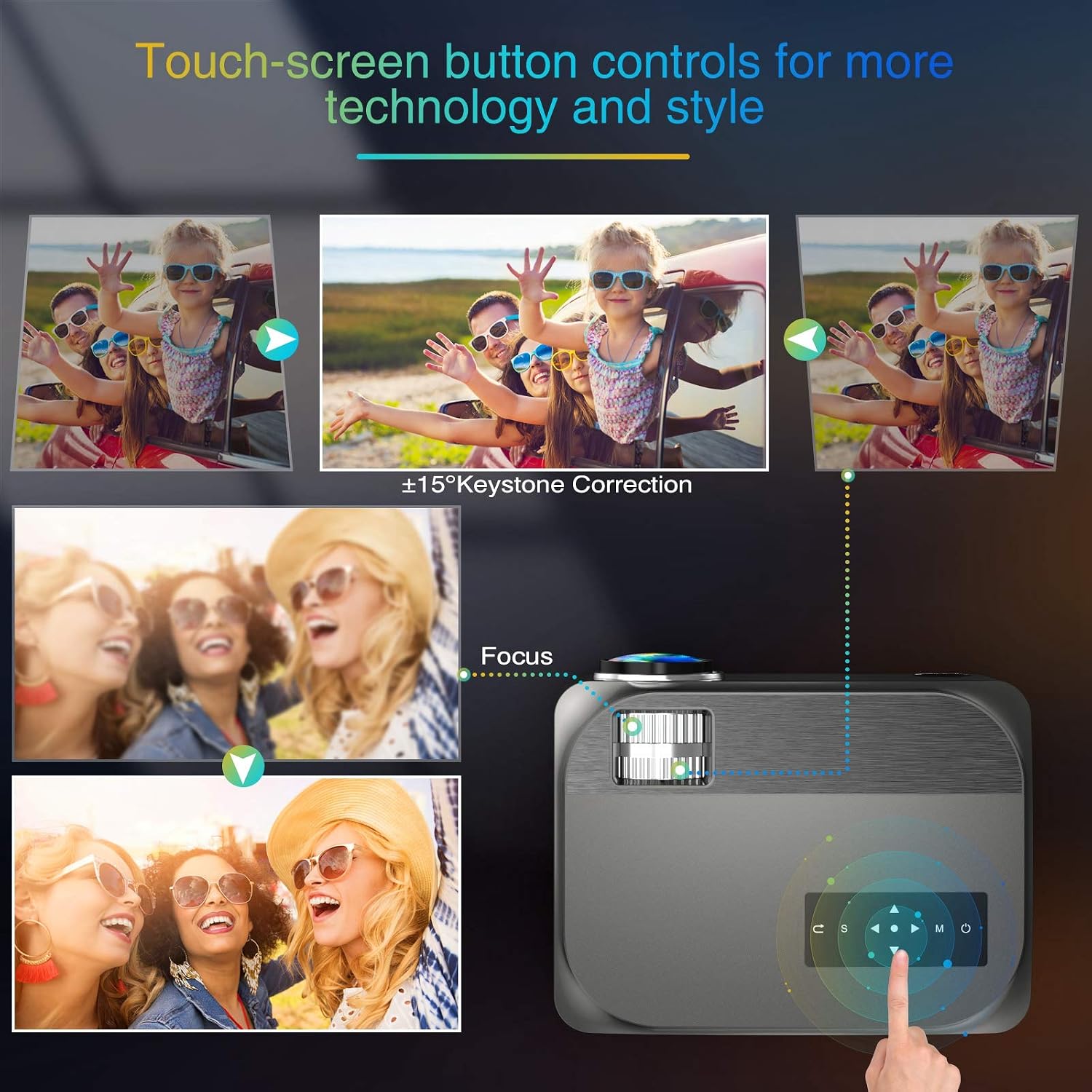
Image: Visual guide for adjusting keystone correction and focus on the VILINICE BL89 projector.
6.3 Fonksyon Zoom
The projector features a -25% zoom function, allowing you to reduce the image size without moving the projector. This is particularly useful for ceiling-mounted installations. Use the remote control to access and adjust the zoom setting.

Image: Illustration of the projector's zoom function, showing how the image size can be reduced from 100% to 75%.
6.4 Chwazi Sous Antre
Press the 'Source' button on the projector or remote control to cycle through available input sources (HDMI1, HDMI2, USB1, USB2, VGA, AV). Select the input corresponding to your connected device.
6.5 Sòti odyo
The projector has built-in 10W HiFi stereo speakers. For an enhanced audio experience, you can connect external speakers or headphones to the 3.5mm audio out (AUX) port.

Imaj: Yon imaj anlè view showing the VILINICE BL89 projector in use, emphasizing its integrated Hi-Fi stereo sound system.
6.6 Sèvis Difizyon
Due to app copyright restrictions, direct streaming of services like Netflix, Prime Video, or Hulu is not supported via the projector's internal system. To watch content from these platforms, connect an external device such as a laptop, Amazon Fire TV Stick, Roku, or Chromecast via an HDMI port.
7. Antretyen
7.1 Netwaye Lantiy la
Sèvi ak yon twal mou ki pa gen pousyè, espesyalman fèt pou lantiy optik, pou siye lantiy pwojektè a dousman. Evite itilize pwodui netwayaj abrazif oswa fòs twòp, ki ka grate lantiy la.
7.2 Netwayaj kò pwojektè a
Siye deyò pwojektè a avèk yon twal mou epi sèk. Pa sèvi ak pwodui netwayaj likid oswa ayewosòl.
7.3 Vantilasyon
Regularly check that the ventilation openings are clear of dust and debris to ensure proper airflow and prevent overheating. The projector's ECO-mode helps extend the lamp lavi.
7.4 Lamp Lavi
Dirije lamp in your VILINICE BL89 projector has an estimated operating life of up to 100,000 hours, significantly reducing the need for lamp ranplasman.
NAN. Depanaj
Si ou rankontre pwoblèm ak pwojektè ou a, gade pwoblèm ak solisyon komen sa yo:
| Pwoblèm | Kòz posib | Solisyon |
|---|---|---|
| Pa gen imaj oswa imaj la twoub | Focus not adjusted; Keystone not adjusted; Lens cap on; Incorrect input source. | Adjust the focus ring; Adjust keystone correction; Remove lens cap; Select correct input source. |
| Pa gen son | Volume too low; Mute enabled; External audio device not connected or configured correctly; Source device volume low. | Increase projector volume; Disable mute; Check external audio connections; Increase volume on source device. |
| Remote kontwòl pa travay | Batteries dead or incorrectly inserted; Obstruction between remote and projector; Remote out of range. | Replace batteries; Remove obstructions; Ensure remote is within range and pointed at the IR receiver. |
| Pwojektè a chofe twòp epi li fèmen | Ventilation blocked; Operating in high ambient temperature. | Ensure ventilation openings are clear; Operate in a well-ventilated area. |
| Image is distorted or discolored | Faulty cable connection; Source device issue; Projector settings. | Check and re-secure all cable connections; Test with a different source device; Reset projector display settings. |
9. Espesifikasyon
| Karakteristik | Detay |
|---|---|
| Mak | VILINICE |
| Nimewo Modèl | BL89 |
| Rezolisyon natif natal | 1920 x 1080P Full HD |
| Klète | 9000 Lux |
| Pwopòsyon kontras | 8000:1 |
| Kalite ekspozisyon | LCD |
| Sous limyè opere lavi | 100,000 èdtan |
| Koreksyon Keystone | Manyèl ±15° |
| Fonksyon Zoom | -25% |
| Gwosè pwojeksyon | 44" - 300" |
| Jete Distans | 1.2 - 5 Meters (5 - 30 ft) |
| Oratè ki entegre yo | 10W HiFi Stereo Sound |
| Koneksyon Teknoloji | HDMI, USB, VGA, AV, AUX |
| Aparèy konpatib | TV Box, Amazon Fire Stick TV, Chromecast, Laptop, Speakers, Playstation, Xbox, DVD player, Card reader, USB stick, Media players, iPad, iPhone, Android smartphone |
| Metòd kontwòl | Remote Control, App (if applicable) |
| Koulè | Gri |
| Wattage | 130 Watt-èdtan |
10. Garanti & Sipò
10.1 Enfòmasyon sou Garanti
The VILINICE BL89 Projector comes with a 2-year warranty. Additionally, upon product registration, you may receive an extended 3-month return period and a 24-month promise.
10.2 Sipò teknik
VILINICE offers lifetime technical support for this product. If you have any questions, require assistance, or encounter issues not covered in this manual, please contact VILINICE customer service. Refer to the product packaging or the official VILINICE website for contact details (e.g., email address or support portal).