
1. Entwodiksyon
This manual provides essential instructions for the safe and efficient use of your Andoer NP-FV5 Battery Charger and NP-FV5 Plus rechargeable batteries. Please read this manual thoroughly before using the product and retain it for future reference.

Image 1.1: Andoer NP-FV5 Battery Charger Kit Components
2. Enfòmasyon sou Sekirite
To prevent injury or damage to your product, observe the following safety precautions:
- Pa demonte, ouvri, oswa chire pake pil yo.
- Pa ekspoze pil nan chalè oswa dife. Evite depo nan limyè solèy la dirèk.
- Pa kout sikwi yon batri. Pa sere pil yo azar nan yon bwat oswa yon tiwa kote yo ka kout sikwi youn ak lòt oswa yo ka kout sikwi lòt objè metal.
- Pa soumèt pil nan chòk mekanik.
- Si yon pil ta koule, pa kite likid la antre an kontak ak po a oswa je yo. Si gen kontak, lave zòn ki afekte a ak anpil dlo epi chèche konsèy medikal.
- Kenbe pil pwòp epi sèk.
- Pa sèvi ak nenpòt chajè lòt pase sa ki espesyalman bay pou itilize ak ekipman an.
- Pa kite yon batri ap chaje lè w pa ap itilize li.
- Do not immerse the charger or batteries in water or other liquids.
- Kenbe soti nan atenn timoun yo.
3. Pake kontni
Verifye ke tout atik yo prezan nan pakè ou a:
- 1 x Andoer NP-FV5 Battery Charger
- 2 x Andoer NP-FV5 Plus 3.7V 1000mAh Lithium-ion Polymer Batteries
- 1 x USB Charging Cable (Micro USB)
4. Pwodwi souview
The Andoer NP-FV5 Battery Charger is designed to charge NP-FV5 series batteries efficiently. It features a compact design and an LED indicator for charging status.
4.1. Konpozan chajè yo
- Plas batri: Area where the battery is inserted for charging.
- Kontak chaje: Metal pins inside the slot that connect to the battery.
- Mikwo USB Port: Input for the USB charging cable.
- Limyè endikatè ki ap dirije: Montre estati chaje.

Image 4.1: Charger Battery Slot and Contacts

Image 4.2: Charger with USB Port and LED
4.2. Batri souview
The NP-FV5 Plus batteries are 3.7V 1000mAh Lithium-ion Polymer batteries, providing reliable power for compatible devices.
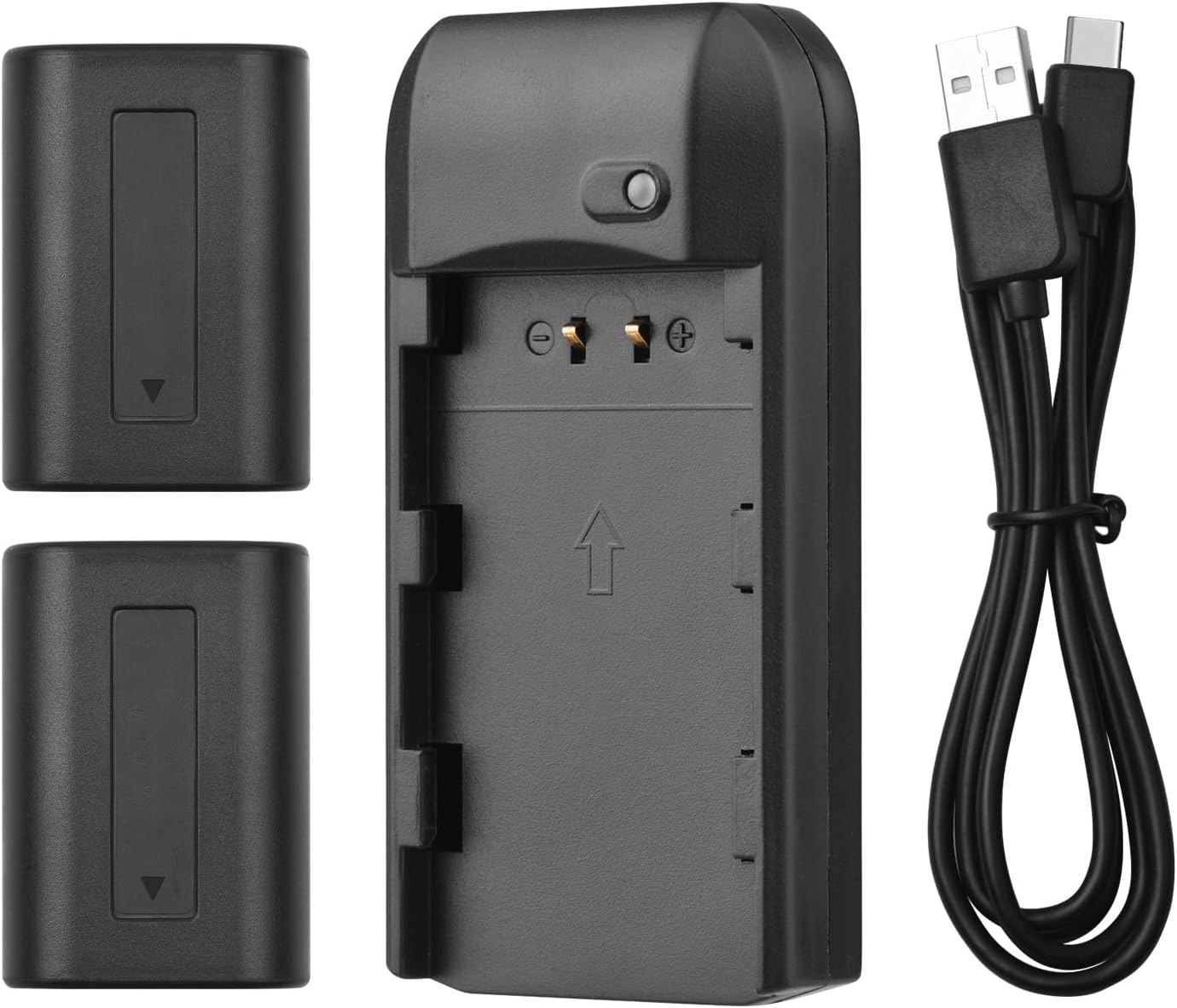
Image 4.3: All Kit Components
5. Enstalasyon ak Chaje
Follow these steps to set up your charger and begin charging the batteries:
- Konekte plato a: Insert the Micro USB end of the provided USB charging cable into the charger's Micro USB port.
- Konekte sou sous pouvwa: Connect the standard USB-A end of the cable to a compatible 5V 1A USB power source. This can be a laptop, a USB wall adapter, or a power bank.
- Mete batri: Carefully align the NP-FV5 battery with the charger's battery slot and gently push it in until it clicks into place. Ensure the battery contacts align with the charger's pins.
- Siveye eta chaje: The LED indicator light on the charger will show the charging status:
- Limyè wouj: Indicates the battery is currently charging.
- Limyè vèt: Endike batri a chaje nèt.
- Retire batri: Once the LED turns green, the battery is fully charged. Gently pull the battery out of the charger.

Image 5.1: LED Indicator Light Status
6. Operasyon Enstriksyon
The charger operates automatically once a battery is inserted and power is connected. No manual intervention is required during the charging process.
- Always ensure the charger is connected to a stable 5V 1A power source.
- Only charge NP-FV5 series batteries with this charger.
- Do not cover the charger during operation to ensure proper ventilation.
7. Antretyen ak Depo
Proper maintenance ensures the longevity of your charger and batteries:
- Netwayaj: Use a soft, dry cloth to clean the charger and batteries. Do not use liquid cleaners or solvents.
- Depo: Sere chajè a ak pil yo nan yon kote ki fre epi sèk, lwen limyè solèy dirèk ak tanperati ekstrèm.
- Swen batri: For long-term storage, it is recommended to charge batteries to approximately 50% capacity. Avoid storing fully charged or completely depleted batteries for extended periods.
- Swen kab: Evite pliye oswa tòde kab USB a twòp.
NAN. Depanaj
Si ou rankontre pwoblèm, gade pwoblèm ak solisyon komen sa yo:
| Pwoblèm | Kòz posib | Solisyon |
|---|---|---|
| Endikatè ki ap dirije pa limen. | No power supply, faulty cable, or incorrect battery insertion. |
|
| Battery does not charge (LED remains red indefinitely or doesn't change). | Battery fault, charger fault, or insufficient power input. |
|
| Charger or battery becomes excessively hot during charging. | Overload, faulty battery, or poor ventilation. |
|
9. Espesifikasyon
Technical details for the Andoer NP-FV5 Battery Charger and NP-FV5 Plus Batteries:
| Eleman | Spesifikasyon |
|---|---|
| Antre plato | DC 5V 1A |
| Sòti Charger | DC 4.2V, 400mA |
| Port chaje | Mikwo USB |
| Kalite batri | Lityòm-ion Polymère |
| Batri Voltage | 3.7V |
| Kapasite batri | 1000mAh |
| Dimansyon plato | 6.5 x 3.3 x 1.5 cm (2.6 x 1.3 x 0.6 pous) |
| Pwa Charger | 11g (0.4oz) |
| Nimewo Modèl | XCW2361199610991EL (Charger) / NP-FV5 (Batteries) |

Image 9.1: Charger Dimensions

Image 9.2: Charger Label with Specifications
10. Garanti ak sipò
Pou enfòmasyon sou garanti a ak sipò kliyan, tanpri gade dokiman yo te bay lè w te achte a oswa kontakte revandè w la. Kenbe prèv acha w la pou reklamasyon garanti.
For further assistance, you may visit the official Andoer websit oswa kontakte depatman sèvis kliyan yo.