
1. Pwodwi souview
The Anderic OEM NSRCFNA21 Smart Remote is an original equipment manufacturer (OEM) replacement remote control specifically designed for various Insignia TV models. This remote provides seamless functionality and user-friendly operation, ensuring reliable control over your television.
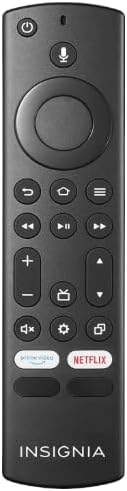
Imaj 1.1: The Anderic OEM NSRCFNA21 Smart Remote. This image displays the front view of the black remote control, featuring various buttons for power, voice control, navigation, volume, channel, and dedicated streaming service buttons.
Karakteristik kle yo enkli:
- Original Quality: An authentic OEM product, ensuring performance and reliability comparable to the remote originally supplied with your TV.
- Konsepsyon itilizatè-zanmitay: Intuitive buttons and controls for easy navigation, volume adjustment, channel changes, and access to various TV functions.
- Pèfòmans serye: Provides a stable and responsive connection for accurate command execution.
2. Enstriksyon pou enstalasyon ak koneksyon
To ensure proper functionality, the remote control must be paired with your Insignia TV. Follow these steps carefully:
- Reyajiste televizyon: Unplug your Insignia TV from its power source. Wait for approximately 30 seconds.
- Limen televizyon an: Plug the TV back into the power source and turn it on. Allow the TV to fully boot up.
- Inisye pè: Once the TV has completely booted up and is displaying content, press and hold the Lakay button on the Anderic NSRCFNA21 remote control for up to 30 seconds.
- Remote Update (if prompted): Your TV may display a message indicating that the remote needs an update. If prompted, allow the TV to proceed with the update. This process may take 1 to 3 minutes to complete.
- Verifikasyon: After the update (if any) and pairing process, test the remote's functions (e.g., volume, channel, navigation) to confirm successful pairing.
If the remote does not pair after following these steps, repeat the process or refer to the troubleshooting section.
3. Opere kontwòl Remote a
The Anderic NSRCFNA21 remote control features an intuitive layout for easy operation of your Insignia TV. Below are the general functions of the primary buttons:
- Bouton pouvwa: Limen oswa etenn televizyon an.
- Bouton kontwòl vwa: Activates voice commands for searching content or controlling the TV.
- Navigation Pad (Directional Buttons and Select): Itilize pou deplase nan meni yo epi chwazi atik.
- Bouton Kay: Retounen nan ekran prensipal televizyon an.
- Bouton tounen: Retounen nan ekran oswa meni anvan an.
- Bouton Meni/Opsyon: Accesses additional menu options or settings.
- Volim monte/desann: Adjusts the TV's audio volume.
- Chèn monte/desann: Chanje chanèl televizyon yo.
- Bouton bèbè: Mutes or unmutes the TV's audio.
- Anviwònman bouton: Ouvri meni paramèt televizyon an.
- Bouton Antre/Sous: Changes the TV's input source (e.g., HDMI 1, HDMI 2).
- Bouton sèvis difizyon dedye: Provides quick access to popular streaming applications (e.g., Amazon Prime Video, Netflix).
4. Konpatibilite
The Anderic OEM NSRCFNA21 Smart Remote is compatible with the following Insignia TV models:
- NS24DF310NA21
- NS39DF310NA21
- NS50DF710NA21
- NS55DF710NA21
This remote also replaces the following models:
- NSRCFNA19 Rev B Fire
- NSRCFNA19revB
- NSRCFNA21 Fire
- NSRCFNA21 Rev E
- NSRCFNA21-Rev-E
Ensure your TV model is listed above for optimal performance.
5. Antretyen
Proper maintenance can extend the life and functionality of your remote control.
- Ranplasman batri: The remote requires two AAA batteries. Replace batteries when the remote's responsiveness decreases or it stops functioning. Ensure correct polarity when inserting new batteries.
- Netwayaj: Use a soft, dry cloth to clean the remote's surface. Avoid using liquid cleaners or abrasive materials, as these can damage the remote.
- Depo: Sere telekòmand lan nan yon kote ki sèk, lwen tanperati ekstrèm ak limyè solèy dirèk.
NAN. Depanaj
If you encounter issues with your Anderic NSRCFNA21 Smart Remote, try the following troubleshooting steps:
- Remote pa reponn:
- Check the batteries. Replace them with fresh AAA batteries, ensuring correct polarity.
- Asire w pa gen okenn obstak ant telekòmand lan ak detèktè televizyon an.
- Eseye pwosesis koneksyon an ankò jan sa dekri nan Seksyon 2 la.
- Fonksyonalite tanzantan:
- Sa ka vle di pil yo pa gen anpil enèji. Ranplase pil yo.
- Asire w ou nan zòn efektif detèktè televizyon an.
- Pairing Fails:
- Confirm your TV model is listed in the compatibility section (Section 4).
- Ensure the TV is fully booted up before attempting to hold the Home button.
- Try unplugging the TV for a longer period (e.g., 1-2 minutes) before plugging it back in and re-attempting pairing.
Si pwoblèm yo pèsiste apre ou fin eseye etap sa yo, kontakte sèvis kliyan pou plis asistans.
7. Espesifikasyon
| Mak | Anderik |
| Nimewo Modèl | NSRCFNA21 Rev B |
| Aparèy konpatib | Insignia Televisions |
| Sous pouvwa | 2 pil AAA (obligatwa) |
| Pwa atik | 1.76 ons |
| Dimansyon pake | 6.3 x 2.95 x 0.67 pous |
| Koulè | Nwa |
| Manifakti | Dan's Electronics Etc., Inc. |
8. Garanti ak sipò
For warranty information or technical support, please contact the manufacturer, Anderic (Dan's Electronics Etc., Inc.). Refer to the product packaging or the official Anderic websit la pou plis enfòmasyon kontak ak kondisyon garanti.
Ou ka vizite a Magazen Anderic sou Amazon pou plis enfòmasyon.