
Entwodiksyon
Thank you for choosing the Audizio SB85 Soundbar with Subwoofer. This manual provides essential information for the safe and correct operation of your new audio system. Please read it thoroughly before use and retain it for future reference. The SB85 is designed to enhance your television's audio, providing a rich, immersive sound experience for movies, games, and music, complete with a dedicated subwoofer for powerful bass.
Enstriksyon Sekirite
- Li tout enstriksyon yo ak anpil atansyon anvan ou opere aparèy la.
- Keep the unit away from water, moisture, and heat sources.
- Pa bloke okenn ouvèti vantilasyon.
- Sèvi ak sèlman atachman/akseswa manifakti a espesifye.
- Deploge aparèy la pandan tanpèt zèklè oswa lè li pa itilize pou yon tan long.
- Refere tout sèvis yo bay pèsonèl sèvis kalifye.
- Do not expose the battery (if applicable) to excessive heat such as sunshine, fire, or the like.
Kontni pake
Asire w tout bagay yo prezan nan bwat la:
- Audizio SB85 Soundbar
- Filè Subwoofer
- Kontwòl Remote
- Optical Cable (Toslink)
- AUX kab
- Adaptè pouvwa
- Manyèl itilizatè
Pwodwi souview
The Audizio SB85 system consists of a soundbar and a separate wired subwoofer, designed to deliver a powerful and clear audio experience.
Karakteristik Soundbar
- Integrated 150W speaker system with 4 speakers (2x 2cm range, 2x 2cm tweeter).
- Front LED display for status indication.
- Control buttons on the side panel.
- Multiple input options: HDMI (ARC), USB, Line In (AUX), Coaxial, Optical.
- Bluetooth 5.0 pou difizyon odyo san fil.

Image: Close-up of the Audizio SB85 Soundbar's control panel and its remote control, highlighting Bluetooth 5.0 and ease of use.

Imaj: Entèn view of the Audizio SB85 Soundbar's full-range speaker, emphasizing its 150W speaker system for an immersive audio experience.
Karakteristik subwoofer
- 5.25-inch wired subwoofer for enhanced bass response.

Image: Close-up of the Audizio SB85 wired subwoofer, designed to amplify bass frequencies.
Enstalasyon
1. Plasman
Place the soundbar centrally below your television. The subwoofer can be placed on the floor near the soundbar, ideally in a corner for optimal bass reflection, but ensure it is not obstructed.

Image: Audizio SB85 Soundbar and Subwoofer setup in a living room, demonstrating room-filling sound and clean design.

Image: Audizio SB85 Soundbar placed below a television, illustrating its universal compatibility with any TV.
2. Konekte ak pouvwa
Connect the power adapter to the DC IN port on the soundbar and then plug it into a wall outlet (230 Vac/50 Hz).
3. Konekte Subwoofer la
Connect the wired subwoofer to the dedicated subwoofer output port on the soundbar.
4. Konekte ak Sous Odyo
The SB85 offers several connection options:
- HDMI (ARC): For the best audio quality and control, connect an HDMI cable from the HDMI (ARC) port on the soundbar to the HDMI ARC port on your TV. This allows the TV to send audio to the soundbar and often enables TV remote control of the soundbar's volume.
- Optik (Toslink): Connect the included optical cable from the OPTICAL port on the soundbar to the Optical Digital Audio Out port on your TV or other audio source.
- Line In (AUX): Use the included AUX cable to connect the LINE IN port on the soundbar to the headphone jack or audio output of your device (e.g., smartphone, MP3 player).
- Kowaksyal: Connect a coaxial cable (not included) from the COAXIAL port on the soundbar to the Coaxial Digital Audio Out port on your TV or other audio source.
- USB: Insert a USB flash drive into the USB port for MP3 playback.
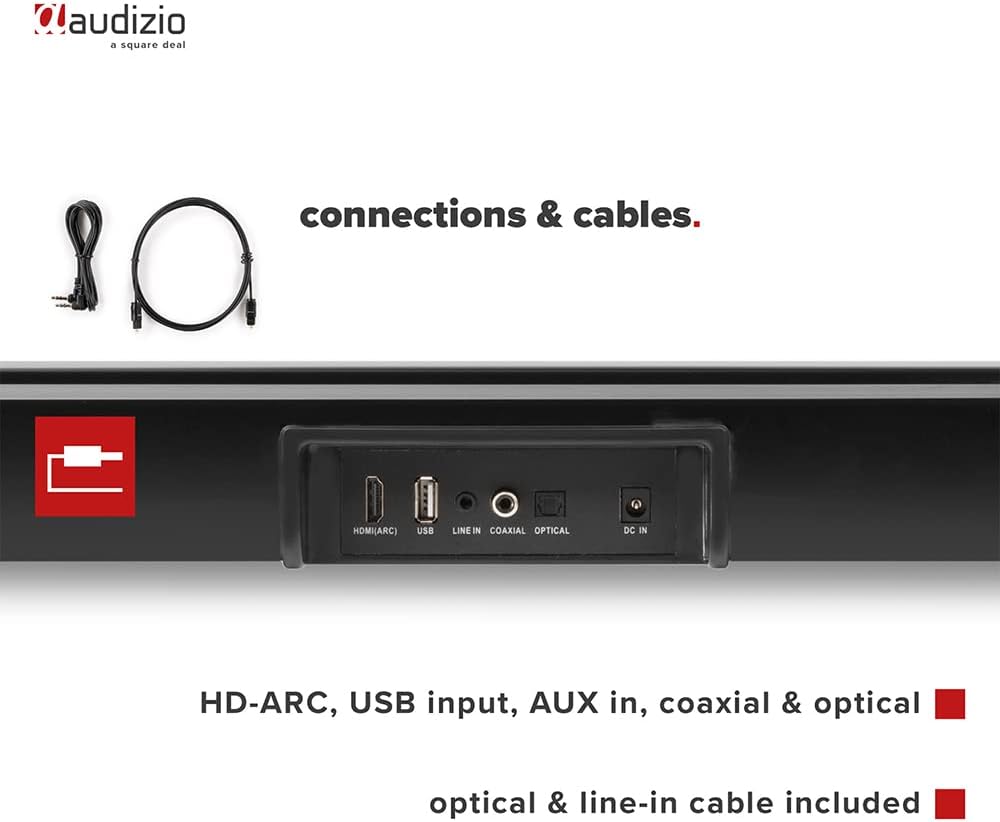
Imaj: Dèyè view of the Audizio SB85 Soundbar showing various connection ports: HDMI (ARC), USB, Line In, Coaxial, and Optical. Includes optical and line-in cables.
Enstriksyon Operasyon
1. Power On/Off
Peze bouton Power ki sou ba son an oswa sou kontwòl remote la pou limen oswa etenn aparèy la.
2. Seleksyon sous Antre
Press the 'MODE' button on the soundbar or the remote control repeatedly to cycle through the available input sources: HDMI (ARC), Optical, Coaxial, AUX, USB, and Bluetooth. The selected input will be shown on the front LED display.
3. Kontwòl Volim
Use the 'VOL+' and 'VOL-' buttons on the soundbar or the remote control to adjust the volume. The 'MUTE' button on the remote control will temporarily silence the audio.
4. Pè Bluetooth
- Switch the soundbar to Bluetooth mode using the 'MODE' button. The LED display will show 'BT'.
- Sou smartphone ou oswa tablèt, aktive Bluetooth epi chèche aparèy ki disponib.
- Select 'Audizio SB85' from the list of devices.
- Once paired, the soundbar will indicate a successful connection, and you can stream audio wirelessly.
5. Lektur USB
Mete yon kle USB ki gen odyo MP3 ladan l files into the USB port. The soundbar will automatically switch to USB mode and begin playing the music. Use the remote control to navigate tracks (play/pause, next/previous).
6. Fonksyon kontwòl Remote
The remote control provides full functionality for the soundbar, including power, mode selection, volume, mute, and playback controls for USB and Bluetooth modes.
Antretyen
Netwayaj
Wipe the soundbar and subwoofer surfaces with a soft, dry cloth. Do not use abrasive cleaners, waxes, or solvents as they may damage the finish. Ensure the device is unplugged before cleaning.
Depo
Si w ap sere aparèy la pou yon bon bout tan, debranche l nan priz kouran an epi sere l nan yon kote ki fre epi sèk, lwen limyè solèy dirèk ak tanperati ekstrèm.
Depanaj
| Pwoblèm | Kòz posib | Solisyon |
|---|---|---|
| Pa gen pouvwa | Kab kouran an pa konekte; Priz kouran an gen pwoblèm | Tcheke koneksyon kab kouran an; Eseye yon lòt priz kouran. |
| Pa gen son | Incorrect input selected; Volume too low; Mute activated; Cable connection loose | Select correct input source; Increase volume; Deactivate mute; Check all audio cable connections. |
| Bluetooth pa konekte | Soundbar not in Bluetooth mode; Device too far; Device already connected to another unit | Switch soundbar to BT mode; Move device closer; Disconnect from other devices and try again. |
| Remote kontwòl pa travay | Pil yo fin itilize; Gen yon obstak ant telekòmand lan ak ba son an | Ranplase pil yo; Retire tout obstak. |
Espesifikasyon
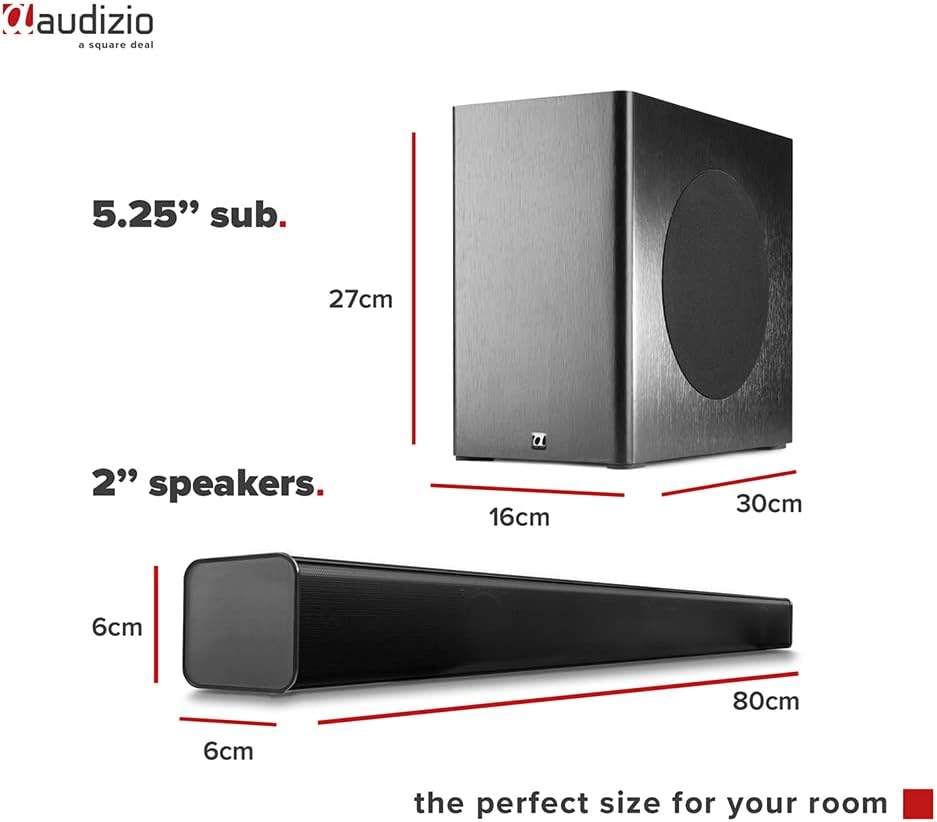
Image: Diagram showing the dimensions of the Audizio SB85 Soundbar and its subwoofer.
- Sorti pouvwa: 150W (Max)
- Konfigirasyon Oratè: 4 speakers (2x 2cm range, 2x 2cm tweeter)
- Gwosè subwoofer: 5.25 pous
- Gamme frekans: 50 Hz - 16,000 Hz
- Max SPL: 125 dB
- Koneksyon: Bluetooth 5.0, HDMI (ARC), USB, Line In (AUX), Coaxial, Optical
- Audio Sòti Mode: Stereo
- Aparèy konpatib: MP3 Player, Smartphone, TV
- Sous pouvwa: 230 Vac/50 Hz (via electric cable)
- Soundbar Dimensions (L x W x H): 80 x 6 x 6 cm
- Subwoofer Dimensions (L x W x H): 16 x 30 x 27 cm
- Pwa total: 3.9 kg
- Nimewo Modèl: 100.292
Garanti ak sipò
Pou enfòmasyon sou garanti a oswa pou sipò teknik, tanpri gade dokiman yo te bay lè w te achte a oswa kontakte revandè w la. Kenbe prèv acha w la pou nenpòt reklamasyon garanti.