
1. Entwodiksyon
This manual provides instructions for the proper installation, operation, and maintenance of your Kolink RGB Extension Cable. Please read this manual thoroughly before use to ensure safe and efficient operation.
The Kolink RGB Extension Cable is designed to extend the reach of your 4-pin RGB lighting connections within your PC system, offering greater flexibility for component placement and aesthetic customization.
2. Enfòmasyon sou Sekirite
- Ensure your PC system is powered off and unplugged from the wall outlet before installing or removing any components.
- Handle the cable by its connectors, not by the wires, to prevent damage.
- Do not expose the cable to excessive force, sharp objects, or extreme temperatures.
- This product is intended for indoor use within a computer chassis.
- Verify that the connector type (4-pin RGB) matches your devices before connection. Incorrect connection may cause damage.
3. Pake kontni
Pakè ou a ta dwe genyen atik sa yo:
- 1x Kolink RGB Extension Cable (50cm)
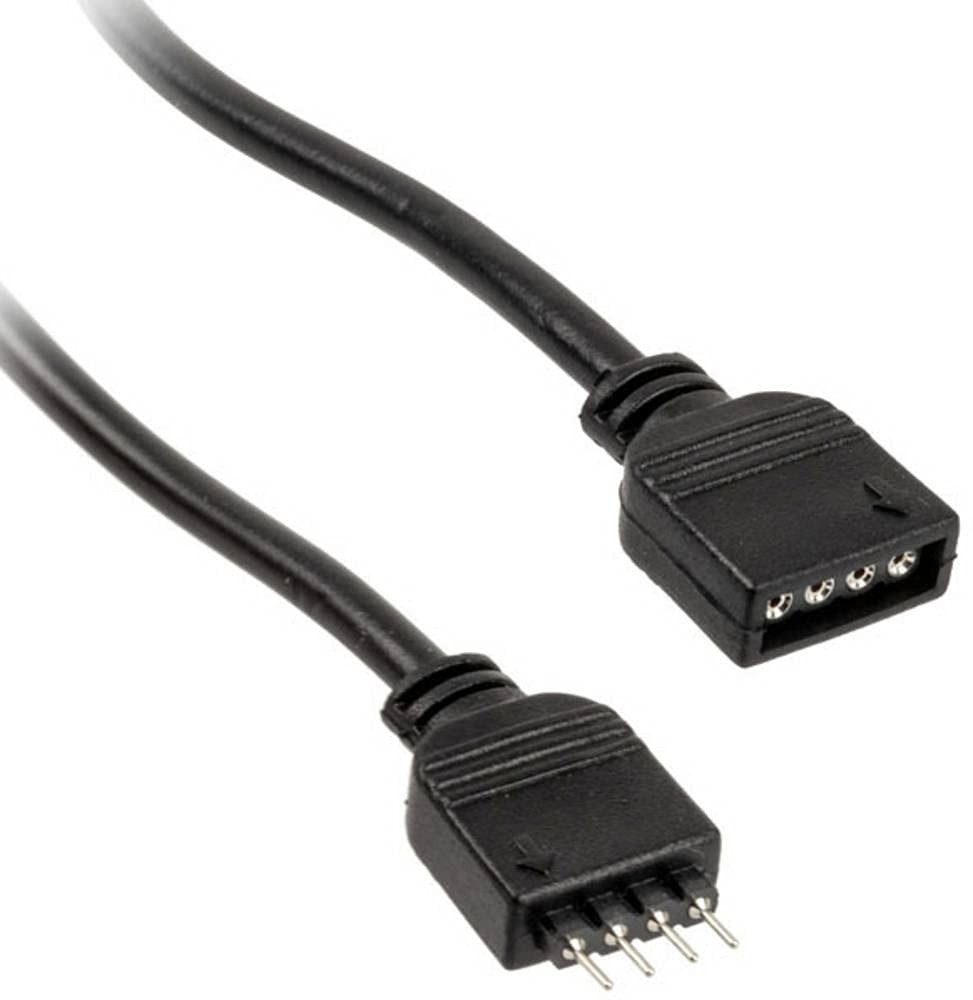
Figi 1: Kolink RGB Extension Cable. This image shows the 50cm black extension cable with its 4-pin male and female connectors, designed for extending RGB lighting connections within a PC.
4. Enstalasyon ak Enstalasyon
- Sistèm pou etenn: Ensure your computer is completely powered off and disconnected from the main power supply.
- Idantifye konektè: Locate the 4-pin RGB header on your motherboard or existing RGB controller, and the 4-pin RGB connector on the device you wish to extend (e.g., an RGB fan or LED strip).
- Connect Extension Cable: Carefully connect the gason end of the Kolink RGB Extension Cable to the fi 4-pin RGB header on your motherboard or controller. Ensure the pins align correctly and the connection is secure.
- Konekte aparèy: Konekte a fi end of the Kolink RGB Extension Cable to the gason 4-pin RGB connector of your RGB device. Again, ensure correct pin alignment and a secure connection.
- Jesyon kab: Route the cable neatly within your PC case, ensuring it does not obstruct airflow or interfere with moving parts like fans. The tangle-free design assists with this.
- Sistèm pou limen: Once all connections are secure, close your PC case, reconnect the power supply, and power on your system.
5. Operasyon
The Kolink RGB Extension Cable functions as a passive extension for your 4-pin RGB signals. Once connected, the RGB device will operate as if it were directly connected to the motherboard or controller, allowing you to control its lighting effects through your system's existing RGB software or hardware controls.
Pa gen okenn lojisyèl oswa chofè adisyonèl ki nesesè pou kab la li menm.
6. Antretyen
- Netwayaj: If necessary, gently wipe the cable with a dry, lint-free cloth to remove dust. Do not use liquid cleaners.
- Enspeksyon: Periodically inspect the cable for any signs of wear, fraying, or damage to the connectors. If damage is observed, discontinue use and replace the cable.
- Depo: Lè w pa ap itilize kab la, sere l nan yon kote ki fre epi sèk, lwen limyè solèy dirèk ak tanperati ekstrèm. Evite koube oswa pli byen file.
NAN. Depanaj
| Pwoblèm | Kòz posib | Solisyon |
|---|---|---|
| RGB device not lighting up. | Loose connection, incorrect pin alignment, or faulty RGB device/controller. | Ensure all 4-pin connections are secure and correctly aligned. Verify the RGB device works when connected directly. Check motherboard/controller settings. |
| Incorrect colors or flickering. | Loose connection, software issue, or incompatible RGB standard. | Check connections. Update or reinstall RGB control software. Ensure your device uses the 4-pin 12V RGB standard (not 3-pin 5V ARGB). |
| Kab la sanble domaje. | Domaj fizik. | Discontinue use immediately. Replace the cable. |
8. Espesifikasyon
- Mak: MAP RELE
- Modèl: PGW-AC-KOL-042
- Kalite kab: Kab Ekstansyon RGB
- Kalite konektè: 4-pin RGB (Male-to-Female)
- Longè: 50 cm
- Kantite broch: 4
- Maksimòm Voltage: 5 Vòlt (DC) (Note: Standard 4-pin RGB is typically 12V. Users should verify their device's voltage requirement to ensure compatibility.)
- Karakteristik espesyal: Sou entènèt jwèt Tangle gratis
- Itilizasyon Rekòmande: PC fan extension, RGB lighting extension
- Koulè: Nwa
- Konfòmite: RoHS
9. Garanti ak sipò
Kolink products are manufactured to high-quality standards. For warranty information and technical support, please refer to the official Kolink websit la oubyen kontakte revandè w la. Kenbe prèv acha w la pou reklamasyon garanti a.
EU Spare Part Availability Duration: 1 Year (as per product specifications).