
PLZ MP-902
PLZ MP-902 Double Din Car Stereo User Manual
Model: MP-902 | Brand: PLZ
Entwodiksyon
This user manual provides comprehensive instructions for the installation, operation, and maintenance of your PLZ MP-902 Double Din Car Stereo. Please read this manual thoroughly before using the product to ensure proper functionality and safety. The MP-902 is designed to enhance your in-car audio and entertainment experience with its advanced features and user-friendly interface.
Karakteristik pwodwi
- Bluetooth 5.1 & Dual Mic: Enjoy hands-free calling and audio streaming with advanced Bluetooth 5.1. Features a built-in microphone and external microphone interface for clear communication.
- Mirror Link Functionality: Supports screen mirroring for both ISO (iPhone) and Android phones via USB, allowing you to display navigation, videos, and other apps on the 7-inch touchscreen.
- Dèyè / Devan View Sipò pou kamera: Designed for safety, the MP-902 automatically displays the rear camera image when reversing. An HD rear camera with night vision and a 170° ultra-wide viewing angle is included.
- 7 Inch Full HD Capacitive Touchscreen: Features a highly sensitive and accurate 7-inch capacitive touch screen supporting 1080P video playback for an immersive vieweksperyans nan.
- 16-Band EQ DSP: Customize your audio experience with the built-in 16-band equalizer and Digital Signal Processor (DSP) to match various music styles.
- USB Fast Charging & Data Read: Conveniently charge your devices and read data via the USB port.
- Radyo FM/AM: Access your favorite radio stations with FM/AM tuner.
- Kontwòl volan: Compatible with steering wheel controls for safe and convenient operation while driving.
Kontni pake
Tanpri asire w ke tout atik ki nan lis anba a yo prezan nan pakè w la:
- PLZ MP-902 Double Din Car Stereo Unit
- Kontwòl Remote
- Dèyè View Kamera
- Kab kamera sovgad
- Ankadreman
- Brackets (Mounting Hardware)
- Vis
- Câblage lekipay
- Manyèl itilizatè

Image: Complete package contents for the PLZ MP-902 car stereo.
Enstalasyon ak Enstalasyon
Before beginning installation, ensure your vehicle's dashboard opening is compatible with the standard double din size (173mm x 98mm). If not, a suitable dash kit or modification may be required. Professional installation is recommended.
1. Koneksyon fil elektrik
Connect the included wiring harness to your vehicle's existing wiring. Refer to the detailed wiring diagram provided in the user manual and on the product image for correct connections. Additional wire harness adapters or antenna adapters may be needed for specific car models.

Image: Standard size and wiring diagram for the MP-902 car stereo.
2. Enstalasyon Kamera
The MP-902 supports both front and rear view cameras. The included HD rear camera should be mounted at the rear of your vehicle. Connect the camera's video output to the 'R-CAM' input on the stereo and its power to your vehicle's reverse light circuit for automatic activation when shifting into reverse.

Image: Front and rear camera input setup, highlighting the included rear camera with night vision and wide viewang ang.
3. Enstalasyon Fizik
Secure the stereo unit into the dashboard opening using the provided brackets and screws. Attach the frame for a clean, integrated look. Ensure all cables are properly routed and secured to prevent interference or damage.
Video: A demonstration of the PLZ MP-902 car stereo's functions, including a brief overview of its physical features and connections.
Enstriksyon Operasyon
The PLZ MP-902 features an intuitive touchscreen interface for easy navigation and control. Below are instructions for key functions.
1. Navigasyon debaz
From the main menu, tap on the desired icon to access functions such as Radio, Bluetooth, Phone Link, USB, Card, AV In, F-CAM (Front Camera), and Setup.

Image: Main menu interface of the MP-902.
2. Bluetooth Koneksyon
To connect your phone via Bluetooth 5.1, go to the 'BT' menu. Enable Bluetooth on your phone and search for 'MP-902'. Pair the devices. Once connected, you can make hands-free calls, access your phonebook, and stream audio. The dual microphone system ensures clear call quality.

Image: Bluetooth 5.1 interface for hands-free calling and music streaming.
3. Mirror Link (Phone Connectivity)
Select 'Phone Link' from the main menu. Connect your ISO or Android smartphone via a USB cable. Follow the on-screen prompts to enable screen mirroring. This allows you to display your phone's screen, including navigation apps and video content, directly on the stereo's display.

Image: Phone Mirror Link feature displaying a mirrored smartphone screen.
4. Audio Settings (16-Band EQ)
Access the 16-Band EQ settings from the 'EQ' icon. Adjust individual frequency bands to customize your audio output. You can also control fader and balance settings to optimize sound distribution within your vehicle.

Image: Detailed 16-Band EQ settings for audio customization.
5. Operasyon Radyo
Select 'Radio' from the main menu. You can manually tune to stations or use the auto-scan feature to find available FM/AM frequencies. Save your favorite stations as presets for quick access.
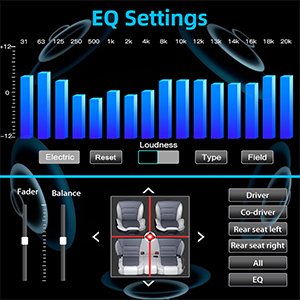
Image: FM/AM Radio interface.
6. Kontwòl volan (SWC)
If your vehicle supports steering wheel controls, you can configure them in the 'Setup' menu under 'Steering Wheel Setup'. This allows you to control volume, track changes, and other functions directly from your steering wheel.

Imaj: Entèfas konfigirasyon kontwòl volan an.
Antretyen
To ensure the longevity and optimal performance of your PLZ MP-902 car stereo, follow these maintenance guidelines:
- Netwaye ekran an: Sèvi ak yon twal mou ki pa gen pousyè pou siye ekran tactile a dousman. Pou tach ki difisil pou retire, siye yon ti kras.ampLave twal la avèk dlo oswa yon pwodui netwayaj ki pa danjere pou ekran. Evite materyèl abrazif oswa pwodui chimik ki agresif.
- Netwayaj jeneral: Kenbe aparèy la pwòp de pousyè ak debri. Sèvi ak yon bwòs mou oswa lè konprese pou netwaye alantou bouton yo ak ouvèti yo.
- Mizajou lojisyèl: Tcheke manifakti a regilyèman website or contact customer support for any available software updates. Updates can improve performance, add features, or fix bugs. Follow update instructions carefully.
- Evite tanperati ekstrèm: Pa ekspoze aparèy la nan chalè oswa frèt ekstrèm pou yon peryòd tan pwolonje, paske sa ka afekte konpozan elektwonik yo.
Depanaj
If you encounter issues with your PLZ MP-902, refer to the following common troubleshooting steps:
| Pwoblèm | Kòz posib | Solisyon |
|---|---|---|
| Pa gen pouvwa | Loose wiring, blown fuse, vehicle power issue. | Check power and ground connections. Inspect vehicle's fuse box and the stereo's inline fuse. Ensure ignition is on. |
| Pa gen Son | Incorrect speaker wiring, volume too low, mute activated, incorrect audio source. | Verify speaker connections. Increase volume. Check if mute is active. Select the correct audio source (e.g., Radio, BT, USB). |
| Bluetooth pa konekte | Bluetooth not enabled on phone/stereo, device not in pairing mode, interference. | Ensure Bluetooth is on for both devices. Put stereo in pairing mode. Delete previous pairings on phone and retry. Move closer to the unit. |
| Mirror Link Not Working | Incorrect USB cable, phone settings, app compatibility. | Use a high-quality USB cable. Ensure phone's USB debugging or mirroring settings are enabled. Some apps may restrict mirroring due to copyright. |
| Rear Camera Image Not Displaying | Incorrect camera wiring, reverse trigger wire not connected, faulty camera. | Check camera video input and power connections. Ensure the reverse trigger wire is correctly connected to the vehicle's reverse light. |
If these steps do not resolve the issue, please contact PLZ customer support for further assistance.
Espesifikasyon
| Karakteristik | Detay |
|---|---|
| Nimewo Modèl | MP-902 |
| Gwosè ekran | 7 pous |
| Kalite ekran | Full HD Capacitive Touchscreen |
| Bluetooth vèsyon | 5.1 |
| Odyo Equalizer | 16-Band EQ DSP |
| Koneksyon | Bluetooth, oksilyè, USB |
| Supported Video Playback | 1080P |
| Dimansyon pwodwi | 3.26"P x 7"L x 3.93"H (8.28 x 17.78 x 9.98 cm) |
| Pwa atik | 2.51 liv (1.14 kg) |
| Included Camera | HD Rear Camera with Night Vision (170° ultra-wide viewang ang) |
Garanti ak sipò
PLZ is committed to providing high-quality products and excellent customer service. For any warranty claims, technical support, or inquiries regarding your MP-902 car stereo, please contact PLZ customer support directly. Refer to the contact information provided with your product packaging or visit the official PLZ websit pou asistans.
Many common issues can be resolved by referring to the troubleshooting section of this manual or by checking for the latest software updates from PLZ.
Ask a question about this manual
Ask about setup, troubleshooting, compatibility, parts, safety, or missing instructions. Manuals+ will review the question and use this page’s manual context to help answer it.