
Petcube Petcube Cam
Petcube Cam Indoor Wi-Fi Pet and Security Camera
Manyèl Enstriksyon Itilizatè
1. Entwodiksyon
The Petcube Cam is an indoor Wi-Fi pet and security camera designed to help you monitor your pets and home from anywhere. It features 1080p HD video, 2-way audio, night vision, and smart alerts, providing peace of mind and allowing you to interact with your pets remotely.

Image: The Petcube Cam device shown above a smartphone displaying a live feed of a dog and a cat, illustrating its monitoring capabilities.
2. Ki sa ki nan bwat la
Your Petcube Cam package includes the following components:
- Petcube Cam device
- 2m USB kab
- Petcube power adapter
- 3M tape for mounting
- Gid Quick Start
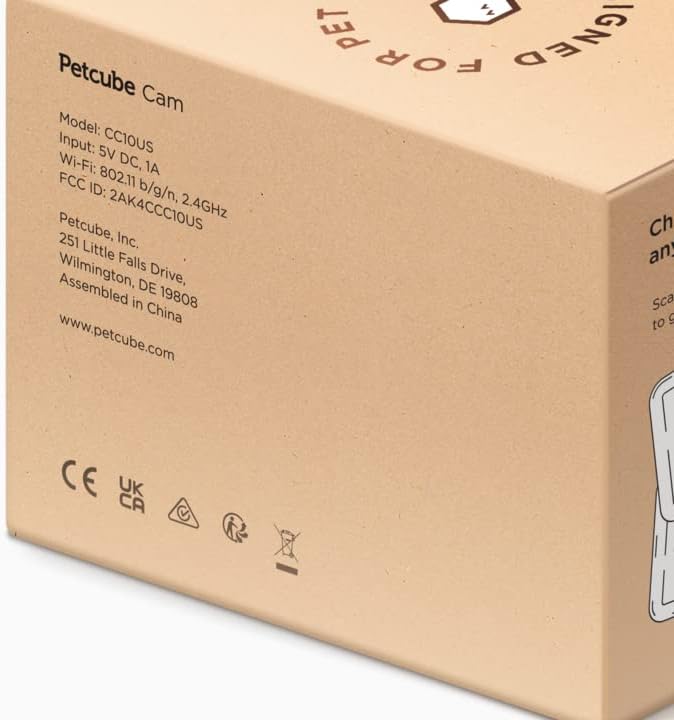
Image: The side of the Petcube Cam packaging, detailing product information such as model number (CC10US), input voltage (5V DC, 1A), Wi-Fi specifications (802.11 b/g/n, 2.4GHz), and manufacturer details.
3. Gid Enstalasyon
Setting up your Petcube Cam is a quick and straightforward process:
- Download the Petcube App: Chèche pou "Petcube" in your smartphone's app store (iOS or Android) and download the official application.
- Pouvwa sou: Connect the Petcube Cam to a power outlet using the provided 2m USB cable and power adapter. The camera will power on automatically.
- Konekte ak Wi-Fi: Open the Petcube app and follow the on-screen instructions to connect your camera to your home Wi-Fi network. Ensure your Wi-Fi is 2.4 GHz, as the Petcube Cam is only compatible with 2.4 GHz networks.
- Plasman: Position your Petcube Cam in a location that provides the best view of your pet or desired area. The camera offers flexible mounting options, including tabletop placement or wall mounting using the included 3M tape.

Image: A Petcube Cam device next to a smartphone displaying the Wi-Fi connection screen, emphasizing compatibility with 2.4GHz Wi-Fi networks for setup.

Image: A collage demonstrating the versatile mounting options for the Petcube Cam, including placement on a flat surface, attachment to a wall, and hanging from a ceiling, allowing for optimal viewang ing.
4. Operating Your Petcube Cam
Once set up, you can utilize the Petcube app to access and control your camera's features:
4.1. Live HD Video Monitoring
Access a live 1080p HD video stream of your home 24/7. The camera provides a 110° wide-angle view and 8x digital zoom, ensuring you don't miss any moments.

Image: The Petcube Cam positioned to monitor a dog, with a smartphone displaying a close-up live view of the dog's face, highlighting the live HD video capability.
4.2. Crystal-Clear 2-Way Audio
Engage with your pets remotely using the built-in microphone and speaker. You can talk to them to soothe anxiety or listen for barks and meows. This feature helps reinforce positive behavior through audio feedback.

Image: A Petcube Cam mounted on a wall, observing a puppy playfully chewing on toilet paper, accompanied by a speech bubble indicating the two-way audio feature with the command "Maxie, drop it!".
4.3. AI-Powered Smart Alerts
Receive instant sound and motion alerts customized by AI. The camera can differentiate between human and pet activity, providing real-time notifications for significant events at home.

Image: An illustration of the AI-powered smart alerts, showing a person holding a dog with green and orange outlines identifying the human as "Becky" and the dog as "Good boy," demonstrating human and pet recognition.
4.4. Vizyon lannwit
The Petcube Cam offers clear night vision up to 30 feet, ensuring you can monitor your pets and home even in complete darkness.

Image: Two small puppies sleeping soundly in a dimly lit environment, with the Petcube Cam subtly visible in the background, illustrating its effective night vision capabilities.
4.5. Video History & Downloads (Petcube Care)
With a Petcube Care subscription, you can review up to 90 days of pet cam activity and save your favorite moments. A web interface is also available for easy access to your video history.

Image: Two smartphone screens displaying the Petcube app. One shows a notification for motion detection, and the other illustrates the video history timeline with various recorded clips, highlighting the Petcube Care features.
5. Antretyen
To ensure optimal performance and longevity of your Petcube Cam, follow these maintenance guidelines:
- Netwayaj: Gently wipe the camera lens and body with a soft, dry, lint-free cloth. Avoid using harsh chemicals or abrasive materials.
- Plasman: Asire w ke kamera a mete nan yon kote ki stab, lwen limyè solèy dirèk, tanperati ekstrèm ak imidite.
- Mizajou lojisyèl: Keep your Petcube app and camera firmware updated to the latest versions to benefit from new features and security enhancements.
- Sik pouvwa: If you experience minor issues, try unplugging the camera from the power outlet for 10 seconds and then plugging it back in.
NAN. Depanaj
If you encounter issues with your Petcube Cam, refer to the following common solutions:
- Kamera Offline:
- Check your Wi-Fi connection and ensure it is stable and within range of the camera.
- Verify that the camera is powered on and the power adapter is securely connected.
- Restart your Wi-Fi router and the Petcube Cam.
- Kalite videyo pòv:
- Ensure your internet connection speed is adequate for streaming HD video.
- Netwaye lantiy kamera a ak yon twal mou.
- Check for any obstructions in front of the lens.
- 2-Way Audio Issues:
- Ensure the microphone and speaker settings are enabled in the Petcube app.
- Tcheke paramèt volim smartphone ou a.
- Redui bri anbyen toupre kamera a oswa telefòn ou.
- Alèt ki pa resevwa:
- Verify that notifications are enabled in both the Petcube app and your smartphone's system settings.
- Adjust motion and sound detection sensitivity in the app.
7. Espesifikasyon
| Karakteristik | Detay |
|---|---|
| Non modèl | Petcube Cam |
| Nimewo Modèl | 854592007394 |
| Rezolisyon videyo | 1080p HD |
| Viewing Ang | 110 Degre |
| Vizyon lannwit Range | 30 pye |
| Odyo | 2-Way Audio |
| Teknoloji san fil | Wi-Fi (2.4 GHz sèlman) |
| Sous pouvwa | Corded Electric (10 watt) |
| Koulè | Nwa |
| Kalite aliye | Tabletop mòn |
| Item Dimensions (L x B x H) | 10 x 5 x 1.27 cm |
| Pwa atik | 313 g |
| Manifakti | Petcube |
| Peyi orijin | Lachin |
8. Garanti ak sipò
For information regarding product warranty, returns, or technical support, please refer to the official Petcube website or contact Petcube customer service directly. You can also visit the Petcube Store on Amazon pou resous adisyonèl.
Petcube also offers subscription-based services like "Online Vet" and "Emergency Fund" for comprehensive pet care support. For more details, please check the Petcube app or their official websit.

Image: A smartphone displaying a chat interface for "Vet Chat," showing a conversation between a user and a veterinarian about a dog's behavior, illustrating the online vet support service.
Ask a question about this manual
Ask about setup, troubleshooting, compatibility, parts, safety, or missing instructions. Manuals+ will review the question and use this page’s manual context to help answer it.