
Entwodiksyon
Thank you for choosing the SOMIC MS300 Over-Ear Wireless Bluetooth Headphones. This manual provides essential information for setting up, operating, and maintaining your headphones to ensure optimal performance and longevity. Please read this manual thoroughly before using the product.
Kontni pake
- SOMIC MS300 Over-Ear Wireless Bluetooth Headphones
- USB Chaje Kab
- 3.5mm Audio Kab
- Manyèl Itilizatè (dokiman sa a)
Pwodwi souview
Familiarize yourself with the various components and controls of your SOMIC MS300 headphones.
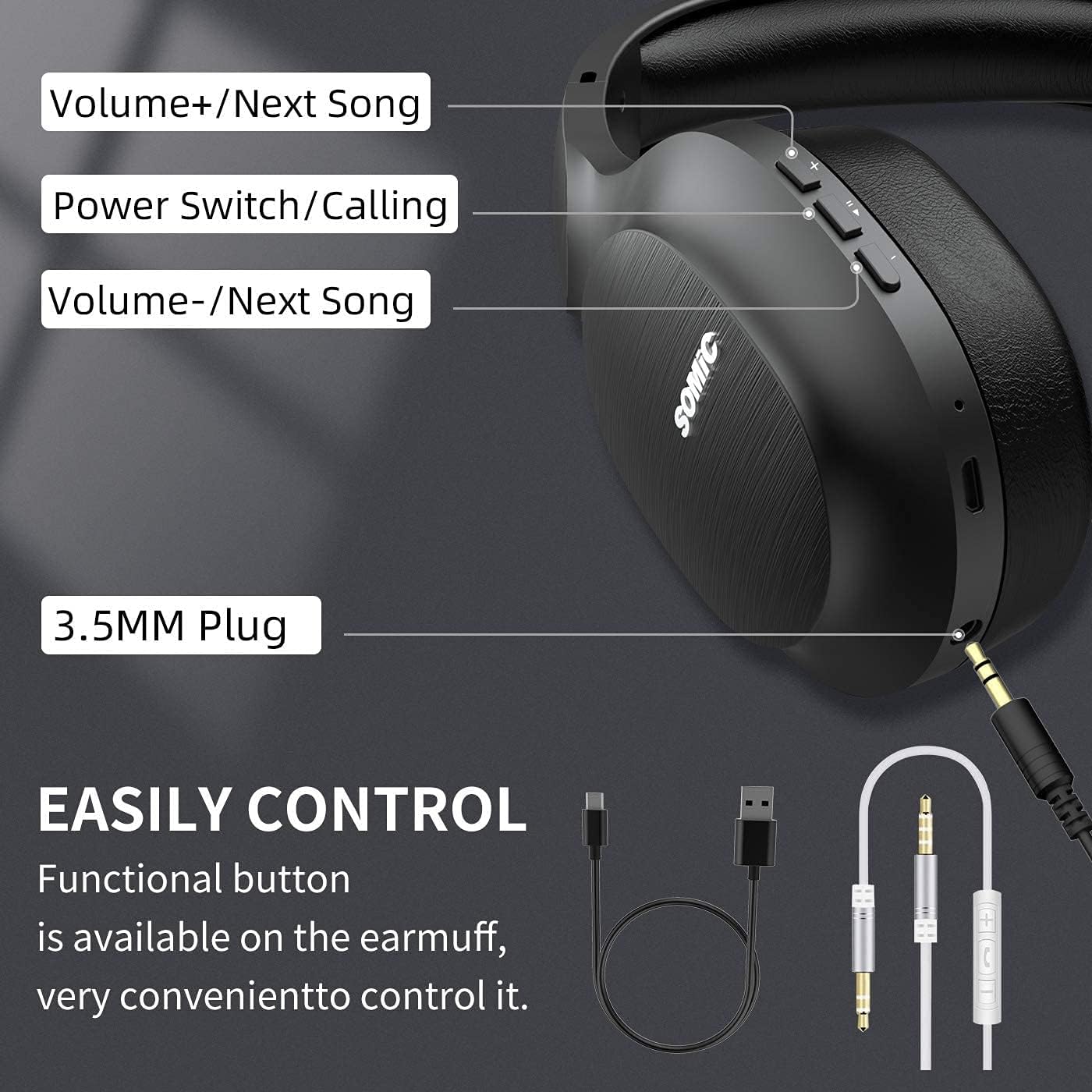
Imaj: Plis paseview of the SOMIC MS300 headphone controls, including volume buttons, power switch, and 3.5mm audio jack.
Kontwòl ak pò
- Volim + / Chante kap vini an: Press briefly to increase volume, press and hold to skip to the next song.
- Power Switch / Calling: Press and hold to power on/off. Briefly press to play/pause music. During a call, press to answer/end a call.
- Volim - / Chante anvan: Press briefly to decrease volume, press and hold to go to the previous song.
- 3.5mm Audio Jack: Pou koneksyon filaire, sèvi ak kab odyo 3.5mm ki enkli a.
- USB chaje Port: For charging the headphones using the included USB cable.
- Mikwofòn: Entegre pou apèl men lib.
Enstalasyon
Chaje kas ekoutè yo

Imaj: The SOMIC MS300 headphones illustrating the fast charging capability: 5 minutes of charge provides 2 hours of playback.
- Konekte ti bout kab chaje USB a nan pò chaje USB ki sou kas ekoutè a.
- Konekte pi gwo bout kab chaje USB a nan yon adaptè kouran USB (pa enkli) oubyen nan yon pò USB òdinatè.
- Endikatè LED la ap montre eta chaj la (pa egzanp, wouj pou chaj, ble pou chaj konplè).
- A full charge takes approximately 2-3 hours. For quick use, a 5-minute charge provides up to 2 hours of playtime.

Imaj: The SOMIC MS300 headphones highlighting their strong endurance with up to 72 hours of playtime on a single charge.
Limen / Off
- Pou limen: Press and hold the Power Switch button for approximately 3 seconds until the LED indicator flashes blue.
- Pou etenn: Press and hold the Power Switch button for approximately 3 seconds until the LED indicator turns off.
Pè Bluetooth
- Asire w ke kas ekoutè yo etenn.
- Press and hold the Power Switch button for about 5-7 seconds until the LED indicator flashes red and blue alternately, indicating pairing mode.
- Sou aparèy ou an (telefòn entelijan, tablèt, òdinatè), aktive Bluetooth epi chèche aparèy ki disponib yo.
- Select "SOMIC MS300" from the list of devices.
- Yon fwa konekte, endikatè ki ap dirije a ap klere ble tou dousman.
Koneksyon Filaire (Kab Odyo 3.5mm)

Imaj: The SOMIC MS300 headphones demonstrating their versatility with both wireless Bluetooth connectivity and a wired option via a 3.5mm audio cable.
The SOMIC MS300 headphones can also be used with a wired connection, even if the battery is depleted.
- Connect one end of the 3.5mm audio cable to the 3.5mm audio jack on the headphones.
- Connect the other end of the 3.5mm audio cable to the audio output port of your device.
- Kas ekoutè a ap chanje otomatikman an mòd filaire. Fonksyonalite Bluetooth la ap enfim.
Enstriksyon Operasyon
Lèktur Klas Mizik
- Jwe/Poz: Briefly press the Power Switch button.
- Volim moute: Briefly press the Volume + button.
- Volim desann: Briefly press the Volume - button.
- Pwochen Track: Peze epi kenbe bouton Volim + la.
- Track Previous: Peze epi kenbe bouton Volim - la.
Apèl Telefòn
- Reponn/Fen Apèl: Briefly press the Power Switch button.
- Rejte apèl: Press and hold the Power Switch button for 2 seconds.
- Recomposition Dènye Nimewo: Double-press the Power Switch button.
Koneksyon Doub Aparèy
The SOMIC MS300 headphones support connecting to two Bluetooth devices simultaneously.
- Connect the headphones to the first device as described in the "Bluetooth Pairing" section.
- Dezaktive Bluetooth sou premye aparèy la. Kas ekoutè a ap antre nan mòd koneksyon ankò.
- Connect the headphones to the second device.
- Re-enable Bluetooth on the first device. The headphones should automatically reconnect to both devices.
- Odyo a ap jwe nan aparèy k ap jwe medya a oswa k ap resevwa yon apèl aktivman an.
Noise Cancellation (CVC 8.0)

Imaj: A person wearing SOMIC MS300 headphones in a public setting, demonstrating the effectiveness of CVC Noise Cancelling Technology in reducing ambient noise.
The SOMIC MS300 headphones feature CVC 8.0 noise cancelling technology, which helps reduce ambient noise during calls for clearer communication. This feature is automatically active when using the built-in microphone.
Antretyen
Netwayaj
- Siye kas ekoutè yo ak yon twal mou, sèk, epi ki pa gen pousyè.
- Pa sèvi ak pwodui netwayaj abrazif, solvan, oswa pwodui netwayaj an espre.
- Evite ke imidite antre nan nenpòt ouvèti.
Depo
- Sere kas ekoutè yo nan yon kote ki fre epi sèk, lwen tanperati ekstrèm ak limyè solèy dirèk.
- When not in use for extended periods, charge the headphones at least once every three months to preserve battery life.
Swen batri
- Do not attempt to replace the battery yourself. Contact customer support for battery-related issues.
- Evite dechaje batri a nèt souvan, paske sa ka diminye dire lavi li an jeneral.
Depanaj
| Pwoblèm | Solisyon posib |
|---|---|
| Kas ekoutè yo pa limen. | Asire w ke kas ekoutè yo chaje. Konekte yo ak yon sous kouran avèk kab USB a. |
| Pa ka konekte ak yon aparèy. | Ensure headphones are in pairing mode (LED flashing red and blue). Turn off and on Bluetooth on your device. Move headphones closer to the device. |
| Pa gen son oswa volim nan ba. | Tcheke nivo volim nan tou de kas ekoutè yo ak aparèy ki konekte a. Asire w ke kas ekoutè yo byen konekte oswa kab 3.5mm lan byen branche. |
| Kalite son pòv. | Move closer to the connected device to avoid interference. Ensure there are no obstacles between the headphones and the device. |
| Mikwofòn pa mache. | Ensure the headphones are connected via Bluetooth. Check microphone settings on your device. |
Espesifikasyon

Imaj: Yon te eksploze view of the 40mm dynamic driver and the Qualcomm QCC Bluetooth 5.0 chip, highlighting the audio technology within the SOMIC MS300 headphones.
| Karakteristik | Detay |
|---|---|
| Modèl | MS300 |
| Mak | SOMIC |
| Koneksyon | Wireless (Bluetooth 5.0), Wired (3.5mm Audio Jack) |
| Chip Bluetooth | Qualcomm QCC Bluetooth 5.0 |
| Gwosè Chofè | 40mm chofè dinamik |
| Kontwòl bri | CVC 8.0 Anile Bri |
| Kapasite batri | 1000mAh |
| Playtime | Jiska 72 èdtan |
| Chaje vit | 5 minit chaj pou 2 èdtan tan lekti |
| Materyèl Earpads | Memory Foam Protein |
| Pwa | 208g |
| Koulè | Nwa |
| Rezistans dlo | Pa reziste dlo |
Garanti ak sipò
Enfòmasyon sou Garanti
SOMIC products are designed and manufactured to the highest quality standards. This product is covered by a limited warranty from the date of purchase. Please refer to the warranty card included in your package for specific terms and conditions. Keep your proof of purchase for warranty claims.
Sipò pou Kliyan
If you encounter any issues or have questions regarding your SOMIC MS300 headphones, please contact our customer support team. Contact details can typically be found on the warranty card or the official SOMIC website. Please have your model number (MS300) and purchase information ready when contacting support.